<?xml version="1.0" encoding="utf-8"?>
<feed xmlns="http://www.w3.org/2005/Atom">
    <id>https://project-hami.io/blog</id>
    <title>HAMi Blog</title>
    <updated>2026-11-17T00:00:00.000Z</updated>
    <generator>https://github.com/jpmonette/feed</generator>
    <link rel="alternate" href="https://project-hami.io/blog"/>
    <subtitle>Latest news and updates from the HAMi project</subtitle>
    <icon>https://project-hami.io/favicon.ico</icon>
    <rights>Copyright 2026 HAMi Authors</rights>
    <entry>
        <title type="html"><![CDATA[Introducing HAMi GPU Descheduler: Automated GPU Defragmentation for Kubernetes]]></title>
        <id>https://project-hami.io/blog/hami-gpu-descheduler</id>
        <link href="https://project-hami.io/blog/hami-gpu-descheduler"/>
        <updated>2026-11-17T00:00:00.000Z</updated>
        <summary type="html"><![CDATA[GPU fragmentation can leave a cluster 67% idle while new Pods stay Pending. Learn why it happens and how HAMi GPU Descheduler consolidates scattered vGPU workloads to recover contiguous GPU capacity.]]></summary>
        <content type="html"><![CDATA[<p>GPUs are the most expensive resource in a Kubernetes cluster, so most teams share them. With <a href="https://github.com/Project-HAMi/HAMi" target="_blank" rel="noopener noreferrer" class="">HAMi</a>, a single GPU can be split into virtual GPUs and assigned to multiple Pods, each with its own memory and compute isolation.</p>
<p>Sharing, however, introduces a problem that every long-running cluster eventually hits: <strong>GPU fragmentation</strong>. Pods come and go through autoscaling, rolling updates, and failed jobs, and each leaves a small slice of GPU memory behind. One day a Pod asks for a whole GPU, the cluster reports plenty of free memory, yet the Pod stays <code>Pending</code>. The capacity is there, but it is scattered in pieces too small to use.</p>
<p>This post explains why GPU fragmentation happens, why it is hard to fix by hand, and how <a href="https://github.com/Project-HAMi/gpu-descheduler" target="_blank" rel="noopener noreferrer" class="">HAMi GPU Descheduler</a> automates the fix.</p>
<h2 class="anchor anchorTargetStickyNavbar_Vzrq" id="the-problem-capacity-without-placement">The problem: capacity without placement<a href="https://project-hami.io/blog/hami-gpu-descheduler#the-problem-capacity-without-placement" class="hash-link" aria-label="Direct link to The problem: capacity without placement" title="Direct link to The problem: capacity without placement" translate="no">​</a></h2>
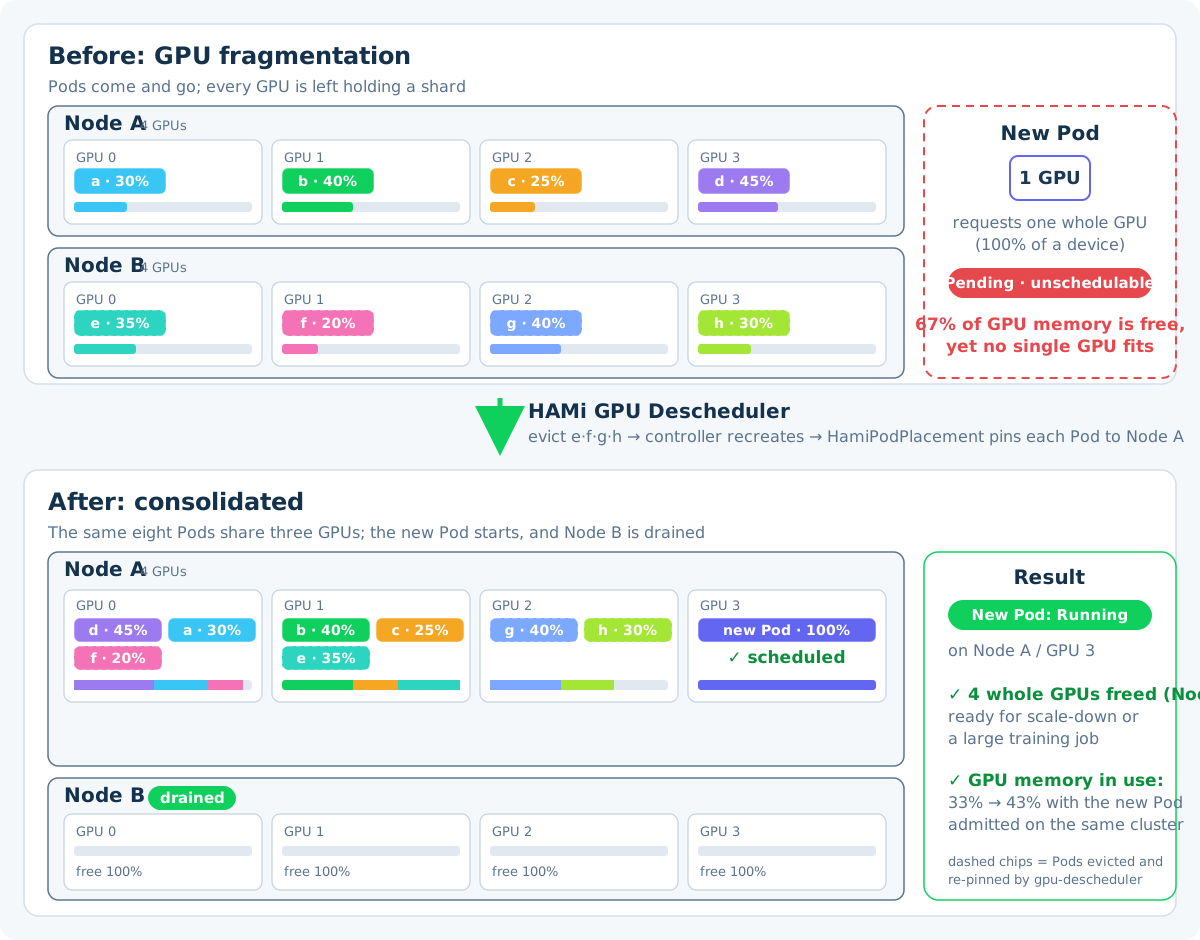
<p>Consider a two-node cluster, each node with 4 GPUs shared through HAMi. Eight Pods hold small vGPU slices:</p>
<ul>
<li class="">Node A: <code>a</code> 30%, <code>b</code> 40%, <code>c</code> 25%, <code>d</code> 45%</li>
<li class="">Node B: <code>e</code> 35%, <code>f</code> 20%, <code>g</code> 40%, <code>h</code> 30%</li>
</ul>
<p>Across the cluster, only 33% of total GPU memory is in use and 67% is free. Now a new Pod requests <strong>one whole GPU</strong>. No single device anywhere has 100% free, so the scheduler cannot place it. The Pod waits in <code>Pending</code> while most of your GPU investment sits idle.</p>
<p><img decoding="async" loading="lazy" alt="GPU fragmentation before and after defragmentation" src="https://project-hami.io/assets/images/gpu-fragmentation-d24df9ee9b0498f65a1808829fa24d95.svg#light-only" width="1200" height="940" class="img_ev3q"> <img decoding="async" loading="lazy" alt="GPU fragmentation before and after defragmentation" src="https://project-hami.io/assets/images/gpu-fragmentation-dark-aa822bcf1ead548e2c3b5852b7c8925d.svg#dark-only" width="1200" height="940" class="img_ev3q"></p>
<p>This is the same phenomenon as memory or disk fragmentation, with one difference: you cannot <code>malloc</code> your way out. A Pod that needs an entire GPU device (for example, a model that does not shard) can only run on a device that is completely free, and slices on different GPUs cannot be combined. Nor is fragmentation only a whole-GPU problem: any vGPU request stalls when it exceeds the largest free slice on any single device. A Pod asking for 70% of a GPU cannot land on cards whose free memory is split into 40% and 30% scraps, either. The whole-GPU request is simply the easiest case to spot.</p>
<h2 class="anchor anchorTargetStickyNavbar_Vzrq" id="where-fragmentation-comes-from">Where fragmentation comes from<a href="https://project-hami.io/blog/hami-gpu-descheduler#where-fragmentation-comes-from" class="hash-link" aria-label="Direct link to Where fragmentation comes from" title="Direct link to Where fragmentation comes from" translate="no">​</a></h2>
<p>Fragmentation is not caused by a bug. It is the natural result of a dynamic cluster:</p>
<ul>
<li class=""><strong>Horizontal autoscaling.</strong> Scale-down removes Pods scattered across many nodes, leaving partial GPUs everywhere.</li>
<li class=""><strong>Rolling updates.</strong> The new version of a Deployment starts on nodes with room for its slice; the old version leaves holes behind.</li>
<li class=""><strong>Retries and failed jobs.</strong> A training job that restarts may land on a different node each time.</li>
<li class=""><strong>Mixed workloads.</strong> Inference Pods requesting 20% to 40% of a GPU interleave with jobs that need whole devices.</li>
</ul>
<p>Over weeks, the cluster drifts from a compact layout to a scattered one. Total utilization looks healthy in dashboards while contiguous free capacity quietly disappears. Worse, the workloads fragmentation blocks are often the ones that matter most: small Pods keep slipping into the gaps, while larger requests, such as training and fine-tuning jobs, are the hardest to place.</p>
<h2 class="anchor anchorTargetStickyNavbar_Vzrq" id="why-fixing-it-by-hand-hurts">Why fixing it by hand hurts<a href="https://project-hami.io/blog/hami-gpu-descheduler#why-fixing-it-by-hand-hurts" class="hash-link" aria-label="Direct link to Why fixing it by hand hurts" title="Direct link to Why fixing it by hand hurts" translate="no">​</a></h2>
<p>The manual fix is well known: find the fragments, <code>kubectl delete pod</code> the ones you can move, wait for their controllers to recreate them, and hope they land in the right places, possibly pinning them with node selectors. Repeat until some device has a free slice large enough for the waiting Pod.</p>
<p>This works once or twice, but it has real costs:</p>
<ul>
<li class="">Every eviction is a manual disruption decision: you must know which workloads tolerate it.</li>
<li class="">Recreated Pods go back through the scheduler, which may spread them out again, undoing your work.</li>
<li class="">There is no record of intent, so the layout degrades again and the whole exercise repeats.</li>
</ul>
<p>What teams need is a way to express "consolidate these workloads onto that node's GPU" as a declarative, one-shot operation. That is exactly what HAMi GPU Descheduler provides.</p>
<h2 class="anchor anchorTargetStickyNavbar_Vzrq" id="hami-gpu-descheduler">HAMi GPU Descheduler<a href="https://project-hami.io/blog/hami-gpu-descheduler#hami-gpu-descheduler" class="hash-link" aria-label="Direct link to HAMi GPU Descheduler" title="Direct link to HAMi GPU Descheduler" translate="no">​</a></h2>
<p><a href="https://github.com/Project-HAMi/gpu-descheduler" target="_blank" rel="noopener noreferrer" class="">HAMi GPU Descheduler</a> is a GPU defragmentation tool for HAMi-virtualized Kubernetes clusters. It consolidates scattered vGPU workloads across nodes through two mechanisms: a <strong>Mutating Admission Webhook</strong> and the <strong><code>HamiPodPlacement</code> CRD</strong>. Its role parallels the disk defragmenter of an operating system: pack scattered workloads together and restore contiguous free capacity on each device. It complements the HAMi Scheduler, which virtualizes, schedules, and isolates GPU resources, by repacking what has already been allocated.</p>
<p><img decoding="async" loading="lazy" alt="How HAMi GPU Descheduler consolidates fragmented vGPU workloads" src="https://project-hami.io/assets/images/how-it-works-b51fd8d4837fce172e70a86756d6afcd.svg#light-only" width="840" height="640" class="img_ev3q"> <img decoding="async" loading="lazy" alt="How HAMi GPU Descheduler consolidates fragmented vGPU workloads" src="https://project-hami.io/assets/images/how-it-works-dark-3cecff398641c43624ec676c6b378397.svg#dark-only" width="840" height="640" class="img_ev3q"></p>
<p>The flow works like this:</p>
<ol>
<li class="">You create a <code>HamiPodPlacement</code> describing the desired placement: a target node, GPU devices, the Pod it applies to, and optionally a Pod to evict to make room.</li>
<li class="">If <code>evictPod</code> is set, the descheduler evicts that Pod and waits. The workload's controller (Deployment, StatefulSet, etc.) recreates it.</li>
<li class="">When the target Pod, new or recreated, goes through admission, the webhook matches it against the <code>HamiPodPlacement</code> (<code>reqID</code> plus <code>podSelector</code>) and injects the planned placement.</li>
<li class="">The Pod is scheduled to the exact node and GPU device you specified. Each <code>HamiPodPlacement</code> is consumed by exactly one Pod, which keeps the operation idempotent and auditable.</li>
</ol>
<p>Because placement is expressed as a CRD, defragmentation becomes just another Kubernetes operation: declarative, reviewable in git, and safe to automate.</p>
<h2 class="anchor anchorTargetStickyNavbar_Vzrq" id="defragmenting-the-cluster">Defragmenting the cluster<a href="https://project-hami.io/blog/hami-gpu-descheduler#defragmenting-the-cluster" class="hash-link" aria-label="Direct link to Defragmenting the cluster" title="Direct link to Defragmenting the cluster" translate="no">​</a></h2>
<p>Back to the fragmented two-node cluster from the beginning. Six one-shot placements reach the "after" state in the diagram: Pods <code>e</code>, <code>f</code>, <code>g</code>, and <code>h</code> relocate from Node B onto Node A, while <code>c</code> and <code>d</code> are re-pinned within Node A so the eight Pods pack onto GPUs 0 through 2. A placement for Pod <code>e</code> looks like this:</p>
<div class="language-yaml codeBlockContainer_Ckt0 theme-code-block" style="--prism-color:#bfc7d5;--prism-background-color:#292d3e"><div class="codeBlockContent_QJqH"><pre tabindex="0" class="prism-code language-yaml codeBlock_bY9V thin-scrollbar" style="color:#bfc7d5;background-color:#292d3e"><code class="codeBlockLines_e6Vv"><div class="token-line" style="color:#bfc7d5"><span class="token key atrule">apiVersion</span><span class="token punctuation" style="color:rgb(199, 146, 234)">:</span><span class="token plain"> scheduling.hami.placement.com/v1</span><br></div><div class="token-line" style="color:#bfc7d5"><span class="token plain"></span><span class="token key atrule">kind</span><span class="token punctuation" style="color:rgb(199, 146, 234)">:</span><span class="token plain"> HamiPodPlacement</span><br></div><div class="token-line" style="color:#bfc7d5"><span class="token plain"></span><span class="token key atrule">metadata</span><span class="token punctuation" style="color:rgb(199, 146, 234)">:</span><span class="token plain"></span><br></div><div class="token-line" style="color:#bfc7d5"><span class="token plain">  </span><span class="token key atrule">name</span><span class="token punctuation" style="color:rgb(199, 146, 234)">:</span><span class="token plain"> consolidate</span><span class="token punctuation" style="color:rgb(199, 146, 234)">-</span><span class="token plain">e</span><br></div><div class="token-line" style="color:#bfc7d5"><span class="token plain">  </span><span class="token key atrule">namespace</span><span class="token punctuation" style="color:rgb(199, 146, 234)">:</span><span class="token plain"> default</span><br></div><div class="token-line" style="color:#bfc7d5"><span class="token plain"></span><span class="token key atrule">spec</span><span class="token punctuation" style="color:rgb(199, 146, 234)">:</span><span class="token plain"></span><br></div><div class="token-line" style="color:#bfc7d5"><span class="token plain">  </span><span class="token key atrule">reqID</span><span class="token punctuation" style="color:rgb(199, 146, 234)">:</span><span class="token plain"> </span><span class="token string" style="color:rgb(195, 232, 141)">"defrag-e-0001"</span><span class="token plain"> </span><span class="token comment" style="color:rgb(105, 112, 152);font-style:italic"># min length 5, consumed once</span><span class="token plain"></span><br></div><div class="token-line" style="color:#bfc7d5"><span class="token plain">  </span><span class="token key atrule">podSelector</span><span class="token punctuation" style="color:rgb(199, 146, 234)">:</span><span class="token plain"></span><br></div><div class="token-line" style="color:#bfc7d5"><span class="token plain">    </span><span class="token key atrule">matchLabels</span><span class="token punctuation" style="color:rgb(199, 146, 234)">:</span><span class="token plain"></span><br></div><div class="token-line" style="color:#bfc7d5"><span class="token plain">      </span><span class="token key atrule">app</span><span class="token punctuation" style="color:rgb(199, 146, 234)">:</span><span class="token plain"> inference</span><br></div><div class="token-line" style="color:#bfc7d5"><span class="token plain">  </span><span class="token key atrule">nodeName</span><span class="token punctuation" style="color:rgb(199, 146, 234)">:</span><span class="token plain"> gpu</span><span class="token punctuation" style="color:rgb(199, 146, 234)">-</span><span class="token plain">node</span><span class="token punctuation" style="color:rgb(199, 146, 234)">-</span><span class="token plain">a</span><br></div><div class="token-line" style="color:#bfc7d5"><span class="token plain">  </span><span class="token key atrule">gpuDevices</span><span class="token punctuation" style="color:rgb(199, 146, 234)">:</span><span class="token plain"></span><br></div><div class="token-line" style="color:#bfc7d5"><span class="token plain">    </span><span class="token punctuation" style="color:rgb(199, 146, 234)">-</span><span class="token plain"> gpu</span><span class="token punctuation" style="color:rgb(199, 146, 234)">-</span><span class="token number" style="color:rgb(247, 140, 108)">1</span><span class="token plain"> </span><span class="token comment" style="color:rgb(105, 112, 152);font-style:italic"># or gpu-1/70 for 70% of GPU 1</span><span class="token plain"></span><br></div><div class="token-line" style="color:#bfc7d5"><span class="token plain">  </span><span class="token key atrule">evictPod</span><span class="token punctuation" style="color:rgb(199, 146, 234)">:</span><span class="token plain"> inference</span><span class="token punctuation" style="color:rgb(199, 146, 234)">-</span><span class="token plain">e</span><span class="token punctuation" style="color:rgb(199, 146, 234)">-</span><span class="token plain">6cd5964877</span><span class="token punctuation" style="color:rgb(199, 146, 234)">-</span><span class="token plain">zdb5z </span><span class="token comment" style="color:rgb(105, 112, 152);font-style:italic"># Pod to evict and re-place</span><br></div></code></pre></div></div>
<p>One caution on <code>podSelector</code>: it decides which Pod consumes the placement, and the first matching Pod to pass admission takes it. If every Pod in the namespace carries <code>app: inference</code>, a sibling could consume the placement meant for <code>e</code>. Labels such as the ReplicaSet's <code>pod-template-hash</code> do not solve this: every replica in the same ReplicaSet carries the same value, so a sibling admitted first can still take the placement. Use a label that only the workload being relocated carries, so the selector matches nothing else, and with multi-replica workloads move one replica at a time while no sibling Pod is being created.</p>
<h3 class="anchor anchorTargetStickyNavbar_Vzrq" id="what-evictpod-does">What <code>evictPod</code> does<a href="https://project-hami.io/blog/hami-gpu-descheduler#what-evictpod-does" class="hash-link" aria-label="Direct link to what-evictpod-does" title="Direct link to what-evictpod-does" translate="no">​</a></h3>
<p><code>evictPod</code> is the field that turns a placement into a relocation. It names one existing Pod in the same namespace as the <code>HamiPodPlacement</code> and answers a single question: which running Pod should give up its current GPU so this placement can happen?</p>
<p>The sequence then runs like this. The descheduler evicts the named Pod and waits. The workload controller (Deployment, StatefulSet, or similar) recreates the Pod. The recreated Pod enters admission, matches <code>reqID</code> and <code>podSelector</code>, and the webhook pins it to the <code>nodeName</code> and <code>gpuDevices</code> you planned. Without the field, a placement only affects Pods created after it and stays a planning tool; with it, you can actively move workloads that are already running, which is exactly what a consolidation needs.</p>
<p>The field is optional for a reason. Eviction happens before the destination is validated, so confirm that <code>nodeName</code> and <code>gpuDevices</code> point to a valid destination with enough room before you add it; an invalid target would leave the Pod evicted with nowhere to land. And since the descheduler waits for a replacement but never creates Pods itself, the evicted workload must be managed by a controller. Add <code>evictPod</code> deliberately, one Pod at a time.</p>
<p>As each Pod is evicted, recreated, and pinned to a specific GPU on Node A, the layout converges to the "after" state in the diagram: the eight Pods pack onto three GPUs, the new Pod takes the fourth, and <strong>Node B is drained completely</strong>: four whole GPUs recovered with zero capacity added. Cluster GPU-memory utilization rises from 33% to 43% simply by admitting the Pod that could not start before.</p>
<p>The freed node can now be scaled down to cut cost, or repurposed for a large training job that needs whole devices.</p>
<div class="theme-admonition theme-admonition-warning admonition_xJq3 alert alert--warning"><div class="admonitionHeading_Gvgb"><span class="admonitionIcon_Rf37"><svg viewBox="0 0 16 16"><path fill-rule="evenodd" d="M8.893 1.5c-.183-.31-.52-.5-.887-.5s-.703.19-.886.5L.138 13.499a.98.98 0 0 0 0 1.001c.193.31.53.501.886.501h13.964c.367 0 .704-.19.877-.5a1.03 1.03 0 0 0 .01-1.002L8.893 1.5zm.133 11.497H6.987v-2.003h2.039v2.003zm0-3.004H6.987V5.987h2.039v4.006z"></path></svg></span>Before you evict</div><div class="admonitionContent_BuS1"><p>Active eviction terminates a running Pod and may temporarily reduce availability. The workload must be managed by a controller (Deployment, StatefulSet, etc.) so the evicted Pod is recreated, and you should check readiness and disruption protection before starting a consolidation.</p></div></div>
<h2 class="anchor anchorTargetStickyNavbar_Vzrq" id="getting-started">Getting started<a href="https://project-hami.io/blog/hami-gpu-descheduler#getting-started" class="hash-link" aria-label="Direct link to Getting started" title="Direct link to Getting started" translate="no">​</a></h2>
<p>Deploy the descheduler with Helm (requires HAMi Scheduler v2.10.0+ and Kubernetes v1.24+, v1.28+ recommended):</p>
<div class="language-bash codeBlockContainer_Ckt0 theme-code-block" style="--prism-color:#bfc7d5;--prism-background-color:#292d3e"><div class="codeBlockContent_QJqH"><pre tabindex="0" class="prism-code language-bash codeBlock_bY9V thin-scrollbar" style="color:#bfc7d5;background-color:#292d3e"><code class="codeBlockLines_e6Vv"><div class="token-line" style="color:#bfc7d5"><span class="token function" style="color:rgb(130, 170, 255)">git</span><span class="token plain"> clone https://github.com/Project-HAMi/gpu-descheduler.git</span><br></div><div class="token-line" style="color:#bfc7d5"><span class="token plain"></span><span class="token builtin class-name" style="color:rgb(255, 203, 107)">cd</span><span class="token plain"> gpu-descheduler</span><br></div><div class="token-line" style="color:#bfc7d5"><span class="token plain">helm </span><span class="token function" style="color:rgb(130, 170, 255)">install</span><span class="token plain"> gpu-descheduler ./chart </span><span class="token parameter variable" style="color:rgb(191, 199, 213)">--namespace</span><span class="token plain"> kube-system --create-namespace</span><br></div></code></pre></div></div>
<p>Verify the webhook is running:</p>
<div class="language-bash codeBlockContainer_Ckt0 theme-code-block" style="--prism-color:#bfc7d5;--prism-background-color:#292d3e"><div class="codeBlockContent_QJqH"><pre tabindex="0" class="prism-code language-bash codeBlock_bY9V thin-scrollbar" style="color:#bfc7d5;background-color:#292d3e"><code class="codeBlockLines_e6Vv"><div class="token-line" style="color:#bfc7d5"><span class="token plain">kubectl get pods </span><span class="token parameter variable" style="color:rgb(191, 199, 213)">-n</span><span class="token plain"> kube-system </span><span class="token parameter variable" style="color:rgb(191, 199, 213)">-l</span><span class="token plain"> </span><span class="token assign-left variable" style="color:rgb(191, 199, 213)">app</span><span class="token operator" style="color:rgb(137, 221, 255)">=</span><span class="token plain">gpu-descheduler-webhook </span><span class="token parameter variable" style="color:rgb(191, 199, 213)">-w</span><br></div></code></pre></div></div>
<p>The webhook also exposes a REST API on port 8083 that reports cluster GPU state and placement records, useful for deciding what to consolidate. The port is not exposed through a Service, so forward it to your machine first (the command blocks, so run it in a separate terminal):</p>
<div class="language-bash codeBlockContainer_Ckt0 theme-code-block" style="--prism-color:#bfc7d5;--prism-background-color:#292d3e"><div class="codeBlockContent_QJqH"><pre tabindex="0" class="prism-code language-bash codeBlock_bY9V thin-scrollbar" style="color:#bfc7d5;background-color:#292d3e"><code class="codeBlockLines_e6Vv"><div class="token-line" style="color:#bfc7d5"><span class="token plain">kubectl port-forward </span><span class="token parameter variable" style="color:rgb(191, 199, 213)">-n</span><span class="token plain"> kube-system deploy/gpu-descheduler-webhook </span><span class="token number" style="color:rgb(247, 140, 108)">8083</span><span class="token plain">:8083</span><br></div></code></pre></div></div>
<p>Then query the API:</p>
<div class="language-bash codeBlockContainer_Ckt0 theme-code-block" style="--prism-color:#bfc7d5;--prism-background-color:#292d3e"><div class="codeBlockContent_QJqH"><pre tabindex="0" class="prism-code language-bash codeBlock_bY9V thin-scrollbar" style="color:#bfc7d5;background-color:#292d3e"><code class="codeBlockLines_e6Vv"><div class="token-line" style="color:#bfc7d5"><span class="token comment" style="color:rgb(105, 112, 152);font-style:italic"># Nodes, GPU devices, and health status</span><span class="token plain"></span><br></div><div class="token-line" style="color:#bfc7d5"><span class="token plain"></span><span class="token function" style="color:rgb(130, 170, 255)">curl</span><span class="token plain"> </span><span class="token parameter variable" style="color:rgb(191, 199, 213)">-s</span><span class="token plain"> http://localhost:8083/api/v1/cluster-info</span><br></div><div class="token-line" style="color:#bfc7d5"><span class="token plain" style="display:inline-block"></span><br></div><div class="token-line" style="color:#bfc7d5"><span class="token plain"></span><span class="token comment" style="color:rgb(105, 112, 152);font-style:italic"># Current Placement CRD cache and allocation records</span><span class="token plain"></span><br></div><div class="token-line" style="color:#bfc7d5"><span class="token plain"></span><span class="token function" style="color:rgb(130, 170, 255)">curl</span><span class="token plain"> </span><span class="token parameter variable" style="color:rgb(191, 199, 213)">-s</span><span class="token plain"> http://localhost:8083/api/v1/placements</span><br></div></code></pre></div></div>
<p>The target Pod must use <code>schedulerName: hami-scheduler</code> and its labels must match the <code>podSelector</code> in the <code>HamiPodPlacement</code>. See the <a class="" href="https://project-hami.io/docs/next/userguide/hami-gpu-descheduler">user guide</a> for the complete walkthrough.</p>
<h2 class="anchor anchorTargetStickyNavbar_Vzrq" id="conclusion">Conclusion<a href="https://project-hami.io/blog/hami-gpu-descheduler#conclusion" class="hash-link" aria-label="Direct link to Conclusion" title="Direct link to Conclusion" translate="no">​</a></h2>
<p>GPU fragmentation is an availability and cost problem that grows with cluster dynamism: capacity exists but cannot be used, and manual cleanup is fragile and unrecorded. HAMi GPU Descheduler makes defragmentation a declarative, one-shot Kubernetes operation: evict, recreate, and pin, with placement expressed as a CRD and enforced by an admission webhook.</p>
<p>The capability grew out of a production pain point: <a href="https://github.com/Project-HAMi/HAMi/issues/2072" target="_blank" rel="noopener noreferrer" class="">HAMi issue #2072</a> asked for intra-node defragmentation. Engineers from the <a href="https://www.yxqiche.com/" target="_blank" rel="noopener noreferrer" class="">unified training-and-inference platform team</a> at Yixin Group, an automotive-finance technology company and a HAMi user in production, designed the webhook-plus-CRD approach, delivered the main implementation, and open-sourced it to the HAMi community; after the repository went public, community maintainers and users kept reviewing and improving it. Thanks to everyone who has shaped it. Today the consolidation plan is still written by a human: which Pods to pack onto which node remains a manual decision, while the descheduler executes the plan precisely and relocations can already cross nodes. The next step under discussion in the community is to automate that planning: detect fragmentation automatically, generate candidate remediation plans for the user to choose from, and extend the view from single nodes to the whole cluster.</p>
<p>If you run HAMi-shared GPUs in a dynamic cluster, watch for <code>Pending</code> Pods whose requests exceed the largest free slice on any device; whole-GPU requests are just the easiest to spot. Then try the descheduler:</p>
<ul>
<li class=""><strong>Code and releases:</strong> <a href="https://github.com/Project-HAMi/gpu-descheduler" target="_blank" rel="noopener noreferrer" class="">github.com/Project-HAMi/gpu-descheduler</a></li>
<li class=""><strong>User guide:</strong> <a class="" href="https://project-hami.io/docs/next/userguide/hami-gpu-descheduler">Organizing GPU resource fragments with HAMi GPU Descheduler</a></li>
</ul>
<h2 class="anchor anchorTargetStickyNavbar_Vzrq" id="further-reading">Further reading<a href="https://project-hami.io/blog/hami-gpu-descheduler#further-reading" class="hash-link" aria-label="Direct link to Further reading" title="Direct link to Further reading" translate="no">​</a></h2>
<ul>
<li class=""><a class="" href="https://project-hami.io/docs/next/userguide/hami-gpu-descheduler">HAMi GPU Descheduler user guide</a></li>
<li class=""><a href="https://github.com/Project-HAMi/HAMi/issues/2072" target="_blank" rel="noopener noreferrer" class="">HAMi issue #2072: Intra-defragmentation of vGPU resource nodes</a></li>
<li class=""><a href="https://github.com/Project-HAMi/HAMi" target="_blank" rel="noopener noreferrer" class="">HAMi project</a></li>
</ul>]]></content>
        <author>
            <name>Jimmy Song</name>
            <uri>https://github.com/rootsongjc</uri>
        </author>
        <author>
            <name>Yixin Training-Inference Team</name>
        </author>
        <category label="HAMi" term="HAMi"/>
        <category label="GPU" term="GPU"/>
        <category label="Kubernetes" term="Kubernetes"/>
        <category label="Descheduler" term="Descheduler"/>
    </entry>
    <entry>
        <title type="html"><![CDATA[HAMi v2.11 Remote GPU in Practice: Run CUDA Anywhere]]></title>
        <id>https://project-hami.io/blog/hami-v2-11-remote-gpu</id>
        <link href="https://project-hami.io/blog/hami-v2-11-remote-gpu"/>
        <updated>2026-11-12T00:00:00.000Z</updated>
        <summary type="html"><![CDATA[Deploy HAMi v2.11 Remote GPU, run CUDA Samples and vLLM on a CPU-only Kubernetes node, and verify real inference on a remote Tesla T4.]]></summary>
        <content type="html"><![CDATA[<p>HAMi v2.11.0 introduces <strong>Remote GPU access</strong>, allowing CPU-only machines to use GPUs on other machines. CUDA workloads and GPU resources can now run on separate nodes.</p>
<p>Running CUDA or vLLM on Kubernetes usually means scheduling the Pod onto a GPU node. With Remote GPU, the Pod can run on a separate CPU node and use a GPU Server over the network. The client needs neither a local GPU nor an NVIDIA driver.</p>
<h2 class="anchor anchorTargetStickyNavbar_Vzrq" id="1-introducing-lupine-remote-gpu">1. Introducing Lupine Remote GPU<a href="https://project-hami.io/blog/hami-v2-11-remote-gpu#1-introducing-lupine-remote-gpu" class="hash-link" aria-label="Direct link to 1. Introducing Lupine Remote GPU" title="Direct link to 1. Introducing Lupine Remote GPU" translate="no">​</a></h2>
<p>Lupine is a <code>GPU-over-IP</code> project that lets CPU-only machines run CUDA workloads using GPUs on other machines over the network.</p>
<p>Lupine has two node roles:</p>
<ul>
<li class="">The Server has the GPU, an NVIDIA driver, and the Lupine server process. It receives remote CUDA calls, executes GPU computation, and returns the results.</li>
<li class="">The Client runs the CUDA application. Lupine client libraries forward CUDA calls to the Server over the network, without a local GPU or NVIDIA driver.</li>
</ul>
<p><img decoding="async" loading="lazy" alt="Local GPU and Remote GPU execution paths" src="data:image/svg+xml;base64,PHN2ZyB4bWxucz0iaHR0cDovL3d3dy53My5vcmcvMjAwMC9zdmciIHdpZHRoPSIxMjAwIiBoZWlnaHQ9IjcyMCIgdmlld0JveD0iMCAwIDEyMDAgNzIwIiByb2xlPSJpbWciIGFyaWEtbGFiZWxsZWRieT0idGl0bGUgZGVzY3JpcHRpb24iPgogIDx0aXRsZSBpZD0idGl0bGUiPkxvY2FsIEdQVSBhbmQgUmVtb3RlIEdQVSBleGVjdXRpb24gcGF0aHM8L3RpdGxlPgogIDxkZXNjIGlkPSJkZXNjcmlwdGlvbiI+QSBsb2NhbCBhcHBsaWNhdGlvbiBhY2Nlc3NlcyBpdHMgR1BVIHRocm91Z2ggdGhlIE5WSURJQSBkcml2ZXIuIE9uIGEgQ1BVIENsaWVudCwgTHVwaW5lIGNsaWVudCBsaWJyYXJpZXMgZm9yd2FyZCBDVURBIGNhbGxzIG92ZXIgdGhlIG5ldHdvcmsgdG8gYSBHUFUgU2VydmVyIGFuZCByZXR1cm4gdGhlIHJlc3VsdHMuPC9kZXNjPgogIDxkZWZzPgogICAgPG1hcmtlciBpZD0iYXJyb3ciIG1hcmtlcldpZHRoPSI4IiBtYXJrZXJIZWlnaHQ9IjgiIHJlZlg9IjciIHJlZlk9IjQiIG9yaWVudD0iYXV0byI+CiAgICAgIDxwYXRoIGQ9Ik0gMCAwIEwgOCA0IEwgMCA4IFoiIGZpbGw9IiMzOWM2ZjQiIGZpbGwtb3BhY2l0eT0iMC43NSIvPgogICAgPC9tYXJrZXI+CiAgICA8bWFya2VyIGlkPSJyZXR1cm4tYXJyb3ciIG1hcmtlcldpZHRoPSI4IiBtYXJrZXJIZWlnaHQ9IjgiIHJlZlg9IjciIHJlZlk9IjQiIG9yaWVudD0iYXV0byI+CiAgICAgIDxwYXRoIGQ9Ik0gMCAwIEwgOCA0IEwgMCA4IFoiIGZpbGw9IiMxMGQwNWQiLz4KICAgIDwvbWFya2VyPgogICAgPHN0eWxlPgogICAgICB0ZXh0IHsKICAgICAgICBmaWxsOiAjMWEzOTU2OwogICAgICAgIGZvbnQtZmFtaWx5OiAiU291cmNlIFNhbnMgMyIsICJOb3RvIFNhbnMiLCAiU2Vnb2UgVUkiLCAiUGluZ0ZhbmcgU0MiLCAiTm90byBTYW5zIENKSyBTQyIsICJNaWNyb3NvZnQgWWFIZWkiLCBzYW5zLXNlcmlmOwogICAgICAgIGZvbnQtc2l6ZTogMjBweDsKICAgICAgfQogICAgICAuaGVhZGluZyB7CiAgICAgICAgZmlsbDogIzE1MzI0ZDsKICAgICAgICBmb250LWZhbWlseTogIlNwYWNlIEdyb3Rlc2siLCAiQXZlbmlyIE5leHQiLCAiU2Vnb2UgVUkiLCAiUGluZ0ZhbmcgU0MiLCAiTm90byBTYW5zIENKSyBTQyIsIHNhbnMtc2VyaWY7CiAgICAgICAgZm9udC1zaXplOiAyNHB4OwogICAgICAgIGZvbnQtd2VpZ2h0OiA2MDA7CiAgICAgIH0KICAgICAgLmxhYmVsIHsgZmlsbDogIzE1MzI0ZDsgZm9udC1zaXplOiAyMnB4OyBmb250LXdlaWdodDogNjAwOyB9CiAgICAgIC5tdXRlZCB7IGZpbGw6ICM1YTc0OGY7IGZvbnQtc2l6ZTogMThweDsgfQogICAgICAucGFuZWwgeyBmaWxsOiAjZmZmZmZmOyBzdHJva2U6ICNkNWRlZTg7IHN0cm9rZS13aWR0aDogMS41OyB9CiAgICAgIC5ub2RlIHsgZmlsbDogI2ZmZmZmZjsgc3Ryb2tlOiAjNWE3NDhmOyBzdHJva2Utd2lkdGg6IDEuNTsgfQogICAgICAuY29ubmVjdG9yIHsgZmlsbDogbm9uZTsgc3Ryb2tlOiAjMzljNmY0OyBzdHJva2Utb3BhY2l0eTogMC43NTsgc3Ryb2tlLXdpZHRoOiAyLjU7IG1hcmtlci1lbmQ6IHVybCgjYXJyb3cpOyB9CiAgICAgIC5yZXR1cm4geyBmaWxsOiBub25lOyBzdHJva2U6ICMxMGQwNWQ7IHN0cm9rZS13aWR0aDogMi41OyBzdHJva2UtZGFzaGFycmF5OiA3IDU7IG1hcmtlci1lbmQ6IHVybCgjcmV0dXJuLWFycm93KTsgfQogICAgICAuZ3JlZW4geyBmaWxsOiAjMGE4ZjNkOyBmb250LXNpemU6IDE4cHg7IH0KICAgIDwvc3R5bGU+CiAgPC9kZWZzPgogIDxyZWN0IHdpZHRoPSIxMjAwIiBoZWlnaHQ9IjcyMCIgcng9IjE2IiBmaWxsPSIjZjVmOGZiIi8+CiAgPCEtLSBMb2NhbCBleGVjdXRpb24gb24gYSBHUFUgbm9kZSAtLT4KICA8cmVjdCBjbGFzcz0icGFuZWwiIHg9IjI0IiB5PSIyNCIgd2lkdGg9IjExNTIiIGhlaWdodD0iMjMwIiByeD0iMTQiLz4KICA8dGV4dCBjbGFzcz0iaGVhZGluZyIgeD0iNDgiIHk9IjY0Ij5Mb2NhbCBHUFU8L3RleHQ+CiAgPHRleHQgY2xhc3M9Im11dGVkIiB4PSI0OCIgeT0iOTQiPkdQVSBub2RlPC90ZXh0PgoKICA8cmVjdCBjbGFzcz0ibm9kZSIgeD0iNjQiIHk9IjEyNiIgd2lkdGg9IjI4OCIgaGVpZ2h0PSI5MCIgcng9IjEwIi8+CiAgPHRleHQgY2xhc3M9ImxhYmVsIiB4PSIyMDgiIHk9IjE2NCIgdGV4dC1hbmNob3I9Im1pZGRsZSI+QXBwbGljYXRpb248L3RleHQ+CiAgPHRleHQgY2xhc3M9Im11dGVkIiB4PSIyMDgiIHk9IjE5NCIgdGV4dC1hbmNob3I9Im1pZGRsZSI+Q1VEQSAvIHZMTE08L3RleHQ+CiAgPHBhdGggY2xhc3M9ImNvbm5lY3RvciIgZD0iTSAzNTIgMTcxIEggNTIwIi8+CiAgPHRleHQgY2xhc3M9Im11dGVkIiB4PSI0MzYiIHk9IjE1MSIgdGV4dC1hbmNob3I9Im1pZGRsZSI+Q1VEQSBjYWxsczwvdGV4dD4KCiAgPHJlY3QgY2xhc3M9Im5vZGUiIHg9IjUyMCIgeT0iMTI2IiB3aWR0aD0iMzAwIiBoZWlnaHQ9IjkwIiByeD0iMTAiLz4KICA8dGV4dCBjbGFzcz0ibGFiZWwiIHg9IjY3MCIgeT0iMTc5IiB0ZXh0LWFuY2hvcj0ibWlkZGxlIj5OVklESUEgZHJpdmVyPC90ZXh0PgogIDxwYXRoIGNsYXNzPSJjb25uZWN0b3IiIGQ9Ik0gODIwIDE3MSBIIDEwMDAiLz4KICA8cmVjdCBjbGFzcz0ibm9kZSIgeD0iMTAwMCIgeT0iMTI2IiB3aWR0aD0iMTM2IiBoZWlnaHQ9IjkwIiByeD0iMTAiLz4KICA8dGV4dCBjbGFzcz0ibGFiZWwiIHg9IjEwNjgiIHk9IjE3OSIgdGV4dC1hbmNob3I9Im1pZGRsZSI+R1BVPC90ZXh0PgoKICA8IS0tIFJlbW90ZSBleGVjdXRpb24gYWNyb3NzIHRoZSBDbGllbnQgYW5kIFNlcnZlciBub2RlcyAtLT4KICA8cmVjdCBjbGFzcz0icGFuZWwiIHg9IjI0IiB5PSIyODYiIHdpZHRoPSIxMTUyIiBoZWlnaHQ9IjQxMCIgcng9IjE0Ii8+CiAgPHRleHQgY2xhc3M9ImhlYWRpbmciIHg9IjQ4IiB5PSIzMjYiPlJlbW90ZSBHUFU8L3RleHQ+CgogIDxyZWN0IGNsYXNzPSJwYW5lbCIgeD0iNDQiIHk9IjM0NCIgd2lkdGg9IjMyOCIgaGVpZ2h0PSIzMjgiIHJ4PSIxMiIvPgogIDx0ZXh0IGNsYXNzPSJsYWJlbCIgeD0iNjQiIHk9IjM4OCI+Q1BVIENsaWVudDwvdGV4dD4KICA8dGV4dCBjbGFzcz0ibXV0ZWQiIHg9IjY0IiB5PSI0MTgiPk5vIEdQVSAvIG5vIE5WSURJQSBkcml2ZXI8L3RleHQ+CiAgPHJlY3QgY2xhc3M9Im5vZGUiIHg9IjY0IiB5PSI0MzgiIHdpZHRoPSIyODgiIGhlaWdodD0iNzAiIHJ4PSIxMCIvPgogIDx0ZXh0IGNsYXNzPSJsYWJlbCIgeD0iMjA4IiB5PSI0NjgiIHRleHQtYW5jaG9yPSJtaWRkbGUiPkFwcGxpY2F0aW9uPC90ZXh0PgogIDx0ZXh0IGNsYXNzPSJtdXRlZCIgeD0iMjA4IiB5PSI0OTQiIHRleHQtYW5jaG9yPSJtaWRkbGUiPkNVREEgLyB2TExNPC90ZXh0PgogIDxwYXRoIGNsYXNzPSJjb25uZWN0b3IiIGQ9Ik0gMjA4IDUwOCBWIDU3MCIvPgogIDx0ZXh0IGNsYXNzPSJtdXRlZCIgeD0iMjI2IiB5PSI1NDgiPkNVREEgY2FsbHM8L3RleHQ+CiAgPHJlY3QgY2xhc3M9Im5vZGUiIHg9IjY0IiB5PSI1NzAiIHdpZHRoPSIyODgiIGhlaWdodD0iNzgiIHJ4PSIxMCIvPgogIDx0ZXh0IGNsYXNzPSJsYWJlbCIgeD0iMjA4IiB5PSI2MTYiIHRleHQtYW5jaG9yPSJtaWRkbGUiPkx1cGluZSBjbGllbnQgbGlicmFyaWVzPC90ZXh0PgoKICA8cmVjdCBjbGFzcz0icGFuZWwiIHg9IjY0MCIgeT0iMzQ0IiB3aWR0aD0iNTM2IiBoZWlnaHQ9IjMyOCIgcng9IjEyIi8+CiAgPHRleHQgY2xhc3M9ImxhYmVsIiB4PSI2NjAiIHk9IjM4OCI+R1BVIFNlcnZlcjwvdGV4dD4KICA8dGV4dCBjbGFzcz0ibXV0ZWQiIHg9IjY2MCIgeT0iNDE4Ij5OVklESUEgZHJpdmVyIGluc3RhbGxlZDwvdGV4dD4KICA8cmVjdCBjbGFzcz0ibm9kZSIgeD0iNjYwIiB5PSI1NzAiIHdpZHRoPSIxNzAiIGhlaWdodD0iNzgiIHJ4PSIxMCIvPgogIDx0ZXh0IGNsYXNzPSJsYWJlbCIgeD0iNzQ1IiB5PSI2MDQiIHRleHQtYW5jaG9yPSJtaWRkbGUiPkx1cGluZTwvdGV4dD4KICA8dGV4dCB4PSI3NDUiIHk9IjYzMiIgdGV4dC1hbmNob3I9Im1pZGRsZSI+U2VydmVyPC90ZXh0PgogIDxwYXRoIGNsYXNzPSJjb25uZWN0b3IiIGQ9Ik0gODMwIDYwOSBIIDg2NiIvPgogIDxyZWN0IGNsYXNzPSJub2RlIiB4PSI4NjYiIHk9IjU3MCIgd2lkdGg9IjE3MCIgaGVpZ2h0PSI3OCIgcng9IjEwIi8+CiAgPHRleHQgY2xhc3M9ImxhYmVsIiB4PSI5NTEiIHk9IjYwNCIgdGV4dC1hbmNob3I9Im1pZGRsZSI+TlZJRElBPC90ZXh0PgogIDx0ZXh0IHg9Ijk1MSIgeT0iNjMyIiB0ZXh0LWFuY2hvcj0ibWlkZGxlIj5Ecml2ZXI8L3RleHQ+CiAgPHBhdGggY2xhc3M9ImNvbm5lY3RvciIgZD0iTSAxMDM2IDYwOSBIIDEwNzIiLz4KICA8cmVjdCBjbGFzcz0ibm9kZSIgeD0iMTA3MiIgeT0iNTcwIiB3aWR0aD0iODQiIGhlaWdodD0iNzgiIHJ4PSIxMCIvPgogIDx0ZXh0IGNsYXNzPSJsYWJlbCIgeD0iMTExNCIgeT0iNjE3IiB0ZXh0LWFuY2hvcj0ibWlkZGxlIj5HUFU8L3RleHQ+CgogIDxwYXRoIGNsYXNzPSJjb25uZWN0b3IiIGQ9Ik0gMzUyIDU5MCBIIDY2MCIvPgogIDx0ZXh0IGNsYXNzPSJtdXRlZCIgeD0iNTA2IiB5PSI1NTAiIHRleHQtYW5jaG9yPSJtaWRkbGUiPkNVREEgY2FsbHMgb3ZlciB0aGUgbmV0d29yazwvdGV4dD4KICA8cGF0aCBjbGFzcz0icmV0dXJuIiBkPSJNIDY2MCA2MzAgSCAzNTIiLz4KICA8dGV4dCBjbGFzcz0iZ3JlZW4iIHg9IjUwNiIgeT0iNjc5IiB0ZXh0LWFuY2hvcj0ibWlkZGxlIj5SZXN1bHRzPC90ZXh0Pgo8L3N2Zz4K#light-only" width="1200" height="720" class="img_ev3q"> <img decoding="async" loading="lazy" alt="Local GPU and Remote GPU execution paths" src="data:image/svg+xml;base64,PHN2ZyB4bWxucz0iaHR0cDovL3d3dy53My5vcmcvMjAwMC9zdmciIHdpZHRoPSIxMjAwIiBoZWlnaHQ9IjcyMCIgdmlld0JveD0iMCAwIDEyMDAgNzIwIiByb2xlPSJpbWciIGFyaWEtbGFiZWxsZWRieT0idGl0bGUgZGVzY3JpcHRpb24iPgogIDx0aXRsZSBpZD0idGl0bGUiPkxvY2FsIEdQVSBhbmQgUmVtb3RlIEdQVSBleGVjdXRpb24gcGF0aHM8L3RpdGxlPgogIDxkZXNjIGlkPSJkZXNjcmlwdGlvbiI+QSBsb2NhbCBhcHBsaWNhdGlvbiBhY2Nlc3NlcyBpdHMgR1BVIHRocm91Z2ggdGhlIE5WSURJQSBkcml2ZXIuIE9uIGEgQ1BVIENsaWVudCwgTHVwaW5lIGNsaWVudCBsaWJyYXJpZXMgZm9yd2FyZCBDVURBIGNhbGxzIG92ZXIgdGhlIG5ldHdvcmsgdG8gYSBHUFUgU2VydmVyIGFuZCByZXR1cm4gdGhlIHJlc3VsdHMuPC9kZXNjPgogIDxkZWZzPgogICAgPG1hcmtlciBpZD0iYXJyb3ciIG1hcmtlcldpZHRoPSI4IiBtYXJrZXJIZWlnaHQ9IjgiIHJlZlg9IjciIHJlZlk9IjQiIG9yaWVudD0iYXV0byI+CiAgICAgIDxwYXRoIGQ9Ik0gMCAwIEwgOCA0IEwgMCA4IFoiIGZpbGw9IiMzOWM2ZjQiIGZpbGwtb3BhY2l0eT0iMC43NSIvPgogICAgPC9tYXJrZXI+CiAgICA8bWFya2VyIGlkPSJyZXR1cm4tYXJyb3ciIG1hcmtlcldpZHRoPSI4IiBtYXJrZXJIZWlnaHQ9IjgiIHJlZlg9IjciIHJlZlk9IjQiIG9yaWVudD0iYXV0byI+CiAgICAgIDxwYXRoIGQ9Ik0gMCAwIEwgOCA0IEwgMCA4IFoiIGZpbGw9IiMxMGQwNWQiLz4KICAgIDwvbWFya2VyPgogICAgPHN0eWxlPgogICAgICB0ZXh0IHsKICAgICAgICBmaWxsOiAjZDhlZWZiOwogICAgICAgIGZvbnQtZmFtaWx5OiAiU291cmNlIFNhbnMgMyIsICJOb3RvIFNhbnMiLCAiU2Vnb2UgVUkiLCAiUGluZ0ZhbmcgU0MiLCAiTm90byBTYW5zIENKSyBTQyIsICJNaWNyb3NvZnQgWWFIZWkiLCBzYW5zLXNlcmlmOwogICAgICAgIGZvbnQtc2l6ZTogMjBweDsKICAgICAgfQogICAgICAuaGVhZGluZyB7CiAgICAgICAgZmlsbDogI2YwZjZmZDsKICAgICAgICBmb250LWZhbWlseTogIlNwYWNlIEdyb3Rlc2siLCAiQXZlbmlyIE5leHQiLCAiU2Vnb2UgVUkiLCAiUGluZ0ZhbmcgU0MiLCAiTm90byBTYW5zIENKSyBTQyIsIHNhbnMtc2VyaWY7CiAgICAgICAgZm9udC1zaXplOiAyNHB4OwogICAgICAgIGZvbnQtd2VpZ2h0OiA2MDA7CiAgICAgIH0KICAgICAgLmxhYmVsIHsgZmlsbDogI2YwZjZmZDsgZm9udC1zaXplOiAyMnB4OyBmb250LXdlaWdodDogNjAwOyB9CiAgICAgIC5tdXRlZCB7IGZpbGw6ICM5ZWI2Y2U7IGZvbnQtc2l6ZTogMThweDsgfQogICAgICAucGFuZWwgeyBmaWxsOiAjMTcxZTI3OyBzdHJva2U6ICMyYTM0NDI7IHN0cm9rZS13aWR0aDogMS41OyB9CiAgICAgIC5ub2RlIHsgZmlsbDogIzE3MWUyNzsgc3Ryb2tlOiAjOWViNmNlOyBzdHJva2Utd2lkdGg6IDEuNTsgfQogICAgICAuY29ubmVjdG9yIHsgZmlsbDogbm9uZTsgc3Ryb2tlOiAjMzljNmY0OyBzdHJva2Utb3BhY2l0eTogMC43NTsgc3Ryb2tlLXdpZHRoOiAyLjU7IG1hcmtlci1lbmQ6IHVybCgjYXJyb3cpOyB9CiAgICAgIC5yZXR1cm4geyBmaWxsOiBub25lOyBzdHJva2U6ICMxMGQwNWQ7IHN0cm9rZS13aWR0aDogMi41OyBzdHJva2UtZGFzaGFycmF5OiA3IDU7IG1hcmtlci1lbmQ6IHVybCgjcmV0dXJuLWFycm93KTsgfQogICAgICAuZ3JlZW4geyBmaWxsOiAjMzVlMzdiOyBmb250LXNpemU6IDE4cHg7IH0KICAgIDwvc3R5bGU+CiAgPC9kZWZzPgogIDxyZWN0IHdpZHRoPSIxMjAwIiBoZWlnaHQ9IjcyMCIgcng9IjE2IiBmaWxsPSIjMGIwZjE0Ii8+CiAgPCEtLSBMb2NhbCBleGVjdXRpb24gb24gYSBHUFUgbm9kZSAtLT4KICA8cmVjdCBjbGFzcz0icGFuZWwiIHg9IjI0IiB5PSIyNCIgd2lkdGg9IjExNTIiIGhlaWdodD0iMjMwIiByeD0iMTQiLz4KICA8dGV4dCBjbGFzcz0iaGVhZGluZyIgeD0iNDgiIHk9IjY0Ij5Mb2NhbCBHUFU8L3RleHQ+CiAgPHRleHQgY2xhc3M9Im11dGVkIiB4PSI0OCIgeT0iOTQiPkdQVSBub2RlPC90ZXh0PgoKICA8cmVjdCBjbGFzcz0ibm9kZSIgeD0iNjQiIHk9IjEyNiIgd2lkdGg9IjI4OCIgaGVpZ2h0PSI5MCIgcng9IjEwIi8+CiAgPHRleHQgY2xhc3M9ImxhYmVsIiB4PSIyMDgiIHk9IjE2NCIgdGV4dC1hbmNob3I9Im1pZGRsZSI+QXBwbGljYXRpb248L3RleHQ+CiAgPHRleHQgY2xhc3M9Im11dGVkIiB4PSIyMDgiIHk9IjE5NCIgdGV4dC1hbmNob3I9Im1pZGRsZSI+Q1VEQSAvIHZMTE08L3RleHQ+CiAgPHBhdGggY2xhc3M9ImNvbm5lY3RvciIgZD0iTSAzNTIgMTcxIEggNTIwIi8+CiAgPHRleHQgY2xhc3M9Im11dGVkIiB4PSI0MzYiIHk9IjE1MSIgdGV4dC1hbmNob3I9Im1pZGRsZSI+Q1VEQSBjYWxsczwvdGV4dD4KCiAgPHJlY3QgY2xhc3M9Im5vZGUiIHg9IjUyMCIgeT0iMTI2IiB3aWR0aD0iMzAwIiBoZWlnaHQ9IjkwIiByeD0iMTAiLz4KICA8dGV4dCBjbGFzcz0ibGFiZWwiIHg9IjY3MCIgeT0iMTc5IiB0ZXh0LWFuY2hvcj0ibWlkZGxlIj5OVklESUEgZHJpdmVyPC90ZXh0PgogIDxwYXRoIGNsYXNzPSJjb25uZWN0b3IiIGQ9Ik0gODIwIDE3MSBIIDEwMDAiLz4KICA8cmVjdCBjbGFzcz0ibm9kZSIgeD0iMTAwMCIgeT0iMTI2IiB3aWR0aD0iMTM2IiBoZWlnaHQ9IjkwIiByeD0iMTAiLz4KICA8dGV4dCBjbGFzcz0ibGFiZWwiIHg9IjEwNjgiIHk9IjE3OSIgdGV4dC1hbmNob3I9Im1pZGRsZSI+R1BVPC90ZXh0PgoKICA8IS0tIFJlbW90ZSBleGVjdXRpb24gYWNyb3NzIHRoZSBDbGllbnQgYW5kIFNlcnZlciBub2RlcyAtLT4KICA8cmVjdCBjbGFzcz0icGFuZWwiIHg9IjI0IiB5PSIyODYiIHdpZHRoPSIxMTUyIiBoZWlnaHQ9IjQxMCIgcng9IjE0Ii8+CiAgPHRleHQgY2xhc3M9ImhlYWRpbmciIHg9IjQ4IiB5PSIzMjYiPlJlbW90ZSBHUFU8L3RleHQ+CgogIDxyZWN0IGNsYXNzPSJwYW5lbCIgeD0iNDQiIHk9IjM0NCIgd2lkdGg9IjMyOCIgaGVpZ2h0PSIzMjgiIHJ4PSIxMiIvPgogIDx0ZXh0IGNsYXNzPSJsYWJlbCIgeD0iNjQiIHk9IjM4OCI+Q1BVIENsaWVudDwvdGV4dD4KICA8dGV4dCBjbGFzcz0ibXV0ZWQiIHg9IjY0IiB5PSI0MTgiPk5vIEdQVSAvIG5vIE5WSURJQSBkcml2ZXI8L3RleHQ+CiAgPHJlY3QgY2xhc3M9Im5vZGUiIHg9IjY0IiB5PSI0MzgiIHdpZHRoPSIyODgiIGhlaWdodD0iNzAiIHJ4PSIxMCIvPgogIDx0ZXh0IGNsYXNzPSJsYWJlbCIgeD0iMjA4IiB5PSI0NjgiIHRleHQtYW5jaG9yPSJtaWRkbGUiPkFwcGxpY2F0aW9uPC90ZXh0PgogIDx0ZXh0IGNsYXNzPSJtdXRlZCIgeD0iMjA4IiB5PSI0OTQiIHRleHQtYW5jaG9yPSJtaWRkbGUiPkNVREEgLyB2TExNPC90ZXh0PgogIDxwYXRoIGNsYXNzPSJjb25uZWN0b3IiIGQ9Ik0gMjA4IDUwOCBWIDU3MCIvPgogIDx0ZXh0IGNsYXNzPSJtdXRlZCIgeD0iMjI2IiB5PSI1NDgiPkNVREEgY2FsbHM8L3RleHQ+CiAgPHJlY3QgY2xhc3M9Im5vZGUiIHg9IjY0IiB5PSI1NzAiIHdpZHRoPSIyODgiIGhlaWdodD0iNzgiIHJ4PSIxMCIvPgogIDx0ZXh0IGNsYXNzPSJsYWJlbCIgeD0iMjA4IiB5PSI2MTYiIHRleHQtYW5jaG9yPSJtaWRkbGUiPkx1cGluZSBjbGllbnQgbGlicmFyaWVzPC90ZXh0PgoKICA8cmVjdCBjbGFzcz0icGFuZWwiIHg9IjY0MCIgeT0iMzQ0IiB3aWR0aD0iNTM2IiBoZWlnaHQ9IjMyOCIgcng9IjEyIi8+CiAgPHRleHQgY2xhc3M9ImxhYmVsIiB4PSI2NjAiIHk9IjM4OCI+R1BVIFNlcnZlcjwvdGV4dD4KICA8dGV4dCBjbGFzcz0ibXV0ZWQiIHg9IjY2MCIgeT0iNDE4Ij5OVklESUEgZHJpdmVyIGluc3RhbGxlZDwvdGV4dD4KICA8cmVjdCBjbGFzcz0ibm9kZSIgeD0iNjYwIiB5PSI1NzAiIHdpZHRoPSIxNzAiIGhlaWdodD0iNzgiIHJ4PSIxMCIvPgogIDx0ZXh0IGNsYXNzPSJsYWJlbCIgeD0iNzQ1IiB5PSI2MDQiIHRleHQtYW5jaG9yPSJtaWRkbGUiPkx1cGluZTwvdGV4dD4KICA8dGV4dCB4PSI3NDUiIHk9IjYzMiIgdGV4dC1hbmNob3I9Im1pZGRsZSI+U2VydmVyPC90ZXh0PgogIDxwYXRoIGNsYXNzPSJjb25uZWN0b3IiIGQ9Ik0gODMwIDYwOSBIIDg2NiIvPgogIDxyZWN0IGNsYXNzPSJub2RlIiB4PSI4NjYiIHk9IjU3MCIgd2lkdGg9IjE3MCIgaGVpZ2h0PSI3OCIgcng9IjEwIi8+CiAgPHRleHQgY2xhc3M9ImxhYmVsIiB4PSI5NTEiIHk9IjYwNCIgdGV4dC1hbmNob3I9Im1pZGRsZSI+TlZJRElBPC90ZXh0PgogIDx0ZXh0IHg9Ijk1MSIgeT0iNjMyIiB0ZXh0LWFuY2hvcj0ibWlkZGxlIj5Ecml2ZXI8L3RleHQ+CiAgPHBhdGggY2xhc3M9ImNvbm5lY3RvciIgZD0iTSAxMDM2IDYwOSBIIDEwNzIiLz4KICA8cmVjdCBjbGFzcz0ibm9kZSIgeD0iMTA3MiIgeT0iNTcwIiB3aWR0aD0iODQiIGhlaWdodD0iNzgiIHJ4PSIxMCIvPgogIDx0ZXh0IGNsYXNzPSJsYWJlbCIgeD0iMTExNCIgeT0iNjE3IiB0ZXh0LWFuY2hvcj0ibWlkZGxlIj5HUFU8L3RleHQ+CgogIDxwYXRoIGNsYXNzPSJjb25uZWN0b3IiIGQ9Ik0gMzUyIDU5MCBIIDY2MCIvPgogIDx0ZXh0IGNsYXNzPSJtdXRlZCIgeD0iNTA2IiB5PSI1NTAiIHRleHQtYW5jaG9yPSJtaWRkbGUiPkNVREEgY2FsbHMgb3ZlciB0aGUgbmV0d29yazwvdGV4dD4KICA8cGF0aCBjbGFzcz0icmV0dXJuIiBkPSJNIDY2MCA2MzAgSCAzNTIiLz4KICA8dGV4dCBjbGFzcz0iZ3JlZW4iIHg9IjUwNiIgeT0iNjc5IiB0ZXh0LWFuY2hvcj0ibWlkZGxlIj5SZXN1bHRzPC90ZXh0Pgo8L3N2Zz4K#dark-only" width="1200" height="720" class="img_ev3q"></p>
<p>The application process runs on the CPU Client. Client libraries forward CUDA calls to the GPU Server, where the driver accesses the GPU, performs the computation, and returns the results.</p>
<h2 class="anchor anchorTargetStickyNavbar_Vzrq" id="2-how-hami-integrates-remote-gpu">2. How HAMi integrates Remote GPU<a href="https://project-hami.io/blog/hami-v2-11-remote-gpu#2-how-hami-integrates-remote-gpu" class="hash-link" aria-label="Direct link to 2. How HAMi integrates Remote GPU" title="Direct link to 2. How HAMi integrates Remote GPU" translate="no">​</a></h2>
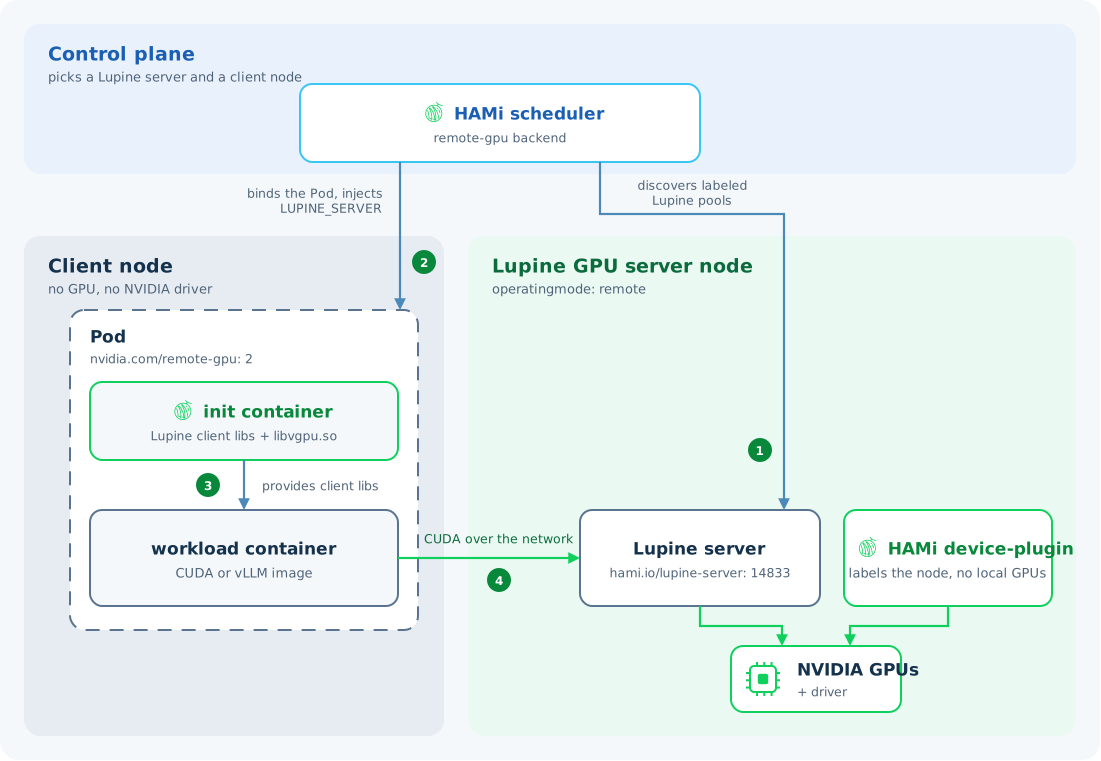
<p>With HAMi Remote GPU, the Client and Server run on different nodes in the same Kubernetes cluster. GPU nodes provide Server resources, while applications can run on CPU-only nodes and access those GPUs over the network.</p>
<p>Integrating this into Kubernetes requires resource discovery, Server selection, and client setup. HAMi identifies nodes that can provide remote GPUs, assigns a Server to each Pod, and prepares the client libraries and connection address before the application starts.</p>
<p><img decoding="async" loading="lazy" alt="HAMi Remote GPU architecture" src="data:image/svg+xml;base64,PHN2ZyB4bWxucz0iaHR0cDovL3d3dy53My5vcmcvMjAwMC9zdmciIHdpZHRoPSIxMjAwIiBoZWlnaHQ9IjgwMCIgdmlld0JveD0iMCAwIDEyMDAgODAwIiByb2xlPSJpbWciIGFyaWEtbGFiZWxsZWRieT0idGl0bGUgZGVzY3JpcHRpb24iPgogIDx0aXRsZSBpZD0idGl0bGUiPkhBTWkgUmVtb3RlIEdQVSBjb250cm9sIHBsYW5lIGFuZCByZW1vdGUgQ1VEQSBhcmNoaXRlY3R1cmU8L3RpdGxlPgogIDxkZXNjIGlkPSJkZXNjcmlwdGlvbiI+SEFNaSBkaXNjb3ZlcnMgR1BVIFNlcnZlcnMgYW5kIHNlbGVjdHMgdGhlIENsaWVudCBhbmQgU2VydmVyIGZvciBhIFBvZC4gSW5pdCBjb250YWluZXJzIHByb3ZpZGUgY2xpZW50IGxpYnJhcmllcy4gVGhlIHdvcmtsb2FkIHNlbmRzIENVREEgY2FsbHMgb3ZlciB0aGUgbmV0d29yayB0byB0aGUgTHVwaW5lIHNlcnZlciwgd2hpY2ggZXhlY3V0ZXMgdGhlbSB1c2luZyB0aGUgR1BVIFNlcnZlcidzIGRyaXZlciBhbmQgR1BVLjwvZGVzYz4KICA8ZGVmcz4KICAgIDxtYXJrZXIgaWQ9ImFycm93IiBtYXJrZXJXaWR0aD0iOCIgbWFya2VySGVpZ2h0PSI4IiByZWZYPSI3IiByZWZZPSI0IiBvcmllbnQ9ImF1dG8iPgogICAgICA8cGF0aCBkPSJNIDAgMCBMIDggNCBMIDAgOCBaIiBmaWxsPSIjMzljNmY0IiBmaWxsLW9wYWNpdHk9IjAuNzUiLz4KICAgIDwvbWFya2VyPgogICAgPHN0eWxlPgogICAgICB0ZXh0IHsKICAgICAgICBmaWxsOiAjMWEzOTU2OwogICAgICAgIGZvbnQtZmFtaWx5OiAiU291cmNlIFNhbnMgMyIsICJOb3RvIFNhbnMiLCAiU2Vnb2UgVUkiLCAiUGluZ0ZhbmcgU0MiLCAiTm90byBTYW5zIENKSyBTQyIsICJNaWNyb3NvZnQgWWFIZWkiLCBzYW5zLXNlcmlmOwogICAgICAgIGZvbnQtc2l6ZTogMjBweDsKICAgICAgfQogICAgICAuaGVhZGluZyB7CiAgICAgICAgZmlsbDogIzE1MzI0ZDsKICAgICAgICBmb250LWZhbWlseTogIlNwYWNlIEdyb3Rlc2siLCAiQXZlbmlyIE5leHQiLCAiU2Vnb2UgVUkiLCAiUGluZ0ZhbmcgU0MiLCAiTm90byBTYW5zIENKSyBTQyIsIHNhbnMtc2VyaWY7CiAgICAgICAgZm9udC1zaXplOiAyNHB4OwogICAgICAgIGZvbnQtd2VpZ2h0OiA2MDA7CiAgICAgIH0KICAgICAgLmxhYmVsIHsgZmlsbDogIzE1MzI0ZDsgZm9udC1zaXplOiAyMnB4OyBmb250LXdlaWdodDogNjAwOyB9CiAgICAgIC5tdXRlZCB7IGZpbGw6ICM1YTc0OGY7IGZvbnQtc2l6ZTogMThweDsgfQogICAgICAubW9ubyB7IGZvbnQtZmFtaWx5OiAiSUJNIFBsZXggTW9ubyIsICJTRk1vbm8tUmVndWxhciIsIENvbnNvbGFzLCBtb25vc3BhY2U7IGZvbnQtc2l6ZTogMThweDsgfQogICAgICAucGFuZWwgeyBmaWxsOiAjZmZmZmZmOyBzdHJva2U6ICNkNWRlZTg7IHN0cm9rZS13aWR0aDogMS41OyB9CiAgICAgIC5ub2RlIHsgZmlsbDogI2ZmZmZmZjsgc3Ryb2tlOiAjNWE3NDhmOyBzdHJva2Utd2lkdGg6IDEuNTsgfQogICAgICAuaGFtaSB7IGZpbGw6ICMxMGQwNWQ7IGZpbGwtb3BhY2l0eTogMC4wODsgc3Ryb2tlOiAjMTBkMDVkOyBzdHJva2Utd2lkdGg6IDI7IH0KICAgICAgLnNjaGVkdWxlciB7IGZpbGw6ICM3YzhjZmY7IGZpbGwtb3BhY2l0eTogMC4wODsgc3Ryb2tlOiAjN2M4Y2ZmOyBzdHJva2Utd2lkdGg6IDI7IH0KICAgICAgLmNvbm5lY3RvciB7IGZpbGw6IG5vbmU7IHN0cm9rZTogIzM5YzZmNDsgc3Ryb2tlLW9wYWNpdHk6IDAuNzU7IHN0cm9rZS13aWR0aDogMi41OyBtYXJrZXItZW5kOiB1cmwoI2Fycm93KTsgfQogICAgPC9zdHlsZT4KICA8L2RlZnM+CiAgPHJlY3Qgd2lkdGg9IjEyMDAiIGhlaWdodD0iODAwIiByeD0iMTYiIGZpbGw9IiNmNWY4ZmIiLz4KICA8IS0tIFRoZSBjb250cm9sIHBsYW5lIHNlbGVjdHMgdGhlIFNlcnZlciBhbmQgcHJlcGFyZXMgdGhlIFBvZCAtLT4KICA8cmVjdCBjbGFzcz0icGFuZWwiIHg9IjI0IiB5PSIyNCIgd2lkdGg9IjExNTIiIGhlaWdodD0iMjEwIiByeD0iMTQiLz4KICA8dGV4dCBjbGFzcz0iaGVhZGluZyIgeD0iNDgiIHk9IjY0Ij5Db250cm9sIHBsYW5lPC90ZXh0PgogIDx0ZXh0IGNsYXNzPSJtdXRlZCIgeD0iNDgiIHk9Ijk2Ij5TZWxlY3QgYSBHUFUgU2VydmVyPC90ZXh0PgogIDx0ZXh0IGNsYXNzPSJtdXRlZCIgeD0iNDgiIHk9IjEyNCI+YW5kIENsaWVudCBub2RlPC90ZXh0PgogIDxyZWN0IGNsYXNzPSJzY2hlZHVsZXIiIHg9IjM5MCIgeT0iODQiIHdpZHRoPSI0MjAiIGhlaWdodD0iMTAwIiByeD0iMTAiLz4KICA8dGV4dCBjbGFzcz0ibGFiZWwiIHg9IjYwMCIgeT0iMTI2IiB0ZXh0LWFuY2hvcj0ibWlkZGxlIj5IQU1pIHNjaGVkdWxlcjwvdGV4dD4KICA8dGV4dCBjbGFzcz0ibXV0ZWQiIHg9IjYwMCIgeT0iMTU4IiB0ZXh0LWFuY2hvcj0ibWlkZGxlIj5yZW1vdGUtZ3B1IGJhY2tlbmQ8L3RleHQ+CgogIDx0ZXh0IGNsYXNzPSJoZWFkaW5nIiB4PSIyNCIgeT0iMjgyIj5EYXRhIHBsYW5lPC90ZXh0PgoKICA8IS0tIENQVS1vbmx5IENsaWVudCBhbmQgaXRzIGluamVjdGVkIGxpYnJhcmllcyAtLT4KICA8cmVjdCBjbGFzcz0icGFuZWwiIHg9IjI0IiB5PSIzMTIiIHdpZHRoPSI1MDAiIGhlaWdodD0iNDYwIiByeD0iMTQiLz4KICA8dGV4dCBjbGFzcz0iaGVhZGluZyIgeD0iNDgiIHk9IjM1MiI+Q2xpZW50IG5vZGU8L3RleHQ+CiAgPHRleHQgY2xhc3M9Im11dGVkIiB4PSI0OCIgeT0iMzg0Ij5ObyBHUFUgLyBubyBOVklESUEgZHJpdmVyPC90ZXh0PgogIDxyZWN0IGNsYXNzPSJub2RlIiB4PSI0OCIgeT0iNDEyIiB3aWR0aD0iNDUyIiBoZWlnaHQ9IjMyOCIgcng9IjEyIiBzdHJva2UtZGFzaGFycmF5PSI5IDYiLz4KICA8dGV4dCBjbGFzcz0ibGFiZWwiIHg9IjcwIiB5PSI0NDgiPlBvZDwvdGV4dD4KICA8dGV4dCBjbGFzcz0ibW9ubyIgeD0iNzAiIHk9IjQ3OCI+bnZpZGlhLmNvbS9yZW1vdGUtZ3B1OiAxPC90ZXh0PgoKICA8cmVjdCBjbGFzcz0iaGFtaSIgeD0iNzYiIHk9IjUxOCIgd2lkdGg9IjM5NiIgaGVpZ2h0PSI3NiIgcng9IjEwIi8+CiAgPHRleHQgY2xhc3M9ImxhYmVsIiB4PSIyNzQiIHk9IjU1MCIgdGV4dC1hbmNob3I9Im1pZGRsZSI+SW5pdCBjb250YWluZXJzPC90ZXh0PgogIDx0ZXh0IGNsYXNzPSJtdXRlZCIgeD0iMjc0IiB5PSI1NzgiIHRleHQtYW5jaG9yPSJtaWRkbGUiPkx1cGluZSBjbGllbnQgbGlicmFyaWVzICsgbGlidmdwdS5zbzwvdGV4dD4KICA8cGF0aCBjbGFzcz0iY29ubmVjdG9yIiBkPSJNIDE1MCA1OTQgViA2NDgiLz4KICA8dGV4dCBjbGFzcz0ibXV0ZWQiIHg9IjE3NiIgeT0iNjI4Ij5DbGllbnQgbGlicmFyaWVzPC90ZXh0PgogIDxyZWN0IGNsYXNzPSJub2RlIiB4PSI3NiIgeT0iNjQ4IiB3aWR0aD0iMzk2IiBoZWlnaHQ9IjY4IiByeD0iMTAiLz4KICA8dGV4dCBjbGFzcz0ibGFiZWwiIHg9IjI3NCIgeT0iNjc3IiB0ZXh0LWFuY2hvcj0ibWlkZGxlIj5Xb3JrbG9hZCBjb250YWluZXI8L3RleHQ+CiAgPHRleHQgY2xhc3M9Im11dGVkIiB4PSIyNzQiIHk9IjcwMyIgdGV4dC1hbmNob3I9Im1pZGRsZSI+Q1VEQSAvIHZMTE08L3RleHQ+CgogIDwhLS0gR1BVIFNlcnZlciBkaXNjb3ZlcnkgYW5kIEdQVSByZWdpc3RyYXRpb24gLS0+CiAgPHJlY3QgY2xhc3M9InBhbmVsIiB4PSI2NjAiIHk9IjMxMiIgd2lkdGg9IjUxNiIgaGVpZ2h0PSI0NjAiIHJ4PSIxNCIvPgogIDx0ZXh0IGNsYXNzPSJoZWFkaW5nIiB4PSI2ODQiIHk9IjM1MiI+R1BVIFNlcnZlciBub2RlPC90ZXh0PgogIDx0ZXh0IGNsYXNzPSJtb25vIiB4PSI2ODQiIHk9IjM4NCI+b3BlcmF0aW5nbW9kZTogcmVtb3RlPC90ZXh0PgogIDxyZWN0IGNsYXNzPSJoYW1pIiB4PSI5MDgiIHk9IjQ0NCIgd2lkdGg9IjI0NCIgaGVpZ2h0PSIxMDAiIHJ4PSIxMCIvPgogIDx0ZXh0IGNsYXNzPSJsYWJlbCIgeD0iMTAzMCIgeT0iNDgzIiB0ZXh0LWFuY2hvcj0ibWlkZGxlIiBzdHlsZT0iZm9udC1zaXplOiAyMHB4Ij5IQU1pIERldmljZSBQbHVnaW48L3RleHQ+CiAgPHRleHQgY2xhc3M9Im11dGVkIiB4PSIxMDMwIiB5PSI1MTUiIHRleHQtYW5jaG9yPSJtaWRkbGUiPkxhYmVscyAvIEdQVSByZWdpc3RyYXRpb248L3RleHQ+CgogIDxyZWN0IGNsYXNzPSJub2RlIiB4PSI2ODQiIHk9IjU3MCIgd2lkdGg9IjIzNCIgaGVpZ2h0PSI4NiIgcng9IjEwIi8+CiAgPHRleHQgY2xhc3M9ImxhYmVsIiB4PSI4MDEiIHk9IjYwNyIgdGV4dC1hbmNob3I9Im1pZGRsZSI+THVwaW5lIHNlcnZlcjwvdGV4dD4KICA8dGV4dCBjbGFzcz0ibW9ubyIgeD0iODAxIiB5PSI2MzciIHRleHQtYW5jaG9yPSJtaWRkbGUiPlRDUCAxNDgzMzwvdGV4dD4KICA8cmVjdCBjbGFzcz0ibm9kZSIgeD0iNzU2IiB5PSI2ODQiIHdpZHRoPSIzMjgiIGhlaWdodD0iNjQiIHJ4PSIxMCIvPgogIDx0ZXh0IGNsYXNzPSJsYWJlbCIgeD0iOTIwIiB5PSI3MjQiIHRleHQtYW5jaG9yPSJtaWRkbGUiPk5WSURJQSBHUFUgKyBkcml2ZXI8L3RleHQ+CiAgPHBhdGggY2xhc3M9ImNvbm5lY3RvciIgZD0iTSA4MDEgNjU2IFYgNjY4IEggODUwIFYgNjg0Ii8+CiAgPHBhdGggY2xhc3M9ImNvbm5lY3RvciIgZD0iTSAxMDMwIDU0NCBWIDY2OCBIIDEwMDAgViA2ODQiLz4KCiAgPCEtLSBUaGUgc2NoZWR1bGVyIGRpc2NvdmVycyBhIHBvb2wgYW5kIGJpbmRzIHRoZSB3b3JrbG9hZCAtLT4KICA8cGF0aCBjbGFzcz0iY29ubmVjdG9yIiBkPSJNIDc0MCAxODQgViAyNjYgSCAxMTAwIFYgMzEyIi8+CiAgPHRleHQgY2xhc3M9Im11dGVkIiB4PSI5MzAiIHk9IjI0NSIgdGV4dC1hbmNob3I9Im1pZGRsZSI+RGlzY292ZXIgbGFiZWxlZCBMdXBpbmUgcG9vbHM8L3RleHQ+CiAgPHBhdGggY2xhc3M9ImNvbm5lY3RvciIgZD0iTSA0ODAgMTg0IFYgNDEyIi8+CiAgPHRleHQgY2xhc3M9Im11dGVkIiB4PSI0NTQiIHk9IjI1NSIgdGV4dC1hbmNob3I9ImVuZCI+QmluZCBQb2QgYW5kIGluamVjdDwvdGV4dD4KICA8dGV4dCBjbGFzcz0ibW9ubyIgeD0iNDU0IiB5PSIyODQiIHRleHQtYW5jaG9yPSJlbmQiPkxVUElORV9TRVJWRVI8L3RleHQ+CgogIDwhLS0gQ1VEQSBjYWxscyB0cmF2ZWwgZnJvbSB0aGUgYXBwbGljYXRpb24gdG8gdGhlIHJlbW90ZSBlbmRwb2ludCAtLT4KICA8cGF0aCBjbGFzcz0iY29ubmVjdG9yIiBkPSJNIDQ3MiA2ODIgSCA2NDAgViA2MTMgSCA2ODQiLz4KICA8dGV4dCBjbGFzcz0ibXV0ZWQiIHg9IjU4MiIgeT0iNjQwIiB0ZXh0LWFuY2hvcj0ibWlkZGxlIj5OZXR3b3JrPC90ZXh0PgogIDx0ZXh0IGNsYXNzPSJtdXRlZCIgeD0iNTgyIiB5PSI2NjUiIHRleHQtYW5jaG9yPSJtaWRkbGUiPkNVREEgY2FsbHM8L3RleHQ+Cjwvc3ZnPgo=#light-only" width="1200" height="800" class="img_ev3q"> <img decoding="async" loading="lazy" alt="HAMi Remote GPU architecture" src="data:image/svg+xml;base64,PHN2ZyB4bWxucz0iaHR0cDovL3d3dy53My5vcmcvMjAwMC9zdmciIHdpZHRoPSIxMjAwIiBoZWlnaHQ9IjgwMCIgdmlld0JveD0iMCAwIDEyMDAgODAwIiByb2xlPSJpbWciIGFyaWEtbGFiZWxsZWRieT0idGl0bGUgZGVzY3JpcHRpb24iPgogIDx0aXRsZSBpZD0idGl0bGUiPkhBTWkgUmVtb3RlIEdQVSBjb250cm9sIHBsYW5lIGFuZCByZW1vdGUgQ1VEQSBhcmNoaXRlY3R1cmU8L3RpdGxlPgogIDxkZXNjIGlkPSJkZXNjcmlwdGlvbiI+SEFNaSBkaXNjb3ZlcnMgR1BVIFNlcnZlcnMgYW5kIHNlbGVjdHMgdGhlIENsaWVudCBhbmQgU2VydmVyIGZvciBhIFBvZC4gSW5pdCBjb250YWluZXJzIHByb3ZpZGUgY2xpZW50IGxpYnJhcmllcy4gVGhlIHdvcmtsb2FkIHNlbmRzIENVREEgY2FsbHMgb3ZlciB0aGUgbmV0d29yayB0byB0aGUgTHVwaW5lIHNlcnZlciwgd2hpY2ggZXhlY3V0ZXMgdGhlbSB1c2luZyB0aGUgR1BVIFNlcnZlcidzIGRyaXZlciBhbmQgR1BVLjwvZGVzYz4KICA8ZGVmcz4KICAgIDxtYXJrZXIgaWQ9ImFycm93IiBtYXJrZXJXaWR0aD0iOCIgbWFya2VySGVpZ2h0PSI4IiByZWZYPSI3IiByZWZZPSI0IiBvcmllbnQ9ImF1dG8iPgogICAgICA8cGF0aCBkPSJNIDAgMCBMIDggNCBMIDAgOCBaIiBmaWxsPSIjMzljNmY0IiBmaWxsLW9wYWNpdHk9IjAuNzUiLz4KICAgIDwvbWFya2VyPgogICAgPHN0eWxlPgogICAgICB0ZXh0IHsKICAgICAgICBmaWxsOiAjZDhlZWZiOwogICAgICAgIGZvbnQtZmFtaWx5OiAiU291cmNlIFNhbnMgMyIsICJOb3RvIFNhbnMiLCAiU2Vnb2UgVUkiLCAiUGluZ0ZhbmcgU0MiLCAiTm90byBTYW5zIENKSyBTQyIsICJNaWNyb3NvZnQgWWFIZWkiLCBzYW5zLXNlcmlmOwogICAgICAgIGZvbnQtc2l6ZTogMjBweDsKICAgICAgfQogICAgICAuaGVhZGluZyB7CiAgICAgICAgZmlsbDogI2YwZjZmZDsKICAgICAgICBmb250LWZhbWlseTogIlNwYWNlIEdyb3Rlc2siLCAiQXZlbmlyIE5leHQiLCAiU2Vnb2UgVUkiLCAiUGluZ0ZhbmcgU0MiLCAiTm90byBTYW5zIENKSyBTQyIsIHNhbnMtc2VyaWY7CiAgICAgICAgZm9udC1zaXplOiAyNHB4OwogICAgICAgIGZvbnQtd2VpZ2h0OiA2MDA7CiAgICAgIH0KICAgICAgLmxhYmVsIHsgZmlsbDogI2YwZjZmZDsgZm9udC1zaXplOiAyMnB4OyBmb250LXdlaWdodDogNjAwOyB9CiAgICAgIC5tdXRlZCB7IGZpbGw6ICM5ZWI2Y2U7IGZvbnQtc2l6ZTogMThweDsgfQogICAgICAubW9ubyB7IGZvbnQtZmFtaWx5OiAiSUJNIFBsZXggTW9ubyIsICJTRk1vbm8tUmVndWxhciIsIENvbnNvbGFzLCBtb25vc3BhY2U7IGZvbnQtc2l6ZTogMThweDsgfQogICAgICAucGFuZWwgeyBmaWxsOiAjMTcxZTI3OyBzdHJva2U6ICMyYTM0NDI7IHN0cm9rZS13aWR0aDogMS41OyB9CiAgICAgIC5ub2RlIHsgZmlsbDogIzE3MWUyNzsgc3Ryb2tlOiAjOWViNmNlOyBzdHJva2Utd2lkdGg6IDEuNTsgfQogICAgICAuaGFtaSB7IGZpbGw6ICMxMGQwNWQ7IGZpbGwtb3BhY2l0eTogMC4wODsgc3Ryb2tlOiAjMTBkMDVkOyBzdHJva2Utd2lkdGg6IDI7IH0KICAgICAgLnNjaGVkdWxlciB7IGZpbGw6ICM3YzhjZmY7IGZpbGwtb3BhY2l0eTogMC4wODsgc3Ryb2tlOiAjN2M4Y2ZmOyBzdHJva2Utd2lkdGg6IDI7IH0KICAgICAgLmNvbm5lY3RvciB7IGZpbGw6IG5vbmU7IHN0cm9rZTogIzM5YzZmNDsgc3Ryb2tlLW9wYWNpdHk6IDAuNzU7IHN0cm9rZS13aWR0aDogMi41OyBtYXJrZXItZW5kOiB1cmwoI2Fycm93KTsgfQogICAgPC9zdHlsZT4KICA8L2RlZnM+CiAgPHJlY3Qgd2lkdGg9IjEyMDAiIGhlaWdodD0iODAwIiByeD0iMTYiIGZpbGw9IiMwYjBmMTQiLz4KICA8IS0tIFRoZSBjb250cm9sIHBsYW5lIHNlbGVjdHMgdGhlIFNlcnZlciBhbmQgcHJlcGFyZXMgdGhlIFBvZCAtLT4KICA8cmVjdCBjbGFzcz0icGFuZWwiIHg9IjI0IiB5PSIyNCIgd2lkdGg9IjExNTIiIGhlaWdodD0iMjEwIiByeD0iMTQiLz4KICA8dGV4dCBjbGFzcz0iaGVhZGluZyIgeD0iNDgiIHk9IjY0Ij5Db250cm9sIHBsYW5lPC90ZXh0PgogIDx0ZXh0IGNsYXNzPSJtdXRlZCIgeD0iNDgiIHk9Ijk2Ij5TZWxlY3QgYSBHUFUgU2VydmVyPC90ZXh0PgogIDx0ZXh0IGNsYXNzPSJtdXRlZCIgeD0iNDgiIHk9IjEyNCI+YW5kIENsaWVudCBub2RlPC90ZXh0PgogIDxyZWN0IGNsYXNzPSJzY2hlZHVsZXIiIHg9IjM5MCIgeT0iODQiIHdpZHRoPSI0MjAiIGhlaWdodD0iMTAwIiByeD0iMTAiLz4KICA8dGV4dCBjbGFzcz0ibGFiZWwiIHg9IjYwMCIgeT0iMTI2IiB0ZXh0LWFuY2hvcj0ibWlkZGxlIj5IQU1pIHNjaGVkdWxlcjwvdGV4dD4KICA8dGV4dCBjbGFzcz0ibXV0ZWQiIHg9IjYwMCIgeT0iMTU4IiB0ZXh0LWFuY2hvcj0ibWlkZGxlIj5yZW1vdGUtZ3B1IGJhY2tlbmQ8L3RleHQ+CgogIDx0ZXh0IGNsYXNzPSJoZWFkaW5nIiB4PSIyNCIgeT0iMjgyIj5EYXRhIHBsYW5lPC90ZXh0PgoKICA8IS0tIENQVS1vbmx5IENsaWVudCBhbmQgaXRzIGluamVjdGVkIGxpYnJhcmllcyAtLT4KICA8cmVjdCBjbGFzcz0icGFuZWwiIHg9IjI0IiB5PSIzMTIiIHdpZHRoPSI1MDAiIGhlaWdodD0iNDYwIiByeD0iMTQiLz4KICA8dGV4dCBjbGFzcz0iaGVhZGluZyIgeD0iNDgiIHk9IjM1MiI+Q2xpZW50IG5vZGU8L3RleHQ+CiAgPHRleHQgY2xhc3M9Im11dGVkIiB4PSI0OCIgeT0iMzg0Ij5ObyBHUFUgLyBubyBOVklESUEgZHJpdmVyPC90ZXh0PgogIDxyZWN0IGNsYXNzPSJub2RlIiB4PSI0OCIgeT0iNDEyIiB3aWR0aD0iNDUyIiBoZWlnaHQ9IjMyOCIgcng9IjEyIiBzdHJva2UtZGFzaGFycmF5PSI5IDYiLz4KICA8dGV4dCBjbGFzcz0ibGFiZWwiIHg9IjcwIiB5PSI0NDgiPlBvZDwvdGV4dD4KICA8dGV4dCBjbGFzcz0ibW9ubyIgeD0iNzAiIHk9IjQ3OCI+bnZpZGlhLmNvbS9yZW1vdGUtZ3B1OiAxPC90ZXh0PgoKICA8cmVjdCBjbGFzcz0iaGFtaSIgeD0iNzYiIHk9IjUxOCIgd2lkdGg9IjM5NiIgaGVpZ2h0PSI3NiIgcng9IjEwIi8+CiAgPHRleHQgY2xhc3M9ImxhYmVsIiB4PSIyNzQiIHk9IjU1MCIgdGV4dC1hbmNob3I9Im1pZGRsZSI+SW5pdCBjb250YWluZXJzPC90ZXh0PgogIDx0ZXh0IGNsYXNzPSJtdXRlZCIgeD0iMjc0IiB5PSI1NzgiIHRleHQtYW5jaG9yPSJtaWRkbGUiPkx1cGluZSBjbGllbnQgbGlicmFyaWVzICsgbGlidmdwdS5zbzwvdGV4dD4KICA8cGF0aCBjbGFzcz0iY29ubmVjdG9yIiBkPSJNIDE1MCA1OTQgViA2NDgiLz4KICA8dGV4dCBjbGFzcz0ibXV0ZWQiIHg9IjE3NiIgeT0iNjI4Ij5DbGllbnQgbGlicmFyaWVzPC90ZXh0PgogIDxyZWN0IGNsYXNzPSJub2RlIiB4PSI3NiIgeT0iNjQ4IiB3aWR0aD0iMzk2IiBoZWlnaHQ9IjY4IiByeD0iMTAiLz4KICA8dGV4dCBjbGFzcz0ibGFiZWwiIHg9IjI3NCIgeT0iNjc3IiB0ZXh0LWFuY2hvcj0ibWlkZGxlIj5Xb3JrbG9hZCBjb250YWluZXI8L3RleHQ+CiAgPHRleHQgY2xhc3M9Im11dGVkIiB4PSIyNzQiIHk9IjcwMyIgdGV4dC1hbmNob3I9Im1pZGRsZSI+Q1VEQSAvIHZMTE08L3RleHQ+CgogIDwhLS0gR1BVIFNlcnZlciBkaXNjb3ZlcnkgYW5kIEdQVSByZWdpc3RyYXRpb24gLS0+CiAgPHJlY3QgY2xhc3M9InBhbmVsIiB4PSI2NjAiIHk9IjMxMiIgd2lkdGg9IjUxNiIgaGVpZ2h0PSI0NjAiIHJ4PSIxNCIvPgogIDx0ZXh0IGNsYXNzPSJoZWFkaW5nIiB4PSI2ODQiIHk9IjM1MiI+R1BVIFNlcnZlciBub2RlPC90ZXh0PgogIDx0ZXh0IGNsYXNzPSJtb25vIiB4PSI2ODQiIHk9IjM4NCI+b3BlcmF0aW5nbW9kZTogcmVtb3RlPC90ZXh0PgogIDxyZWN0IGNsYXNzPSJoYW1pIiB4PSI5MDgiIHk9IjQ0NCIgd2lkdGg9IjI0NCIgaGVpZ2h0PSIxMDAiIHJ4PSIxMCIvPgogIDx0ZXh0IGNsYXNzPSJsYWJlbCIgeD0iMTAzMCIgeT0iNDgzIiB0ZXh0LWFuY2hvcj0ibWlkZGxlIiBzdHlsZT0iZm9udC1zaXplOiAyMHB4Ij5IQU1pIERldmljZSBQbHVnaW48L3RleHQ+CiAgPHRleHQgY2xhc3M9Im11dGVkIiB4PSIxMDMwIiB5PSI1MTUiIHRleHQtYW5jaG9yPSJtaWRkbGUiPkxhYmVscyAvIEdQVSByZWdpc3RyYXRpb248L3RleHQ+CgogIDxyZWN0IGNsYXNzPSJub2RlIiB4PSI2ODQiIHk9IjU3MCIgd2lkdGg9IjIzNCIgaGVpZ2h0PSI4NiIgcng9IjEwIi8+CiAgPHRleHQgY2xhc3M9ImxhYmVsIiB4PSI4MDEiIHk9IjYwNyIgdGV4dC1hbmNob3I9Im1pZGRsZSI+THVwaW5lIHNlcnZlcjwvdGV4dD4KICA8dGV4dCBjbGFzcz0ibW9ubyIgeD0iODAxIiB5PSI2MzciIHRleHQtYW5jaG9yPSJtaWRkbGUiPlRDUCAxNDgzMzwvdGV4dD4KICA8cmVjdCBjbGFzcz0ibm9kZSIgeD0iNzU2IiB5PSI2ODQiIHdpZHRoPSIzMjgiIGhlaWdodD0iNjQiIHJ4PSIxMCIvPgogIDx0ZXh0IGNsYXNzPSJsYWJlbCIgeD0iOTIwIiB5PSI3MjQiIHRleHQtYW5jaG9yPSJtaWRkbGUiPk5WSURJQSBHUFUgKyBkcml2ZXI8L3RleHQ+CiAgPHBhdGggY2xhc3M9ImNvbm5lY3RvciIgZD0iTSA4MDEgNjU2IFYgNjY4IEggODUwIFYgNjg0Ii8+CiAgPHBhdGggY2xhc3M9ImNvbm5lY3RvciIgZD0iTSAxMDMwIDU0NCBWIDY2OCBIIDEwMDAgViA2ODQiLz4KCiAgPCEtLSBUaGUgc2NoZWR1bGVyIGRpc2NvdmVycyBhIHBvb2wgYW5kIGJpbmRzIHRoZSB3b3JrbG9hZCAtLT4KICA8cGF0aCBjbGFzcz0iY29ubmVjdG9yIiBkPSJNIDc0MCAxODQgViAyNjYgSCAxMTAwIFYgMzEyIi8+CiAgPHRleHQgY2xhc3M9Im11dGVkIiB4PSI5MzAiIHk9IjI0NSIgdGV4dC1hbmNob3I9Im1pZGRsZSI+RGlzY292ZXIgbGFiZWxlZCBMdXBpbmUgcG9vbHM8L3RleHQ+CiAgPHBhdGggY2xhc3M9ImNvbm5lY3RvciIgZD0iTSA0ODAgMTg0IFYgNDEyIi8+CiAgPHRleHQgY2xhc3M9Im11dGVkIiB4PSI0NTQiIHk9IjI1NSIgdGV4dC1hbmNob3I9ImVuZCI+QmluZCBQb2QgYW5kIGluamVjdDwvdGV4dD4KICA8dGV4dCBjbGFzcz0ibW9ubyIgeD0iNDU0IiB5PSIyODQiIHRleHQtYW5jaG9yPSJlbmQiPkxVUElORV9TRVJWRVI8L3RleHQ+CgogIDwhLS0gQ1VEQSBjYWxscyB0cmF2ZWwgZnJvbSB0aGUgYXBwbGljYXRpb24gdG8gdGhlIHJlbW90ZSBlbmRwb2ludCAtLT4KICA8cGF0aCBjbGFzcz0iY29ubmVjdG9yIiBkPSJNIDQ3MiA2ODIgSCA2NDAgViA2MTMgSCA2ODQiLz4KICA8dGV4dCBjbGFzcz0ibXV0ZWQiIHg9IjU4MiIgeT0iNjQwIiB0ZXh0LWFuY2hvcj0ibWlkZGxlIj5OZXR3b3JrPC90ZXh0PgogIDx0ZXh0IGNsYXNzPSJtdXRlZCIgeD0iNTgyIiB5PSI2NjUiIHRleHQtYW5jaG9yPSJtaWRkbGUiPkNVREEgY2FsbHM8L3RleHQ+Cjwvc3ZnPgo=#dark-only" width="1200" height="800" class="img_ev3q"></p>
<h3 class="anchor anchorTargetStickyNavbar_Vzrq" id="21-register-a-gpu-node-as-a-server">2.1 Register a GPU node as a Server<a href="https://project-hami.io/blog/hami-v2-11-remote-gpu#21-register-a-gpu-node-as-a-server" class="hash-link" aria-label="Direct link to 2.1 Register a GPU node as a Server" title="Direct link to 2.1 Register a GPU node as a Server" translate="no">​</a></h3>
<p>Administrators select remote mode with <code>operatingmode: remote</code>. The Device Plugin registers GPU information as remote resources and automatically adds the <code>hami.io/lupine-server</code> discovery label to the node. The remote server runs on the GPU node and provides the CUDA endpoint for workloads.</p>
<p>HAMi can then discover GPU Servers available for allocation. Node labels can also group Servers into resource pools for different workloads.</p>
<h3 class="anchor anchorTargetStickyNavbar_Vzrq" id="22-select-the-client-and-gpu-server-for-a-pod">2.2 Select the Client and GPU Server for a Pod<a href="https://project-hami.io/blog/hami-v2-11-remote-gpu#22-select-the-client-and-gpu-server-for-a-pod" class="hash-link" aria-label="Direct link to 2.2 Select the Client and GPU Server for a Pod" title="Direct link to 2.2 Select the Client and GPU Server for a Pod" translate="no">​</a></h3>
<p>A workload requests remote GPUs with <code>nvidia.com/remote-gpu</code>. The optional <code>nvidia.com/remote-gpu-memory</code> resource sets a memory quota in MiB per GPU.</p>
<p>This Pod excerpt places the application on a CPU node, requests one remote GPU, and sets a 3000 MiB memory quota per GPU:</p>
<div class="language-yaml codeBlockContainer_Ckt0 theme-code-block" style="--prism-color:#bfc7d5;--prism-background-color:#292d3e"><div class="codeBlockContent_QJqH"><pre tabindex="0" class="prism-code language-yaml codeBlock_bY9V thin-scrollbar" style="color:#bfc7d5;background-color:#292d3e"><code class="codeBlockLines_e6Vv"><div class="token-line" style="color:#bfc7d5"><span class="token key atrule">spec</span><span class="token punctuation" style="color:rgb(199, 146, 234)">:</span><span class="token plain"></span><br></div><div class="token-line" style="color:#bfc7d5"><span class="token plain">  </span><span class="token key atrule">nodeSelector</span><span class="token punctuation" style="color:rgb(199, 146, 234)">:</span><span class="token plain"></span><br></div><div class="token-line" style="color:#bfc7d5"><span class="token plain">    </span><span class="token key atrule">kubernetes.io/hostname</span><span class="token punctuation" style="color:rgb(199, 146, 234)">:</span><span class="token plain"> cpu</span><span class="token punctuation" style="color:rgb(199, 146, 234)">-</span><span class="token plain">client</span><span class="token punctuation" style="color:rgb(199, 146, 234)">-</span><span class="token number" style="color:rgb(247, 140, 108)">01</span><span class="token plain"></span><br></div><div class="token-line" style="color:#bfc7d5"><span class="token plain">  </span><span class="token key atrule">containers</span><span class="token punctuation" style="color:rgb(199, 146, 234)">:</span><span class="token plain"></span><br></div><div class="token-line" style="color:#bfc7d5"><span class="token plain">    </span><span class="token punctuation" style="color:rgb(199, 146, 234)">-</span><span class="token plain"> </span><span class="token key atrule">name</span><span class="token punctuation" style="color:rgb(199, 146, 234)">:</span><span class="token plain"> cuda</span><br></div><div class="token-line" style="color:#bfc7d5"><span class="token plain">      </span><span class="token key atrule">image</span><span class="token punctuation" style="color:rgb(199, 146, 234)">:</span><span class="token plain"> nvidia/cuda</span><span class="token punctuation" style="color:rgb(199, 146, 234)">:</span><span class="token plain">13.0.2</span><span class="token punctuation" style="color:rgb(199, 146, 234)">-</span><span class="token plain">devel</span><span class="token punctuation" style="color:rgb(199, 146, 234)">-</span><span class="token plain">ubuntu24.04</span><br></div><div class="token-line" style="color:#bfc7d5"><span class="token plain">      </span><span class="token key atrule">command</span><span class="token punctuation" style="color:rgb(199, 146, 234)">:</span><span class="token plain"> </span><span class="token punctuation" style="color:rgb(199, 146, 234)">[</span><span class="token string" style="color:rgb(195, 232, 141)">"nvidia-smi"</span><span class="token punctuation" style="color:rgb(199, 146, 234)">,</span><span class="token plain"> </span><span class="token string" style="color:rgb(195, 232, 141)">"-L"</span><span class="token punctuation" style="color:rgb(199, 146, 234)">]</span><span class="token plain"></span><br></div><div class="token-line" style="color:#bfc7d5"><span class="token plain">      </span><span class="token key atrule">resources</span><span class="token punctuation" style="color:rgb(199, 146, 234)">:</span><span class="token plain"></span><br></div><div class="token-line" style="color:#bfc7d5"><span class="token plain">        </span><span class="token key atrule">limits</span><span class="token punctuation" style="color:rgb(199, 146, 234)">:</span><span class="token plain"></span><br></div><div class="token-line" style="color:#bfc7d5"><span class="token plain">          </span><span class="token key atrule">nvidia.com/remote-gpu</span><span class="token punctuation" style="color:rgb(199, 146, 234)">:</span><span class="token plain"> </span><span class="token number" style="color:rgb(247, 140, 108)">1</span><span class="token plain"> </span><span class="token comment" style="color:rgb(105, 112, 152);font-style:italic"># Remote GPU count</span><span class="token plain"></span><br></div><div class="token-line" style="color:#bfc7d5"><span class="token plain">          </span><span class="token key atrule">nvidia.com/remote-gpu-memory</span><span class="token punctuation" style="color:rgb(199, 146, 234)">:</span><span class="token plain"> </span><span class="token number" style="color:rgb(247, 140, 108)">3000</span><span class="token plain"> </span><span class="token comment" style="color:rgb(105, 112, 152);font-style:italic"># Memory quota per GPU, in MiB</span><br></div></code></pre></div></div>
<p>Scheduling determines two locations: the Client node running the Pod and the Server providing the GPU. Here, <code>nodeSelector</code> pins the Pod to a CPU node, while HAMi assigns the remote Server.</p>
<blockquote>
<p>To select a particular resource pool, a Pod can set the <code>hami.io/remote-server</code> annotation.</p>
</blockquote>
<div class="theme-admonition theme-admonition-warning admonition_xJq3 alert alert--warning"><div class="admonitionHeading_Gvgb"><span class="admonitionIcon_Rf37"><svg viewBox="0 0 16 16"><path fill-rule="evenodd" d="M8.893 1.5c-.183-.31-.52-.5-.887-.5s-.703.19-.886.5L.138 13.499a.98.98 0 0 0 0 1.001c.193.31.53.501.886.501h13.964c.367 0 .704-.19.877-.5a1.03 1.03 0 0 0 .01-1.002L8.893 1.5zm.133 11.497H6.987v-2.003h2.039v2.003zm0-3.004H6.987V5.987h2.039v4.006z"></path></svg></span>Current limitation</div><div class="admonitionContent_BuS1"><p>A workload reserves the entire GPU server. The endpoint exposes all its GPUs, so set the GPU count to the server's physical GPU count. A smaller memory quota does not make the remaining server capacity available to another workload. Run the test Pods in this post sequentially, or use separate servers.</p></div></div>
<h3 class="anchor anchorTargetStickyNavbar_Vzrq" id="23-prepare-the-application-client-environment">2.3 Prepare the application client environment<a href="https://project-hami.io/blog/hami-v2-11-remote-gpu#23-prepare-the-application-client-environment" class="hash-link" aria-label="Direct link to 2.3 Prepare the application client environment" title="Direct link to 2.3 Prepare the application client environment" translate="no">​</a></h3>
<p>After allocation, the application needs the client libraries and the address of its assigned Server.</p>
<p>HAMi delivers Lupine client libraries and a compatible <code>nvidia-smi</code> through an init container, mounts the libraries into the application container, and injects the selected endpoint through <code>LUPINE_SERVER</code>. When memory enforcement is enabled, it also delivers HAMi-core and adds it to the call path through <code>LD_PRELOAD</code> to enforce the memory quota.</p>
<p>The following excerpt shows the injected init containers and key fields for a workload with a memory quota:</p>
<blockquote>
<p>HAMi injects these fields. They do not need to be added to the workload manifest.</p>
</blockquote>
<div class="language-yaml codeBlockContainer_Ckt0 theme-code-block" style="--prism-color:#bfc7d5;--prism-background-color:#292d3e"><div class="codeBlockContent_QJqH"><pre tabindex="0" class="prism-code language-yaml codeBlock_bY9V thin-scrollbar" style="color:#bfc7d5;background-color:#292d3e"><code class="codeBlockLines_e6Vv"><div class="token-line" style="color:#bfc7d5"><span class="token key atrule">spec</span><span class="token punctuation" style="color:rgb(199, 146, 234)">:</span><span class="token plain"></span><br></div><div class="token-line" style="color:#bfc7d5"><span class="token plain">  </span><span class="token key atrule">initContainers</span><span class="token punctuation" style="color:rgb(199, 146, 234)">:</span><span class="token plain"></span><br></div><div class="token-line" style="color:#bfc7d5"><span class="token plain">    </span><span class="token punctuation" style="color:rgb(199, 146, 234)">-</span><span class="token plain"> </span><span class="token key atrule">name</span><span class="token punctuation" style="color:rgb(199, 146, 234)">:</span><span class="token plain"> hami</span><span class="token punctuation" style="color:rgb(199, 146, 234)">-</span><span class="token plain">remote</span><span class="token punctuation" style="color:rgb(199, 146, 234)">-</span><span class="token plain">gpu</span><span class="token punctuation" style="color:rgb(199, 146, 234)">-</span><span class="token plain">lib</span><br></div><div class="token-line" style="color:#bfc7d5"><span class="token plain">      </span><span class="token key atrule">image</span><span class="token punctuation" style="color:rgb(199, 146, 234)">:</span><span class="token plain"> docker.m.daocloud.io/projecthami/hami</span><span class="token punctuation" style="color:rgb(199, 146, 234)">:</span><span class="token plain">v2.11.0</span><br></div><div class="token-line" style="color:#bfc7d5"><span class="token plain">      </span><span class="token key atrule">volumeMounts</span><span class="token punctuation" style="color:rgb(199, 146, 234)">:</span><span class="token plain"></span><br></div><div class="token-line" style="color:#bfc7d5"><span class="token plain">        </span><span class="token punctuation" style="color:rgb(199, 146, 234)">-</span><span class="token plain"> </span><span class="token key atrule">name</span><span class="token punctuation" style="color:rgb(199, 146, 234)">:</span><span class="token plain"> hami</span><span class="token punctuation" style="color:rgb(199, 146, 234)">-</span><span class="token plain">remote</span><span class="token punctuation" style="color:rgb(199, 146, 234)">-</span><span class="token plain">gpu</span><span class="token punctuation" style="color:rgb(199, 146, 234)">-</span><span class="token plain">lib</span><br></div><div class="token-line" style="color:#bfc7d5"><span class="token plain">          </span><span class="token key atrule">mountPath</span><span class="token punctuation" style="color:rgb(199, 146, 234)">:</span><span class="token plain"> /hami</span><span class="token punctuation" style="color:rgb(199, 146, 234)">-</span><span class="token plain">remote</span><span class="token punctuation" style="color:rgb(199, 146, 234)">-</span><span class="token plain">gpu</span><br></div><div class="token-line" style="color:#bfc7d5"><span class="token plain">    </span><span class="token punctuation" style="color:rgb(199, 146, 234)">-</span><span class="token plain"> </span><span class="token key atrule">name</span><span class="token punctuation" style="color:rgb(199, 146, 234)">:</span><span class="token plain"> hami</span><span class="token punctuation" style="color:rgb(199, 146, 234)">-</span><span class="token plain">lupine</span><span class="token punctuation" style="color:rgb(199, 146, 234)">-</span><span class="token plain">client</span><br></div><div class="token-line" style="color:#bfc7d5"><span class="token plain">      </span><span class="token key atrule">image</span><span class="token punctuation" style="color:rgb(199, 146, 234)">:</span><span class="token plain"> ghcr.io/lupinemachines/lupine</span><span class="token punctuation" style="color:rgb(199, 146, 234)">-</span><span class="token plain">client</span><span class="token punctuation" style="color:rgb(199, 146, 234)">:</span><span class="token plain">cuda</span><span class="token punctuation" style="color:rgb(199, 146, 234)">-</span><span class="token plain">13.3.1</span><span class="token punctuation" style="color:rgb(199, 146, 234)">-</span><span class="token plain">ubuntu24.04</span><br></div><div class="token-line" style="color:#bfc7d5"><span class="token plain">      </span><span class="token key atrule">volumeMounts</span><span class="token punctuation" style="color:rgb(199, 146, 234)">:</span><span class="token plain"></span><br></div><div class="token-line" style="color:#bfc7d5"><span class="token plain">        </span><span class="token punctuation" style="color:rgb(199, 146, 234)">-</span><span class="token plain"> </span><span class="token key atrule">name</span><span class="token punctuation" style="color:rgb(199, 146, 234)">:</span><span class="token plain"> hami</span><span class="token punctuation" style="color:rgb(199, 146, 234)">-</span><span class="token plain">lupine</span><span class="token punctuation" style="color:rgb(199, 146, 234)">-</span><span class="token plain">client</span><br></div><div class="token-line" style="color:#bfc7d5"><span class="token plain">          </span><span class="token key atrule">mountPath</span><span class="token punctuation" style="color:rgb(199, 146, 234)">:</span><span class="token plain"> /lupine</span><span class="token punctuation" style="color:rgb(199, 146, 234)">-</span><span class="token plain">lib</span><br></div><div class="token-line" style="color:#bfc7d5"><span class="token plain">  </span><span class="token key atrule">containers</span><span class="token punctuation" style="color:rgb(199, 146, 234)">:</span><span class="token plain"></span><br></div><div class="token-line" style="color:#bfc7d5"><span class="token plain">    </span><span class="token punctuation" style="color:rgb(199, 146, 234)">-</span><span class="token plain"> </span><span class="token key atrule">name</span><span class="token punctuation" style="color:rgb(199, 146, 234)">:</span><span class="token plain"> vllm</span><br></div><div class="token-line" style="color:#bfc7d5"><span class="token plain">      </span><span class="token key atrule">env</span><span class="token punctuation" style="color:rgb(199, 146, 234)">:</span><span class="token plain"></span><br></div><div class="token-line" style="color:#bfc7d5"><span class="token plain">        </span><span class="token punctuation" style="color:rgb(199, 146, 234)">-</span><span class="token plain"> </span><span class="token key atrule">name</span><span class="token punctuation" style="color:rgb(199, 146, 234)">:</span><span class="token plain"> LUPINE_SERVER</span><br></div><div class="token-line" style="color:#bfc7d5"><span class="token plain">          </span><span class="token key atrule">valueFrom</span><span class="token punctuation" style="color:rgb(199, 146, 234)">:</span><span class="token plain"></span><br></div><div class="token-line" style="color:#bfc7d5"><span class="token plain">            </span><span class="token key atrule">fieldRef</span><span class="token punctuation" style="color:rgb(199, 146, 234)">:</span><span class="token plain"></span><br></div><div class="token-line" style="color:#bfc7d5"><span class="token plain">              </span><span class="token key atrule">fieldPath</span><span class="token punctuation" style="color:rgb(199, 146, 234)">:</span><span class="token plain"> metadata.annotations</span><span class="token punctuation" style="color:rgb(199, 146, 234)">[</span><span class="token string" style="color:rgb(195, 232, 141)">'hami.io/lupine-endpoint'</span><span class="token punctuation" style="color:rgb(199, 146, 234)">]</span><span class="token plain"></span><br></div><div class="token-line" style="color:#bfc7d5"><span class="token plain">        </span><span class="token punctuation" style="color:rgb(199, 146, 234)">-</span><span class="token plain"> </span><span class="token key atrule">name</span><span class="token punctuation" style="color:rgb(199, 146, 234)">:</span><span class="token plain"> LD_PRELOAD</span><br></div><div class="token-line" style="color:#bfc7d5"><span class="token plain">          </span><span class="token key atrule">value</span><span class="token punctuation" style="color:rgb(199, 146, 234)">:</span><span class="token plain"> /hami</span><span class="token punctuation" style="color:rgb(199, 146, 234)">-</span><span class="token plain">remote</span><span class="token punctuation" style="color:rgb(199, 146, 234)">-</span><span class="token plain">gpu/libvgpu.so</span><br></div><div class="token-line" style="color:#bfc7d5"><span class="token plain">        </span><span class="token punctuation" style="color:rgb(199, 146, 234)">-</span><span class="token plain"> </span><span class="token key atrule">name</span><span class="token punctuation" style="color:rgb(199, 146, 234)">:</span><span class="token plain"> CUDA_DEVICE_MEMORY_LIMIT</span><br></div><div class="token-line" style="color:#bfc7d5"><span class="token plain">          </span><span class="token key atrule">value</span><span class="token punctuation" style="color:rgb(199, 146, 234)">:</span><span class="token plain"> 15360m</span><br></div><div class="token-line" style="color:#bfc7d5"><span class="token plain">      </span><span class="token key atrule">volumeMounts</span><span class="token punctuation" style="color:rgb(199, 146, 234)">:</span><span class="token plain"></span><br></div><div class="token-line" style="color:#bfc7d5"><span class="token plain">        </span><span class="token punctuation" style="color:rgb(199, 146, 234)">-</span><span class="token plain"> </span><span class="token key atrule">name</span><span class="token punctuation" style="color:rgb(199, 146, 234)">:</span><span class="token plain"> hami</span><span class="token punctuation" style="color:rgb(199, 146, 234)">-</span><span class="token plain">remote</span><span class="token punctuation" style="color:rgb(199, 146, 234)">-</span><span class="token plain">gpu</span><span class="token punctuation" style="color:rgb(199, 146, 234)">-</span><span class="token plain">lib</span><br></div><div class="token-line" style="color:#bfc7d5"><span class="token plain">          </span><span class="token key atrule">mountPath</span><span class="token punctuation" style="color:rgb(199, 146, 234)">:</span><span class="token plain"> /hami</span><span class="token punctuation" style="color:rgb(199, 146, 234)">-</span><span class="token plain">remote</span><span class="token punctuation" style="color:rgb(199, 146, 234)">-</span><span class="token plain">gpu</span><br></div><div class="token-line" style="color:#bfc7d5"><span class="token plain">        </span><span class="token punctuation" style="color:rgb(199, 146, 234)">-</span><span class="token plain"> </span><span class="token key atrule">name</span><span class="token punctuation" style="color:rgb(199, 146, 234)">:</span><span class="token plain"> hami</span><span class="token punctuation" style="color:rgb(199, 146, 234)">-</span><span class="token plain">lupine</span><span class="token punctuation" style="color:rgb(199, 146, 234)">-</span><span class="token plain">client</span><br></div><div class="token-line" style="color:#bfc7d5"><span class="token plain">          </span><span class="token key atrule">mountPath</span><span class="token punctuation" style="color:rgb(199, 146, 234)">:</span><span class="token plain"> /opt/lupine/lib</span><br></div><div class="token-line" style="color:#bfc7d5"><span class="token plain">          </span><span class="token key atrule">readOnly</span><span class="token punctuation" style="color:rgb(199, 146, 234)">:</span><span class="token plain"> </span><span class="token boolean important" style="color:rgb(255, 88, 116)">true</span><span class="token plain"></span><br></div><div class="token-line" style="color:#bfc7d5"><span class="token plain">  </span><span class="token key atrule">volumes</span><span class="token punctuation" style="color:rgb(199, 146, 234)">:</span><span class="token plain"></span><br></div><div class="token-line" style="color:#bfc7d5"><span class="token plain">    </span><span class="token punctuation" style="color:rgb(199, 146, 234)">-</span><span class="token plain"> </span><span class="token key atrule">name</span><span class="token punctuation" style="color:rgb(199, 146, 234)">:</span><span class="token plain"> hami</span><span class="token punctuation" style="color:rgb(199, 146, 234)">-</span><span class="token plain">remote</span><span class="token punctuation" style="color:rgb(199, 146, 234)">-</span><span class="token plain">gpu</span><span class="token punctuation" style="color:rgb(199, 146, 234)">-</span><span class="token plain">lib</span><br></div><div class="token-line" style="color:#bfc7d5"><span class="token plain">      </span><span class="token key atrule">emptyDir</span><span class="token punctuation" style="color:rgb(199, 146, 234)">:</span><span class="token plain"> </span><span class="token punctuation" style="color:rgb(199, 146, 234)">{</span><span class="token punctuation" style="color:rgb(199, 146, 234)">}</span><span class="token plain"></span><br></div><div class="token-line" style="color:#bfc7d5"><span class="token plain">    </span><span class="token punctuation" style="color:rgb(199, 146, 234)">-</span><span class="token plain"> </span><span class="token key atrule">name</span><span class="token punctuation" style="color:rgb(199, 146, 234)">:</span><span class="token plain"> hami</span><span class="token punctuation" style="color:rgb(199, 146, 234)">-</span><span class="token plain">lupine</span><span class="token punctuation" style="color:rgb(199, 146, 234)">-</span><span class="token plain">client</span><br></div><div class="token-line" style="color:#bfc7d5"><span class="token plain">      </span><span class="token key atrule">emptyDir</span><span class="token punctuation" style="color:rgb(199, 146, 234)">:</span><span class="token plain"> </span><span class="token punctuation" style="color:rgb(199, 146, 234)">{</span><span class="token punctuation" style="color:rgb(199, 146, 234)">}</span><br></div></code></pre></div></div>
<table><thead><tr><th>Init container</th><th>Purpose</th><th>Exit code</th></tr></thead><tbody><tr><td><code>hami-remote-gpu-lib</code></td><td>Copies HAMi-core <code>libvgpu.so</code> into a shared volume</td><td>0</td></tr><tr><td><code>hami-lupine-client</code></td><td>Copies Lupine client libraries, dependencies, and a compatible <code>nvidia-smi</code> into a shared volume</td><td>0</td></tr></tbody></table>
<p>Both shared volumes use <code>emptyDir</code>. The init containers write the files before the application container mounts them.</p>
<h3 class="anchor anchorTargetStickyNavbar_Vzrq" id="24-start-the-application-and-execute-remote-cuda-calls">2.4 Start the application and execute remote CUDA calls<a href="https://project-hami.io/blog/hami-v2-11-remote-gpu#24-start-the-application-and-execute-remote-cuda-calls" class="hash-link" aria-label="Direct link to 2.4 Start the application and execute remote CUDA calls" title="Direct link to 2.4 Start the application and execute remote CUDA calls" translate="no">​</a></h3>
<p>Once its client environment is ready, the application starts on the CPU Client. Its CUDA calls pass through the client libraries to the assigned GPU Server, which executes them on the GPU and returns the results.</p>
<h2 class="anchor anchorTargetStickyNavbar_Vzrq" id="3-environment-and-deployment">3. Environment and deployment<a href="https://project-hami.io/blog/hami-v2-11-remote-gpu#3-environment-and-deployment" class="hash-link" aria-label="Direct link to 3. Environment and deployment" title="Direct link to 3. Environment and deployment" translate="no">​</a></h2>
<h3 class="anchor anchorTargetStickyNavbar_Vzrq" id="31-prepare-a-kubernetes-cluster">3.1 Prepare a Kubernetes cluster<a href="https://project-hami.io/blog/hami-v2-11-remote-gpu#31-prepare-a-kubernetes-cluster" class="hash-link" aria-label="Direct link to 3.1 Prepare a Kubernetes cluster" title="Direct link to 3.1 Prepare a Kubernetes cluster" translate="no">​</a></h3>
<p>Prepare a Kubernetes cluster with a GPU node and a CPU-only node.</p>
<p>Node names in the manifests and captured output use example names. Replace them with the actual node names in your cluster.</p>
<table><thead><tr><th>Component</th><th>Test environment</th></tr></thead><tbody><tr><td>GPU Server</td><td><code>gpu-server-01</code>, 8 vCPU, 16 GiB RAM, Tesla T4 with 15360 MiB</td></tr><tr><td>CPU Client</td><td><code>cpu-client-01</code>, 4 vCPU, about 8 GiB RAM, no GPU</td></tr><tr><td>Kubernetes / containerd</td><td>v1.37.0 / 2.2.4</td></tr><tr><td>HAMi</td><td>v2.11.0</td></tr></tbody></table>
<p>Pods on the CPU Client must be able to reach the GPU Server's InternalIP. The default server port is TCP 14833.</p>
<p>List the cluster nodes. Replace the node names in subsequent commands and YAML with those from your cluster.</p>
<div class="language-bash codeBlockContainer_Ckt0 theme-code-block" style="--prism-color:#bfc7d5;--prism-background-color:#292d3e"><div class="codeBlockContent_QJqH"><pre tabindex="0" class="prism-code language-bash codeBlock_bY9V thin-scrollbar" style="color:#bfc7d5;background-color:#292d3e"><code class="codeBlockLines_e6Vv"><div class="token-line" style="color:#bfc7d5"><span class="token plain">kubectl get nodes</span><br></div></code></pre></div></div>
<p>Both test nodes were Ready:</p>
<div class="language-text codeBlockContainer_Ckt0 theme-code-block" style="--prism-color:#bfc7d5;--prism-background-color:#292d3e"><div class="codeBlockContent_QJqH"><pre tabindex="0" class="prism-code language-text codeBlock_bY9V thin-scrollbar" style="color:#bfc7d5;background-color:#292d3e"><code class="codeBlockLines_e6Vv"><div class="token-line" style="color:#bfc7d5"><span class="token plain">NAME            STATUS   ROLES           VERSION</span><br></div><div class="token-line" style="color:#bfc7d5"><span class="token plain">cpu-client-01   Ready    &lt;none&gt;          v1.37.0</span><br></div><div class="token-line" style="color:#bfc7d5"><span class="token plain">gpu-server-01   Ready    control-plane   v1.37.0</span><br></div></code></pre></div></div>
<p>The GPU Server in this example is also a master (control-plane) node. Remove any control-plane <code>NoSchedule</code> taint before deployment so the HAMi Device Plugin and Lupine Server can be scheduled on that node.</p>
<h3 class="anchor anchorTargetStickyNavbar_Vzrq" id="32-deploy-gpu-operator">3.2 Deploy GPU Operator<a href="https://project-hami.io/blog/hami-v2-11-remote-gpu#32-deploy-gpu-operator" class="hash-link" aria-label="Direct link to 3.2 Deploy GPU Operator" title="Direct link to 3.2 Deploy GPU Operator" translate="no">​</a></h3>
<p>GPU Operator installs the NVIDIA driver, Container Toolkit, and monitoring components. Disable the native NVIDIA Device Plugin so HAMi can manage the GPUs.</p>
<div class="language-bash codeBlockContainer_Ckt0 theme-code-block" style="--prism-color:#bfc7d5;--prism-background-color:#292d3e"><div class="codeBlockContent_QJqH"><pre tabindex="0" class="prism-code language-bash codeBlock_bY9V thin-scrollbar" style="color:#bfc7d5;background-color:#292d3e"><code class="codeBlockLines_e6Vv"><div class="token-line" style="color:#bfc7d5"><span class="token plain">helm repo </span><span class="token function" style="color:rgb(130, 170, 255)">add</span><span class="token plain"> nvidia https://helm.ngc.nvidia.com/nvidia</span><br></div><div class="token-line" style="color:#bfc7d5"><span class="token plain">helm repo update</span><br></div><div class="token-line" style="color:#bfc7d5"><span class="token plain" style="display:inline-block"></span><br></div><div class="token-line" style="color:#bfc7d5"><span class="token plain">helm upgrade </span><span class="token parameter variable" style="color:rgb(191, 199, 213)">--install</span><span class="token plain"> gpu-operator nvidia/gpu-operator </span><span class="token punctuation" style="color:rgb(199, 146, 234)">\</span><span class="token plain"></span><br></div><div class="token-line" style="color:#bfc7d5"><span class="token plain">  </span><span class="token parameter variable" style="color:rgb(191, 199, 213)">-n</span><span class="token plain"> gpu-operator --create-namespace </span><span class="token punctuation" style="color:rgb(199, 146, 234)">\</span><span class="token plain"></span><br></div><div class="token-line" style="color:#bfc7d5"><span class="token plain">  </span><span class="token parameter variable" style="color:rgb(191, 199, 213)">--version</span><span class="token operator" style="color:rgb(137, 221, 255)">=</span><span class="token plain">v26.3.1 </span><span class="token punctuation" style="color:rgb(199, 146, 234)">\</span><span class="token plain"></span><br></div><div class="token-line" style="color:#bfc7d5"><span class="token plain">  </span><span class="token parameter variable" style="color:rgb(191, 199, 213)">--set</span><span class="token plain"> </span><span class="token assign-left variable" style="color:rgb(191, 199, 213)">driver.enabled</span><span class="token operator" style="color:rgb(137, 221, 255)">=</span><span class="token plain">true </span><span class="token punctuation" style="color:rgb(199, 146, 234)">\</span><span class="token plain"></span><br></div><div class="token-line" style="color:#bfc7d5"><span class="token plain">  </span><span class="token parameter variable" style="color:rgb(191, 199, 213)">--set</span><span class="token plain"> </span><span class="token assign-left variable" style="color:rgb(191, 199, 213)">devicePlugin.enabled</span><span class="token operator" style="color:rgb(137, 221, 255)">=</span><span class="token plain">false </span><span class="token punctuation" style="color:rgb(199, 146, 234)">\</span><span class="token plain"></span><br></div><div class="token-line" style="color:#bfc7d5"><span class="token plain">  </span><span class="token parameter variable" style="color:rgb(191, 199, 213)">--wait</span><br></div></code></pre></div></div>
<blockquote>
<p>If the node already has an NVIDIA driver, set <code>driver.enabled</code> to <code>false</code>.</p>
</blockquote>
<h3 class="anchor anchorTargetStickyNavbar_Vzrq" id="33-install-hami-and-enable-remote-gpu">3.3 Install HAMi and enable Remote GPU<a href="https://project-hami.io/blog/hami-v2-11-remote-gpu#33-install-hami-and-enable-remote-gpu" class="hash-link" aria-label="Direct link to 3.3 Install HAMi and enable Remote GPU" title="Direct link to 3.3 Install HAMi and enable Remote GPU" translate="no">​</a></h3>
<div class="language-bash codeBlockContainer_Ckt0 theme-code-block" style="--prism-color:#bfc7d5;--prism-background-color:#292d3e"><div class="codeBlockContent_QJqH"><pre tabindex="0" class="prism-code language-bash codeBlock_bY9V thin-scrollbar" style="color:#bfc7d5;background-color:#292d3e"><code class="codeBlockLines_e6Vv"><div class="token-line" style="color:#bfc7d5"><span class="token plain">helm repo </span><span class="token function" style="color:rgb(130, 170, 255)">add</span><span class="token plain"> hami-charts https://project-hami.github.io/HAMi/</span><br></div><div class="token-line" style="color:#bfc7d5"><span class="token plain">helm repo update hami-charts</span><br></div></code></pre></div></div>
<p>Install HAMi with Remote GPU enabled:</p>
<div class="language-bash codeBlockContainer_Ckt0 theme-code-block" style="--prism-color:#bfc7d5;--prism-background-color:#292d3e"><div class="codeBlockContent_QJqH"><pre tabindex="0" class="prism-code language-bash codeBlock_bY9V thin-scrollbar" style="color:#bfc7d5;background-color:#292d3e"><code class="codeBlockLines_e6Vv"><div class="token-line" style="color:#bfc7d5"><span class="token plain">kubectl get runtimeclass</span><br></div><div class="token-line" style="color:#bfc7d5"><span class="token plain" style="display:inline-block"></span><br></div><div class="token-line" style="color:#bfc7d5"><span class="token plain">helm upgrade </span><span class="token parameter variable" style="color:rgb(191, 199, 213)">--install</span><span class="token plain"> hami hami-charts/hami </span><span class="token punctuation" style="color:rgb(199, 146, 234)">\</span><span class="token plain"></span><br></div><div class="token-line" style="color:#bfc7d5"><span class="token plain">  </span><span class="token parameter variable" style="color:rgb(191, 199, 213)">--version</span><span class="token plain"> </span><span class="token number" style="color:rgb(247, 140, 108)">2.11</span><span class="token plain">.0 </span><span class="token parameter variable" style="color:rgb(191, 199, 213)">-n</span><span class="token plain"> hami-system --create-namespace </span><span class="token punctuation" style="color:rgb(199, 146, 234)">\</span><span class="token plain"></span><br></div><div class="token-line" style="color:#bfc7d5"><span class="token plain">  </span><span class="token parameter variable" style="color:rgb(191, 199, 213)">--set</span><span class="token plain"> </span><span class="token assign-left variable" style="color:rgb(191, 199, 213)">devices.remotegpu.enabled</span><span class="token operator" style="color:rgb(137, 221, 255)">=</span><span class="token plain">true </span><span class="token punctuation" style="color:rgb(199, 146, 234)">\</span><span class="token plain"></span><br></div><div class="token-line" style="color:#bfc7d5"><span class="token plain">  </span><span class="token parameter variable" style="color:rgb(191, 199, 213)">--set</span><span class="token plain"> </span><span class="token assign-left variable" style="color:rgb(191, 199, 213)">devices.nvidia.runtimeClassName</span><span class="token operator" style="color:rgb(137, 221, 255)">=</span><span class="token plain">nvidia </span><span class="token punctuation" style="color:rgb(199, 146, 234)">\</span><span class="token plain"></span><br></div><div class="token-line" style="color:#bfc7d5"><span class="token plain">  </span><span class="token parameter variable" style="color:rgb(191, 199, 213)">--set</span><span class="token plain"> </span><span class="token assign-left variable" style="color:rgb(191, 199, 213)">devices.remotegpu.server.runtimeClassName</span><span class="token operator" style="color:rgb(137, 221, 255)">=</span><span class="token plain">nvidia </span><span class="token punctuation" style="color:rgb(199, 146, 234)">\</span><span class="token plain"></span><br></div><div class="token-line" style="color:#bfc7d5"><span class="token plain">  </span><span class="token parameter variable" style="color:rgb(191, 199, 213)">--wait</span><br></div></code></pre></div></div>
<p>After installation, update the Device Plugin node configuration to switch the GPU Server to <code>remote</code> mode:</p>
<div class="language-bash codeBlockContainer_Ckt0 theme-code-block" style="--prism-color:#bfc7d5;--prism-background-color:#292d3e"><div class="codeBlockContent_QJqH"><pre tabindex="0" class="prism-code language-bash codeBlock_bY9V thin-scrollbar" style="color:#bfc7d5;background-color:#292d3e"><code class="codeBlockLines_e6Vv"><div class="token-line" style="color:#bfc7d5"><span class="token plain">kubectl </span><span class="token parameter variable" style="color:rgb(191, 199, 213)">-n</span><span class="token plain"> hami-system patch configmap hami-device-plugin </span><span class="token punctuation" style="color:rgb(199, 146, 234)">\</span><span class="token plain"></span><br></div><div class="token-line" style="color:#bfc7d5"><span class="token plain">  </span><span class="token parameter variable" style="color:rgb(191, 199, 213)">--type</span><span class="token operator" style="color:rgb(137, 221, 255)">=</span><span class="token plain">merge --patch-file</span><span class="token operator" style="color:rgb(137, 221, 255)">=</span><span class="token plain">/dev/stdin </span><span class="token operator" style="color:rgb(137, 221, 255)">&lt;&lt;</span><span class="token string" style="color:rgb(195, 232, 141)">'EOF'</span><br></div><div class="token-line" style="color:#bfc7d5"><span class="token string" style="color:rgb(195, 232, 141)">data:</span><br></div><div class="token-line" style="color:#bfc7d5"><span class="token string" style="color:rgb(195, 232, 141)">  config.json: |</span><br></div><div class="token-line" style="color:#bfc7d5"><span class="token string" style="color:rgb(195, 232, 141)">    {</span><br></div><div class="token-line" style="color:#bfc7d5"><span class="token string" style="color:rgb(195, 232, 141)">      "nodeconfig": [</span><br></div><div class="token-line" style="color:#bfc7d5"><span class="token string" style="color:rgb(195, 232, 141)">        {</span><br></div><div class="token-line" style="color:#bfc7d5"><span class="token string" style="color:rgb(195, 232, 141)">          "name": "gpu-server-01",</span><br></div><div class="token-line" style="color:#bfc7d5"><span class="token string" style="color:rgb(195, 232, 141)">          "operatingmode": "remote"</span><br></div><div class="token-line" style="color:#bfc7d5"><span class="token string" style="color:rgb(195, 232, 141)">        }</span><br></div><div class="token-line" style="color:#bfc7d5"><span class="token string" style="color:rgb(195, 232, 141)">      ]</span><br></div><div class="token-line" style="color:#bfc7d5"><span class="token string" style="color:rgb(195, 232, 141)">    }</span><br></div><div class="token-line" style="color:#bfc7d5"><span class="token string" style="color:rgb(195, 232, 141)">EOF</span><span class="token plain"></span><br></div><div class="token-line" style="color:#bfc7d5"><span class="token plain" style="display:inline-block"></span><br></div><div class="token-line" style="color:#bfc7d5"><span class="token plain">kubectl </span><span class="token parameter variable" style="color:rgb(191, 199, 213)">-n</span><span class="token plain"> hami-system rollout restart daemonset/hami-device-plugin</span><br></div><div class="token-line" style="color:#bfc7d5"><span class="token plain">kubectl </span><span class="token parameter variable" style="color:rgb(191, 199, 213)">-n</span><span class="token plain"> hami-system rollout status daemonset/hami-device-plugin </span><span class="token parameter variable" style="color:rgb(191, 199, 213)">--timeout</span><span class="token operator" style="color:rgb(137, 221, 255)">=</span><span class="token plain">180s</span><br></div></code></pre></div></div>
<p>The Device Plugin adds the discovery label to the GPU Server, and the remote server is scheduled onto that node.</p>
<p>Finally, label the node <code>gpu=on</code>. HAMi does not manage nodes without this label.</p>
<div class="language-bash codeBlockContainer_Ckt0 theme-code-block" style="--prism-color:#bfc7d5;--prism-background-color:#292d3e"><div class="codeBlockContent_QJqH"><pre tabindex="0" class="prism-code language-bash codeBlock_bY9V thin-scrollbar" style="color:#bfc7d5;background-color:#292d3e"><code class="codeBlockLines_e6Vv"><div class="token-line" style="color:#bfc7d5"><span class="token comment" style="color:rgb(105, 112, 152);font-style:italic"># kubectl label nodes {nodeid} gpu=on</span><span class="token plain"></span><br></div><div class="token-line" style="color:#bfc7d5"><span class="token plain">kubectl label nodes gpu-server-01 </span><span class="token assign-left variable" style="color:rgb(191, 199, 213)">gpu</span><span class="token operator" style="color:rgb(137, 221, 255)">=</span><span class="token plain">on </span><span class="token parameter variable" style="color:rgb(191, 199, 213)">--overwrite</span><br></div></code></pre></div></div>
<h3 class="anchor anchorTargetStickyNavbar_Vzrq" id="34-check-the-deployment">3.4 Check the deployment<a href="https://project-hami.io/blog/hami-v2-11-remote-gpu#34-check-the-deployment" class="hash-link" aria-label="Direct link to 3.4 Check the deployment" title="Direct link to 3.4 Check the deployment" translate="no">​</a></h3>
<p>Check that the GPU Server has the <code>hami.io/lupine-server</code> label and that the HAMi components are ready.</p>
<div class="language-bash codeBlockContainer_Ckt0 theme-code-block" style="--prism-color:#bfc7d5;--prism-background-color:#292d3e"><div class="codeBlockContent_QJqH"><pre tabindex="0" class="prism-code language-bash codeBlock_bY9V thin-scrollbar" style="color:#bfc7d5;background-color:#292d3e"><code class="codeBlockLines_e6Vv"><div class="token-line" style="color:#bfc7d5"><span class="token plain">kubectl get nodes </span><span class="token parameter variable" style="color:rgb(191, 199, 213)">-l</span><span class="token plain"> hami.io/lupine-server </span><span class="token parameter variable" style="color:rgb(191, 199, 213)">-o</span><span class="token plain"> wide</span><br></div><div class="token-line" style="color:#bfc7d5"><span class="token plain">kubectl </span><span class="token parameter variable" style="color:rgb(191, 199, 213)">-n</span><span class="token plain"> hami-system get pods </span><span class="token parameter variable" style="color:rgb(191, 199, 213)">-o</span><span class="token plain"> wide</span><br></div></code></pre></div></div>
<p>The components in this test were:</p>
<div class="language-text codeBlockContainer_Ckt0 theme-code-block" style="--prism-color:#bfc7d5;--prism-background-color:#292d3e"><div class="codeBlockContent_QJqH"><pre tabindex="0" class="prism-code language-text codeBlock_bY9V thin-scrollbar" style="color:#bfc7d5;background-color:#292d3e"><code class="codeBlockLines_e6Vv"><div class="token-line" style="color:#bfc7d5"><span class="token plain">NAME                             READY   STATUS    NODE</span><br></div><div class="token-line" style="color:#bfc7d5"><span class="token plain">hami-device-plugin-cphp2         2/2     Running   gpu-server-01</span><br></div><div class="token-line" style="color:#bfc7d5"><span class="token plain">hami-lupine-server-4xjb8         1/1     Running   gpu-server-01</span><br></div><div class="token-line" style="color:#bfc7d5"><span class="token plain">hami-scheduler-c9c5cf696-lgvgn   2/2     Running   cpu-client-01</span><br></div></code></pre></div></div>
<p>Query the GPU from the remote server container to confirm that the Server can access the device.</p>
<div class="language-bash codeBlockContainer_Ckt0 theme-code-block" style="--prism-color:#bfc7d5;--prism-background-color:#292d3e"><div class="codeBlockContent_QJqH"><pre tabindex="0" class="prism-code language-bash codeBlock_bY9V thin-scrollbar" style="color:#bfc7d5;background-color:#292d3e"><code class="codeBlockLines_e6Vv"><div class="token-line" style="color:#bfc7d5"><span class="token plain">kubectl </span><span class="token parameter variable" style="color:rgb(191, 199, 213)">-n</span><span class="token plain"> hami-system </span><span class="token builtin class-name" style="color:rgb(255, 203, 107)">exec</span><span class="token plain"> daemonset/hami-lupine-server -- </span><span class="token punctuation" style="color:rgb(199, 146, 234)">\</span><span class="token plain"></span><br></div><div class="token-line" style="color:#bfc7d5"><span class="token plain">  nvidia-smi --query-gpu</span><span class="token operator" style="color:rgb(137, 221, 255)">=</span><span class="token plain">name,memory.total </span><span class="token parameter variable" style="color:rgb(191, 199, 213)">--format</span><span class="token operator" style="color:rgb(137, 221, 255)">=</span><span class="token plain">csv,noheader</span><br></div></code></pre></div></div>
<p>The output was:</p>
<div class="language-text codeBlockContainer_Ckt0 theme-code-block" style="--prism-color:#bfc7d5;--prism-background-color:#292d3e"><div class="codeBlockContent_QJqH"><pre tabindex="0" class="prism-code language-text codeBlock_bY9V thin-scrollbar" style="color:#bfc7d5;background-color:#292d3e"><code class="codeBlockLines_e6Vv"><div class="token-line" style="color:#bfc7d5"><span class="token plain">Tesla T4, 15360 MiB</span><br></div></code></pre></div></div>
<p>The GPU Server is ready. Next, run CUDA Samples and vLLM on the CPU Client to verify allocation and actual GPU computation.</p>
<h2 class="anchor anchorTargetStickyNavbar_Vzrq" id="4-verify-remote-gpu">4. Verify Remote GPU<a href="https://project-hami.io/blog/hami-v2-11-remote-gpu#4-verify-remote-gpu" class="hash-link" aria-label="Direct link to 4. Verify Remote GPU" title="Direct link to 4. Verify Remote GPU" translate="no">​</a></h2>
<h3 class="anchor anchorTargetStickyNavbar_Vzrq" id="41-inspect-the-remote-gpu">4.1 Inspect the remote GPU<a href="https://project-hami.io/blog/hami-v2-11-remote-gpu#41-inspect-the-remote-gpu" class="hash-link" aria-label="Direct link to 4.1 Inspect the remote GPU" title="Direct link to 4.1 Inspect the remote GPU" translate="no">​</a></h3>
<p>Create a Pod that stays running on the CPU node, then use <code>kubectl exec</code> to run <code>nvidia-smi</code> and confirm that the remote GPU is visible. Save the following as <code>remote-gpu-smi.yaml</code>, replacing <code>nodeSelector</code> with the actual CPU node name.</p>
<div class="language-yaml codeBlockContainer_Ckt0 theme-code-block" style="--prism-color:#bfc7d5;--prism-background-color:#292d3e"><div class="codeBlockContent_QJqH"><pre tabindex="0" class="prism-code language-yaml codeBlock_bY9V thin-scrollbar" style="color:#bfc7d5;background-color:#292d3e"><code class="codeBlockLines_e6Vv"><div class="token-line" style="color:#bfc7d5"><span class="token key atrule">apiVersion</span><span class="token punctuation" style="color:rgb(199, 146, 234)">:</span><span class="token plain"> v1</span><br></div><div class="token-line" style="color:#bfc7d5"><span class="token plain"></span><span class="token key atrule">kind</span><span class="token punctuation" style="color:rgb(199, 146, 234)">:</span><span class="token plain"> Pod</span><br></div><div class="token-line" style="color:#bfc7d5"><span class="token plain"></span><span class="token key atrule">metadata</span><span class="token punctuation" style="color:rgb(199, 146, 234)">:</span><span class="token plain"></span><br></div><div class="token-line" style="color:#bfc7d5"><span class="token plain">  </span><span class="token key atrule">name</span><span class="token punctuation" style="color:rgb(199, 146, 234)">:</span><span class="token plain"> remote</span><span class="token punctuation" style="color:rgb(199, 146, 234)">-</span><span class="token plain">gpu</span><span class="token punctuation" style="color:rgb(199, 146, 234)">-</span><span class="token plain">smi</span><br></div><div class="token-line" style="color:#bfc7d5"><span class="token plain">  </span><span class="token key atrule">namespace</span><span class="token punctuation" style="color:rgb(199, 146, 234)">:</span><span class="token plain"> default</span><br></div><div class="token-line" style="color:#bfc7d5"><span class="token plain"></span><span class="token key atrule">spec</span><span class="token punctuation" style="color:rgb(199, 146, 234)">:</span><span class="token plain"></span><br></div><div class="token-line" style="color:#bfc7d5"><span class="token plain">  </span><span class="token key atrule">nodeSelector</span><span class="token punctuation" style="color:rgb(199, 146, 234)">:</span><span class="token plain"></span><br></div><div class="token-line" style="color:#bfc7d5"><span class="token plain">    </span><span class="token key atrule">kubernetes.io/hostname</span><span class="token punctuation" style="color:rgb(199, 146, 234)">:</span><span class="token plain"> cpu</span><span class="token punctuation" style="color:rgb(199, 146, 234)">-</span><span class="token plain">client</span><span class="token punctuation" style="color:rgb(199, 146, 234)">-</span><span class="token number" style="color:rgb(247, 140, 108)">01</span><span class="token plain"></span><br></div><div class="token-line" style="color:#bfc7d5"><span class="token plain">  </span><span class="token key atrule">restartPolicy</span><span class="token punctuation" style="color:rgb(199, 146, 234)">:</span><span class="token plain"> Never</span><br></div><div class="token-line" style="color:#bfc7d5"><span class="token plain">  </span><span class="token key atrule">containers</span><span class="token punctuation" style="color:rgb(199, 146, 234)">:</span><span class="token plain"></span><br></div><div class="token-line" style="color:#bfc7d5"><span class="token plain">    </span><span class="token punctuation" style="color:rgb(199, 146, 234)">-</span><span class="token plain"> </span><span class="token key atrule">name</span><span class="token punctuation" style="color:rgb(199, 146, 234)">:</span><span class="token plain"> smi</span><br></div><div class="token-line" style="color:#bfc7d5"><span class="token plain">      </span><span class="token key atrule">image</span><span class="token punctuation" style="color:rgb(199, 146, 234)">:</span><span class="token plain"> vllm/vllm</span><span class="token punctuation" style="color:rgb(199, 146, 234)">-</span><span class="token plain">openai</span><span class="token punctuation" style="color:rgb(199, 146, 234)">:</span><span class="token plain">v0.25.1</span><span class="token punctuation" style="color:rgb(199, 146, 234)">-</span><span class="token plain">ubuntu2404</span><br></div><div class="token-line" style="color:#bfc7d5"><span class="token plain">      </span><span class="token key atrule">command</span><span class="token punctuation" style="color:rgb(199, 146, 234)">:</span><span class="token plain"> </span><span class="token punctuation" style="color:rgb(199, 146, 234)">[</span><span class="token string" style="color:rgb(195, 232, 141)">"sleep"</span><span class="token punctuation" style="color:rgb(199, 146, 234)">,</span><span class="token plain"> </span><span class="token string" style="color:rgb(195, 232, 141)">"infinity"</span><span class="token punctuation" style="color:rgb(199, 146, 234)">]</span><span class="token plain"></span><br></div><div class="token-line" style="color:#bfc7d5"><span class="token plain">      </span><span class="token key atrule">resources</span><span class="token punctuation" style="color:rgb(199, 146, 234)">:</span><span class="token plain"></span><br></div><div class="token-line" style="color:#bfc7d5"><span class="token plain">        </span><span class="token key atrule">limits</span><span class="token punctuation" style="color:rgb(199, 146, 234)">:</span><span class="token plain"></span><br></div><div class="token-line" style="color:#bfc7d5"><span class="token plain">          </span><span class="token key atrule">nvidia.com/remote-gpu</span><span class="token punctuation" style="color:rgb(199, 146, 234)">:</span><span class="token plain"> </span><span class="token number" style="color:rgb(247, 140, 108)">1</span><br></div></code></pre></div></div>
<p>Create the Pod, wait for it to become ready, and check its placement.</p>
<div class="language-bash codeBlockContainer_Ckt0 theme-code-block" style="--prism-color:#bfc7d5;--prism-background-color:#292d3e"><div class="codeBlockContent_QJqH"><pre tabindex="0" class="prism-code language-bash codeBlock_bY9V thin-scrollbar" style="color:#bfc7d5;background-color:#292d3e"><code class="codeBlockLines_e6Vv"><div class="token-line" style="color:#bfc7d5"><span class="token plain">kubectl apply </span><span class="token parameter variable" style="color:rgb(191, 199, 213)">-f</span><span class="token plain"> remote-gpu-smi.yaml</span><br></div></code></pre></div></div>
<p>The Pod runs on the CPU node <code>cpu-client-01</code>:</p>
<div class="language-text codeBlockContainer_Ckt0 theme-code-block" style="--prism-color:#bfc7d5;--prism-background-color:#292d3e"><div class="codeBlockContent_QJqH"><pre tabindex="0" class="prism-code language-text codeBlock_bY9V thin-scrollbar" style="color:#bfc7d5;background-color:#292d3e"><code class="codeBlockLines_e6Vv"><div class="token-line" style="color:#bfc7d5"><span class="token plain">NAME             READY   STATUS    RESTARTS   AGE   IP              NODE         NOMINATED NODE   READINESS GATES</span><br></div><div class="token-line" style="color:#bfc7d5"><span class="token plain">remote-gpu-smi   1/1     Running   0          13s   172.25.58.225   cpu-client-01   &lt;none&gt;           &lt;none&gt;</span><br></div></code></pre></div></div>
<p>Run the query inside the container:</p>
<div class="language-bash codeBlockContainer_Ckt0 theme-code-block" style="--prism-color:#bfc7d5;--prism-background-color:#292d3e"><div class="codeBlockContent_QJqH"><pre tabindex="0" class="prism-code language-bash codeBlock_bY9V thin-scrollbar" style="color:#bfc7d5;background-color:#292d3e"><code class="codeBlockLines_e6Vv"><div class="token-line" style="color:#bfc7d5"><span class="token plain">kubectl </span><span class="token builtin class-name" style="color:rgb(255, 203, 107)">exec</span><span class="token plain"> remote-gpu-smi </span><span class="token parameter variable" style="color:rgb(191, 199, 213)">-c</span><span class="token plain"> smi -- nvidia-smi</span><br></div></code></pre></div></div>
<p>The full <code>nvidia-smi</code> output was:</p>
<div class="language-text codeBlockContainer_Ckt0 theme-code-block" style="--prism-color:#bfc7d5;--prism-background-color:#292d3e"><div class="codeBlockContent_QJqH"><pre tabindex="0" class="prism-code language-text codeBlock_bY9V thin-scrollbar" style="color:#bfc7d5;background-color:#292d3e"><code class="codeBlockLines_e6Vv"><div class="token-line" style="color:#bfc7d5"><span class="token plain">Tue Nov 10 04:25:13 2026</span><br></div><div class="token-line" style="color:#bfc7d5"><span class="token plain">+-----------------------------------------------------------------------------------------+</span><br></div><div class="token-line" style="color:#bfc7d5"><span class="token plain">| NVIDIA-SMI 615.71.09              KMD Version: 580.178.04    CUDA UMD Version: 13.3     |</span><br></div><div class="token-line" style="color:#bfc7d5"><span class="token plain">+-----------------------------------------+------------------------+----------------------+</span><br></div><div class="token-line" style="color:#bfc7d5"><span class="token plain">| GPU  Name                 Persistence-M | Bus-Id          Disp.A | Volatile Uncorr. ECC |</span><br></div><div class="token-line" style="color:#bfc7d5"><span class="token plain">| Fan  Temp   Perf          Pwr:Usage/Cap |           Memory-Usage | GPU-Util  Compute M. |</span><br></div><div class="token-line" style="color:#bfc7d5"><span class="token plain">|                                         |                        |               MIG M. |</span><br></div><div class="token-line" style="color:#bfc7d5"><span class="token plain">|=========================================+========================+======================|</span><br></div><div class="token-line" style="color:#bfc7d5"><span class="token plain">|   0  Tesla T4 (via lupine 172...    Off |   00000000:00:06.0 Off |                    0 |</span><br></div><div class="token-line" style="color:#bfc7d5"><span class="token plain">| N/A   34C    P8             15W /   70W |       0MiB /  15360MiB |      0%      Default |</span><br></div><div class="token-line" style="color:#bfc7d5"><span class="token plain">|                                         |                        |                  N/A |</span><br></div><div class="token-line" style="color:#bfc7d5"><span class="token plain">+-----------------------------------------+------------------------+----------------------+</span><br></div><div class="token-line" style="color:#bfc7d5"><span class="token plain" style="display:inline-block"></span><br></div><div class="token-line" style="color:#bfc7d5"><span class="token plain">+-----------------------------------------------------------------------------------------+</span><br></div><div class="token-line" style="color:#bfc7d5"><span class="token plain">| Processes:                                                                              |</span><br></div><div class="token-line" style="color:#bfc7d5"><span class="token plain">|  GPU   GI   CI              PID   Type   Process name                        GPU Memory |</span><br></div><div class="token-line" style="color:#bfc7d5"><span class="token plain">|        ID   ID                                                               Usage      |</span><br></div><div class="token-line" style="color:#bfc7d5"><span class="token plain">|=========================================================================================|</span><br></div><div class="token-line" style="color:#bfc7d5"><span class="token plain">|  No running processes found                                                             |</span><br></div><div class="token-line" style="color:#bfc7d5"><span class="token plain">+-----------------------------------------------------------------------------------------+</span><br></div></code></pre></div></div>
<p>The remote Tesla T4 is visible with 15360 MiB of memory. Its device name includes <code>via lupine</code>.</p>
<p>The <code>sleep</code> command keeps the Pod running and retains its remote GPU allocation. Delete this Pod before running the CUDA examples.</p>
<div class="language-bash codeBlockContainer_Ckt0 theme-code-block" style="--prism-color:#bfc7d5;--prism-background-color:#292d3e"><div class="codeBlockContent_QJqH"><pre tabindex="0" class="prism-code language-bash codeBlock_bY9V thin-scrollbar" style="color:#bfc7d5;background-color:#292d3e"><code class="codeBlockLines_e6Vv"><div class="token-line" style="color:#bfc7d5"><span class="token plain">kubectl delete pod remote-gpu-smi</span><br></div></code></pre></div></div>
<h3 class="anchor anchorTargetStickyNavbar_Vzrq" id="42-run-the-official-nvidia-cuda-samples">4.2 Run the official NVIDIA CUDA Samples<a href="https://project-hami.io/blog/hami-v2-11-remote-gpu#42-run-the-official-nvidia-cuda-samples" class="hash-link" aria-label="Direct link to 4.2 Run the official NVIDIA CUDA Samples" title="Direct link to 4.2 Run the official NVIDIA CUDA Samples" translate="no">​</a></h3>
<p>Before loading a model, verify CUDA independently. Two basic NVIDIA CUDA Samples check device discovery and actual computation.</p>
<table><thead><tr><th>Sample</th><th>What it checks</th><th>Observed result</th></tr></thead><tbody><tr><td><code>deviceQuery</code></td><td>Device count, name, compute capability, and memory through the CUDA Runtime</td><td>One Tesla T4, compute capability 7.5, 3000 MiB visible memory, <code>Result = PASS</code></td></tr><tr><td><code>vectorAdd</code></td><td>GPU memory allocation, input upload, vector-add kernel execution, result download, and element-by-element CPU verification</td><td>50,000 elements computed correctly, <code>Test PASSED</code></td></tr></tbody></table>
<p><code>deviceQuery</code> can also print PASS when no device is found, so check the device count and name. The manifest adds a device-count check, then runs <code>vectorAdd</code> to verify data transfers and kernel results.</p>
<p>Prepare the source on the CPU Client, pinned to <code>v13.0</code> to match CUDA 13.0 in the image.</p>
<div class="language-bash codeBlockContainer_Ckt0 theme-code-block" style="--prism-color:#bfc7d5;--prism-background-color:#292d3e"><div class="codeBlockContent_QJqH"><pre tabindex="0" class="prism-code language-bash codeBlock_bY9V thin-scrollbar" style="color:#bfc7d5;background-color:#292d3e"><code class="codeBlockLines_e6Vv"><div class="token-line" style="color:#bfc7d5"><span class="token function" style="color:rgb(130, 170, 255)">git</span><span class="token plain"> clone </span><span class="token parameter variable" style="color:rgb(191, 199, 213)">--depth</span><span class="token plain"> </span><span class="token number" style="color:rgb(247, 140, 108)">1</span><span class="token plain"> </span><span class="token parameter variable" style="color:rgb(191, 199, 213)">--branch</span><span class="token plain"> v13.0 </span><span class="token parameter variable" style="color:rgb(191, 199, 213)">--filter</span><span class="token operator" style="color:rgb(137, 221, 255)">=</span><span class="token plain">blob:none </span><span class="token parameter variable" style="color:rgb(191, 199, 213)">--sparse</span><span class="token plain"> </span><span class="token punctuation" style="color:rgb(199, 146, 234)">\</span><span class="token plain"></span><br></div><div class="token-line" style="color:#bfc7d5"><span class="token plain">  https://github.com/NVIDIA/cuda-samples.git /opt/cuda-samples-hami-v13.0</span><br></div><div class="token-line" style="color:#bfc7d5"><span class="token plain"></span><span class="token function" style="color:rgb(130, 170, 255)">git</span><span class="token plain"> </span><span class="token parameter variable" style="color:rgb(191, 199, 213)">-C</span><span class="token plain"> /opt/cuda-samples-hami-v13.0 sparse-checkout </span><span class="token builtin class-name" style="color:rgb(255, 203, 107)">set</span><span class="token plain"> </span><span class="token punctuation" style="color:rgb(199, 146, 234)">\</span><span class="token plain"></span><br></div><div class="token-line" style="color:#bfc7d5"><span class="token plain">  Common Samples/1_Utilities/deviceQuery Samples/0_Introduction/vectorAdd</span><br></div></code></pre></div></div>
<p>Save the following as <code>cuda-samples-pod.yaml</code>, replacing <code>nodeSelector</code> with the actual CPU node name.</p>
<div class="language-yaml codeBlockContainer_Ckt0 theme-code-block" style="--prism-color:#bfc7d5;--prism-background-color:#292d3e"><div class="codeBlockContent_QJqH"><pre tabindex="0" class="prism-code language-yaml codeBlock_bY9V thin-scrollbar" style="color:#bfc7d5;background-color:#292d3e"><code class="codeBlockLines_e6Vv"><div class="token-line" style="color:#bfc7d5"><span class="token key atrule">apiVersion</span><span class="token punctuation" style="color:rgb(199, 146, 234)">:</span><span class="token plain"> v1</span><br></div><div class="token-line" style="color:#bfc7d5"><span class="token plain"></span><span class="token key atrule">kind</span><span class="token punctuation" style="color:rgb(199, 146, 234)">:</span><span class="token plain"> Pod</span><br></div><div class="token-line" style="color:#bfc7d5"><span class="token plain"></span><span class="token key atrule">metadata</span><span class="token punctuation" style="color:rgb(199, 146, 234)">:</span><span class="token plain"></span><br></div><div class="token-line" style="color:#bfc7d5"><span class="token plain">  </span><span class="token key atrule">name</span><span class="token punctuation" style="color:rgb(199, 146, 234)">:</span><span class="token plain"> cuda</span><span class="token punctuation" style="color:rgb(199, 146, 234)">-</span><span class="token plain">samples</span><span class="token punctuation" style="color:rgb(199, 146, 234)">-</span><span class="token plain">remote</span><br></div><div class="token-line" style="color:#bfc7d5"><span class="token plain">  </span><span class="token key atrule">namespace</span><span class="token punctuation" style="color:rgb(199, 146, 234)">:</span><span class="token plain"> default</span><br></div><div class="token-line" style="color:#bfc7d5"><span class="token plain"></span><span class="token key atrule">spec</span><span class="token punctuation" style="color:rgb(199, 146, 234)">:</span><span class="token plain"></span><br></div><div class="token-line" style="color:#bfc7d5"><span class="token plain">  </span><span class="token key atrule">nodeSelector</span><span class="token punctuation" style="color:rgb(199, 146, 234)">:</span><span class="token plain"></span><br></div><div class="token-line" style="color:#bfc7d5"><span class="token plain">    </span><span class="token key atrule">kubernetes.io/hostname</span><span class="token punctuation" style="color:rgb(199, 146, 234)">:</span><span class="token plain"> cpu</span><span class="token punctuation" style="color:rgb(199, 146, 234)">-</span><span class="token plain">client</span><span class="token punctuation" style="color:rgb(199, 146, 234)">-</span><span class="token number" style="color:rgb(247, 140, 108)">01</span><span class="token plain"></span><br></div><div class="token-line" style="color:#bfc7d5"><span class="token plain">  </span><span class="token key atrule">restartPolicy</span><span class="token punctuation" style="color:rgb(199, 146, 234)">:</span><span class="token plain"> Never</span><br></div><div class="token-line" style="color:#bfc7d5"><span class="token plain">  </span><span class="token key atrule">containers</span><span class="token punctuation" style="color:rgb(199, 146, 234)">:</span><span class="token plain"></span><br></div><div class="token-line" style="color:#bfc7d5"><span class="token plain">    </span><span class="token punctuation" style="color:rgb(199, 146, 234)">-</span><span class="token plain"> </span><span class="token key atrule">name</span><span class="token punctuation" style="color:rgb(199, 146, 234)">:</span><span class="token plain"> cuda</span><span class="token punctuation" style="color:rgb(199, 146, 234)">-</span><span class="token plain">samples</span><br></div><div class="token-line" style="color:#bfc7d5"><span class="token plain">      </span><span class="token key atrule">image</span><span class="token punctuation" style="color:rgb(199, 146, 234)">:</span><span class="token plain"> vllm/vllm</span><span class="token punctuation" style="color:rgb(199, 146, 234)">-</span><span class="token plain">openai</span><span class="token punctuation" style="color:rgb(199, 146, 234)">:</span><span class="token plain">v0.25.1</span><span class="token punctuation" style="color:rgb(199, 146, 234)">-</span><span class="token plain">ubuntu2404</span><br></div><div class="token-line" style="color:#bfc7d5"><span class="token plain">      </span><span class="token key atrule">command</span><span class="token punctuation" style="color:rgb(199, 146, 234)">:</span><span class="token plain"> </span><span class="token punctuation" style="color:rgb(199, 146, 234)">[</span><span class="token string" style="color:rgb(195, 232, 141)">"bash"</span><span class="token punctuation" style="color:rgb(199, 146, 234)">,</span><span class="token plain"> </span><span class="token string" style="color:rgb(195, 232, 141)">"-ec"</span><span class="token punctuation" style="color:rgb(199, 146, 234)">]</span><span class="token plain"></span><br></div><div class="token-line" style="color:#bfc7d5"><span class="token plain">      </span><span class="token key atrule">args</span><span class="token punctuation" style="color:rgb(199, 146, 234)">:</span><span class="token plain"></span><br></div><div class="token-line" style="color:#bfc7d5"><span class="token plain">        </span><span class="token punctuation" style="color:rgb(199, 146, 234)">-</span><span class="token plain"> </span><span class="token punctuation" style="color:rgb(199, 146, 234)">|</span><span class="token scalar string" style="color:rgb(195, 232, 141)"></span><br></div><div class="token-line" style="color:#bfc7d5"><span class="token scalar string" style="color:rgb(195, 232, 141)">          set -o pipefail</span><br></div><div class="token-line" style="color:#bfc7d5"><span class="token scalar string" style="color:rgb(195, 232, 141)">          NVCC=/usr/local/cuda-13.0/bin/nvcc</span><br></div><div class="token-line" style="color:#bfc7d5"><span class="token scalar string" style="color:rgb(195, 232, 141)">          cd /tmp</span><span class="token plain"></span><br></div><div class="token-line" style="color:#bfc7d5"><span class="token plain" style="display:inline-block"></span><br></div><div class="token-line" style="color:#bfc7d5"><span class="token plain">          "$NVCC" </span><span class="token punctuation" style="color:rgb(199, 146, 234)">-</span><span class="token plain">std=c++17 </span><span class="token punctuation" style="color:rgb(199, 146, 234)">-</span><span class="token plain">O2 </span><span class="token punctuation" style="color:rgb(199, 146, 234)">-</span><span class="token plain">arch=sm_75 </span><span class="token punctuation" style="color:rgb(199, 146, 234)">-</span><span class="token plain">I/samples/Common \</span><br></div><div class="token-line" style="color:#bfc7d5"><span class="token plain">            /samples/Samples/1_Utilities/deviceQuery/deviceQuery.cpp </span><span class="token punctuation" style="color:rgb(199, 146, 234)">-</span><span class="token plain">o deviceQuery</span><br></div><div class="token-line" style="color:#bfc7d5"><span class="token plain">          "$NVCC" </span><span class="token punctuation" style="color:rgb(199, 146, 234)">-</span><span class="token plain">std=c++17 </span><span class="token punctuation" style="color:rgb(199, 146, 234)">-</span><span class="token plain">O2 </span><span class="token punctuation" style="color:rgb(199, 146, 234)">-</span><span class="token plain">arch=sm_75 </span><span class="token punctuation" style="color:rgb(199, 146, 234)">-</span><span class="token plain">I/samples/Common \</span><br></div><div class="token-line" style="color:#bfc7d5"><span class="token plain">            /samples/Samples/0_Introduction/vectorAdd/vectorAdd.cu </span><span class="token punctuation" style="color:rgb(199, 146, 234)">-</span><span class="token plain">o vectorAdd</span><br></div><div class="token-line" style="color:#bfc7d5"><span class="token plain" style="display:inline-block"></span><br></div><div class="token-line" style="color:#bfc7d5"><span class="token plain">          ./deviceQuery </span><span class="token punctuation" style="color:rgb(199, 146, 234)">|</span><span class="token plain"> tee /tmp/device</span><span class="token punctuation" style="color:rgb(199, 146, 234)">-</span><span class="token plain">query.log</span><br></div><div class="token-line" style="color:#bfc7d5"><span class="token plain">          grep </span><span class="token punctuation" style="color:rgb(199, 146, 234)">-</span><span class="token plain">Eq 'Detected </span><span class="token punctuation" style="color:rgb(199, 146, 234)">[</span><span class="token plain">1</span><span class="token punctuation" style="color:rgb(199, 146, 234)">-</span><span class="token number" style="color:rgb(247, 140, 108)">9</span><span class="token punctuation" style="color:rgb(199, 146, 234)">]</span><span class="token punctuation" style="color:rgb(199, 146, 234)">[</span><span class="token plain">0</span><span class="token punctuation" style="color:rgb(199, 146, 234)">-</span><span class="token number" style="color:rgb(247, 140, 108)">9</span><span class="token punctuation" style="color:rgb(199, 146, 234)">]</span><span class="token plain">* CUDA Capable device' /tmp/device</span><span class="token punctuation" style="color:rgb(199, 146, 234)">-</span><span class="token plain">query.log</span><br></div><div class="token-line" style="color:#bfc7d5"><span class="token plain">          ./vectorAdd</span><br></div><div class="token-line" style="color:#bfc7d5"><span class="token plain">          echo "REMOTE CUDA SAMPLES PASS"</span><br></div><div class="token-line" style="color:#bfc7d5"><span class="token plain">      </span><span class="token key atrule">resources</span><span class="token punctuation" style="color:rgb(199, 146, 234)">:</span><span class="token plain"></span><br></div><div class="token-line" style="color:#bfc7d5"><span class="token plain">        </span><span class="token key atrule">requests</span><span class="token punctuation" style="color:rgb(199, 146, 234)">:</span><span class="token plain"></span><br></div><div class="token-line" style="color:#bfc7d5"><span class="token plain">          </span><span class="token key atrule">cpu</span><span class="token punctuation" style="color:rgb(199, 146, 234)">:</span><span class="token plain"> </span><span class="token string" style="color:rgb(195, 232, 141)">"1"</span><span class="token plain"></span><br></div><div class="token-line" style="color:#bfc7d5"><span class="token plain">          </span><span class="token key atrule">memory</span><span class="token punctuation" style="color:rgb(199, 146, 234)">:</span><span class="token plain"> 1Gi</span><br></div><div class="token-line" style="color:#bfc7d5"><span class="token plain">        </span><span class="token key atrule">limits</span><span class="token punctuation" style="color:rgb(199, 146, 234)">:</span><span class="token plain"></span><br></div><div class="token-line" style="color:#bfc7d5"><span class="token plain">          </span><span class="token key atrule">cpu</span><span class="token punctuation" style="color:rgb(199, 146, 234)">:</span><span class="token plain"> </span><span class="token string" style="color:rgb(195, 232, 141)">"2"</span><span class="token plain"></span><br></div><div class="token-line" style="color:#bfc7d5"><span class="token plain">          </span><span class="token key atrule">memory</span><span class="token punctuation" style="color:rgb(199, 146, 234)">:</span><span class="token plain"> 2Gi</span><br></div><div class="token-line" style="color:#bfc7d5"><span class="token plain">          </span><span class="token key atrule">nvidia.com/remote-gpu</span><span class="token punctuation" style="color:rgb(199, 146, 234)">:</span><span class="token plain"> </span><span class="token number" style="color:rgb(247, 140, 108)">1</span><span class="token plain"></span><br></div><div class="token-line" style="color:#bfc7d5"><span class="token plain">          </span><span class="token key atrule">nvidia.com/remote-gpu-memory</span><span class="token punctuation" style="color:rgb(199, 146, 234)">:</span><span class="token plain"> </span><span class="token number" style="color:rgb(247, 140, 108)">3000</span><span class="token plain"></span><br></div><div class="token-line" style="color:#bfc7d5"><span class="token plain">      </span><span class="token key atrule">volumeMounts</span><span class="token punctuation" style="color:rgb(199, 146, 234)">:</span><span class="token plain"></span><br></div><div class="token-line" style="color:#bfc7d5"><span class="token plain">        </span><span class="token punctuation" style="color:rgb(199, 146, 234)">-</span><span class="token plain"> </span><span class="token key atrule">name</span><span class="token punctuation" style="color:rgb(199, 146, 234)">:</span><span class="token plain"> samples</span><br></div><div class="token-line" style="color:#bfc7d5"><span class="token plain">          </span><span class="token key atrule">mountPath</span><span class="token punctuation" style="color:rgb(199, 146, 234)">:</span><span class="token plain"> /samples</span><br></div><div class="token-line" style="color:#bfc7d5"><span class="token plain">          </span><span class="token key atrule">readOnly</span><span class="token punctuation" style="color:rgb(199, 146, 234)">:</span><span class="token plain"> </span><span class="token boolean important" style="color:rgb(255, 88, 116)">true</span><span class="token plain"></span><br></div><div class="token-line" style="color:#bfc7d5"><span class="token plain">  </span><span class="token key atrule">volumes</span><span class="token punctuation" style="color:rgb(199, 146, 234)">:</span><span class="token plain"></span><br></div><div class="token-line" style="color:#bfc7d5"><span class="token plain">    </span><span class="token punctuation" style="color:rgb(199, 146, 234)">-</span><span class="token plain"> </span><span class="token key atrule">name</span><span class="token punctuation" style="color:rgb(199, 146, 234)">:</span><span class="token plain"> samples</span><br></div><div class="token-line" style="color:#bfc7d5"><span class="token plain">      </span><span class="token key atrule">hostPath</span><span class="token punctuation" style="color:rgb(199, 146, 234)">:</span><span class="token plain"></span><br></div><div class="token-line" style="color:#bfc7d5"><span class="token plain">        </span><span class="token key atrule">path</span><span class="token punctuation" style="color:rgb(199, 146, 234)">:</span><span class="token plain"> /opt/cuda</span><span class="token punctuation" style="color:rgb(199, 146, 234)">-</span><span class="token plain">samples</span><span class="token punctuation" style="color:rgb(199, 146, 234)">-</span><span class="token plain">hami</span><span class="token punctuation" style="color:rgb(199, 146, 234)">-</span><span class="token plain">v13.0</span><br></div><div class="token-line" style="color:#bfc7d5"><span class="token plain">        </span><span class="token key atrule">type</span><span class="token punctuation" style="color:rgb(199, 146, 234)">:</span><span class="token plain"> Directory</span><br></div></code></pre></div></div>
<p>Create the Pod from a terminal with cluster access and wait for execution to finish.</p>
<div class="language-bash codeBlockContainer_Ckt0 theme-code-block" style="--prism-color:#bfc7d5;--prism-background-color:#292d3e"><div class="codeBlockContent_QJqH"><pre tabindex="0" class="prism-code language-bash codeBlock_bY9V thin-scrollbar" style="color:#bfc7d5;background-color:#292d3e"><code class="codeBlockLines_e6Vv"><div class="token-line" style="color:#bfc7d5"><span class="token plain">kubectl apply </span><span class="token parameter variable" style="color:rgb(191, 199, 213)">-f</span><span class="token plain"> cuda-samples-pod.yaml</span><br></div><div class="token-line" style="color:#bfc7d5"><span class="token plain">kubectl logs cuda-samples-remote </span><span class="token parameter variable" style="color:rgb(191, 199, 213)">-c</span><span class="token plain"> cuda-samples</span><br></div></code></pre></div></div>
<p>The Pod ran on the CPU-only node and produced:</p>
<div class="language-text codeBlockContainer_Ckt0 theme-code-block" style="--prism-color:#bfc7d5;--prism-background-color:#292d3e"><div class="codeBlockContent_QJqH"><pre tabindex="0" class="prism-code language-text codeBlock_bY9V thin-scrollbar" style="color:#bfc7d5;background-color:#292d3e"><code class="codeBlockLines_e6Vv"><div class="token-line" style="color:#bfc7d5"><span class="token plain">Detected 1 CUDA Capable device(s)</span><br></div><div class="token-line" style="color:#bfc7d5"><span class="token plain">Device 0: "Tesla T4"</span><br></div><div class="token-line" style="color:#bfc7d5"><span class="token plain">Result = PASS</span><br></div></code></pre></div></div>
<div class="language-text codeBlockContainer_Ckt0 theme-code-block" style="--prism-color:#bfc7d5;--prism-background-color:#292d3e"><div class="codeBlockContent_QJqH"><pre tabindex="0" class="prism-code language-text codeBlock_bY9V thin-scrollbar" style="color:#bfc7d5;background-color:#292d3e"><code class="codeBlockLines_e6Vv"><div class="token-line" style="color:#bfc7d5"><span class="token plain">[Vector addition of 50000 elements]</span><br></div><div class="token-line" style="color:#bfc7d5"><span class="token plain">Test PASSED</span><br></div><div class="token-line" style="color:#bfc7d5"><span class="token plain">Done</span><br></div><div class="token-line" style="color:#bfc7d5"><span class="token plain">REMOTE CUDA SAMPLES PASS</span><br></div></code></pre></div></div>
<p>Delete the Pod after completion to release the Server reservation before running vLLM.</p>
<div class="language-bash codeBlockContainer_Ckt0 theme-code-block" style="--prism-color:#bfc7d5;--prism-background-color:#292d3e"><div class="codeBlockContent_QJqH"><pre tabindex="0" class="prism-code language-bash codeBlock_bY9V thin-scrollbar" style="color:#bfc7d5;background-color:#292d3e"><code class="codeBlockLines_e6Vv"><div class="token-line" style="color:#bfc7d5"><span class="token plain">kubectl delete pod cuda-samples-remote</span><br></div></code></pre></div></div>
<h3 class="anchor anchorTargetStickyNavbar_Vzrq" id="43-deploy-vllm-on-the-cpu-node">4.3 Deploy vLLM on the CPU node<a href="https://project-hami.io/blog/hami-v2-11-remote-gpu#43-deploy-vllm-on-the-cpu-node" class="hash-link" aria-label="Direct link to 4.3 Deploy vLLM on the CPU node" title="Direct link to 4.3 Deploy vLLM on the CPU node" translate="no">​</a></h3>
<blockquote>
<p>Prepare the <code>Qwen2.5-0.5B-Instruct</code> model on the CPU Client under <code>/opt/models/Qwen2.5-0.5B-Instruct</code> before continuing.</p>
</blockquote>
<p>Save the following as <code>vllm-remote.yaml</code>:</p>
<div class="language-yaml codeBlockContainer_Ckt0 theme-code-block" style="--prism-color:#bfc7d5;--prism-background-color:#292d3e"><div class="codeBlockContent_QJqH"><pre tabindex="0" class="prism-code language-yaml codeBlock_bY9V thin-scrollbar" style="color:#bfc7d5;background-color:#292d3e"><code class="codeBlockLines_e6Vv"><div class="token-line" style="color:#bfc7d5"><span class="token key atrule">apiVersion</span><span class="token punctuation" style="color:rgb(199, 146, 234)">:</span><span class="token plain"> v1</span><br></div><div class="token-line" style="color:#bfc7d5"><span class="token plain"></span><span class="token key atrule">kind</span><span class="token punctuation" style="color:rgb(199, 146, 234)">:</span><span class="token plain"> Pod</span><br></div><div class="token-line" style="color:#bfc7d5"><span class="token plain"></span><span class="token key atrule">metadata</span><span class="token punctuation" style="color:rgb(199, 146, 234)">:</span><span class="token plain"></span><br></div><div class="token-line" style="color:#bfc7d5"><span class="token plain">  </span><span class="token key atrule">name</span><span class="token punctuation" style="color:rgb(199, 146, 234)">:</span><span class="token plain"> vllm</span><span class="token punctuation" style="color:rgb(199, 146, 234)">-</span><span class="token plain">remote</span><br></div><div class="token-line" style="color:#bfc7d5"><span class="token plain"></span><span class="token key atrule">spec</span><span class="token punctuation" style="color:rgb(199, 146, 234)">:</span><span class="token plain"></span><br></div><div class="token-line" style="color:#bfc7d5"><span class="token plain">  </span><span class="token key atrule">nodeSelector</span><span class="token punctuation" style="color:rgb(199, 146, 234)">:</span><span class="token plain"></span><br></div><div class="token-line" style="color:#bfc7d5"><span class="token plain">    </span><span class="token key atrule">kubernetes.io/hostname</span><span class="token punctuation" style="color:rgb(199, 146, 234)">:</span><span class="token plain"> cpu</span><span class="token punctuation" style="color:rgb(199, 146, 234)">-</span><span class="token plain">client</span><span class="token punctuation" style="color:rgb(199, 146, 234)">-</span><span class="token number" style="color:rgb(247, 140, 108)">01</span><span class="token plain"></span><br></div><div class="token-line" style="color:#bfc7d5"><span class="token plain">  </span><span class="token key atrule">containers</span><span class="token punctuation" style="color:rgb(199, 146, 234)">:</span><span class="token plain"></span><br></div><div class="token-line" style="color:#bfc7d5"><span class="token plain">    </span><span class="token punctuation" style="color:rgb(199, 146, 234)">-</span><span class="token plain"> </span><span class="token key atrule">name</span><span class="token punctuation" style="color:rgb(199, 146, 234)">:</span><span class="token plain"> vllm</span><br></div><div class="token-line" style="color:#bfc7d5"><span class="token plain">      </span><span class="token key atrule">image</span><span class="token punctuation" style="color:rgb(199, 146, 234)">:</span><span class="token plain"> vllm/vllm</span><span class="token punctuation" style="color:rgb(199, 146, 234)">-</span><span class="token plain">openai</span><span class="token punctuation" style="color:rgb(199, 146, 234)">:</span><span class="token plain">v0.25.1</span><span class="token punctuation" style="color:rgb(199, 146, 234)">-</span><span class="token plain">ubuntu2404</span><br></div><div class="token-line" style="color:#bfc7d5"><span class="token plain">      </span><span class="token key atrule">command</span><span class="token punctuation" style="color:rgb(199, 146, 234)">:</span><span class="token plain"> </span><span class="token punctuation" style="color:rgb(199, 146, 234)">[</span><span class="token string" style="color:rgb(195, 232, 141)">"vllm"</span><span class="token punctuation" style="color:rgb(199, 146, 234)">,</span><span class="token plain"> </span><span class="token string" style="color:rgb(195, 232, 141)">"serve"</span><span class="token punctuation" style="color:rgb(199, 146, 234)">,</span><span class="token plain"> </span><span class="token string" style="color:rgb(195, 232, 141)">"/models/Qwen2.5-0.5B-Instruct"</span><span class="token punctuation" style="color:rgb(199, 146, 234)">]</span><span class="token plain"></span><br></div><div class="token-line" style="color:#bfc7d5"><span class="token plain">      </span><span class="token key atrule">args</span><span class="token punctuation" style="color:rgb(199, 146, 234)">:</span><span class="token plain"></span><br></div><div class="token-line" style="color:#bfc7d5"><span class="token plain">        </span><span class="token punctuation" style="color:rgb(199, 146, 234)">-</span><span class="token plain"> </span><span class="token punctuation" style="color:rgb(199, 146, 234)">-</span><span class="token punctuation" style="color:rgb(199, 146, 234)">-</span><span class="token plain">served</span><span class="token punctuation" style="color:rgb(199, 146, 234)">-</span><span class="token plain">model</span><span class="token punctuation" style="color:rgb(199, 146, 234)">-</span><span class="token plain">name=qwen</span><br></div><div class="token-line" style="color:#bfc7d5"><span class="token plain">        </span><span class="token punctuation" style="color:rgb(199, 146, 234)">-</span><span class="token plain"> </span><span class="token punctuation" style="color:rgb(199, 146, 234)">-</span><span class="token punctuation" style="color:rgb(199, 146, 234)">-</span><span class="token plain">dtype=float16</span><br></div><div class="token-line" style="color:#bfc7d5"><span class="token plain">        </span><span class="token punctuation" style="color:rgb(199, 146, 234)">-</span><span class="token plain"> </span><span class="token punctuation" style="color:rgb(199, 146, 234)">-</span><span class="token punctuation" style="color:rgb(199, 146, 234)">-</span><span class="token plain">gpu</span><span class="token punctuation" style="color:rgb(199, 146, 234)">-</span><span class="token plain">memory</span><span class="token punctuation" style="color:rgb(199, 146, 234)">-</span><span class="token plain">utilization=0.7</span><br></div><div class="token-line" style="color:#bfc7d5"><span class="token plain">        </span><span class="token punctuation" style="color:rgb(199, 146, 234)">-</span><span class="token plain"> </span><span class="token punctuation" style="color:rgb(199, 146, 234)">-</span><span class="token punctuation" style="color:rgb(199, 146, 234)">-</span><span class="token plain">max</span><span class="token punctuation" style="color:rgb(199, 146, 234)">-</span><span class="token plain">model</span><span class="token punctuation" style="color:rgb(199, 146, 234)">-</span><span class="token plain">len=1024</span><br></div><div class="token-line" style="color:#bfc7d5"><span class="token plain">        </span><span class="token punctuation" style="color:rgb(199, 146, 234)">-</span><span class="token plain"> </span><span class="token punctuation" style="color:rgb(199, 146, 234)">-</span><span class="token punctuation" style="color:rgb(199, 146, 234)">-</span><span class="token plain">max</span><span class="token punctuation" style="color:rgb(199, 146, 234)">-</span><span class="token plain">num</span><span class="token punctuation" style="color:rgb(199, 146, 234)">-</span><span class="token plain">seqs=4</span><br></div><div class="token-line" style="color:#bfc7d5"><span class="token plain">        </span><span class="token punctuation" style="color:rgb(199, 146, 234)">-</span><span class="token plain"> </span><span class="token punctuation" style="color:rgb(199, 146, 234)">-</span><span class="token punctuation" style="color:rgb(199, 146, 234)">-</span><span class="token plain">enforce</span><span class="token punctuation" style="color:rgb(199, 146, 234)">-</span><span class="token plain">eager</span><br></div><div class="token-line" style="color:#bfc7d5"><span class="token plain">        </span><span class="token punctuation" style="color:rgb(199, 146, 234)">-</span><span class="token plain"> </span><span class="token punctuation" style="color:rgb(199, 146, 234)">-</span><span class="token punctuation" style="color:rgb(199, 146, 234)">-</span><span class="token plain">attention</span><span class="token punctuation" style="color:rgb(199, 146, 234)">-</span><span class="token plain">config.backend=TRITON_ATTN</span><br></div><div class="token-line" style="color:#bfc7d5"><span class="token plain">      </span><span class="token key atrule">env</span><span class="token punctuation" style="color:rgb(199, 146, 234)">:</span><span class="token plain"></span><br></div><div class="token-line" style="color:#bfc7d5"><span class="token plain">        </span><span class="token punctuation" style="color:rgb(199, 146, 234)">-</span><span class="token plain"> </span><span class="token key atrule">name</span><span class="token punctuation" style="color:rgb(199, 146, 234)">:</span><span class="token plain"> TORCH_BLAS_PREFER_CUBLASLT</span><br></div><div class="token-line" style="color:#bfc7d5"><span class="token plain">          </span><span class="token key atrule">value</span><span class="token punctuation" style="color:rgb(199, 146, 234)">:</span><span class="token plain"> </span><span class="token string" style="color:rgb(195, 232, 141)">"0"</span><span class="token plain"></span><br></div><div class="token-line" style="color:#bfc7d5"><span class="token plain">        </span><span class="token punctuation" style="color:rgb(199, 146, 234)">-</span><span class="token plain"> </span><span class="token key atrule">name</span><span class="token punctuation" style="color:rgb(199, 146, 234)">:</span><span class="token plain"> CUDA_LAUNCH_BLOCKING</span><br></div><div class="token-line" style="color:#bfc7d5"><span class="token plain">          </span><span class="token key atrule">value</span><span class="token punctuation" style="color:rgb(199, 146, 234)">:</span><span class="token plain"> </span><span class="token string" style="color:rgb(195, 232, 141)">"1"</span><span class="token plain"></span><br></div><div class="token-line" style="color:#bfc7d5"><span class="token plain">      </span><span class="token key atrule">readinessProbe</span><span class="token punctuation" style="color:rgb(199, 146, 234)">:</span><span class="token plain"></span><br></div><div class="token-line" style="color:#bfc7d5"><span class="token plain">        </span><span class="token key atrule">httpGet</span><span class="token punctuation" style="color:rgb(199, 146, 234)">:</span><span class="token plain"></span><br></div><div class="token-line" style="color:#bfc7d5"><span class="token plain">          </span><span class="token key atrule">path</span><span class="token punctuation" style="color:rgb(199, 146, 234)">:</span><span class="token plain"> /health</span><br></div><div class="token-line" style="color:#bfc7d5"><span class="token plain">          </span><span class="token key atrule">port</span><span class="token punctuation" style="color:rgb(199, 146, 234)">:</span><span class="token plain"> </span><span class="token number" style="color:rgb(247, 140, 108)">8000</span><span class="token plain"></span><br></div><div class="token-line" style="color:#bfc7d5"><span class="token plain">      </span><span class="token key atrule">resources</span><span class="token punctuation" style="color:rgb(199, 146, 234)">:</span><span class="token plain"></span><br></div><div class="token-line" style="color:#bfc7d5"><span class="token plain">        </span><span class="token key atrule">limits</span><span class="token punctuation" style="color:rgb(199, 146, 234)">:</span><span class="token plain"></span><br></div><div class="token-line" style="color:#bfc7d5"><span class="token plain">          </span><span class="token key atrule">nvidia.com/remote-gpu</span><span class="token punctuation" style="color:rgb(199, 146, 234)">:</span><span class="token plain"> </span><span class="token number" style="color:rgb(247, 140, 108)">1</span><span class="token plain"></span><br></div><div class="token-line" style="color:#bfc7d5"><span class="token plain">      </span><span class="token key atrule">volumeMounts</span><span class="token punctuation" style="color:rgb(199, 146, 234)">:</span><span class="token plain"></span><br></div><div class="token-line" style="color:#bfc7d5"><span class="token plain">        </span><span class="token punctuation" style="color:rgb(199, 146, 234)">-</span><span class="token plain"> </span><span class="token key atrule">name</span><span class="token punctuation" style="color:rgb(199, 146, 234)">:</span><span class="token plain"> models</span><br></div><div class="token-line" style="color:#bfc7d5"><span class="token plain">          </span><span class="token key atrule">mountPath</span><span class="token punctuation" style="color:rgb(199, 146, 234)">:</span><span class="token plain"> /models</span><br></div><div class="token-line" style="color:#bfc7d5"><span class="token plain">          </span><span class="token key atrule">readOnly</span><span class="token punctuation" style="color:rgb(199, 146, 234)">:</span><span class="token plain"> </span><span class="token boolean important" style="color:rgb(255, 88, 116)">true</span><span class="token plain"></span><br></div><div class="token-line" style="color:#bfc7d5"><span class="token plain">  </span><span class="token key atrule">volumes</span><span class="token punctuation" style="color:rgb(199, 146, 234)">:</span><span class="token plain"></span><br></div><div class="token-line" style="color:#bfc7d5"><span class="token plain">    </span><span class="token punctuation" style="color:rgb(199, 146, 234)">-</span><span class="token plain"> </span><span class="token key atrule">name</span><span class="token punctuation" style="color:rgb(199, 146, 234)">:</span><span class="token plain"> models</span><br></div><div class="token-line" style="color:#bfc7d5"><span class="token plain">      </span><span class="token key atrule">hostPath</span><span class="token punctuation" style="color:rgb(199, 146, 234)">:</span><span class="token plain"></span><br></div><div class="token-line" style="color:#bfc7d5"><span class="token plain">        </span><span class="token key atrule">path</span><span class="token punctuation" style="color:rgb(199, 146, 234)">:</span><span class="token plain"> /opt/models</span><br></div></code></pre></div></div>
<p>The Pod requests one remote GPU. <code>gpu-memory-utilization=0.7</code> controls the fraction of GPU memory vLLM uses.</p>
<p><code>--enforce-eager</code> and <code>CUDA_LAUNCH_BLOCKING=1</code> follow the official example.</p>
<p>Create the Pod, wait for the service to become ready, and inspect its placement and startup logs.</p>
<div class="language-bash codeBlockContainer_Ckt0 theme-code-block" style="--prism-color:#bfc7d5;--prism-background-color:#292d3e"><div class="codeBlockContent_QJqH"><pre tabindex="0" class="prism-code language-bash codeBlock_bY9V thin-scrollbar" style="color:#bfc7d5;background-color:#292d3e"><code class="codeBlockLines_e6Vv"><div class="token-line" style="color:#bfc7d5"><span class="token plain">kubectl apply </span><span class="token parameter variable" style="color:rgb(191, 199, 213)">-f</span><span class="token plain"> vllm-remote.yaml</span><br></div><div class="token-line" style="color:#bfc7d5"><span class="token plain" style="display:inline-block"></span><br></div><div class="token-line" style="color:#bfc7d5"><span class="token plain">kubectl get pod vllm-remote </span><span class="token punctuation" style="color:rgb(199, 146, 234)">\</span><span class="token plain"></span><br></div><div class="token-line" style="color:#bfc7d5"><span class="token plain">  </span><span class="token parameter variable" style="color:rgb(191, 199, 213)">-o</span><span class="token plain"> </span><span class="token assign-left variable" style="color:rgb(191, 199, 213)">jsonpath</span><span class="token operator" style="color:rgb(137, 221, 255)">=</span><span class="token string" style="color:rgb(195, 232, 141)">'{.spec.nodeName}{"\n"}{.metadata.annotations.hami\.io/lupine-endpoint}{"\n"}'</span><br></div></code></pre></div></div>
<p>The allocation in this test was:</p>
<div class="language-text codeBlockContainer_Ckt0 theme-code-block" style="--prism-color:#bfc7d5;--prism-background-color:#292d3e"><div class="codeBlockContent_QJqH"><pre tabindex="0" class="prism-code language-text codeBlock_bY9V thin-scrollbar" style="color:#bfc7d5;background-color:#292d3e"><code class="codeBlockLines_e6Vv"><div class="token-line" style="color:#bfc7d5"><span class="token plain">cpu-client-01</span><br></div><div class="token-line" style="color:#bfc7d5"><span class="token plain">172.16.131.132:14833</span><br></div></code></pre></div></div>
<p>After the Pod enters Running, wait for model loading to finish. A 200 response from <code>/health</code> indicates that the service is ready. Run <code>nvidia-smi</code> on the GPU Server host to inspect memory use and GPU processes.</p>
<div class="language-bash codeBlockContainer_Ckt0 theme-code-block" style="--prism-color:#bfc7d5;--prism-background-color:#292d3e"><div class="codeBlockContent_QJqH"><pre tabindex="0" class="prism-code language-bash codeBlock_bY9V thin-scrollbar" style="color:#bfc7d5;background-color:#292d3e"><code class="codeBlockLines_e6Vv"><div class="token-line" style="color:#bfc7d5"><span class="token plain">nvidia-smi</span><br></div></code></pre></div></div>
<p>The full output after model loading was:</p>
<div class="language-text codeBlockContainer_Ckt0 theme-code-block" style="--prism-color:#bfc7d5;--prism-background-color:#292d3e"><div class="codeBlockContent_QJqH"><pre tabindex="0" class="prism-code language-text codeBlock_bY9V thin-scrollbar" style="color:#bfc7d5;background-color:#292d3e"><code class="codeBlockLines_e6Vv"><div class="token-line" style="color:#bfc7d5"><span class="token plain">Tue Nov 10 05:55:16 2026</span><br></div><div class="token-line" style="color:#bfc7d5"><span class="token plain">+-----------------------------------------------------------------------------------------+</span><br></div><div class="token-line" style="color:#bfc7d5"><span class="token plain">| NVIDIA-SMI 580.178.04             Driver Version: 580.178.04     CUDA Version: 13.0     |</span><br></div><div class="token-line" style="color:#bfc7d5"><span class="token plain">+-----------------------------------------+------------------------+----------------------+</span><br></div><div class="token-line" style="color:#bfc7d5"><span class="token plain">| GPU  Name                 Persistence-M | Bus-Id          Disp.A | Volatile Uncorr. ECC |</span><br></div><div class="token-line" style="color:#bfc7d5"><span class="token plain">| Fan  Temp   Perf          Pwr:Usage/Cap |           Memory-Usage | GPU-Util  Compute M. |</span><br></div><div class="token-line" style="color:#bfc7d5"><span class="token plain">|                                         |                        |               MIG M. |</span><br></div><div class="token-line" style="color:#bfc7d5"><span class="token plain">|=========================================+========================+======================|</span><br></div><div class="token-line" style="color:#bfc7d5"><span class="token plain">|   0  Tesla T4                       Off |   00000000:00:06.0 Off |                    0 |</span><br></div><div class="token-line" style="color:#bfc7d5"><span class="token plain">| N/A   41C    P0             28W /   70W |   10765MiB /  15360MiB |      0%      Default |</span><br></div><div class="token-line" style="color:#bfc7d5"><span class="token plain">|                                         |                        |                  N/A |</span><br></div><div class="token-line" style="color:#bfc7d5"><span class="token plain">+-----------------------------------------+------------------------+----------------------+</span><br></div><div class="token-line" style="color:#bfc7d5"><span class="token plain" style="display:inline-block"></span><br></div><div class="token-line" style="color:#bfc7d5"><span class="token plain">+-----------------------------------------------------------------------------------------+</span><br></div><div class="token-line" style="color:#bfc7d5"><span class="token plain">| Processes:                                                                              |</span><br></div><div class="token-line" style="color:#bfc7d5"><span class="token plain">|  GPU   GI   CI              PID   Type   Process name                        GPU Memory |</span><br></div><div class="token-line" style="color:#bfc7d5"><span class="token plain">|        ID   ID                                                               Usage      |</span><br></div><div class="token-line" style="color:#bfc7d5"><span class="token plain">|=========================================================================================|</span><br></div><div class="token-line" style="color:#bfc7d5"><span class="token plain">|    0   N/A  N/A         3442254      C   ...pine/bin/lupine_driver_server        122MiB |</span><br></div><div class="token-line" style="color:#bfc7d5"><span class="token plain">|    0   N/A  N/A         3443585      C   ...pine/bin/lupine_driver_server      10640MiB |</span><br></div><div class="token-line" style="color:#bfc7d5"><span class="token plain">+-----------------------------------------------------------------------------------------+</span><br></div></code></pre></div></div>
<p>T4 memory use increased to 10765 MiB. The <code>lupine_driver_server</code> processes run on the GPU Server and execute GPU computation. The vLLM application process runs on the CPU Client.</p>
<p>Send a request through the OpenAI-compatible API from a machine that can reach the Pod network. This test sent the request from the GPU node to the vLLM service on the CPU node.</p>
<div class="language-bash codeBlockContainer_Ckt0 theme-code-block" style="--prism-color:#bfc7d5;--prism-background-color:#292d3e"><div class="codeBlockContent_QJqH"><pre tabindex="0" class="prism-code language-bash codeBlock_bY9V thin-scrollbar" style="color:#bfc7d5;background-color:#292d3e"><code class="codeBlockLines_e6Vv"><div class="token-line" style="color:#bfc7d5"><span class="token assign-left variable" style="color:rgb(191, 199, 213)">POD_IP</span><span class="token operator" style="color:rgb(137, 221, 255)">=</span><span class="token variable" style="color:rgb(191, 199, 213)">$(</span><span class="token variable" style="color:rgb(191, 199, 213)">kubectl get pod vllm-remote </span><span class="token variable punctuation" style="color:rgb(199, 146, 234)">\</span><span class="token variable" style="color:rgb(191, 199, 213)"></span><br></div><div class="token-line" style="color:#bfc7d5"><span class="token variable" style="color:rgb(191, 199, 213)">  </span><span class="token variable parameter variable" style="color:rgb(191, 199, 213)">-o</span><span class="token variable" style="color:rgb(191, 199, 213)"> </span><span class="token variable assign-left variable" style="color:rgb(191, 199, 213)">jsonpath</span><span class="token variable operator" style="color:rgb(137, 221, 255)">=</span><span class="token variable string" style="color:rgb(195, 232, 141)">'{.status.podIP}'</span><span class="token variable" style="color:rgb(191, 199, 213)">)</span><span class="token plain"></span><br></div><div class="token-line" style="color:#bfc7d5"><span class="token plain"></span><span class="token function" style="color:rgb(130, 170, 255)">curl</span><span class="token plain"> </span><span class="token parameter variable" style="color:rgb(191, 199, 213)">--fail</span><span class="token plain"> </span><span class="token parameter variable" style="color:rgb(191, 199, 213)">--silent</span><span class="token plain"> --show-error </span><span class="token parameter variable" style="color:rgb(191, 199, 213)">-o</span><span class="token plain"> /dev/null </span><span class="token parameter variable" style="color:rgb(191, 199, 213)">-w</span><span class="token plain"> </span><span class="token string" style="color:rgb(195, 232, 141)">'%{http_code}\n'</span><span class="token plain"> </span><span class="token punctuation" style="color:rgb(199, 146, 234)">\</span><span class="token plain"></span><br></div><div class="token-line" style="color:#bfc7d5"><span class="token plain">  </span><span class="token string" style="color:rgb(195, 232, 141)">"http://</span><span class="token string variable" style="color:rgb(191, 199, 213)">${POD_IP}</span><span class="token string" style="color:rgb(195, 232, 141)">:8000/health"</span><span class="token plain"></span><br></div><div class="token-line" style="color:#bfc7d5"><span class="token plain" style="display:inline-block"></span><br></div><div class="token-line" style="color:#bfc7d5"><span class="token plain"></span><span class="token function" style="color:rgb(130, 170, 255)">curl</span><span class="token plain"> --fail-with-body </span><span class="token string" style="color:rgb(195, 232, 141)">"http://</span><span class="token string variable" style="color:rgb(191, 199, 213)">${POD_IP}</span><span class="token string" style="color:rgb(195, 232, 141)">:8000/v1/chat/completions"</span><span class="token plain"> </span><span class="token punctuation" style="color:rgb(199, 146, 234)">\</span><span class="token plain"></span><br></div><div class="token-line" style="color:#bfc7d5"><span class="token plain">  </span><span class="token parameter variable" style="color:rgb(191, 199, 213)">-H</span><span class="token plain"> </span><span class="token string" style="color:rgb(195, 232, 141)">'Content-Type: application/json'</span><span class="token plain"> </span><span class="token punctuation" style="color:rgb(199, 146, 234)">\</span><span class="token plain"></span><br></div><div class="token-line" style="color:#bfc7d5"><span class="token plain">  </span><span class="token parameter variable" style="color:rgb(191, 199, 213)">-d</span><span class="token plain"> </span><span class="token string" style="color:rgb(195, 232, 141)">'{"model":"qwen","messages":[{"role":"user","content":"用一句话解释 Kubernetes。"}],"max_tokens":64,"temperature":0}'</span><br></div></code></pre></div></div>
<p>The original response was in Chinese:</p>
<blockquote>
<p>Kubernetes（简称K8s）是一种开源的容器编排平台，它允许用户定义和管理应用程序在多个节点上的部署、运行和扩展。通过使用Kubernetes，开发者可以轻松地创建、管理和维护复杂的容器化应用集群，从而提高开发效率和资源利用率。</p>
</blockquote>
<p>We have now successfully completed an inference request using Remote GPU.</p>
<p>Delete the test Pod when finished to release the remote GPU resources.</p>
<div class="language-bash codeBlockContainer_Ckt0 theme-code-block" style="--prism-color:#bfc7d5;--prism-background-color:#292d3e"><div class="codeBlockContent_QJqH"><pre tabindex="0" class="prism-code language-bash codeBlock_bY9V thin-scrollbar" style="color:#bfc7d5;background-color:#292d3e"><code class="codeBlockLines_e6Vv"><div class="token-line" style="color:#bfc7d5"><span class="token plain">kubectl delete pod vllm-remote</span><br></div></code></pre></div></div>
<h2 class="anchor anchorTargetStickyNavbar_Vzrq" id="5-use-cases-and-challenges">5. Use cases and challenges<a href="https://project-hami.io/blog/hami-v2-11-remote-gpu#5-use-cases-and-challenges" class="hash-link" aria-label="Direct link to 5. Use cases and challenges" title="Direct link to 5. Use cases and challenges" translate="no">​</a></h2>
<h3 class="anchor anchorTargetStickyNavbar_Vzrq" id="51-why-separate-the-application-from-the-gpu">5.1 Why separate the application from the GPU?<a href="https://project-hami.io/blog/hami-v2-11-remote-gpu#51-why-separate-the-application-from-the-gpu" class="hash-link" aria-label="Direct link to 5.1 Why separate the application from the GPU?" title="Direct link to 5.1 Why separate the application from the GPU?" translate="no">​</a></h3>
<p>Lupine describes itself as a GPU-over-IP bridge that lets CPU-only machines access GPUs over the network. HAMi adds the Kubernetes workflow: the workload runs on a Client node, CUDA calls execute on a separate GPU Server, and HAMi selects that Server and delivers the client libraries.</p>
<p>This separates CPU and GPU placement. The machine providing application CPU and memory can be selected independently from the machine providing the GPU.</p>
<p>Remote GPU offers another deployment option. Whether it helps a particular workload requires measurement.</p>
<h3 class="anchor anchorTargetStickyNavbar_Vzrq" id="52-scenarios-to-try">5.2 Scenarios to try<a href="https://project-hami.io/blog/hami-v2-11-remote-gpu#52-scenarios-to-try" class="hash-link" aria-label="Direct link to 5.2 Scenarios to try" title="Direct link to 5.2 Scenarios to try" translate="no">​</a></h3>
<p>This execution model is useful to explore in the following scenarios.</p>
<p><strong>Applications with substantial CPU or memory needs.</strong> Preprocessing, postprocessing, and GPU computation may need different resource ratios. Running the application on a suitable CPU node and using a separate GPU Server allows each side to be sized independently. Data transfer costs still need evaluation. A <a href="https://arxiv.org/html/2401.13354v1#S2.SS2" target="_blank" rel="noopener noreferrer" class="">GPU API Remoting study</a> also identifies mismatches between fixed CPU/GPU ratios and application needs as a motivation for disaggregation.</p>
<p><strong>Centralized GPUs with distributed applications.</strong> Maintaining GPUs and drivers on Servers while applications access them from different CPU nodes offers another deployment model. Start by verifying separate CPU Clients and GPU Servers within a HAMi cluster. Sharing, isolation, and scheduling capabilities need to be checked for the specific implementation.</p>
<p><strong>Development and functional testing.</strong> Test nodes without GPUs can use remote GPUs to validate CUDA programs, frameworks, and models. The sequence in this post checks device visibility with <code>nvidia-smi</code>, actual CUDA computation with CUDA Samples, and inference responses with vLLM. A CPU-only runner accessing a remote GPU could use the same sequence for functional tests.</p>
<h3 class="anchor anchorTargetStickyNavbar_Vzrq" id="53-what-to-check-before-use">5.3 What to check before use<a href="https://project-hami.io/blog/hami-v2-11-remote-gpu#53-what-to-check-before-use" class="hash-link" aria-label="Direct link to 5.3 What to check before use" title="Direct link to 5.3 What to check before use" translate="no">​</a></h3>
<p><strong>Performance depends on both the network and the remote-call implementation.</strong> CUDA calls and related data travel between Client and Server. Frequent synchronization magnifies round-trip latency, while large transfers consume bandwidth. Serialization, deserialization, and call forwarding add software overhead. The <a href="https://arxiv.org/html/2401.13354v1#S3" target="_blank" rel="noopener noreferrer" class="">GPU API Remoting study</a> analyzes these costs and the effect of asynchronous execution. Network bandwidth alone cannot predict performance, and throughput loss cannot all be attributed to the network. This post verifies functionality; application latency and throughput still need measurement.</p>
<p><strong>A driver-free client still needs a compatible environment.</strong> HAMi automatic library delivery currently targets the supplied amd64 Ubuntu 24.04 CUDA and vLLM example images. Custom images may need changes to library search paths, and libraries loaded by absolute path need separate checks. Re-run basic computation and application verification after changing CUDA, framework, or image versions.</p>
<p><strong>Troubleshooting covers both ends.</strong> Application startup failures and interrupted inference require checks of the Client, network, remote service, and GPU Server. Test recovery after a connection loss or Server restart, as well as long-running stability, before production use.</p>
<h2 class="anchor anchorTargetStickyNavbar_Vzrq" id="6-results">6. Results<a href="https://project-hami.io/blog/hami-v2-11-remote-gpu#6-results" class="hash-link" aria-label="Direct link to 6. Results" title="Direct link to 6. Results" translate="no">​</a></h2>
<p>HAMi v2.11 Remote GPU ran CUDA Samples and vLLM inference on a CPU node with neither a GPU nor an NVIDIA driver. The application process ran on the CPU Client, while a T4 on another node performed the GPU computation. The tests covered remote device discovery, CUDA computation, and model inference.</p>
<p>Applications can use a CPU node for compute and memory while accessing a GPU Server over the network. HAMi connects remote GPU discovery, allocation, and client setup to its scheduling workflow, so this deployment can be managed through familiar Pod resource requests.</p>
<p>For platforms exploring separate CPU and GPU placement or centralized GPU capacity, these functional tests provide a starting point for evaluating the deployment model.</p>
<h2 class="anchor anchorTargetStickyNavbar_Vzrq" id="further-reading">Further reading<a href="https://project-hami.io/blog/hami-v2-11-remote-gpu#further-reading" class="hash-link" aria-label="Direct link to Further reading" title="Direct link to Further reading" translate="no">​</a></h2>
<ul>
<li class=""><a class="" href="https://project-hami.io/blog/hami-v2-11-0-release">HAMi v2.11.0 release overview</a></li>
<li class=""><a class="" href="https://project-hami.io/docs/userguide/nvidia-device/remote-gpu">Remote GPU user guide</a></li>
<li class=""><a href="https://github.com/Project-HAMi/HAMi/tree/v2.11.0/examples/remotegpu" target="_blank" rel="noopener noreferrer" class="">HAMi v2.11.0 Remote GPU examples</a></li>
<li class=""><a href="https://arxiv.org/abs/2401.13354" target="_blank" rel="noopener noreferrer" class="">Characterizing Network Requirements for GPU API Remoting in AI Applications</a></li>
</ul>]]></content>
        <author>
            <name>lixd</name>
            <uri>https://github.com/lixd</uri>
        </author>
        <category label="HAMi" term="HAMi"/>
        <category label="GPU" term="GPU"/>
        <category label="Kubernetes" term="Kubernetes"/>
        <category label="vLLM" term="vLLM"/>
    </entry>
    <entry>
        <title type="html"><![CDATA[HAMi Joins the Vultr Open Source Alliance]]></title>
        <id>https://project-hami.io/blog/hami-joins-vultr-open-source-alliance</id>
        <link href="https://project-hami.io/blog/hami-joins-vultr-open-source-alliance"/>
        <updated>2026-11-11T00:00:00.000Z</updated>
        <summary type="html"><![CDATA[HAMi has joined the newly launched Vultr Open Source Alliance as a founding member, working alongside Spinifex, Upbound, Qdrant, Valkey, and NetBird to advance open, enterprise-ready AI infrastructure.]]></summary>
        <content type="html"><![CDATA[<p>The HAMi community is pleased to announce that HAMi has joined the newly launched <strong>Vultr Open Source Alliance</strong> as one of its six founding members, alongside Spinifex, Upbound, Qdrant, Valkey, and NetBird.</p>
<p><a href="https://blogs.vultr.com/vultr-open-source-alliance" target="_blank" rel="noopener noreferrer" class="">The Alliance was announced on November 10, 2026</a>. It brings together open source projects and infrastructure providers to help organizations deploy and operate open source technologies with the performance, scale, and control of production-grade cloud infrastructure.</p>
<h2 class="anchor anchorTargetStickyNavbar_Vzrq" id="making-gpu-infrastructure-more-open-and-efficient">Making GPU Infrastructure More Open and Efficient<a href="https://project-hami.io/blog/hami-joins-vultr-open-source-alliance#making-gpu-infrastructure-more-open-and-efficient" class="hash-link" aria-label="Direct link to Making GPU Infrastructure More Open and Efficient" title="Direct link to Making GPU Infrastructure More Open and Efficient" translate="no">​</a></h2>
<p>As AI workloads continue to grow, efficient GPU resource management has become increasingly important for organizations building and operating AI infrastructure.</p>
<p>HAMi, a <a class="" href="https://project-hami.io/blog/hami-cncf-incubating">CNCF Incubating project</a>, addresses this challenge by enabling GPU sharing, resource isolation, and heterogeneous accelerator scheduling in Kubernetes environments.</p>
<p>By allowing multiple workloads to share GPU resources while maintaining resource boundaries, HAMi helps organizations improve utilization and make more efficient use of their computing infrastructure.</p>
<h2 class="anchor anchorTargetStickyNavbar_Vzrq" id="why-the-vultr-open-source-alliance-matters">Why the Vultr Open Source Alliance Matters<a href="https://project-hami.io/blog/hami-joins-vultr-open-source-alliance#why-the-vultr-open-source-alliance-matters" class="hash-link" aria-label="Direct link to Why the Vultr Open Source Alliance Matters" title="Direct link to Why the Vultr Open Source Alliance Matters" translate="no">​</a></h2>
<p>The Vultr Open Source Alliance brings together open source technologies and cloud infrastructure to make enterprise adoption easier.</p>
<p>For HAMi, this creates opportunities to explore how open source GPU resource management can complement cloud GPU infrastructure and Kubernetes environments.</p>
<p>Vultr's Cloud GPU and managed Kubernetes offerings provide a relevant foundation for exploring GPU sharing, workload isolation, and resource optimization for AI applications.</p>
<p>More broadly, the collaboration reflects a shared commitment to open, interoperable, and portable infrastructure that gives developers greater flexibility and control.</p>
<h2 class="anchor anchorTargetStickyNavbar_Vzrq" id="thanks-to-vultr-for-supporting-the-hami-community">Thanks to Vultr for Supporting the HAMi Community<a href="https://project-hami.io/blog/hami-joins-vultr-open-source-alliance#thanks-to-vultr-for-supporting-the-hami-community" class="hash-link" aria-label="Direct link to Thanks to Vultr for Supporting the HAMi Community" title="Direct link to Thanks to Vultr for Supporting the HAMi Community" translate="no">​</a></h2>
<p>We would like to thank Vultr for its continued support of the HAMi community.</p>
<p>Vultr has provided test environments for the community's release validation. During the <a class="" href="https://project-hami.io/blog/hami-v2-11-0-release">HAMi v2.11.0 release</a>, the community was able to validate new capabilities on Vultr's cloud GPU test environments. This kind of support helps the community test on real infrastructure and keeps open source development close to production environments.</p>
<h2 class="anchor anchorTargetStickyNavbar_Vzrq" id="looking-ahead">Looking Ahead<a href="https://project-hami.io/blog/hami-joins-vultr-open-source-alliance#looking-ahead" class="hash-link" aria-label="Direct link to Looking Ahead" title="Direct link to Looking Ahead" translate="no">​</a></h2>
<p>As a founding member of the Alliance, the HAMi community looks forward to exploring opportunities for technical collaboration, including deployment guidance, reference architectures, and practical resources that help developers evaluate and adopt GPU sharing technologies.</p>
<p>Our goal remains unchanged: to make heterogeneous computing resources more accessible, efficient, and manageable through open source.</p>
<p>We welcome opportunities to collaborate with infrastructure providers, developers, and the broader cloud native community to advance open AI infrastructure.</p>
<h2 class="anchor anchorTargetStickyNavbar_Vzrq" id="learn-more">Learn More<a href="https://project-hami.io/blog/hami-joins-vultr-open-source-alliance#learn-more" class="hash-link" aria-label="Direct link to Learn More" title="Direct link to Learn More" translate="no">​</a></h2>
<ul>
<li class=""><a href="https://blogs.vultr.com/vultr-open-source-alliance" target="_blank" rel="noopener noreferrer" class="">Vultr Open Source Alliance Announcement</a></li>
<li class=""><a href="https://project-hami.io/" target="_blank" rel="noopener noreferrer" class="">HAMi Official Website</a></li>
<li class=""><a href="https://github.com/Project-HAMi/HAMi" target="_blank" rel="noopener noreferrer" class="">HAMi on GitHub</a></li>
</ul>]]></content>
        <author>
            <name>HAMi Community</name>
        </author>
        <category label="HAMi" term="HAMi"/>
        <category label="GPU" term="GPU"/>
        <category label="Kubernetes" term="Kubernetes"/>
        <category label="CNCF" term="CNCF"/>
    </entry>
    <entry>
        <title type="html"><![CDATA[HAMi v2.11.0 Release: Remote GPU Scheduling, AMD GPU Sharing, Ascend ENPU, NUMA Refit, and Flexible MIG at Scale]]></title>
        <id>https://project-hami.io/blog/hami-v2-11-0-release</id>
        <link href="https://project-hami.io/blog/hami-v2-11-0-release"/>
        <updated>2026-11-04T00:00:00.000Z</updated>
        <summary type="html"><![CDATA[HAMi v2.11.0 is officially released. This release introduces Remote GPU scheduling through Lupine, full AMD Instinct GPU sharing with container-level memory and compute limits, Ascend ENPU mode with policy isolation, a scheduler NUMA refit that aligns CPU and GPU allocations, major Flexible MIG maturation including CDI support, scheduler security hardening, OpenShift and SELinux support, and a reworked Helm chart.]]></summary>
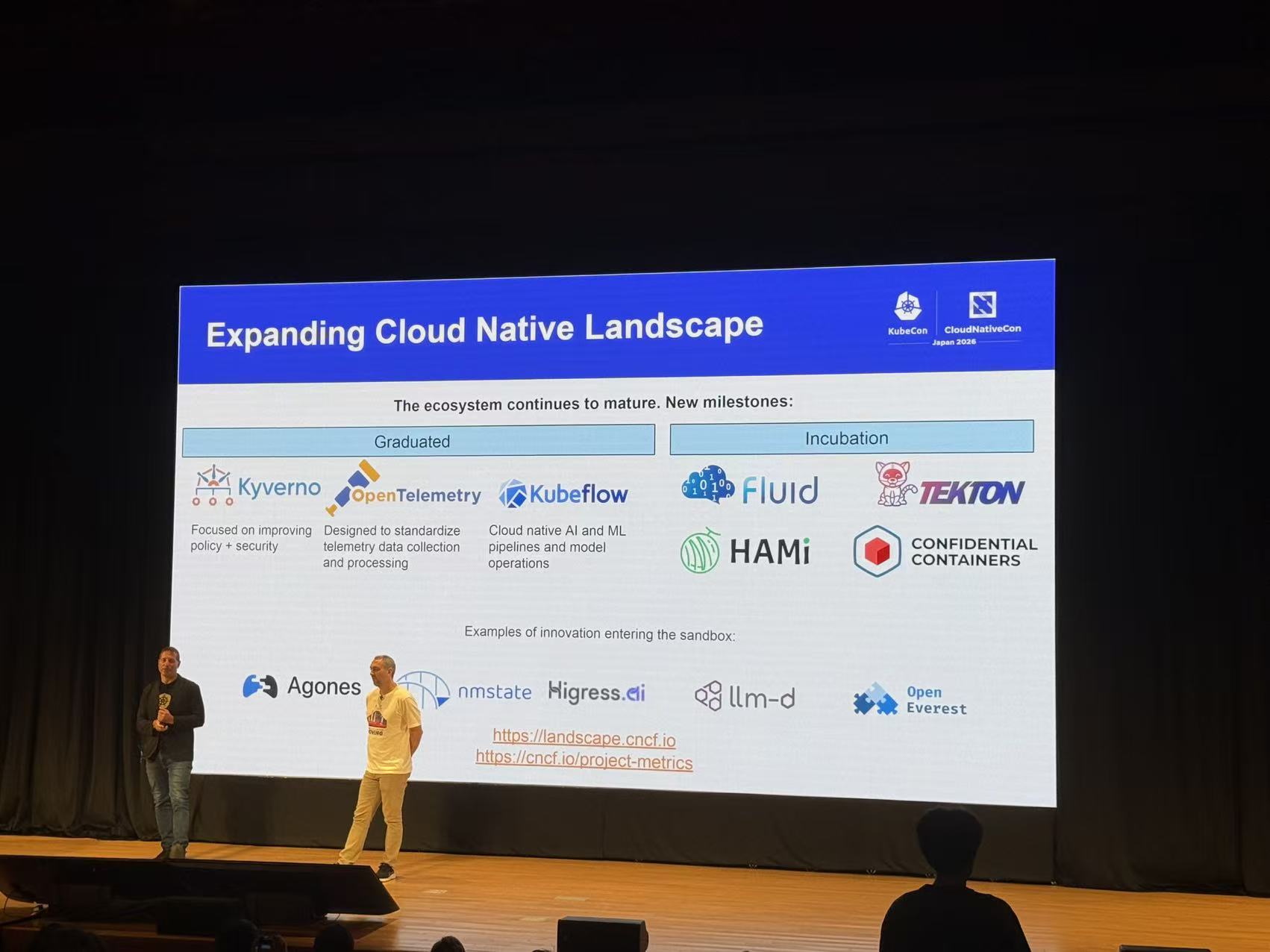
        <content type="html"><![CDATA[<p>The HAMi community is proud to announce the official release of <strong>HAMi v2.11.0</strong>.</p>
<p>Highlights of this release:</p>
<ul>
<li class=""><strong>Remote GPU</strong>: run CUDA and vLLM Pods on GPU-less, driver-less client nodes, using GPUs served over the network by <a href="https://github.com/lupinemachines" target="_blank" rel="noopener noreferrer" class="">Lupine</a> GPU servers.</li>
<li class=""><strong>AMD Instinct GPU sharing</strong>: AMD GPUs (ROCm) are now first-class in HAMi, with memory limits by size or percentage, compute limits, NUMA- and XGMI-aware placement, scheduling policies and queue priorities, all enforced at the container level.</li>
<li class=""><strong>Ascend ENPU mode</strong>: policy-based isolation (<code>fixed-share</code>, <code>elastic</code>, <code>best-effort</code>) as a third partitioning mode alongside templates and hami-core, plus a major <code>hami-vnpu-core</code> performance overhaul.</li>
<li class=""><strong>NUMA refit</strong>: kubelet's Topology Manager and HAMi's scheduler now agree, so CPU affinity and GPU placement land on the same NUMA node.</li>
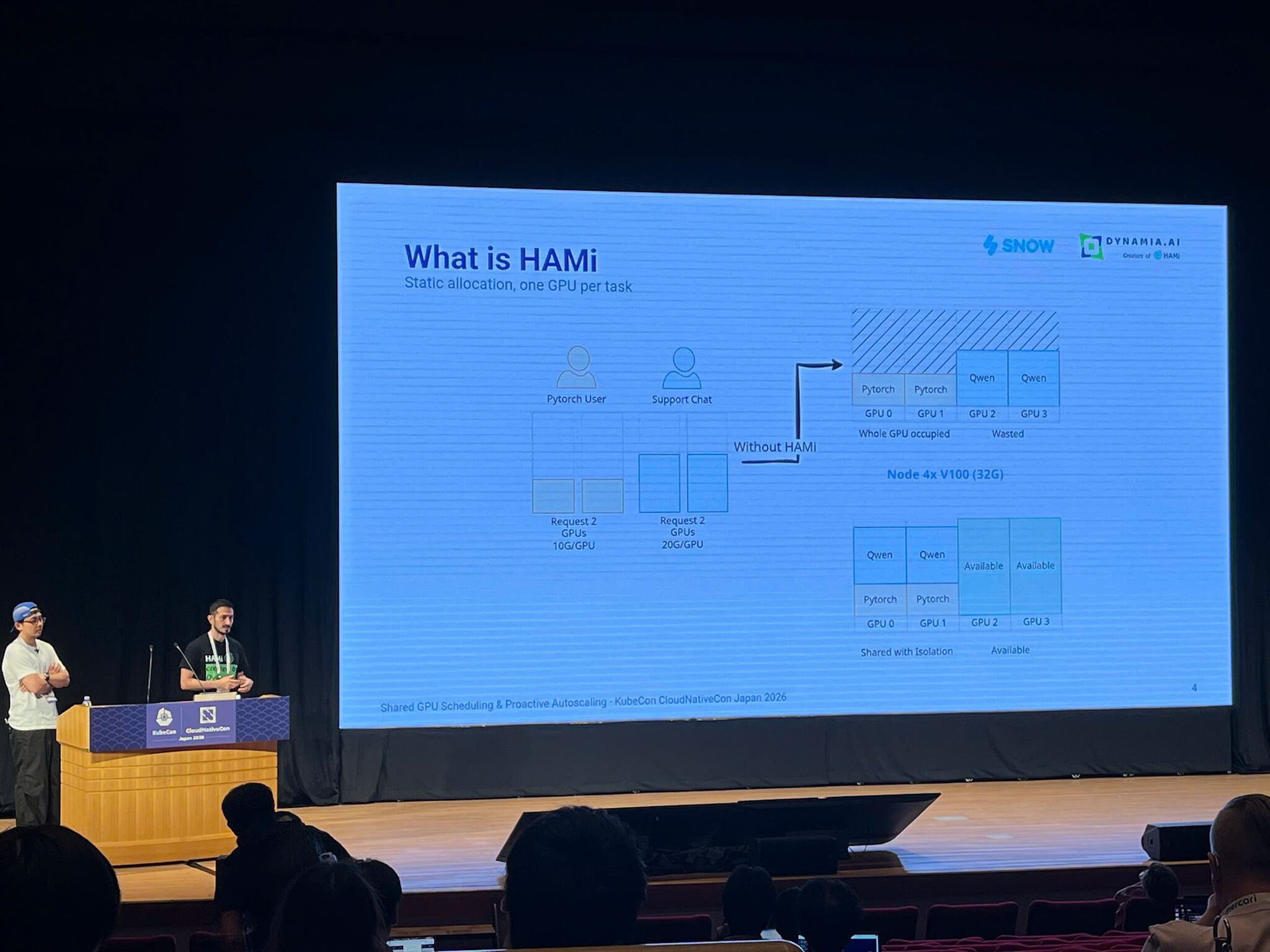
<li class=""><strong>Flexible MIG grows up</strong>: CDI injection for dynamic MIG devices, placement scoring with backtracking, and per-Pod profile preferences.</li>
<li class=""><strong>A harder scheduler</strong>: security-audit-driven hardening of the scheduler extender and webhook, plus Filter-path performance gains.</li>
<li class=""><strong>Platform and chart</strong>: OpenShift and SELinux support, a restructured <code>devices.VENDOR</code> chart, and node capacity resource reporting.</li>
<li class=""><strong>Website overhaul</strong>: reorganized information architecture, a redrawn Concepts section, <code>llms.txt</code>, and restructured installation and upgrade guides.</li>
</ul>
<p>In total, v2.11.0 merges more than 220 pull requests from over 50 contributors, including <strong>29 first-time contributors</strong>.</p>
<p>This article walks through the major updates in v2.11.0.</p>
<h2 class="anchor anchorTargetStickyNavbar_Vzrq" id="remote-gpu-run-cuda-anywhere">Remote GPU: Run CUDA Anywhere<a href="https://project-hami.io/blog/hami-v2-11-0-release#remote-gpu-run-cuda-anywhere" class="hash-link" aria-label="Direct link to Remote GPU: Run CUDA Anywhere" title="Direct link to Remote GPU: Run CUDA Anywhere" translate="no">​</a></h2>
<p>Not every node needs a GPU, and not every GPU node should run workloads. With Remote GPU (<a href="https://github.com/Project-HAMi/HAMi/pull/3004" target="_blank" rel="noopener noreferrer" class="">#3004</a>, <a href="https://github.com/moezdil" target="_blank" rel="noopener noreferrer" class="">@moezdil</a>; design from the <a href="https://github.com/lupinemachines" target="_blank" rel="noopener noreferrer" class="">Lupine</a> project), HAMi now schedules Pods onto GPUs served over the network by a Lupine GPU server:</p>
<ul>
<li class=""><strong>Driver-less client nodes</strong>: the client node needs no GPU and no NVIDIA driver. HAMi places the Pod on a separate client node, delivers the Lupine client libraries plus <code>nvidia-smi</code> through an init container, and injects the <code>LUPINE_SERVER</code> environment variable pointing at the chosen server (<a href="https://github.com/archlitchi" target="_blank" rel="noopener noreferrer" class="">@archlitchi</a>).</li>
<li class=""><strong>GPU nodes become Lupine servers</strong>: a node configured with <code>operatingmode: remote</code> runs its GPUs for Lupine instead of advertising them as local devices, and is labeled <code>hami.io/lupine-server</code> (<a href="https://github.com/Project-HAMi/HAMi/pull/3013" target="_blank" rel="noopener noreferrer" class="">#3013</a>, <a href="https://github.com/moezdil" target="_blank" rel="noopener noreferrer" class="">@moezdil</a>).</li>
<li class=""><strong>Pool selection</strong>: Lupine servers can be grouped into pools by Node label, and a Pod can request a pool through the <code>hami.io/remote-server</code> annotation (<a href="https://github.com/Project-HAMi/HAMi/pull/3195" target="_blank" rel="noopener noreferrer" class="">#3195</a>, <a href="https://github.com/asadjan4611" target="_blank" rel="noopener noreferrer" class="">@asadjan4611</a>). NotReady servers are excluded from placement.</li>
<li class=""><strong>Whole-server reservation with per-GPU memory limits</strong>: <code>nvidia.com/remote-gpu</code> reserves an entire server (with at least the requested GPU count), while the optional <code>nvidia.com/remote-gpu-memory</code> sets a per-GPU memory cap enforced by an injected HAMi-core library. Multi-container Pods are kept on a single server (<a href="https://github.com/sanket-jadhav-cse" target="_blank" rel="noopener noreferrer" class="">@sanket-jadhav-cse</a>).</li>
<li class=""><strong>Operational safety</strong>: Pods waiting for a Lupine fleet change are requeued instead of failing, the Lupine server ships with a configurable securityContext, and an optional session relay lets users <code>kubectl port-forward</code> to a fleet without direct rights in the server namespace. Remote mode was further hardened by <a href="https://github.com/FouoF" target="_blank" rel="noopener noreferrer" class="">@FouoF</a>.</li>
</ul>
<p><img decoding="async" loading="lazy" alt="Remote GPU (Lupine) architecture" src="https://project-hami.io/assets/images/remote-gpu-architecture-7e24efdb806243054e99306fc592705a.svg#light-only" width="1101" height="761" class="img_ev3q"> <img decoding="async" loading="lazy" alt="Remote GPU (Lupine) architecture" src="https://project-hami.io/assets/images/remote-gpu-architecture-dark-bfc59e9d40183bf313a5aadf06257bad.svg#dark-only" width="1101" height="761" class="img_ev3q"></p>
<p><strong>Enabling it</strong> takes two chart values and one node configuration:</p>
<div class="language-yaml codeBlockContainer_Ckt0 theme-code-block" style="--prism-color:#bfc7d5;--prism-background-color:#292d3e"><div class="codeBlockContent_QJqH"><pre tabindex="0" class="prism-code language-yaml codeBlock_bY9V thin-scrollbar" style="color:#bfc7d5;background-color:#292d3e"><code class="codeBlockLines_e6Vv"><div class="token-line" style="color:#bfc7d5"><span class="token key atrule">devices</span><span class="token punctuation" style="color:rgb(199, 146, 234)">:</span><span class="token plain"></span><br></div><div class="token-line" style="color:#bfc7d5"><span class="token plain">  </span><span class="token key atrule">remotegpu</span><span class="token punctuation" style="color:rgb(199, 146, 234)">:</span><span class="token plain"></span><br></div><div class="token-line" style="color:#bfc7d5"><span class="token plain">    </span><span class="token key atrule">enabled</span><span class="token punctuation" style="color:rgb(199, 146, 234)">:</span><span class="token plain"> </span><span class="token boolean important" style="color:rgb(255, 88, 116)">true</span><span class="token plain"></span><br></div><div class="token-line" style="color:#bfc7d5"><span class="token plain">    </span><span class="token key atrule">defaultPort</span><span class="token punctuation" style="color:rgb(199, 146, 234)">:</span><span class="token plain"> </span><span class="token number" style="color:rgb(247, 140, 108)">14833</span><span class="token plain"></span><br></div><div class="token-line" style="color:#bfc7d5"><span class="token plain">    </span><span class="token key atrule">resourceCountName</span><span class="token punctuation" style="color:rgb(199, 146, 234)">:</span><span class="token plain"> </span><span class="token string" style="color:rgb(195, 232, 141)">"nvidia.com/remote-gpu"</span><span class="token plain"></span><br></div><div class="token-line" style="color:#bfc7d5"><span class="token plain">    </span><span class="token key atrule">resourceMemoryName</span><span class="token punctuation" style="color:rgb(199, 146, 234)">:</span><span class="token plain"> </span><span class="token string" style="color:rgb(195, 232, 141)">"nvidia.com/remote-gpu-memory"</span><span class="token plain"></span><br></div><div class="token-line" style="color:#bfc7d5"><span class="token plain" style="display:inline-block"></span><br></div><div class="token-line" style="color:#bfc7d5"><span class="token plain"></span><span class="token key atrule">devicePlugin</span><span class="token punctuation" style="color:rgb(199, 146, 234)">:</span><span class="token plain"></span><br></div><div class="token-line" style="color:#bfc7d5"><span class="token plain">  </span><span class="token key atrule">nodeConfiguration</span><span class="token punctuation" style="color:rgb(199, 146, 234)">:</span><span class="token plain"></span><br></div><div class="token-line" style="color:#bfc7d5"><span class="token plain">    </span><span class="token key atrule">config</span><span class="token punctuation" style="color:rgb(199, 146, 234)">:</span><span class="token plain"> </span><span class="token punctuation" style="color:rgb(199, 146, 234)">|</span><span class="token scalar string" style="color:rgb(195, 232, 141)"></span><br></div><div class="token-line" style="color:#bfc7d5"><span class="token scalar string" style="color:rgb(195, 232, 141)">      {</span><br></div><div class="token-line" style="color:#bfc7d5"><span class="token scalar string" style="color:rgb(195, 232, 141)">        "nodeconfig": [</span><br></div><div class="token-line" style="color:#bfc7d5"><span class="token scalar string" style="color:rgb(195, 232, 141)">          {</span><br></div><div class="token-line" style="color:#bfc7d5"><span class="token scalar string" style="color:rgb(195, 232, 141)">            "nodelabelselector": { "matchLabels": { "role": "lupine-server" } },</span><br></div><div class="token-line" style="color:#bfc7d5"><span class="token scalar string" style="color:rgb(195, 232, 141)">            "operatingmode": "remote"</span><br></div><div class="token-line" style="color:#bfc7d5"><span class="token scalar string" style="color:rgb(195, 232, 141)">          }</span><br></div><div class="token-line" style="color:#bfc7d5"><span class="token scalar string" style="color:rgb(195, 232, 141)">        ]</span><br></div><div class="token-line" style="color:#bfc7d5"><span class="token scalar string" style="color:rgb(195, 232, 141)">      }</span><br></div></code></pre></div></div>
<p>The <code>nodelabelselector</code> above matches a label you apply yourself; label each GPU node that should serve Lupine before (or after, followed by a device-plugin restart) enabling remote mode. The node must also match <code>devicePlugin.nvidiaNodeSelector</code> (<code>gpu=on</code> by default), or the device plugin and the Lupine server will not be scheduled on it:</p>
<div class="language-bash codeBlockContainer_Ckt0 theme-code-block" style="--prism-color:#bfc7d5;--prism-background-color:#292d3e"><div class="codeBlockContent_QJqH"><pre tabindex="0" class="prism-code language-bash codeBlock_bY9V thin-scrollbar" style="color:#bfc7d5;background-color:#292d3e"><code class="codeBlockLines_e6Vv"><div class="token-line" style="color:#bfc7d5"><span class="token plain">kubectl label </span><span class="token function" style="color:rgb(130, 170, 255)">node</span><span class="token plain"> </span><span class="token operator" style="color:rgb(137, 221, 255)">&lt;</span><span class="token plain">gpu-node</span><span class="token operator" style="color:rgb(137, 221, 255)">&gt;</span><span class="token plain"> </span><span class="token assign-left variable" style="color:rgb(191, 199, 213)">gpu</span><span class="token operator" style="color:rgb(137, 221, 255)">=</span><span class="token plain">on </span><span class="token assign-left variable" style="color:rgb(191, 199, 213)">role</span><span class="token operator" style="color:rgb(137, 221, 255)">=</span><span class="token plain">lupine-server</span><br></div></code></pre></div></div>
<p>Then a vLLM Deployment on a GPU-less node looks like any other HAMi workload (see the full <a href="https://github.com/Project-HAMi/HAMi/tree/master/examples/remotegpu" target="_blank" rel="noopener noreferrer" class="">remote-gpu examples</a>):</p>
<div class="language-yaml codeBlockContainer_Ckt0 theme-code-block" style="--prism-color:#bfc7d5;--prism-background-color:#292d3e"><div class="codeBlockContent_QJqH"><pre tabindex="0" class="prism-code language-yaml codeBlock_bY9V thin-scrollbar" style="color:#bfc7d5;background-color:#292d3e"><code class="codeBlockLines_e6Vv"><div class="token-line" style="color:#bfc7d5"><span class="token key atrule">apiVersion</span><span class="token punctuation" style="color:rgb(199, 146, 234)">:</span><span class="token plain"> apps/v1</span><br></div><div class="token-line" style="color:#bfc7d5"><span class="token plain"></span><span class="token key atrule">kind</span><span class="token punctuation" style="color:rgb(199, 146, 234)">:</span><span class="token plain"> Deployment</span><br></div><div class="token-line" style="color:#bfc7d5"><span class="token plain"></span><span class="token key atrule">metadata</span><span class="token punctuation" style="color:rgb(199, 146, 234)">:</span><span class="token plain"></span><br></div><div class="token-line" style="color:#bfc7d5"><span class="token plain">  </span><span class="token key atrule">name</span><span class="token punctuation" style="color:rgb(199, 146, 234)">:</span><span class="token plain"> vllm</span><span class="token punctuation" style="color:rgb(199, 146, 234)">-</span><span class="token plain">remote</span><span class="token punctuation" style="color:rgb(199, 146, 234)">-</span><span class="token plain">gpu</span><br></div><div class="token-line" style="color:#bfc7d5"><span class="token plain"></span><span class="token key atrule">spec</span><span class="token punctuation" style="color:rgb(199, 146, 234)">:</span><span class="token plain"></span><br></div><div class="token-line" style="color:#bfc7d5"><span class="token plain">  </span><span class="token key atrule">selector</span><span class="token punctuation" style="color:rgb(199, 146, 234)">:</span><span class="token plain"></span><br></div><div class="token-line" style="color:#bfc7d5"><span class="token plain">    </span><span class="token key atrule">matchLabels</span><span class="token punctuation" style="color:rgb(199, 146, 234)">:</span><span class="token plain"></span><br></div><div class="token-line" style="color:#bfc7d5"><span class="token plain">      </span><span class="token key atrule">app</span><span class="token punctuation" style="color:rgb(199, 146, 234)">:</span><span class="token plain"> vllm</span><span class="token punctuation" style="color:rgb(199, 146, 234)">-</span><span class="token plain">remote</span><span class="token punctuation" style="color:rgb(199, 146, 234)">-</span><span class="token plain">gpu</span><br></div><div class="token-line" style="color:#bfc7d5"><span class="token plain">  </span><span class="token key atrule">template</span><span class="token punctuation" style="color:rgb(199, 146, 234)">:</span><span class="token plain"></span><br></div><div class="token-line" style="color:#bfc7d5"><span class="token plain">    </span><span class="token key atrule">metadata</span><span class="token punctuation" style="color:rgb(199, 146, 234)">:</span><span class="token plain"></span><br></div><div class="token-line" style="color:#bfc7d5"><span class="token plain">      </span><span class="token key atrule">labels</span><span class="token punctuation" style="color:rgb(199, 146, 234)">:</span><span class="token plain"></span><br></div><div class="token-line" style="color:#bfc7d5"><span class="token plain">        </span><span class="token key atrule">app</span><span class="token punctuation" style="color:rgb(199, 146, 234)">:</span><span class="token plain"> vllm</span><span class="token punctuation" style="color:rgb(199, 146, 234)">-</span><span class="token plain">remote</span><span class="token punctuation" style="color:rgb(199, 146, 234)">-</span><span class="token plain">gpu</span><br></div><div class="token-line" style="color:#bfc7d5"><span class="token plain">    </span><span class="token key atrule">spec</span><span class="token punctuation" style="color:rgb(199, 146, 234)">:</span><span class="token plain"></span><br></div><div class="token-line" style="color:#bfc7d5"><span class="token plain">      </span><span class="token key atrule">containers</span><span class="token punctuation" style="color:rgb(199, 146, 234)">:</span><span class="token plain"></span><br></div><div class="token-line" style="color:#bfc7d5"><span class="token plain">        </span><span class="token punctuation" style="color:rgb(199, 146, 234)">-</span><span class="token plain"> </span><span class="token key atrule">name</span><span class="token punctuation" style="color:rgb(199, 146, 234)">:</span><span class="token plain"> vllm</span><br></div><div class="token-line" style="color:#bfc7d5"><span class="token plain">          </span><span class="token key atrule">image</span><span class="token punctuation" style="color:rgb(199, 146, 234)">:</span><span class="token plain"> vllm/vllm</span><span class="token punctuation" style="color:rgb(199, 146, 234)">-</span><span class="token plain">openai</span><span class="token punctuation" style="color:rgb(199, 146, 234)">:</span><span class="token plain">v0.25.1</span><span class="token punctuation" style="color:rgb(199, 146, 234)">-</span><span class="token plain">ubuntu2404</span><br></div><div class="token-line" style="color:#bfc7d5"><span class="token plain">          </span><span class="token key atrule">command</span><span class="token punctuation" style="color:rgb(199, 146, 234)">:</span><span class="token plain"> </span><span class="token punctuation" style="color:rgb(199, 146, 234)">[</span><span class="token string" style="color:rgb(195, 232, 141)">"vllm"</span><span class="token punctuation" style="color:rgb(199, 146, 234)">,</span><span class="token plain"> </span><span class="token string" style="color:rgb(195, 232, 141)">"serve"</span><span class="token punctuation" style="color:rgb(199, 146, 234)">,</span><span class="token plain"> </span><span class="token string" style="color:rgb(195, 232, 141)">"Qwen/Qwen3-8B"</span><span class="token punctuation" style="color:rgb(199, 146, 234)">]</span><span class="token plain"></span><br></div><div class="token-line" style="color:#bfc7d5"><span class="token plain">          </span><span class="token key atrule">resources</span><span class="token punctuation" style="color:rgb(199, 146, 234)">:</span><span class="token plain"></span><br></div><div class="token-line" style="color:#bfc7d5"><span class="token plain">            </span><span class="token key atrule">limits</span><span class="token punctuation" style="color:rgb(199, 146, 234)">:</span><span class="token plain"></span><br></div><div class="token-line" style="color:#bfc7d5"><span class="token plain">              </span><span class="token key atrule">memory</span><span class="token punctuation" style="color:rgb(199, 146, 234)">:</span><span class="token plain"> 32Gi</span><br></div><div class="token-line" style="color:#bfc7d5"><span class="token plain">              </span><span class="token key atrule">nvidia.com/remote-gpu</span><span class="token punctuation" style="color:rgb(199, 146, 234)">:</span><span class="token plain"> </span><span class="token number" style="color:rgb(247, 140, 108)">2</span><span class="token plain"></span><br></div><div class="token-line" style="color:#bfc7d5"><span class="token plain">              </span><span class="token key atrule">nvidia.com/remote-gpu-memory</span><span class="token punctuation" style="color:rgb(199, 146, 234)">:</span><span class="token plain"> </span><span class="token number" style="color:rgb(247, 140, 108)">20480</span><span class="token plain"> </span><span class="token comment" style="color:rgb(105, 112, 152);font-style:italic"># 20 GiB per GPU</span><br></div></code></pre></div></div>
<p>Current constraints worth knowing: client nodes must be separate from server nodes, supported workload images are CUDA and vLLM 0.19-0.26, and a workload reserves the entire server.</p>
<h2 class="anchor anchorTargetStickyNavbar_Vzrq" id="amd-instinct-gpu-sharing">AMD Instinct GPU Sharing<a href="https://project-hami.io/blog/hami-v2-11-0-release#amd-instinct-gpu-sharing" class="hash-link" aria-label="Direct link to AMD Instinct GPU Sharing" title="Direct link to AMD Instinct GPU Sharing" translate="no">​</a></h2>
<p>HAMi now shares and schedules AMD Instinct GPUs (ROCm) on Kubernetes with the same resource model it uses for NVIDIA, and with hard limits enforced inside the container. v2.10.0 laid down the memory, core, type and UUID basics; v2.11.0 completes the feature set (largely <a href="https://github.com/moezdil" target="_blank" rel="noopener noreferrer" class="">@moezdil</a>):</p>
<ul>
<li class=""><strong>Memory isolation</strong>: request an absolute size with <code>amd.com/gpumem</code> or a share of VRAM with <code>amd.com/gpumem-percentage</code> (<a href="https://github.com/Project-HAMi/HAMi/pull/3179" target="_blank" rel="noopener noreferrer" class="">#3179</a>). The limit is enforced by <a href="https://github.com/Project-HAMi/amd-hami-core" target="_blank" rel="noopener noreferrer" class="">amd-hami-core</a>, which now also caps <code>hipMalloc3D</code>, arrays, memory pools and VMM, reports the limit as the device total, and can serve <code>hipMalloc</code> from managed memory when <code>HIP_OVERSUBSCRIBE</code> is set.</li>
<li class=""><strong>Compute isolation</strong>: <code>amd.com/gpucores</code> sets the compute-unit share through <code>HSA_CU_MASK</code>, with core requests rounded up to whole WGPs on RDNA (<a href="https://github.com/Project-HAMi/HAMi/pull/3174" target="_blank" rel="noopener noreferrer" class="">#3174</a>).</li>
<li class=""><strong>Flexible placement</strong>: pick or avoid GPU types and UUIDs (<code>amd.com/use-gputype</code>, <code>amd.com/use-gpu-uuid</code> and their <code>nouse-</code> counterparts), keep a multi-GPU Pod on a single NUMA node with <code>amd.com/numa-bind</code> (<a href="https://github.com/Project-HAMi/HAMi/pull/3186" target="_blank" rel="noopener noreferrer" class="">#3186</a>) or on XGMI-linked GPUs with <code>amd.com/link-bind</code>, and let the <code>topology-aware</code> policy prefer the group with the most XGMI links (<a href="https://github.com/Project-HAMi/HAMi/pull/3191" target="_blank" rel="noopener noreferrer" class="">#3191</a>).</li>
<li class=""><strong>Advanced scheduling</strong>: the <code>binpack</code>, <code>spread</code>, <code>mutex</code> and <code>topology-aware</code> policies, Pod queue priorities through <code>AMD_TASK_PRIORITY</code>, namespace ResourceQuota checks in Fit (<a href="https://github.com/Project-HAMi/HAMi/pull/3180" target="_blank" rel="noopener noreferrer" class="">#3180</a>), quota-feasible GPU combinations in topology scheduling (<a href="https://github.com/Project-HAMi/HAMi/pull/3361" target="_blank" rel="noopener noreferrer" class="">#3361</a>, <a href="https://github.com/Eshiv-Pandey" target="_blank" rel="noopener noreferrer" class="">@Eshiv-Pandey</a>), defaults for GPU count, memory and cores plus device cordon (<a href="https://github.com/Project-HAMi/HAMi/pull/3192" target="_blank" rel="noopener noreferrer" class="">#3192</a>), a configurable <code>runtimeClassName</code> (<a href="https://github.com/Project-HAMi/HAMi/pull/3194" target="_blank" rel="noopener noreferrer" class="">#3194</a>), node health judged by allocatable GPUs, and a dedicated AMD e2e suite (<a href="https://github.com/Project-HAMi/HAMi/pull/3193" target="_blank" rel="noopener noreferrer" class="">#3193</a>).</li>
</ul>
<p>On the node side, <a href="https://github.com/Project-HAMi/amd-device-plugin" target="_blank" rel="noopener noreferrer" class="">amd-device-plugin</a> v0.0.4 adds hardware compute partitions (SPX, DPX, QPX, CPX) on Instinct GPUs, per-GPU health from the AMD Device Metrics Exporter, XGMI peer reporting in the node annotation, and <code>-device_memory_scaling</code> for memory oversubscription. The new <a href="https://github.com/Project-HAMi/amd-dra-driver" target="_blank" rel="noopener noreferrer" class="">amd-dra-driver</a> (v0.1.0 to v0.4.1) brings the same limits to the DRA path with per-GPU <code>HSA_CU_MASK</code> and <code>HIP_DEVICE_MEMORY_LIMIT_</code> entries and kubelet health reporting, and <a href="https://github.com/Project-HAMi/HAMi-dra" target="_blank" rel="noopener noreferrer" class="">HAMi-dra</a> converts <code>amd.com/gpu</code> requests into claims for it. With NVIDIA and AMD behind one scheduling layer, HAMi now offers unified GPU sharing for heterogeneous clusters; see the <a class="" href="https://project-hami.io/docs/next/userguide/amd-device/enable-amd-gpu-sharing">AMD GPU guide</a> and the <a class="" href="https://project-hami.io/docs/next/userguide/amd-device/verification-status">verification status</a> for what was validated on real hardware.</p>
<p>AMD support is a community effort: <a href="https://github.com/moezdil" target="_blank" rel="noopener noreferrer" class="">@moezdil</a>, with the help of Claven, polished Instinct support across the scheduler, device plugin, amd-hami-core and the DRA driver. Initial device support was implemented by <a href="https://github.com/FouoF" target="_blank" rel="noopener noreferrer" class="">@FouoF</a> on AMD instances provided by DigitalOcean, and the initial compute (SPX, DPX, QPX, CPX) and memory partition work was done by <a href="https://github.com/fishman" target="_blank" rel="noopener noreferrer" class="">@fishman</a>. Special thanks to <strong><a href="https://www.vultr.com/" target="_blank" rel="noopener noreferrer" class="">Vultr</a></strong> for providing the AMD test machines, and to the AMD community for making this possible.</p>
<h2 class="anchor anchorTargetStickyNavbar_Vzrq" id="deeper-ascend-partitioning-enpu-mode-and-a-faster-hami-core">Deeper Ascend Partitioning: ENPU Mode and a Faster HAMi-core<a href="https://project-hami.io/blog/hami-v2-11-0-release#deeper-ascend-partitioning-enpu-mode-and-a-faster-hami-core" class="hash-link" aria-label="Direct link to Deeper Ascend Partitioning: ENPU Mode and a Faster HAMi-core" title="Direct link to Deeper Ascend Partitioning: ENPU Mode and a Faster HAMi-core" translate="no">​</a></h2>
<h3 class="anchor anchorTargetStickyNavbar_Vzrq" id="enpu-policy-based-isolation-for-ascend">ENPU: Policy-Based Isolation for Ascend<a href="https://project-hami.io/blog/hami-v2-11-0-release#enpu-policy-based-isolation-for-ascend" class="hash-link" aria-label="Direct link to ENPU: Policy-Based Isolation for Ascend" title="Direct link to ENPU: Policy-Based Isolation for Ascend" translate="no">​</a></h3>
<p>v2.11.0 adds a third Ascend partitioning mode: <strong>ENPU</strong> (<a href="https://github.com/Project-HAMi/HAMi/pull/3110" target="_blank" rel="noopener noreferrer" class="">#3110</a>, <a href="https://github.com/maverick-woo" target="_blank" rel="noopener noreferrer" class="">@maverick-woo</a>, with the companion <a href="https://github.com/Project-HAMi/ascend-device-plugin" target="_blank" rel="noopener noreferrer" class="">ascend-device-plugin</a> update). Pods annotated with <code>huawei.com/vnpu-mode: enpu</code> use the existing Ascend count, memory, and core resources and are placed only on ENPU-capable nodes:</p>
<ul>
<li class=""><strong>Three isolation policies</strong>: <code>fixed-share</code>, <code>elastic</code>, and <code>best-effort</code> (selected via <code>huawei.com/enpu-policy</code> or the chart default <code>devices.ascend.enpuPolicy</code>), persisted at admission so a later default change never reclassifies existing tenants.</li>
<li class=""><strong>DIE isolation</strong>: tenants with incompatible ENPU policies, and hami-core/ENPU tenants, are kept off the same physical DIE, including legacy hami-core Pods without a mode annotation. Single-DIE ENPU requests are preserved on A3-class hardware while SuperPod behavior is retained for other modes.</li>
<li class=""><strong>No template rounding</strong>: memory and core quotas are passed through without hardware-template rounding, and <code>devices.ascend.deviceSplitCount</code> now controls the virtual-device slots per NPU for both <code>hami-core</code> and <code>enpu</code> modes (<a href="https://github.com/spencercjh" target="_blank" rel="noopener noreferrer" class="">@spencercjh</a>).</li>
</ul>
<div class="language-yaml codeBlockContainer_Ckt0 theme-code-block" style="--prism-color:#bfc7d5;--prism-background-color:#292d3e"><div class="codeBlockContent_QJqH"><pre tabindex="0" class="prism-code language-yaml codeBlock_bY9V thin-scrollbar" style="color:#bfc7d5;background-color:#292d3e"><code class="codeBlockLines_e6Vv"><div class="token-line" style="color:#bfc7d5"><span class="token key atrule">devices</span><span class="token punctuation" style="color:rgb(199, 146, 234)">:</span><span class="token plain"></span><br></div><div class="token-line" style="color:#bfc7d5"><span class="token plain">  </span><span class="token key atrule">ascend</span><span class="token punctuation" style="color:rgb(199, 146, 234)">:</span><span class="token plain"></span><br></div><div class="token-line" style="color:#bfc7d5"><span class="token plain">    </span><span class="token key atrule">enabled</span><span class="token punctuation" style="color:rgb(199, 146, 234)">:</span><span class="token plain"> </span><span class="token boolean important" style="color:rgb(255, 88, 116)">true</span><span class="token plain"></span><br></div><div class="token-line" style="color:#bfc7d5"><span class="token plain">    </span><span class="token key atrule">hamiVnpuMode</span><span class="token punctuation" style="color:rgb(199, 146, 234)">:</span><span class="token plain"> </span><span class="token string" style="color:rgb(195, 232, 141)">"enpu"</span><span class="token plain"> </span><span class="token comment" style="color:rgb(105, 112, 152);font-style:italic"># template | hami-core | enpu</span><span class="token plain"></span><br></div><div class="token-line" style="color:#bfc7d5"><span class="token plain">    </span><span class="token key atrule">enpuPolicy</span><span class="token punctuation" style="color:rgb(199, 146, 234)">:</span><span class="token plain"> </span><span class="token string" style="color:rgb(195, 232, 141)">"elastic"</span><span class="token plain"> </span><span class="token comment" style="color:rgb(105, 112, 152);font-style:italic"># fixed-share | elastic | best-effort</span><br></div></code></pre></div></div>
<p>The global mode is selected with <code>devices.ascend.hamiVnpuMode</code>; node capability annotations from the Ascend device plugin still take precedence. <code>devices.ascend.enabled</code> only turns on Ascend support in the HAMi scheduler, it does not deploy the device plugin: install <a href="https://github.com/Project-HAMi/ascend-device-plugin" target="_blank" rel="noopener noreferrer" class="">ascend-device-plugin</a> separately, using chart 0.2.0 or later for ENPU mode (0.2.x also carries the <code>vnpus.deviceSplitCount</code> support that <code>devices.ascend.deviceSplitCount</code> requires), and make sure its image bundles an ENPU runtime matching your CANN version. See the <a class="" href="https://project-hami.io/docs/next/userguide/ascend-device/enable-ascend-sharing#enpu">Ascend guide</a> for prerequisites. Also new for Ascend: slot capacity is exposed in the chart for hami-core mode, and <strong>Ascend 950 support</strong> lands in this cycle: the scheduler gains Ascend950DT whole-card scheduling (<a href="https://github.com/Project-HAMi/HAMi/pull/3316" target="_blank" rel="noopener noreferrer" class="">#3316</a>, <a href="https://github.com/panpan0000" target="_blank" rel="noopener noreferrer" class="">@panpan0000</a>), and <a href="https://github.com/Project-HAMi/ascend-device-plugin" target="_blank" rel="noopener noreferrer" class="">ascend-device-plugin</a> 0.2.x adds Ascend950DT discovery, node mode overrides, and unhealthy-device preservation on discovery failure.</p>
<h3 class="anchor anchorTargetStickyNavbar_Vzrq" id="hami-core-libvnpu-performance-overhaul">HAMi-core (libvNPU) Performance Overhaul<a href="https://project-hami.io/blog/hami-v2-11-0-release#hami-core-libvnpu-performance-overhaul" class="hash-link" aria-label="Direct link to HAMi-core (libvNPU) Performance Overhaul" title="Direct link to HAMi-core (libvNPU) Performance Overhaul" translate="no">​</a></h3>
<p>Under the LFX Mentorship 2026 Term 3 umbrella, <a href="https://github.com/maverick-woo" target="_blank" rel="noopener noreferrer" class="">@maverick-woo</a> rebuilt significant parts of <a href="https://github.com/Project-HAMi/hami-vnpu-core" target="_blank" rel="noopener noreferrer" class="">hami-vnpu-core</a> (with fixes from <a href="https://github.com/xrwang8" target="_blank" rel="noopener noreferrer" class="">@xrwang8</a>):</p>
<ul>
<li class=""><strong>Reduced initialization lock contention</strong>: a fork-aware per-process client, a same-stream worker read-lock fast path, and bounded scheduler turns.</li>
<li class=""><strong>Cooperative spatial compute policy and a refillable overdraft policy</strong> for fine-grained compute and memory control.</li>
<li class=""><strong>Per-NPU resource limits</strong> covering both cached and runtime HBM allocation paths, with ACL <code>HostArgs</code> eager launches accounted for.</li>
</ul>
<p>These changes target 910C multichip slicing scenarios and make soft-partitioned Ascend meaningfully faster under concurrent inference.</p>
<h2 class="anchor anchorTargetStickyNavbar_Vzrq" id="numa-refit-when-cpu-and-gpu-scheduling-finally-agree">NUMA Refit: When CPU and GPU Scheduling Finally Agree<a href="https://project-hami.io/blog/hami-v2-11-0-release#numa-refit-when-cpu-and-gpu-scheduling-finally-agree" class="hash-link" aria-label="Direct link to NUMA Refit: When CPU and GPU Scheduling Finally Agree" title="Direct link to NUMA Refit: When CPU and GPU Scheduling Finally Agree" translate="no">​</a></h2>
<p>Kubernetes CPU Manager and the Topology Manager make NUMA-local decisions, but they happen <strong>after</strong> HAMi's scheduler has already picked a GPU. When kubelet restricts an allocation to a GPU the scheduler did not choose, the Pod either falls back or runs misaligned. v2.11.0 closes this gap with the <strong>NUMA refit</strong> (<a href="https://github.com/Project-HAMi/HAMi/pull/2731" target="_blank" rel="noopener noreferrer" class="">#2731</a>, <a href="https://github.com/saiyam1814" target="_blank" rel="noopener noreferrer" class="">@saiyam1814</a>, fixes <a href="https://github.com/Project-HAMi/HAMi/issues/2080" target="_blank" rel="noopener noreferrer" class="">#2080</a>):</p>
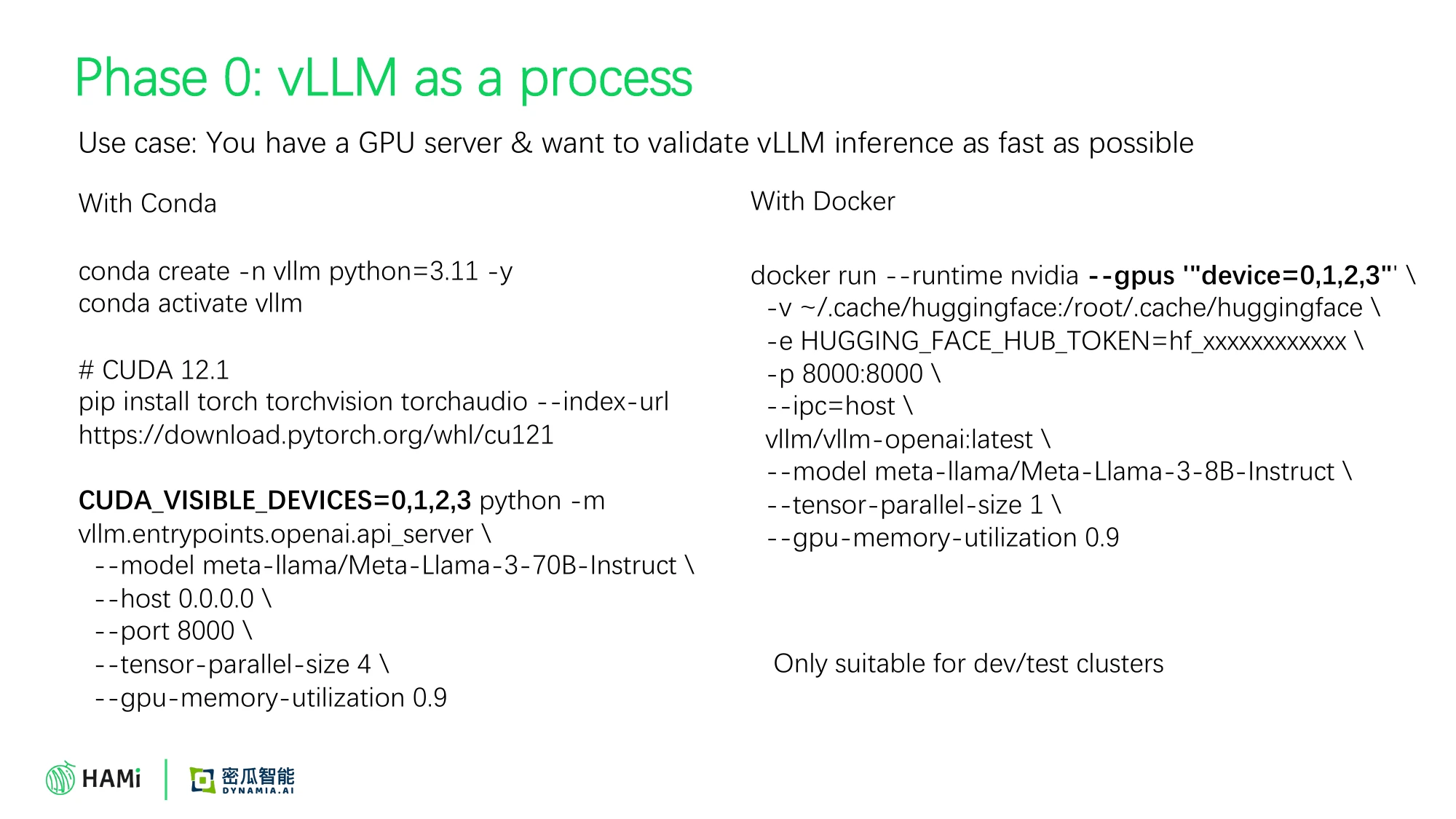
<p><img decoding="async" loading="lazy" alt="NUMA refit flow" src="https://project-hami.io/assets/images/numa-refit-flow-fd2b2fc4810c17e8b45d660db71c770e.svg#light-only" width="961" height="561" class="img_ev3q"> <img decoding="async" loading="lazy" alt="NUMA refit flow" src="https://project-hami.io/assets/images/numa-refit-flow-dark-b51fd62786bb65802481527c308b6378.svg#dark-only" width="961" height="561" class="img_ev3q"></p>
<p>The scheduler stays in charge: it re-runs its normal fit restricted to kubelet's allowed devices, updates both allocation annotations in one patch, and moves the in-memory reservation so runtime and accounting agree. Device pins such as <code>nvidia.com/use-gpuuuid</code> are honored. The feature is off by default and opt-in per Pod:</p>
<div class="language-yaml codeBlockContainer_Ckt0 theme-code-block" style="--prism-color:#bfc7d5;--prism-background-color:#292d3e"><div class="codeBlockContent_QJqH"><pre tabindex="0" class="prism-code language-yaml codeBlock_bY9V thin-scrollbar" style="color:#bfc7d5;background-color:#292d3e"><code class="codeBlockLines_e6Vv"><div class="token-line" style="color:#bfc7d5"><span class="token key atrule">metadata</span><span class="token punctuation" style="color:rgb(199, 146, 234)">:</span><span class="token plain"></span><br></div><div class="token-line" style="color:#bfc7d5"><span class="token plain">  </span><span class="token key atrule">annotations</span><span class="token punctuation" style="color:rgb(199, 146, 234)">:</span><span class="token plain"></span><br></div><div class="token-line" style="color:#bfc7d5"><span class="token plain">    </span><span class="token key atrule">hami.io/numa-alignment</span><span class="token punctuation" style="color:rgb(199, 146, 234)">:</span><span class="token plain"> </span><span class="token string" style="color:rgb(195, 232, 141)">"strict"</span><span class="token plain"> </span><span class="token comment" style="color:rgb(105, 112, 152);font-style:italic"># or best-effort</span><br></div></code></pre></div></div>
<p>with <code>devicePlugin.numaRefit.enabled=true</code> in the chart and NUMA topology enabled: <code>devices.nvidia.enableNumaTopology=true</code> with the default device configuration, or <code>nvidia.enableNumaTopology: true</code> in your custom file (or <code>enablenumatopology: true</code> in the matching node entry) if <code>device-config.content</code> or <code>files/device-config.yaml</code> replaces the generated configuration. The node configuration also needs <code>operatingmode: hami-core</code> and <code>enablegetpreferredallocation</code>. NUMA refit supports <code>hami-core</code> nodes only; MIG-mode nodes are excluded. <code>strict</code> fails the allocation when the refit cannot satisfy the topology constraint; <code>best-effort</code> keeps today's fallback.</p>
<p>The feature was validated on real hardware (8x NVIDIA RTX PRO 6000 Blackwell Server Edition, driver 610.43.02, Kubernetes v1.35.6, CPU Manager <code>static</code>, Topology Manager <code>single-numa-node</code>): annotated Pods received a <code>NumaRefitSucceed</code> event and ended with cpuset, runtime GPU, and annotations on the same NUMA node. Follow-up hardening landed within the same cycle from <a href="https://github.com/asadjan4611" target="_blank" rel="noopener noreferrer" class="">@asadjan4611</a> and <a href="https://github.com/AyushSrivastava1818" target="_blank" rel="noopener noreferrer" class="">@AyushSrivastava1818</a> (phase-aware accounting, quota validation, and caller authentication on <code>/refit</code>), plus an allocLock fix during Pod removal from <a href="https://github.com/saiyam1814" target="_blank" rel="noopener noreferrer" class="">@saiyam1814</a>. See the <a class="" href="https://project-hami.io/docs/userguide/nvidia-device/numa-alignment">NUMA alignment guide</a> for details.</p>
<h2 class="anchor anchorTargetStickyNavbar_Vzrq" id="flexible-mig-grows-up">Flexible MIG Grows Up<a href="https://project-hami.io/blog/hami-v2-11-0-release#flexible-mig-grows-up" class="hash-link" aria-label="Direct link to Flexible MIG Grows Up" title="Direct link to Flexible MIG Grows Up" translate="no">​</a></h2>
<p>Flexible MIG (dynamic MIG instance allocation and deallocation) shipped in v2.10.0 with known limitations: no CDI support, and unvalidated multi-device cases. v2.11.0 closes those gaps:</p>
<ul>
<li class=""><strong>CDI support for dynamic MIG devices</strong> (<a href="https://github.com/Project-HAMi/HAMi/pull/3070" target="_blank" rel="noopener noreferrer" class="">#3070</a>, <a href="https://github.com/asadjan4611" target="_blank" rel="noopener noreferrer" class="">@asadjan4611</a>): after HAMi creates a MIG GI/CI, it publishes an atomic per-MIG CDI spec and returns the CDI device name to CDI-capable runtimes. Startup recovery reconciles live MIG instances before the device plugin serves allocations, and allocation failures roll back both MIG and CDI resources. The v2.10.0 CDI limitation is gone.</li>
<li class=""><strong>Placement scoring with backtracking</strong> (<a href="https://github.com/Project-HAMi/HAMi/pull/2855" target="_blank" rel="noopener noreferrer" class="">#2855</a>, <a href="https://github.com/maishivamhoo123" target="_blank" rel="noopener noreferrer" class="">@maishivamhoo123</a>): MIG placements are now scored, with a backtracking fallback when the greedy choice does not fit, and duplicate MIG candidates in topology scheduling are collapsed.</li>
<li class=""><strong>Per-Pod profile preference</strong> (<a href="https://github.com/Project-HAMi/HAMi/pull/3014" target="_blank" rel="noopener noreferrer" class="">#3014</a>, <a href="https://github.com/maishivamhoo123" target="_blank" rel="noopener noreferrer" class="">@maishivamhoo123</a>): a Pod can name a preferred MIG profile through the <code>nvidia.com/mig-profile-preference</code> annotation. The scheduler tries that profile first and falls back to the normal selection rules (memory request, allowlisted profiles, placement constraints) when it cannot be allocated.</li>
<li class=""><strong>Lifecycle and monitoring</strong>: the dynamic MIG instance lifecycle is optimized (<a href="https://github.com/Project-HAMi/HAMi/pull/3128" target="_blank" rel="noopener noreferrer" class="">#3128</a>, <a href="https://github.com/asadjan4611" target="_blank" rel="noopener noreferrer" class="">@asadjan4611</a>), MIG monitoring now covers Pods using dynamic MIG, the vGPU monitor discovers MIG instances correctly, and allocations are checked against registered profiles with the allowlist using real NVML names (contributions from <a href="https://github.com/tsingst" target="_blank" rel="noopener noreferrer" class="">@tsingst</a>, <a href="https://github.com/FouoF" target="_blank" rel="noopener noreferrer" class="">@FouoF</a>, <a href="https://github.com/archlitchi" target="_blank" rel="noopener noreferrer" class="">@archlitchi</a>, <a href="https://github.com/moezdil" target="_blank" rel="noopener noreferrer" class="">@moezdil</a>, and <a href="https://github.com/usr-bin-ksh" target="_blank" rel="noopener noreferrer" class="">@usr-bin-ksh</a>).</li>
<li class=""><strong>Reliability</strong>: all replicas and MIG slices on a GPU are marked unhealthy on XID errors, and MIG is automatically disabled on hami-core nodes to avoid conflicting lifecycle control.</li>
</ul>
<p><a href="https://github.com/FouoF" target="_blank" rel="noopener noreferrer" class="">@FouoF</a> also contributed automatic <code>nvidiaDriverRoot</code> detection (now the default, with GPU Operator driver-ready contract support) and NVML session pairing fixes.</p>
<h2 class="anchor anchorTargetStickyNavbar_Vzrq" id="a-harder-scheduler">A Harder Scheduler<a href="https://project-hami.io/blog/hami-v2-11-0-release#a-harder-scheduler" class="hash-link" aria-label="Direct link to A Harder Scheduler" title="Direct link to A Harder Scheduler" translate="no">​</a></h2>
<p>v2.11.0 lands the first wave of the security-audit-driven hardening of the scheduler extender and webhook (largely by <a href="https://github.com/moezdil" target="_blank" rel="noopener noreferrer" class="">@moezdil</a>):</p>
<ul>
<li class="">The extender HTTP endpoints (<code>/filter</code> and <code>/bind</code>) are served on <strong>loopback only</strong> (<code>127.0.0.1:9444</code>), not on the cluster-facing port.</li>
<li class="">The extender <strong>verifies Pod identity</strong> before acting on a request.</li>
<li class="">Pods created with <strong>forged scheduler-owned allocation annotations are denied</strong> at admission and guarded on update.</li>
<li class="">The node-lock path serves <strong>only the Pod the lock names</strong>, expired-lock recovery is serialized, and malformed device allocation annotations are rejected.</li>
<li class="">The chart now requires <strong>Kubernetes 1.23+</strong>, guards the PSP, and pins the helper images it pulls from third parties (certgen, the Lupine client and server images, the mock device plugin) by digest; HAMi's own images keep the <code>v2.11.0</code> tag.</li>
</ul>
<p>Scheduler performance also improved: whole-Pod deep copies were removed from the usage snapshot (<a href="https://github.com/togettoyou" target="_blank" rel="noopener noreferrer" class="">@togettoyou</a>), snapshots are built only for candidate nodes with benchmark regression tracking in CI (<a href="https://github.com/im-Toqeer-506" target="_blank" rel="noopener noreferrer" class="">@im-Toqeer-506</a>), and preferred <code>nodeAffinity</code> is honored in node scoring (<a href="https://github.com/falconlee236" target="_blank" rel="noopener noreferrer" class="">@falconlee236</a>).</p>
<p>The scheduling policies introduced in v2.10.0, PodGroup-aware binding, the <code>mutex</code> policy, and comma-separated policy combinations, are now covered by a dedicated scheduler policy e2e suite (<a href="https://github.com/Project-HAMi/HAMi/pull/2793" target="_blank" rel="noopener noreferrer" class="">#2793</a>, <a href="https://github.com/haitwang-cloud" target="_blank" rel="noopener noreferrer" class="">@haitwang-cloud</a>), and two fixes keep them predictable: the configured policy is kept when an unrecognized policy annotation is seen (<a href="https://github.com/Project-HAMi/HAMi/pull/2769" target="_blank" rel="noopener noreferrer" class="">#2769</a>, <a href="https://github.com/IIITManjeet" target="_blank" rel="noopener noreferrer" class="">@IIITManjeet</a>), and padded policy annotations resolve to their canonical name (<a href="https://github.com/Project-HAMi/HAMi/pull/2854" target="_blank" rel="noopener noreferrer" class="">#2854</a>).</p>
<p>Two operability additions round this out (<a href="https://github.com/im-Toqeer-506" target="_blank" rel="noopener noreferrer" class="">@im-Toqeer-506</a>): a <strong>PodDisruptionBudget</strong> for the leader-elected multi-replica scheduler (<a href="https://github.com/Project-HAMi/HAMi/pull/2773" target="_blank" rel="noopener noreferrer" class="">#2773</a>) so node drains cannot evict every replica at once, and a <strong>redacted diagnostic bundle collector</strong> (<code>hack/hami-support-bundle.sh</code>, <a href="https://github.com/Project-HAMi/HAMi/pull/3149" target="_blank" rel="noopener noreferrer" class="">#3149</a>) that gathers versions, workloads, events, HAMi ConfigMaps, and bounded component logs for support cases without ever reading Secrets.</p>
<h2 class="anchor anchorTargetStickyNavbar_Vzrq" id="platform-chart-and-more-devices">Platform, Chart, and More Devices<a href="https://project-hami.io/blog/hami-v2-11-0-release#platform-chart-and-more-devices" class="hash-link" aria-label="Direct link to Platform, Chart, and More Devices" title="Direct link to Platform, Chart, and More Devices" translate="no">​</a></h2>
<ul>
<li class=""><strong>OpenShift and SELinux support</strong> (<a href="https://github.com/Project-HAMi/HAMi/pull/2208" target="_blank" rel="noopener noreferrer" class="">#2208</a>, <a href="https://github.com/spencercjh" target="_blank" rel="noopener noreferrer" class="">@spencercjh</a>): <code>platform.openshift=true</code> creates the required SCC, and <code>selinux.enabled</code> relabels host directories for SELinux-enforcing clusters.</li>
<li class=""><strong>Cluster Autoscaler support</strong> (<a href="https://github.com/Project-HAMi/HAMi/pull/2874" target="_blank" rel="noopener noreferrer" class="">#2874</a>, <a href="https://github.com/shkatara" target="_blank" rel="noopener noreferrer" class="">@shkatara</a>): with <code>devicePlugin.reportNodeCapacity</code>, GPU memory and core resources are reported in Node <code>capacity</code>/<code>allocatable</code>, so Cluster Autoscaler scale-up simulation, dashboards, and quota tooling see real GPU fractions instead of opaque device counts.</li>
<li class=""><strong>Chart overhaul</strong> (<a href="https://github.com/spencercjh" target="_blank" rel="noopener noreferrer" class="">@spencercjh</a>): all vendor configs moved under <code>devices.VENDOR</code> with a complete helm-docs pass, <code>global.imageSource</code> switches between upstream and CN mirrors, and node configs can be selected by label selector (<a href="https://github.com/usr-bin-ksh" target="_blank" rel="noopener noreferrer" class="">@usr-bin-ksh</a>). This is a <strong>breaking change</strong> for custom <code>values.yaml</code> files.</li>
<li class=""><strong>NVIDIA device plugin</strong>: an opt-in <strong>host PID broker</strong> (<a href="https://github.com/Project-HAMi/HAMi/pull/2417" target="_blank" rel="noopener noreferrer" class="">#2417</a>, <a href="https://github.com/iemAnshuman" target="_blank" rel="noopener noreferrer" class="">@iemAnshuman</a>) hands HAMi-core each process's host PID over <code>SO_PEERCRED</code> without mounting host procfs, and IMEX channels discovered at startup are now actually propagated into allocation responses (<a href="https://github.com/Project-HAMi/HAMi/pull/2892" target="_blank" rel="noopener noreferrer" class="">#2892</a>, <a href="https://github.com/Eshiv-Pandey" target="_blank" rel="noopener noreferrer" class="">@Eshiv-Pandey</a>).</li>
<li class=""><strong>More devices</strong>: all four NeuronCores on AWS Inferentia1 (<a href="https://github.com/asadjan4611" target="_blank" rel="noopener noreferrer" class="">@asadjan4611</a>), model-aware scheduling restored for Cambricon MLU and a count above 1 accounted as whole MLUs (<a href="https://github.com/Project-HAMi/HAMi/pull/3218" target="_blank" rel="noopener noreferrer" class="">#3218</a>, <a href="https://github.com/B-White84" target="_blank" rel="noopener noreferrer" class="">@B-White84</a>), Mthreads S5000 per-card memory units (<a href="https://github.com/wjluo" target="_blank" rel="noopener noreferrer" class="">@wjluo</a>), Hygon DCU resources renamed to <strong>HCU</strong> across charts and docs (<a href="https://github.com/kinglong08" target="_blank" rel="noopener noreferrer" class="">@kinglong08</a>) with the default core value updated so DTK 26.10+ shares compute like NVIDIA when no core resource is requested (<a href="https://github.com/Project-HAMi/HAMi/pull/3285" target="_blank" rel="noopener noreferrer" class="">#3285</a>, <a href="https://github.com/archlitchi" target="_blank" rel="noopener noreferrer" class="">@archlitchi</a>). Vendor fixes also landed for MetaX (multi-container Pods spread over exclusive GPUs, <a href="https://github.com/Project-HAMi/HAMi/pull/2837" target="_blank" rel="noopener noreferrer" class="">#2837</a>), Enflame (DRS profile core costs kept within the device budget, <a href="https://github.com/Project-HAMi/HAMi/pull/2810" target="_blank" rel="noopener noreferrer" class="">#2810</a>), Kunlunxin (topology selection independent of slice order, <a href="https://github.com/Project-HAMi/HAMi/pull/2811" target="_blank" rel="noopener noreferrer" class="">#2811</a>, <a href="https://github.com/Project-HAMi/HAMi/pull/2924" target="_blank" rel="noopener noreferrer" class="">#2924</a>), and Iluvatar (scaled core limit read per card, <a href="https://github.com/Project-HAMi/HAMi/pull/2961" target="_blank" rel="noopener noreferrer" class="">#2961</a>).</li>
<li class=""><strong>Monitoring</strong>: whole-GPU Pods can bypass the HAMi hook and be monitored via direct NVML, and Pods with <code>CUDA_DISABLE_CONTROL</code> or dynamic MIG are covered (<a href="https://github.com/vesta-mlp" target="_blank" rel="noopener noreferrer" class="">@vesta-mlp</a>); hardware health and error metrics are exposed (<a href="https://github.com/Gurkaran18" target="_blank" rel="noopener noreferrer" class="">@Gurkaran18</a>), an unknown-GPU-process counter was added (<a href="https://github.com/heuristicwave" target="_blank" rel="noopener noreferrer" class="">@heuristicwave</a>), and the scheduler exposes leader-election and cache-sync metrics (<a href="https://github.com/KunwarSidhu47" target="_blank" rel="noopener noreferrer" class="">@KunwarSidhu47</a>).</li>
<li class=""><strong>Native sidecar containers</strong> are now accounted for in GPU resource calculations (<a href="https://github.com/maishivamhoo123" target="_blank" rel="noopener noreferrer" class="">@maishivamhoo123</a>), and Pod/container-level environment overrides are supported (<a href="https://github.com/peachest" target="_blank" rel="noopener noreferrer" class="">@peachest</a>).</li>
</ul>
<h2 class="anchor anchorTargetStickyNavbar_Vzrq" id="across-the-project-hami-ecosystem">Across the Project-HAMi Ecosystem<a href="https://project-hami.io/blog/hami-v2-11-0-release#across-the-project-hami-ecosystem" class="hash-link" aria-label="Direct link to Across the Project-HAMi Ecosystem" title="Direct link to Across the Project-HAMi Ecosystem" translate="no">​</a></h2>
<p>The release cycle also moved the satellite projects that ship alongside HAMi:</p>
<ul>
<li class=""><strong><a href="https://github.com/Project-HAMi/HAMi-core" target="_blank" rel="noopener noreferrer" class="">HAMi-core</a></strong> (libvgpu.so): the SM limiter is now charged by thread count instead of grid count, CUDA graph and <code>cuMemAllocAsync</code> allocations are tracked and released per graph lifetime, VMM mappings roll back cleanly when tracking fails, <code>CUDA_DEVICE_MEMORY_LIMIT</code> suffixes are parsed strictly, and the host PID detection race that could pick up another process's PID is closed, with the host PID broker client for the device-plugin feature above.</li>
<li class=""><strong><a href="https://github.com/Project-HAMi/HAMi-WebUI" target="_blank" rel="noopener noreferrer" class="">HAMi-WebUI</a> v1.3.0</strong>: <code>/metrics</code> is scrape-safe with less page-side query fan-out, init containers are decoded in Pod device annotations, task compute utilization is corrected, Pod and container names are searchable, and the chart preserves HAMi workload labels in the ServiceMonitor and scrapes the bundled kube-state-metrics.</li>
<li class=""><strong><a href="https://github.com/Project-HAMi/HAMi-dra" target="_blank" rel="noopener noreferrer" class="">HAMi-dra</a></strong>: chart 0.2.3 ships a webhook PodDisruptionBudget and hardened CEL selectors for <code>nouse-gpuuuid</code>/<code>nouse-gputype</code>; main since then adds AMD support (<code>drivers.amd</code>, <code>amd.com/gpu</code> claim conversion, <code>gpumem-percentage</code>), a <code>hami.io/skip-dra</code> opt-out, and monitor metric labels aligned with HAMi and Prometheus conventions.</li>
<li class=""><strong><a href="https://github.com/Project-HAMi/k8s-dra-driver" target="_blank" rel="noopener noreferrer" class="">k8s-dra-driver</a> v0.1.1</strong>: a vGPU monitor for the DRA path, legacy claim-directory cleanup, and a missing PCIe-root fix, plus GPU-less e2e on kind with Mokka. <strong><a href="https://github.com/Project-HAMi/ascend-dra-driver" target="_blank" rel="noopener noreferrer" class="">ascend-dra-driver</a></strong> chart 0.2.0 exposes <code>/metrics</code> from an internal collector aligned with claim Prepare/Unprepare, adds a DeviceClass for the HAMi vNPU-core mode, and reports real UUIDs in ResourceSlices.</li>
<li class=""><strong><a href="https://github.com/Project-HAMi/volcano-vgpu-device-plugin" target="_blank" rel="noopener noreferrer" class="">volcano-vgpu-device-plugin</a> v1.13.0</strong>: health state is retained across kubelet stream reconnects, allocation state and device annotations are validated, <code>WatchAndRegister</code> stops cleanly with the plugin, and HAMi-core is updated to the latest build.</li>
<li class=""><strong><a href="https://github.com/Project-HAMi/gpu-descheduler" target="_blank" rel="noopener noreferrer" class="">gpu-descheduler</a> v0.0.2</strong>: a new project that defragments scattered vGPU workloads across nodes through a mutating webhook and Placement CRDs; this cycle adds multi-arch builds and uses HAMi's AMD <code>use-gpuuuid</code> annotation key. <strong><a href="https://github.com/Project-HAMi/kai-resource-isolator" target="_blank" rel="noopener noreferrer" class="">kai-resource-isolator</a></strong> gained a webhook PodDisruptionBudget with anti-affinity for multi-replica installs and chart input validation.</li>
</ul>
<h2 class="anchor anchorTargetStickyNavbar_Vzrq" id="a-reorganized-redrawn-website">A Reorganized, Redrawn Website<a href="https://project-hami.io/blog/hami-v2-11-0-release#a-reorganized-redrawn-website" class="hash-link" aria-label="Direct link to A Reorganized, Redrawn Website" title="Direct link to A Reorganized, Redrawn Website" translate="no">​</a></h2>
<p>Alongside the code release, <a href="https://project-hami.io/" target="_blank" rel="noopener noreferrer" class="">project-hami.io</a> went through its largest reorganization since launch:</p>
<ul>
<li class=""><strong>New information architecture</strong> (<a href="https://github.com/moezdil" target="_blank" rel="noopener noreferrer" class="">@moezdil</a>): the docs sidebar is now grouped into a guided path, the devices matrix became the single vendor index (replacing per-category listings), and every vendor guide got its own sidebar. All in-repo HAMi documentation was consolidated into the website, and the internal design documents were ported into a public Developer section, with a Chinese translation following. Four legacy internal-only pages were removed along the way.</li>
<li class=""><strong>A redrawn Concepts section</strong> (<a href="https://github.com/togettoyou" target="_blank" rel="noopener noreferrer" class="">@togettoyou</a>): the old Introduction pages were replaced by a Concepts category that explains device plugins and DRA background, rewrites the Architecture page around the journey of a Pod, and covers the device-sharing resource model and how HAMi-core isolates memory and compute, all illustrated with newly drawn SVG diagrams. A diagram brand guide with dark-mode tokens and Mermaid styling keeps every new diagram visually consistent.</li>
<li class=""><strong><code>llms.txt</code> for LLM-friendly documentation</strong> (<a href="https://github.com/spencercjh" target="_blank" rel="noopener noreferrer" class="">@spencercjh</a>): the site now publishes <code>llms.txt</code>, making the full documentation set efficiently consumable by coding agents and LLM tooling.</li>
<li class=""><strong>Restructured installation and upgrade guides</strong>: a dedicated <a class="" href="https://project-hami.io/docs/next/installation/upgrade">Upgrade guide</a> was rebuilt around a step-by-step flow with breaking-change callouts, the offline installation instructions were refactored (<a href="https://github.com/spencercjh" target="_blank" rel="noopener noreferrer" class="">@spencercjh</a>), the user-guide configuration pages were reorganized, and the NVIDIA guide gained a matrix showing exactly which setup supports each feature.</li>
<li class=""><strong>Platform installation guides</strong>: new step-by-step guides for OpenShift, GKE, and K3s by <a href="https://github.com/spencercjh" target="_blank" rel="noopener noreferrer" class="">@spencercjh</a>, and for the Chinese clouds TKE, ACK, and CCE plus the hands-on HAMi Workshop by <a href="https://github.com/togettoyou" target="_blank" rel="noopener noreferrer" class="">@togettoyou</a>.</li>
<li class=""><strong>Grafana dashboards consolidated</strong> (<a href="https://github.com/togettoyou" target="_blank" rel="noopener noreferrer" class="">@togettoyou</a>), with new MIG inventory and in-use-by-profile panels, a resource-quota used-vs-limit table, and a vGPU cores panel (<a href="https://github.com/loiht2" target="_blank" rel="noopener noreferrer" class="">@loiht2</a>).</li>
<li class=""><strong>New stories on the site</strong>: a Seres case study, CETC Cloud joining the contributors list, ZYT joining the adopters, and a community ambassadors program.</li>
</ul>
<h2 class="anchor anchorTargetStickyNavbar_Vzrq" id="community-activities-since-v2100">Community Activities Since v2.10.0<a href="https://project-hami.io/blog/hami-v2-11-0-release#community-activities-since-v2100" class="hash-link" aria-label="Direct link to Community Activities Since v2.10.0" title="Direct link to Community Activities Since v2.10.0" translate="no">​</a></h2>
<p>The weeks between v2.10.0 and v2.11.0 were some of the busiest in the project's history:</p>
<ul>
<li class=""><strong><a href="https://www.lfopensource.cn/kubecon-cloudnativecon-openinfra-summit-pytorch-conference-china/" target="_blank" rel="noopener noreferrer" class="">KubeCon + CloudNativeCon + OpenInfra Summit + PyTorch Conference China 2026</a></strong> (Shanghai, September): HAMi's first KubeCon China as a CNCF Incubating project, with two keynotes, a lightning talk, a 10,000-GPU production session, and a case study award for China Merchants Bank announced from the keynote stage. Read the <a class="" href="https://project-hami.io/blog/kubecon-china-2026-recap">recap</a>.</li>
<li class=""><strong>LFX Mentorship 2026 Term 3</strong> (September to November): four mentee projects covering HAMi-core lock contention, GPU memory isolation, observability, and documentation. Results of this cycle are already landing in v2.11.0, including the HAMi-core performance work above. See the <a class="" href="https://project-hami.io/blog/lfx-mentorship-2026-term-3">program overview</a>.</li>
<li class=""><strong>ContainerDays &amp; AI Context Singapore 2026</strong> (October 27-28): HAMi appeared in five sessions including a hands-on GPU scheduling workshop by <a href="https://github.com/rootsongjc" target="_blank" rel="noopener noreferrer" class="">@rootsongjc</a> and <a href="https://github.com/fishman" target="_blank" rel="noopener noreferrer" class="">@fishman</a>. Read the <a class="" href="https://project-hami.io/blog/containerdays-singapore-2026-recap">recap</a>.</li>
<li class=""><strong>DRA NPU sharing</strong>: the community published a deep dive on <a class="" href="https://project-hami.io/blog/hami-dra-npu-sharing">HAMi-DRA NPU sharing</a>, extending the DRA story to Ascend NPUs.</li>
</ul>
<h2 class="anchor anchorTargetStickyNavbar_Vzrq" id="contributors">Contributors<a href="https://project-hami.io/blog/hami-v2-11-0-release#contributors" class="hash-link" aria-label="Direct link to Contributors" title="Direct link to Contributors" translate="no">​</a></h2>
<p>v2.11.0 is the result of contributions across the HAMi main repo and the Project-HAMi org (ascend-device-plugin, hami-vnpu-core, HAMi-core, HAMi-dra, amd-device-plugin, amd-dra-driver, HAMi-WebUI, and more). Representative feature owners this cycle:</p>
<ul>
<li class=""><a href="https://github.com/moezdil" target="_blank" rel="noopener noreferrer" class="">@moezdil</a>: Remote GPU scheduler backend and device-plugin integration, the AMD feature wave, scheduler security hardening, release engineering, and the website information-architecture reorganization</li>
<li class=""><a href="https://github.com/archlitchi" target="_blank" rel="noopener noreferrer" class="">@archlitchi</a>: release coordination, vNPU templates, remote client tooling, monitor fixes</li>
<li class=""><a href="https://github.com/maverick-woo" target="_blank" rel="noopener noreferrer" class="">@maverick-woo</a>: Ascend ENPU scheduling, hami-vnpu-core performance overhaul (spatial compute policy, per-NPU limits, lock contention reduction)</li>
<li class=""><a href="https://github.com/saiyam1814" target="_blank" rel="noopener noreferrer" class="">@saiyam1814</a>: NUMA refit (CPU and GPU scheduling alignment)</li>
<li class=""><a href="https://github.com/FouoF" target="_blank" rel="noopener noreferrer" class="">@FouoF</a>: Flexible MIG enhancements, remote mode enhancements, automatic driver root detection</li>
<li class=""><a href="https://github.com/asadjan4611" target="_blank" rel="noopener noreferrer" class="">@asadjan4611</a>: CDI for dynamic MIG, Lupine server pools, Inferentia and Cambricon fixes, NUMA refit hardening</li>
<li class=""><a href="https://github.com/spencercjh" target="_blank" rel="noopener noreferrer" class="">@spencercjh</a>: OpenShift and SELinux support, chart restructure to <code>devices.VENDOR</code> with full helm-docs coverage, <code>deviceSplitCount</code> for hami-core/ENPU, <code>llms.txt</code>, offline-installation and user-guide documentation refactors, OpenShift/GKE/K3s installation guides, DCU-to-HCU docs migration</li>
<li class=""><a href="https://github.com/maishivamhoo123" target="_blank" rel="noopener noreferrer" class="">@maishivamhoo123</a>: MIG placement scoring and profile preference, native sidecar accounting</li>
<li class=""><a href="https://github.com/sanket-jadhav-cse" target="_blank" rel="noopener noreferrer" class="">@sanket-jadhav-cse</a>: multi-container Lupine allocation fixes</li>
<li class=""><a href="https://github.com/shkatara" target="_blank" rel="noopener noreferrer" class="">@shkatara</a>: node capacity resource reporting</li>
<li class=""><a href="https://github.com/im-Toqeer-506" target="_blank" rel="noopener noreferrer" class="">@im-Toqeer-506</a>: scheduler performance and benchmarks, PodDisruptionBudget, diagnostics bundle</li>
<li class=""><a href="https://github.com/togettoyou" target="_blank" rel="noopener noreferrer" class="">@togettoyou</a>: scheduler deep-copy elimination and chart documentation on the HAMi side; on the website, the redrawn Concepts section with SVG diagrams, the consolidated Grafana dashboard, the HAMi Workshop tutorials, and the TKE/ACK/CCE installation guides</li>
<li class=""><a href="https://github.com/vesta-mlp" target="_blank" rel="noopener noreferrer" class="">@vesta-mlp</a>: whole-GPU monitoring bypass</li>
<li class=""><a href="https://github.com/xrwang8" target="_blank" rel="noopener noreferrer" class="">@xrwang8</a>: hami-vnpu-core quota and scheduler fixes</li>
<li class=""><a href="https://github.com/panpan0000" target="_blank" rel="noopener noreferrer" class="">@panpan0000</a>: Ascend950DT whole-card scheduling</li>
<li class=""><a href="https://github.com/kinglong08" target="_blank" rel="noopener noreferrer" class="">@kinglong08</a>: Hygon DCU to HCU rename</li>
<li class=""><a href="https://github.com/wjluo" target="_blank" rel="noopener noreferrer" class="">@wjluo</a>: Mthreads S5000 support</li>
<li class=""><a href="https://github.com/usr-bin-ksh" target="_blank" rel="noopener noreferrer" class="">@usr-bin-ksh</a>: nodeconfig label selectors, MIG allowlist</li>
</ul>
<p>29 contributors made their first contribution in this release, including <a href="https://github.com/Kevindua26" target="_blank" rel="noopener noreferrer" class="">@Kevindua26</a>, <a href="https://github.com/im-Toqeer-506" target="_blank" rel="noopener noreferrer" class="">@im-Toqeer-506</a>, <a href="https://github.com/togettoyou" target="_blank" rel="noopener noreferrer" class="">@togettoyou</a>, <a href="https://github.com/Woolgathererer" target="_blank" rel="noopener noreferrer" class="">@Woolgathererer</a>, <a href="https://github.com/curry30000" target="_blank" rel="noopener noreferrer" class="">@curry30000</a>, <a href="https://github.com/sanket-jadhav-cse" target="_blank" rel="noopener noreferrer" class="">@sanket-jadhav-cse</a>, <a href="https://github.com/usr-bin-ksh" target="_blank" rel="noopener noreferrer" class="">@usr-bin-ksh</a>, <a href="https://github.com/vesta-mlp" target="_blank" rel="noopener noreferrer" class="">@vesta-mlp</a>, <a href="https://github.com/tsingst" target="_blank" rel="noopener noreferrer" class="">@tsingst</a>, <a href="https://github.com/loiht2" target="_blank" rel="noopener noreferrer" class="">@loiht2</a>, <a href="https://github.com/falconlee236" target="_blank" rel="noopener noreferrer" class="">@falconlee236</a>, and <a href="https://github.com/heuristicwave" target="_blank" rel="noopener noreferrer" class="">@heuristicwave</a>. Thank you all, and to every user who reported issues and tested release candidates. The full list is in the <a href="https://github.com/Project-HAMi/HAMi/releases/tag/v2.11.0" target="_blank" rel="noopener noreferrer" class="">v2.11.0 release notes</a>.</p>
<h2 class="anchor anchorTargetStickyNavbar_Vzrq" id="upgrade-guide">Upgrade Guide<a href="https://project-hami.io/blog/hami-v2-11-0-release#upgrade-guide" class="hash-link" aria-label="Direct link to Upgrade Guide" title="Direct link to Upgrade Guide" translate="no">​</a></h2>
<p>Upgrade to v2.11.0 via Helm:</p>
<div class="language-bash codeBlockContainer_Ckt0 theme-code-block" style="--prism-color:#bfc7d5;--prism-background-color:#292d3e"><div class="codeBlockContent_QJqH"><pre tabindex="0" class="prism-code language-bash codeBlock_bY9V thin-scrollbar" style="color:#bfc7d5;background-color:#292d3e"><code class="codeBlockLines_e6Vv"><div class="token-line" style="color:#bfc7d5"><span class="token plain">helm repo </span><span class="token function" style="color:rgb(130, 170, 255)">add</span><span class="token plain"> hami-charts https://project-hami.github.io/HAMi/</span><br></div><div class="token-line" style="color:#bfc7d5"><span class="token plain">helm repo update</span><br></div><div class="token-line" style="color:#bfc7d5"><span class="token plain">helm upgrade hami hami-charts/hami </span><span class="token parameter variable" style="color:rgb(191, 199, 213)">-n</span><span class="token plain"> kube-system </span><span class="token parameter variable" style="color:rgb(191, 199, 213)">--version</span><span class="token plain"> </span><span class="token number" style="color:rgb(247, 140, 108)">2.11</span><span class="token plain">.0</span><br></div><div class="token-line" style="color:#bfc7d5"><span class="token plain" style="display:inline-block"></span><br></div><div class="token-line" style="color:#bfc7d5"><span class="token plain"></span><span class="token comment" style="color:rgb(105, 112, 152);font-style:italic"># If your values.yaml customizes per-vendor settings, migrate it to the new</span><span class="token plain"></span><br></div><div class="token-line" style="color:#bfc7d5"><span class="token plain"></span><span class="token comment" style="color:rgb(105, 112, 152);font-style:italic"># devices.VENDOR layout first, then apply it explicitly. --reset-values discards</span><span class="token plain"></span><br></div><div class="token-line" style="color:#bfc7d5"><span class="token plain"></span><span class="token comment" style="color:rgb(105, 112, 152);font-style:italic"># the values stored in the release, so include every override in my-values.yaml.</span><span class="token plain"></span><br></div><div class="token-line" style="color:#bfc7d5"><span class="token plain">helm upgrade hami hami-charts/hami </span><span class="token parameter variable" style="color:rgb(191, 199, 213)">-n</span><span class="token plain"> kube-system </span><span class="token parameter variable" style="color:rgb(191, 199, 213)">--version</span><span class="token plain"> </span><span class="token number" style="color:rgb(247, 140, 108)">2.11</span><span class="token plain">.0 </span><span class="token punctuation" style="color:rgb(199, 146, 234)">\</span><span class="token plain"></span><br></div><div class="token-line" style="color:#bfc7d5"><span class="token plain">  --reset-values </span><span class="token parameter variable" style="color:rgb(191, 199, 213)">--values</span><span class="token plain"> my-values.yaml</span><br></div></code></pre></div></div>
<p>For a step-by-step upgrade walkthrough with breaking-change callouts, see the dedicated <a class="" href="https://project-hami.io/docs/next/installation/upgrade">Upgrade guide</a>. For complete installation documentation, refer to: <a class="" href="https://project-hami.io/docs/installation/online-installation">/docs/installation/online-installation</a></p>
<div class="theme-admonition theme-admonition-warning admonition_xJq3 alert alert--warning"><div class="admonitionHeading_Gvgb"><span class="admonitionIcon_Rf37"><svg viewBox="0 0 16 16"><path fill-rule="evenodd" d="M8.893 1.5c-.183-.31-.52-.5-.887-.5s-.703.19-.886.5L.138 13.499a.98.98 0 0 0 0 1.001c.193.31.53.501.886.501h13.964c.367 0 .704-.19.877-.5a1.03 1.03 0 0 0 .01-1.002L8.893 1.5zm.133 11.497H6.987v-2.003h2.039v2.003zm0-3.004H6.987V5.987h2.039v4.006z"></path></svg></span>Upgrade notes</div><div class="admonitionContent_BuS1"><ul>
<li class=""><strong>Breaking chart change</strong>: vendor settings moved under <code>devices.VENDOR</code>. If your <code>values.yaml</code> customizes per-vendor device config, migrate it before upgrading; the chart now fails rendering when it finds the old, moved field paths.</li>
<li class=""><strong>Kubernetes 1.23+</strong> is required by the chart.</li>
<li class=""><strong>MIG + hami-core</strong>: MIG is now automatically disabled on hami-core nodes; verify your node configs if you relied on both.</li>
<li class=""><strong>Hygon users</strong>: DCU resources are renamed to HCU across charts and docs.</li>
<li class=""><strong>Metric deprecations</strong>: <code>hami_container_device_memory_bytes</code> and the <code>limit</code> label of <code>hami_resource_quota_used</code> are deprecated; update dashboards and alerts that depend on them.</li>
<li class=""><strong>Metric label changes</strong>: the always-zero <code>container_index</code>/<code>containeridx</code> label was dropped from the four vGPU allocation metrics (<a href="https://github.com/Project-HAMi/HAMi/pull/2898" target="_blank" rel="noopener noreferrer" class="">#2898</a>), and the <code>device_type</code> label on <code>hami_host_gpu_*</code> no longer carries a duplicate <code>NVIDIA</code> prefix, so it matches the scheduler's <code>hami_gpu_*</code> series (<a href="https://github.com/Project-HAMi/HAMi/pull/2991" target="_blank" rel="noopener noreferrer" class="">#2991</a>). Adjust PromQL that groups or filters by these labels.</li>
<li class=""><strong>Stricter request validation</strong>: invalid HAMi device requests now fail closed instead of binding a GPU-less Pod (<a href="https://github.com/Project-HAMi/HAMi/pull/2994" target="_blank" rel="noopener noreferrer" class="">#2994</a>); GPU core percentages outside 0-100 (<a href="https://github.com/Project-HAMi/HAMi/pull/2784" target="_blank" rel="noopener noreferrer" class="">#2784</a>) and fractional <code>nvidia.com/gpumem-percentage</code> values (<a href="https://github.com/Project-HAMi/HAMi/pull/2789" target="_blank" rel="noopener noreferrer" class="">#2789</a>) are rejected at admission; the device plugin refuses an allocation larger than the container's request (<a href="https://github.com/Project-HAMi/HAMi/pull/3075" target="_blank" rel="noopener noreferrer" class="">#3075</a>). Workloads that previously ran with silently dropped requests will now be rejected.</li>
<li class=""><strong>Strict device-config parsing</strong>: unknown or misspelled fields in <code>device-config.yaml</code> now fail scheduler startup with a clear error instead of being ignored (<a href="https://github.com/Project-HAMi/HAMi/pull/2941" target="_blank" rel="noopener noreferrer" class="">#2941</a>). Check custom <code>device-config.content</code> overrides before upgrading.</li>
<li class=""><strong>Node handshake annotations removed</strong>: the <code>hami.io/node-handshake-*</code> annotations are no longer written and are cleaned up on registration; device health now follows the node's <code>allocatable</code> (<a href="https://github.com/Project-HAMi/HAMi/pull/3227" target="_blank" rel="noopener noreferrer" class="">#3227</a>, AMD: <a href="https://github.com/Project-HAMi/HAMi/pull/3182" target="_blank" rel="noopener noreferrer" class="">#3182</a>). Remove any tooling that depends on them.</li>
<li class=""><strong>Limit delivery and cache file</strong>: <code>devices.nvidia.limitDelivery</code> selects <code>file</code> (default, unchanged) or <code>env</code> (env vars only, no <code>/overrideEnv</code> file), overridable per node (<code>limitdelivery</code> in nodeconfig) and per Pod (<code>hami.io/limit-delivery</code>); the shared cache file is now always named <code>usage.cache</code> instead of a random name (<a href="https://github.com/Project-HAMi/HAMi/pull/3226" target="_blank" rel="noopener noreferrer" class="">#3226</a>). Like other <code>devices.nvidia</code> values, <code>limitDelivery</code> is written into the generated device configuration; if <code>device-config.content</code> or <code>files/device-config.yaml</code> replaces it, set the field there instead.</li>
<li class=""><strong>ResourceQuota semantics</strong>: with several ResourceQuota objects in a namespace the effective device limit is now the minimum across them, and deleting one no longer clears enforcement (<a href="https://github.com/Project-HAMi/HAMi/pull/3094" target="_blank" rel="noopener noreferrer" class="">#3094</a>); quota memory limits are stored scaled by <code>memoryFactor</code>, so <code>hami_resource_quota_limit</code> now matches <code>hami_resource_quota_used</code> (<a href="https://github.com/Project-HAMi/HAMi/pull/3339" target="_blank" rel="noopener noreferrer" class="">#3339</a>).</li>
<li class=""><strong>New chart values</strong>: <code>scheduler.kubeQPS</code> / <code>kubeBurst</code> / <code>kubeTimeout</code> for kube-apiserver client tuning (<a href="https://github.com/Project-HAMi/HAMi/pull/2905" target="_blank" rel="noopener noreferrer" class="">#2905</a>), <code>scheduler.nodeLockRetryTimeout</code> and <code>scheduler.extenderHTTPTimeout</code> (<a href="https://github.com/Project-HAMi/HAMi/pull/2944" target="_blank" rel="noopener noreferrer" class="">#2944</a>), and, for Remote GPU images in private registries, <code>devices.remotegpu.sessionImagePullSecrets</code> for the session relay Pods and <code>devices.remotegpu.server.image.pullSecrets</code> for the Lupine server Pods (<a href="https://github.com/Project-HAMi/HAMi/pull/3329" target="_blank" rel="noopener noreferrer" class="">#3329</a>). The scheduler values are unaffected by a <code>device-config.content</code> override.</li>
<li class="">Remote GPU, ENPU, and NUMA refit are all <strong>disabled by default</strong>; enable them explicitly.</li>
<li class="">We recommend verifying compatibility in a test environment before upgrading.</li>
</ul></div></div>
<h2 class="anchor anchorTargetStickyNavbar_Vzrq" id="summary">Summary<a href="https://project-hami.io/blog/hami-v2-11-0-release#summary" class="hash-link" aria-label="Direct link to Summary" title="Direct link to Summary" translate="no">​</a></h2>
<p>HAMi v2.11.0 is a release about <strong>removing boundaries</strong>: between local and remote GPUs (Remote GPU via Lupine), between GPU vendors (AMD Instinct sharing next to NVIDIA), between CPU and GPU scheduling (NUMA refit), between partitioning styles on Ascend (ENPU with policy isolation), and between dynamic MIG and modern runtimes (CDI support). Combined with a security-hardened scheduler, OpenShift/SELinux support, a restructured chart, and a reorganized and redrawn website, HAMi keeps expanding what a unified heterogeneous-compute scheduling platform can do.</p>
<p>We sincerely welcome more developers, users, and ecosystem partners to join the HAMi community and help advance GPU virtualization and heterogeneous-compute scheduling.</p>
<hr>
<p><strong>Related links:</strong></p>
<ul>
<li class="">GitHub Release: <a href="https://github.com/Project-HAMi/HAMi/releases/tag/v2.11.0" target="_blank" rel="noopener noreferrer" class="">https://github.com/Project-HAMi/HAMi/releases/tag/v2.11.0</a></li>
<li class="">Remote GPU examples: <a href="https://github.com/Project-HAMi/HAMi/tree/master/examples/remotegpu" target="_blank" rel="noopener noreferrer" class="">https://github.com/Project-HAMi/HAMi/tree/master/examples/remotegpu</a></li>
<li class="">Lupine: <a href="https://github.com/lupinemachines" target="_blank" rel="noopener noreferrer" class="">https://github.com/lupinemachines</a></li>
<li class="">hami-vnpu-core: <a href="https://github.com/Project-HAMi/hami-vnpu-core" target="_blank" rel="noopener noreferrer" class="">https://github.com/Project-HAMi/hami-vnpu-core</a></li>
<li class="">Documentation: <a class="" href="https://project-hami.io/docs">/docs/</a></li>
<li class="">Community Discord (recommended): <a href="https://discord.gg/Amhy7XmbNq" target="_blank" rel="noopener noreferrer" class="">https://discord.gg/Amhy7XmbNq</a></li>
<li class="">Community CNCF Slack: <a href="https://cloud-native.slack.com/archives/C07T10BU4R2" target="_blank" rel="noopener noreferrer" class="">https://cloud-native.slack.com/archives/C07T10BU4R2</a></li>
</ul>]]></content>
        <author>
            <name>HAMi Community</name>
        </author>
        <category label="Release" term="Release"/>
        <category label="GPU" term="GPU"/>
        <category label="Kubernetes" term="Kubernetes"/>
        <category label="Scheduling" term="Scheduling"/>
    </entry>
    <entry>
        <title type="html"><![CDATA[HAMi at ContainerDays Singapore 2026: From GPU Sharing to AI Factory]]></title>
        <id>https://project-hami.io/blog/containerdays-singapore-2026-recap</id>
        <link href="https://project-hami.io/blog/containerdays-singapore-2026-recap"/>
        <updated>2026-10-30T00:00:00.000Z</updated>
        <summary type="html"><![CDATA[A recap of five ContainerDays Singapore 2026 sessions covering HAMi: hands-on GPU scheduling, Neocloud GPU utilization, DRA integration, AI Factory architecture, and AI-native infrastructure.]]></summary>
        <content type="html"><![CDATA[<p><a href="https://www.containerdays.io/containerdays-singapore-2026/" target="_blank" rel="noopener noreferrer" class="">ContainerDays &amp; AI Context Singapore 2026</a> was held on October 27-28 at Suntec Singapore, bringing together practitioners in cloud native, AI infrastructure, and platform engineering. HAMi Community Manager <a href="https://github.com/rootsongjc" target="_blank" rel="noopener noreferrer" class="">Jimmy Song</a> and HAMi Contributor <a href="https://github.com/fishman" target="_blank" rel="noopener noreferrer" class="">Reza Jelveh</a> (both at Dynamia) presented a hands-on workshop and a conference talk, and HAMi appeared in three other sessions at the event.</p>
<p><img decoding="async" loading="lazy" alt="ContainerDays Singapore 2026" src="https://project-hami.io/assets/images/banner-1dba3e75d4e64d8ed595fd54ee320339.png" width="1280" height="715" class="img_ev3q"></p>
<h2 class="anchor anchorTargetStickyNavbar_Vzrq" id="workshop-from-zero-to-shared-gpus">Workshop: From Zero to Shared GPUs<a href="https://project-hami.io/blog/containerdays-singapore-2026-recap#workshop-from-zero-to-shared-gpus" class="hash-link" aria-label="Direct link to Workshop: From Zero to Shared GPUs" title="Direct link to Workshop: From Zero to Shared GPUs" translate="no">​</a></h2>
<p>The workshop <strong>From Zero to Shared GPUs: Hands-on GPU Scheduling in Kubernetes with HAMi</strong> walked participants through GPU sharing with a local lab built on kind. A mock device plugin registered two simulated NVIDIA A100-40GB GPUs, so participants ran the real HAMi Scheduler and observed requests, device selection, and Pod placement without physical GPUs.</p>
<p><img decoding="async" loading="lazy" alt="Workshop lab at ContainerDays Singapore 2026" src="https://project-hami.io/assets/images/workshop-demo-3ccbf0393341908a82d4d1d645307094.jpg" width="3424" height="2567" class="img_ev3q"></p>
<p>One experiment made a key point visible: three Pods each requesting 15,000 MB of GPU memory and 30% of compute were placed across the two simulated GPUs, while a Pod requesting 45,000 MB stayed Pending. Even though the two cards had enough free memory combined, the scheduler must check whether a single device can satisfy the request, not just the node's free capacity.</p>
<p>The lab continued with a comparison of <strong>binpack</strong> and <strong>spread</strong> placement, and an overview of how HAMi combines with the <strong>KAI Scheduler</strong>, <strong>Volcano</strong>, and <strong>Kubernetes DRA</strong>, with HAMi-core providing runtime resource limits in each combination. Simulated GPUs are sufficient for validating scheduling logic; runtime isolation still needs to be verified on real hardware.</p>
<p>The <a href="https://project-hami.io/assets/files/containerdays-singapore-2026-workshop-6a57bef641783dea45ed779b18b709eb.pdf" target="_blank" class="">workshop slides</a> and the <a href="https://github.com/Project-HAMi/hami-workshop" target="_blank" rel="noopener noreferrer" class="">lab guide</a> are available online, with details on the <a class="" href="https://project-hami.io/landing/containerdays-singapore">event page</a>.</p>
<h2 class="anchor anchorTargetStickyNavbar_Vzrq" id="talk-10x-your-neoclouds-gpu-utilization">Talk: 10X Your Neocloud's GPU Utilization<a href="https://project-hami.io/blog/containerdays-singapore-2026-recap#talk-10x-your-neoclouds-gpu-utilization" class="hash-link" aria-label="Direct link to Talk: 10X Your Neocloud's GPU Utilization" title="Direct link to Talk: 10X Your Neocloud's GPU Utilization" translate="no">​</a></h2>
<p>Reza Jelveh's session <strong>10X Your Neocloud's GPU Utilization with HAMi</strong> addressed a practical question for Neocloud platforms: when GPUs must serve multiple tenants and workload types, how do you reduce idle capacity?</p>
<p>Surveys cited in the talk reported GPU utilization mostly between 5% and 20% across teams: workloads queue for GPUs while allocated GPUs sit underused. A time-series inference task needing about 1 GB of memory can still occupy an entire 141 GB H200 if allocation is whole-card only.</p>
<p><img decoding="async" loading="lazy" alt="Inference replicas sharing one GPU, scaling utilization while keeping p95 latency stable" src="https://project-hami.io/assets/images/inference-replicas-9480176ebebf570c6f33e199199bf3ba.png" width="2400" height="1350" class="img_ev3q"></p>
<p>For inference, adding replicas on the same card scales utilization: in the demo, ten replicas reached 100% GPU SM utilization at the same p95 latency. The "10X" in the title is not a universal promise, as results depend on the workload mix, resource configuration, and platform baseline. Large training jobs keep whole GPUs, untrusted tenants call for MIG or dedicated devices, and heterogeneous devices such as AMD GPUs and Ascend NPUs need per-vendor resource management, which HAMi supports alongside schedulers like Volcano, Kueue, and the KAI Scheduler. The talk also distinguished HAMi's two metric sources: allocation metrics from the Scheduler (port 9395) and usage metrics from vGPUmonitor (port 9394).</p>
<p>The <a href="https://project-hami.io/assets/files/containerdays-singapore-2026-10x-6c46aea08a600846825ebba333d4a99a.pdf" target="_blank" class="">talk slides</a> are available, with details on the <a class="" href="https://project-hami.io/landing/containerdays-singapore-10x">event page</a>.</p>
<h2 class="anchor anchorTargetStickyNavbar_Vzrq" id="dra-allocates-but-who-enforces">DRA Allocates, But Who Enforces?<a href="https://project-hami.io/blog/containerdays-singapore-2026-recap#dra-allocates-but-who-enforces" class="hash-link" aria-label="Direct link to DRA Allocates, But Who Enforces?" title="Direct link to DRA Allocates, But Who Enforces?" translate="no">​</a></h2>
<p>In <strong>DRA Allocates, But Who Enforces? Closing the GPU Sharing Gap with HAMi</strong>, Ivan Porta (Todea) examined the gap between DRA's resource allocation and runtime enforcement. DRA can describe and allocate devices through ResourceClaims, but the Kubernetes API does not by itself stop a container from exceeding its GPU quota at runtime.</p>
<p>The session showed how the HAMi components close that gap: the mutating webhook adjusts scheduling information, the scheduler extender participates in placement decisions, the device plugin registers and assigns devices, and HAMi-core intercepts CUDA calls in the container runtime to enforce memory and compute limits. HAMi-DRA can convert <code>nvidia.com/gpu</code> requests into DRA ResourceClaims, keeping the Pod's resource interface stable while the underlying mechanism evolves.</p>
<p><img decoding="async" loading="lazy" alt="Ivan Porta presenting on DRA and HAMi" src="https://project-hami.io/assets/images/ivan-porta-eddcd8e6d25e6fe9dd3eee768a39cba5.jpg" width="1440" height="1080" class="img_ev3q"></p>
<h2 class="anchor anchorTargetStickyNavbar_Vzrq" id="will-everyone-build-an-ai-factory">Will Everyone Build an AI Factory?<a href="https://project-hami.io/blog/containerdays-singapore-2026-recap#will-everyone-build-an-ai-factory" class="hash-link" aria-label="Direct link to Will Everyone Build an AI Factory?" title="Direct link to Will Everyone Build an AI Factory?" translate="no">​</a></h2>
<p>Saiyam Pathak (vCluster Labs) explored the path from a single GPU on a personal computer to an enterprise AI Factory. His live demo ran multiple teams' isolated Kubernetes clusters and inference workloads on the same GPU, using open-source projects including vCluster and HAMi.</p>
<p><img decoding="async" loading="lazy" alt="Saiyam Pathak presenting on AI Factory architecture" src="https://project-hami.io/assets/images/saiyam-pathak-56b0726f18661e34e76b5955ddcd15c6.jpg" width="1600" height="900" class="img_ev3q"></p>
<p>The takeaway: an AI Factory is not just a pile of GPUs. It is a software platform that organizes hardware into manageable compute environments, where Kubernetes handles orchestration and GPU sharing lets limited accelerator capacity serve more teams.</p>
<h2 class="anchor anchorTargetStickyNavbar_Vzrq" id="from-cloud-native-to-ai-native">From Cloud-Native to AI-Native<a href="https://project-hami.io/blog/containerdays-singapore-2026-recap#from-cloud-native-to-ai-native" class="hash-link" aria-label="Direct link to From Cloud-Native to AI-Native" title="Direct link to From Cloud-Native to AI-Native" translate="no">​</a></h2>
<p>Xu Chen (DaoCloud) discussed Southeast Asia's shift from cloud-native application modernization toward AI-native platforms, covering open cloud-native AI platforms and the role of open-source ecosystems. HAMi was included in the stack as the project for sharing and managing heterogeneous compute devices in Kubernetes, alongside other cloud-native components for AI workloads.</p>
<p><img decoding="async" loading="lazy" alt="Xu Chen presenting on cloud-native to AI-native transformation" src="https://project-hami.io/assets/images/xu-chen-b6a6b97729fc63bd0f6759a12fb3a7c2.jpg" width="1600" height="1200" class="img_ev3q"></p>
<h2 class="anchor anchorTargetStickyNavbar_Vzrq" id="common-threads">Common Threads<a href="https://project-hami.io/blog/containerdays-singapore-2026-recap#common-threads" class="hash-link" aria-label="Direct link to Common Threads" title="Direct link to Common Threads" translate="no">​</a></h2>
<p>The five sessions approached different problems, but kept returning to the same questions: how resources are allocated, how limits are enforced at runtime, whether the scheduling policy fits the workload, and whether the platform can observe both allocated and used capacity.</p>
<p>GPU sharing is not a uniform answer for every workload, and finer partitioning is not automatically better. Choosing an allocation model means weighing workload characteristics, performance targets, isolation boundaries, and the platform's overall utilization.</p>
<p>The HAMi community will continue working on GPU sharing, heterogeneous compute management, Kubernetes scheduling, and runtime isolation. To get involved, visit the <a class="" href="https://project-hami.io/community">community page</a> or the <a href="https://github.com/Project-HAMi/HAMi" target="_blank" rel="noopener noreferrer" class="">HAMi repository</a>.</p>]]></content>
        <author>
            <name>HAMi Community</name>
        </author>
        <category label="ContainerDays" term="ContainerDays"/>
        <category label="GPU" term="GPU"/>
        <category label="Kubernetes" term="Kubernetes"/>
        <category label="AI" term="AI"/>
        <category label="Singapore" term="Singapore"/>
    </entry>
    <entry>
        <title type="html"><![CDATA[From HAMi to HAMi-DRA: The Evolution of Heterogeneous Compute Management]]></title>
        <id>https://project-hami.io/blog/hami-dra-npu-sharing</id>
        <link href="https://project-hami.io/blog/hami-dra-npu-sharing"/>
        <updated>2026-10-09T00:00:00.000Z</updated>
        <summary type="html"><![CDATA[What HAMi DRA is, why HAMi needs it, and how it is designed: the four bottlenecks of the Device Plugin era (quota accounting, preemption compatibility, scheduling performance, deadlocks), the HAMi-DRA webhook conversion, the DRA driver ecosystem timeline, the role HAMi-core keeps, and adoption guidance with real-cluster examples.]]></summary>
        <content type="html"><![CDATA[<p>On September 15, 2026, the HAMi community released <a href="https://github.com/Project-HAMi/HAMi-DRA" target="_blank" rel="noopener noreferrer" class="">HAMi DRA</a> 0.2.3. The version itself is a routine iteration, but the timing is worth noting: the HAMi 2.9 release webinar declared HAMi-DRA production-ready, with NPU DRA support planned for 2.10. For anyone tracking heterogeneous compute scheduling, HAMi DRA has moved from "experimental direction" to "an option worth evaluating seriously".</p>
<p>The discussion around it has not stopped either. Ever since Kubernetes 1.34 took DRA (Dynamic Resource Allocation) to GA, "does DRA make HAMi obsolete?" has been a frequent question in the community channels; the answer given in <a class="" href="https://project-hami.io/blog/does-kubernetes-dra-replace-hami">Does Kubernetes DRA Replace HAMi?</a> is that DRA absorbs the request-and-scheduling half, while the enforce-inside-the-container half was never something DRA set out to do, and that is exactly where HAMi stays.</p>
<p>HAMi DRA is the community's engineering answer to that debate: a migration layer that automatically converts the HAMi-style resource requests in existing workloads into native ResourceClaims, hands scheduling and accounting back to kube-scheduler, keeps runtime isolation with HAMi-core, and leaves the business side without a single line to change. The current 0.2.3 release covers NVIDIA GPUs; with the Ascend DRA driver, the chain has been verified end to end on a real 310P3 cluster, and the community shipped the companion <a class="" href="https://project-hami.io/tutorials/labs/ascend-hami-dra">Lab 21: Ascend NPU Sharing with HAMi DRA</a> with commands and real captured output. This post is a systematic introduction to HAMi DRA: its motivation, design, usage, and current boundaries.</p>
<h2 class="anchor anchorTargetStickyNavbar_Vzrq" id="what-hami-solved-and-where-it-hit-the-ceiling">What HAMi solved, and where it hit the ceiling<a href="https://project-hami.io/blog/hami-dra-npu-sharing#what-hami-solved-and-where-it-hit-the-ceiling" class="hash-link" aria-label="Direct link to What HAMi solved, and where it hit the ceiling" title="Direct link to What HAMi solved, and where it hit the ceiling" translate="no">​</a></h2>
<p>The problem HAMi solves is direct: the Device Plugin's extended resources can only express whole cards (<code>nvidia.com/gpu: 1</code>, <code>huawei.com/Ascend310P: 1</code>), while sharing means "part of one card's memory plus part of its compute":</p>
<div class="language-yaml codeBlockContainer_Ckt0 theme-code-block" style="--prism-color:#bfc7d5;--prism-background-color:#292d3e"><div class="codeBlockContent_QJqH"><pre tabindex="0" class="prism-code language-yaml codeBlock_bY9V thin-scrollbar" style="color:#bfc7d5;background-color:#292d3e"><code class="codeBlockLines_e6Vv"><div class="token-line" style="color:#bfc7d5"><span class="token comment" style="color:rgb(105, 112, 152);font-style:italic"># Device Plugin can only ask for a whole card, no slicing</span><span class="token plain"></span><br></div><div class="token-line" style="color:#bfc7d5"><span class="token plain"></span><span class="token key atrule">resources</span><span class="token punctuation" style="color:rgb(199, 146, 234)">:</span><span class="token plain"></span><br></div><div class="token-line" style="color:#bfc7d5"><span class="token plain">  </span><span class="token key atrule">limits</span><span class="token punctuation" style="color:rgb(199, 146, 234)">:</span><span class="token plain"></span><br></div><div class="token-line" style="color:#bfc7d5"><span class="token plain">    </span><span class="token key atrule">nvidia.com/gpu</span><span class="token punctuation" style="color:rgb(199, 146, 234)">:</span><span class="token plain"> </span><span class="token number" style="color:rgb(247, 140, 108)">1</span><span class="token plain"></span><br></div><div class="token-line" style="color:#bfc7d5"><span class="token plain" style="display:inline-block"></span><br></div><div class="token-line" style="color:#bfc7d5"><span class="token plain"></span><span class="token comment" style="color:rgb(105, 112, 152);font-style:italic"># Sharing actually needs this (HAMi syntax):</span><span class="token plain"></span><br></div><div class="token-line" style="color:#bfc7d5"><span class="token plain"></span><span class="token key atrule">resources</span><span class="token punctuation" style="color:rgb(199, 146, 234)">:</span><span class="token plain"></span><br></div><div class="token-line" style="color:#bfc7d5"><span class="token plain">  </span><span class="token key atrule">limits</span><span class="token punctuation" style="color:rgb(199, 146, 234)">:</span><span class="token plain"></span><br></div><div class="token-line" style="color:#bfc7d5"><span class="token plain">    </span><span class="token key atrule">huawei.com/Ascend310P</span><span class="token punctuation" style="color:rgb(199, 146, 234)">:</span><span class="token plain"> </span><span class="token number" style="color:rgb(247, 140, 108)">1</span><span class="token plain"></span><br></div><div class="token-line" style="color:#bfc7d5"><span class="token plain">    </span><span class="token key atrule">huawei.com/Ascend310P-memory</span><span class="token punctuation" style="color:rgb(199, 146, 234)">:</span><span class="token plain"> </span><span class="token string" style="color:rgb(195, 232, 141)">"8192"</span><span class="token plain"> </span><span class="token comment" style="color:rgb(105, 112, 152);font-style:italic"># 8 GiB of memory</span><span class="token plain"></span><br></div><div class="token-line" style="color:#bfc7d5"><span class="token plain">    </span><span class="token key atrule">huawei.com/Ascend310P-core</span><span class="token punctuation" style="color:rgb(199, 146, 234)">:</span><span class="token plain"> </span><span class="token string" style="color:rgb(195, 232, 141)">"50"</span><span class="token plain"> </span><span class="token comment" style="color:rgb(105, 112, 152);font-style:italic"># 50% of the compute</span><br></div></code></pre></div></div>
<p>To deliver that, HAMi built a complete stack on the old API: a mutating webhook rewrites Pods, a scheduler extender does shared scheduling, device plugins report and mount, and HAMi-core (<code>libvgpu</code> / <code>libvnpu</code>) enforces quotas inside containers. The stack has held up in production: SF Express saved up to 57% of its GPUs, SNOW cut costs by 55%, and China Merchants Bank reached 100% hardware pool utilization with topology-aware scheduling.</p>
<p>But every one of these components is a patch on the old API, and the more patches stack up, the more visible the structural problems become. The four pains HAMi users run into most often:</p>
<table><thead><tr><th style="text-align:left">Pain</th><th style="text-align:left">In plain words</th></tr></thead><tbody><tr><td style="text-align:left">Quota does not bite</td><td style="text-align:left">native ResourceQuota can count <code>huawei.com/*</code> extended-resource requests, but only as flat totals per namespace; it cannot see the per-device memory-and-core slicing HAMi does, so limiting real usage per team means building a separate quota system</td></tr><tr><td style="text-align:left">Preemption does not apply</td><td style="text-align:left">preemption and other scheduler features do not recognize decisions made by an out-of-tree scheduler, so a high-priority task cannot bump a low-priority one out of the way</td></tr><tr><td style="text-align:left">Slower when busy</td><td style="text-align:left">several Pods scheduled to the same node are processed one by one (the node lock); the busier the cluster, the slower Pod creation gets</td></tr><tr><td style="text-align:left">Occasional stalls</td><td style="text-align:left">one failed request can leave a whole node locked for 5 minutes, and every new Pod on that node waits</td></tr></tbody></table>
<p>None of these are bugs in the code; they are the road itself: simulating fine-grained slicing on a "whole cards per node" allocation model cannot avoid these costs.</p>
<p><img decoding="async" loading="lazy" alt="Where HAMi gets stuck on Device Plugin" src="https://project-hami.io/assets/images/where-hami-stuck-58864097df5bbabc3a69864d62acd70d.png" width="2346" height="2168" class="img_ev3q"></p>
<p>The left side of the figure is the whole chain HAMi had to build itself to deliver sharing: every layer between the Pod and the accelerator is HAMi's own. The dashed lines show where each bottleneck lives: number 1 sits in the resource declaration itself (extended resources enter native quotas only as flat card counts, not the fine-grained slicing HAMi performs), while numbers 2, 3, and 4 all sit in the Scheduler Extender stage: preemption is limited because HAMi does not implement the optional preempt verb that the extender API defines, the node lock serializes concurrent scheduling, and a failed request can lock a node for 5 minutes.</p>
<h2 class="anchor anchorTargetStickyNavbar_Vzrq" id="what-dra-changed">What DRA changed<a href="https://project-hami.io/blog/hami-dra-npu-sharing#what-dra-changed" class="hash-link" aria-label="Direct link to What DRA changed" title="Direct link to What DRA changed" translate="no">​</a></h2>
<p>Kubernetes 1.34 took the DRA (Dynamic Resource Allocation) core APIs to GA, and cluster device management moved from a node-centric allocation model to a declarative model centered on resource objects. Four new objects:</p>
<ul>
<li class=""><strong>ResourceSlice</strong>: the device inventory. Each accelerator is one device with attributes (uuid, model, PCIe, and so on) and capacity (memory, compute).</li>
<li class=""><strong>ResourceClaim</strong>: the Pod's device demand, expressed and constrained before the Pod is created.</li>
<li class=""><strong>DeviceClass</strong>: filtering and configuration templates for devices.</li>
<li class=""><strong>ResourceClaimTemplate</strong>: lets controllers such as StatefulSet generate claims in bulk.</li>
</ul>
<p>The key enabler for shared scheduling is <strong>Consumable Capacity</strong> (KEP-5075): devices publish capacity along two independent dimensions (memory and a compute percentage), <code>allowMultipleAllocations</code> lets several claims consume one device, and kube-scheduler reconciles consumed capacity dimension by dimension, with each allocation carrying an independent shareID. "Multiple workloads fairly consuming parts of one accelerator" becomes a native scheduler capability for the first time, with no out-of-tree component simulating it. Note the feature gate needs manual enabling on 1.34/1.35 and is on by default from 1.36.</p>
<p>What the device and the allocation look like in a real cluster (abridged):</p>
<div class="language-yaml codeBlockContainer_Ckt0 theme-code-block" style="--prism-color:#bfc7d5;--prism-background-color:#292d3e"><div class="codeBlockContent_QJqH"><pre tabindex="0" class="prism-code language-yaml codeBlock_bY9V thin-scrollbar" style="color:#bfc7d5;background-color:#292d3e"><code class="codeBlockLines_e6Vv"><div class="token-line" style="color:#bfc7d5"><span class="token comment" style="color:rgb(105, 112, 152);font-style:italic"># ResourceSlice: one device per 310P3, capacity in two dimensions</span><span class="token plain"></span><br></div><div class="token-line" style="color:#bfc7d5"><span class="token plain"></span><span class="token key atrule">devices</span><span class="token punctuation" style="color:rgb(199, 146, 234)">:</span><span class="token plain"></span><br></div><div class="token-line" style="color:#bfc7d5"><span class="token plain">  </span><span class="token punctuation" style="color:rgb(199, 146, 234)">-</span><span class="token plain"> </span><span class="token key atrule">name</span><span class="token punctuation" style="color:rgb(199, 146, 234)">:</span><span class="token plain"> npu</span><span class="token punctuation" style="color:rgb(199, 146, 234)">-</span><span class="token plain">0</span><span class="token punctuation" style="color:rgb(199, 146, 234)">-</span><span class="token number" style="color:rgb(247, 140, 108)">0</span><span class="token plain"></span><br></div><div class="token-line" style="color:#bfc7d5"><span class="token plain">    </span><span class="token key atrule">attributes</span><span class="token punctuation" style="color:rgb(199, 146, 234)">:</span><span class="token plain"></span><br></div><div class="token-line" style="color:#bfc7d5"><span class="token plain">      </span><span class="token key atrule">productName</span><span class="token punctuation" style="color:rgb(199, 146, 234)">:</span><span class="token plain"> </span><span class="token punctuation" style="color:rgb(199, 146, 234)">{</span><span class="token plain"> </span><span class="token key atrule">string</span><span class="token punctuation" style="color:rgb(199, 146, 234)">:</span><span class="token plain"> 310P3 </span><span class="token punctuation" style="color:rgb(199, 146, 234)">}</span><span class="token plain"></span><br></div><div class="token-line" style="color:#bfc7d5"><span class="token plain">      </span><span class="token key atrule">uuid</span><span class="token punctuation" style="color:rgb(199, 146, 234)">:</span><span class="token plain"> </span><span class="token punctuation" style="color:rgb(199, 146, 234)">{</span><span class="token plain"> </span><span class="token key atrule">string</span><span class="token punctuation" style="color:rgb(199, 146, 234)">:</span><span class="token plain"> 68496E64</span><span class="token punctuation" style="color:rgb(199, 146, 234)">-</span><span class="token plain">20E05477</span><span class="token punctuation" style="color:rgb(199, 146, 234)">-</span><span class="token plain">92C31323</span><span class="token punctuation" style="color:rgb(199, 146, 234)">-</span><span class="token plain">6E78030A</span><span class="token punctuation" style="color:rgb(199, 146, 234)">-</span><span class="token plain">BD003019 </span><span class="token punctuation" style="color:rgb(199, 146, 234)">}</span><span class="token plain"></span><br></div><div class="token-line" style="color:#bfc7d5"><span class="token plain">    </span><span class="token key atrule">capacity</span><span class="token punctuation" style="color:rgb(199, 146, 234)">:</span><span class="token plain"></span><br></div><div class="token-line" style="color:#bfc7d5"><span class="token plain">      </span><span class="token key atrule">cores</span><span class="token punctuation" style="color:rgb(199, 146, 234)">:</span><span class="token plain"> </span><span class="token punctuation" style="color:rgb(199, 146, 234)">{</span><span class="token plain"> </span><span class="token key atrule">value</span><span class="token punctuation" style="color:rgb(199, 146, 234)">:</span><span class="token plain"> </span><span class="token string" style="color:rgb(195, 232, 141)">"100"</span><span class="token plain"> </span><span class="token punctuation" style="color:rgb(199, 146, 234)">}</span><span class="token plain"></span><br></div><div class="token-line" style="color:#bfc7d5"><span class="token plain">      </span><span class="token key atrule">memory</span><span class="token punctuation" style="color:rgb(199, 146, 234)">:</span><span class="token plain"> </span><span class="token punctuation" style="color:rgb(199, 146, 234)">{</span><span class="token plain"> </span><span class="token key atrule">value</span><span class="token punctuation" style="color:rgb(199, 146, 234)">:</span><span class="token plain"> 21525Mi </span><span class="token punctuation" style="color:rgb(199, 146, 234)">}</span><span class="token plain"></span><br></div><div class="token-line" style="color:#bfc7d5"><span class="token plain">    </span><span class="token key atrule">allowMultipleAllocations</span><span class="token punctuation" style="color:rgb(199, 146, 234)">:</span><span class="token plain"> </span><span class="token boolean important" style="color:rgb(255, 88, 116)">true</span><span class="token plain"></span><br></div><div class="token-line" style="color:#bfc7d5"><span class="token plain" style="display:inline-block"></span><br></div><div class="token-line" style="color:#bfc7d5"><span class="token plain"></span><span class="token comment" style="color:rgb(105, 112, 152);font-style:italic"># ResourceClaim: asking for a part of it</span><span class="token plain"></span><br></div><div class="token-line" style="color:#bfc7d5"><span class="token plain"></span><span class="token key atrule">capacity</span><span class="token punctuation" style="color:rgb(199, 146, 234)">:</span><span class="token plain"></span><br></div><div class="token-line" style="color:#bfc7d5"><span class="token plain">  </span><span class="token key atrule">requests</span><span class="token punctuation" style="color:rgb(199, 146, 234)">:</span><span class="token plain"></span><br></div><div class="token-line" style="color:#bfc7d5"><span class="token plain">    </span><span class="token key atrule">cores</span><span class="token punctuation" style="color:rgb(199, 146, 234)">:</span><span class="token plain"> </span><span class="token string" style="color:rgb(195, 232, 141)">"50"</span><span class="token plain"></span><br></div><div class="token-line" style="color:#bfc7d5"><span class="token plain">    </span><span class="token key atrule">memory</span><span class="token punctuation" style="color:rgb(199, 146, 234)">:</span><span class="token plain"> </span><span class="token string" style="color:rgb(195, 232, 141)">"8589934592"</span><br></div></code></pre></div></div>
<p><img decoding="async" loading="lazy" alt="The DRA object model and per-dimension accounting" src="https://project-hami.io/assets/images/dra-model-7a00c0175b04ee358fd408eea5d6ce51.png" width="3716" height="2622" class="img_ev3q"></p>
<p>In the figure, Claim A and Claim B each ask for a part of the same device (npu-0-0), and kube-scheduler keeps the books against the ResourceSlice, dimension by dimension; once the capacity is fully consumed, Claim C stays pending until a Pod releases its share.</p>
<p>The traditional Device Plugin interface can only expose simple capacity, and the scheduler discovers "not enough resource" only after landing on a node; with DRA, device attributes are matched precisely at scheduling time. The migration logic here is straightforward: the bottleneck was never HAMi's scheduling algorithm, but the API layer beneath it.</p>
<h2 class="anchor anchorTargetStickyNavbar_Vzrq" id="the-design-of-hami-dra">The design of HAMi DRA<a href="https://project-hami.io/blog/hami-dra-npu-sharing#the-design-of-hami-dra" class="hash-link" aria-label="Direct link to The design of HAMi DRA" title="Direct link to The design of HAMi DRA" translate="no">​</a></h2>
<p>HAMi DRA does not start over; it replaces only the upper part: scheduling and accounting move to the Kubernetes-native implementation, and runtime isolation stays with HAMi-core.</p>
<p><img decoding="async" loading="lazy" alt="The HAMi DRA request path, from YAML to accelerator" src="https://project-hami.io/assets/images/hami-dra-design-4528ad4a759091c5dfd2abe1fcdf8603.png" width="3528" height="2888" class="img_ev3q"></p>
<p>The whole journey starts from a single YAML. A compatible-mode user keeps writing resource names like <code>huawei.com/Ascend310P</code>, and HAMi DRA's mutating webhook converts them into a ResourceClaim at admission; a native-mode user submits the ResourceClaim directly and skips that step. From there, kube-scheduler schedules and accounts against the ResourceSlice and binds the Pod to a node. On the node, kubelet calls the DRA driver's Prepare interface, which writes a CDI spec; containerd then creates the container from the spec, with HAMi-core (<code>libvgpu</code> / <code>libvnpu</code>) injected inside to enforce the quotas. The workload finally runs on GPUs, NPUs, DCUs, and the other supported accelerators, and the numbers ① through ⑧ in the figure follow that order.</p>
<p>Three components, three responsibilities: the <strong>HAMi-DRA Webhook</strong> decides "how the request is declared", the <strong>DRA driver</strong> decides "how a device is allocated", and <strong>HAMi-core</strong> decides "how a device is shared".</p>
<p>The <strong>webhook</strong> does two things. First, automatic multi-dimensional resource conversion: it turns HAMi's multi-dimensional resource names (for example <code>huawei.com/Ascend310P</code> plus <code>-memory</code> plus <code>-core</code>, or on the NVIDIA side <code>nvidia.com/gpu</code> plus <code>gpumem</code> plus <code>gpucores</code>) into the ResourceClaim's <code>count</code> and <code>capacity.requests</code>, and HAMi's card-selection annotations (<code>use-*-uuid</code> and friends) into CEL selectors. Second, ResourceClaim lifecycle management: claims are created bound to the Pod and cleaned up when the Pod is deleted. Notably, HAMi-DRA itself no longer contains a scheduler component and works with the native kube-scheduler as well as Volcano and others.</p>
<p>The <strong>DRA driver</strong> is the node-side implementation: it discovers devices and publishes the ResourceSlice (attributes plus capacity), handles kubelet's <code>NodePrepareResources</code> to inject environment variables and create shared directories, and uses <code>UnprepareResourceClaims</code> to clean up HAMi-core's temporary files at the right moment, which is part of why device lifecycle management is more complete than in the Device Plugin era. Device injection reaches containerd through the standard CDI interface.</p>
<p><strong>HAMi-core</strong> stays as it is: DRA only addresses the request-and-scheduling half; the enforce-inside-the-container half (memory quotas, compute time slices) remains with <code>libvgpu</code> / <code>libvnpu</code>. That is exactly where the conclusion of <a class="" href="https://project-hami.io/blog/does-kubernetes-dra-replace-hami">Does Kubernetes DRA Replace HAMi?</a> lands architecturally.</p>
<p>The scheduling-performance gain comes from the same replacement: by riding DRA's own scheduling, HAMi-DRA avoids the node-lock performance decay; when several Pods land on the same node concurrently, the original approach's Pod creation time degrades roughly linearly as concurrency grows, while HAMi-DRA stays clearly lower in internal community testing. This owes mainly to DRA's resource pre-binding: the allocation is settled at scheduling time, which removes scheduling conflicts and retries. The overall change summarizes as four mappings: NodeLock to No Locks, ResourceName to ResourceClaim, Device Plugin to DRA Driver, and Annotation to Attributes.</p>
<p>Another easily underrated change is observability. In the traditional model, resource information comes from Nodes and usage from Pods, and a complete resource view has to be assembled by inference; in the DRA model, ResourceSlice describes the device inventory and ResourceClaim the allocations, so the resource view is itself a first-class citizen. Observability moves from "inferring" to "directly modeling": operators can read from a ResourceClaim who occupies which accelerator, how much memory was allocated, and how much is left, instead of reverse-engineering it from node status and Pod specs.</p>
<h2 class="anchor anchorTargetStickyNavbar_Vzrq" id="two-usage-modes">Two usage modes<a href="https://project-hami.io/blog/hami-dra-npu-sharing#two-usage-modes" class="hash-link" aria-label="Direct link to Two usage modes" title="Direct link to Two usage modes" translate="no">​</a></h2>
<p>One cost of DRA's capability upgrade is often overlooked: the writing complexity, the often-mentioned "UX regression". The Device Plugin style is one line:</p>
<div class="language-yaml codeBlockContainer_Ckt0 theme-code-block" style="--prism-color:#bfc7d5;--prism-background-color:#292d3e"><div class="codeBlockContent_QJqH"><pre tabindex="0" class="prism-code language-yaml codeBlock_bY9V thin-scrollbar" style="color:#bfc7d5;background-color:#292d3e"><code class="codeBlockLines_e6Vv"><div class="token-line" style="color:#bfc7d5"><span class="token key atrule">resources</span><span class="token punctuation" style="color:rgb(199, 146, 234)">:</span><span class="token plain"></span><br></div><div class="token-line" style="color:#bfc7d5"><span class="token plain">  </span><span class="token key atrule">limits</span><span class="token punctuation" style="color:rgb(199, 146, 234)">:</span><span class="token plain"></span><br></div><div class="token-line" style="color:#bfc7d5"><span class="token plain">    </span><span class="token key atrule">nvidia.com/gpu</span><span class="token punctuation" style="color:rgb(199, 146, 234)">:</span><span class="token plain"> </span><span class="token number" style="color:rgb(247, 140, 108)">1</span><br></div></code></pre></div></div>
<p>The native DRA style is a separate ResourceClaim object with nested <code>count</code> and <code>capacity.requests</code>, plus a CEL selector filtering by device attributes:</p>
<div class="language-yaml codeBlockContainer_Ckt0 theme-code-block" style="--prism-color:#bfc7d5;--prism-background-color:#292d3e"><div class="codeBlockContent_QJqH"><pre tabindex="0" class="prism-code language-yaml codeBlock_bY9V thin-scrollbar" style="color:#bfc7d5;background-color:#292d3e"><code class="codeBlockLines_e6Vv"><div class="token-line" style="color:#bfc7d5"><span class="token key atrule">spec</span><span class="token punctuation" style="color:rgb(199, 146, 234)">:</span><span class="token plain"></span><br></div><div class="token-line" style="color:#bfc7d5"><span class="token plain">  </span><span class="token key atrule">devices</span><span class="token punctuation" style="color:rgb(199, 146, 234)">:</span><span class="token plain"></span><br></div><div class="token-line" style="color:#bfc7d5"><span class="token plain">    </span><span class="token key atrule">requests</span><span class="token punctuation" style="color:rgb(199, 146, 234)">:</span><span class="token plain"></span><br></div><div class="token-line" style="color:#bfc7d5"><span class="token plain">      </span><span class="token punctuation" style="color:rgb(199, 146, 234)">-</span><span class="token plain"> </span><span class="token key atrule">exactly</span><span class="token punctuation" style="color:rgb(199, 146, 234)">:</span><span class="token plain"></span><br></div><div class="token-line" style="color:#bfc7d5"><span class="token plain">          </span><span class="token key atrule">allocationMode</span><span class="token punctuation" style="color:rgb(199, 146, 234)">:</span><span class="token plain"> ExactCount</span><br></div><div class="token-line" style="color:#bfc7d5"><span class="token plain">          </span><span class="token key atrule">count</span><span class="token punctuation" style="color:rgb(199, 146, 234)">:</span><span class="token plain"> </span><span class="token number" style="color:rgb(247, 140, 108)">1</span><span class="token plain"></span><br></div><div class="token-line" style="color:#bfc7d5"><span class="token plain">          </span><span class="token key atrule">capacity</span><span class="token punctuation" style="color:rgb(199, 146, 234)">:</span><span class="token plain"></span><br></div><div class="token-line" style="color:#bfc7d5"><span class="token plain">            </span><span class="token key atrule">requests</span><span class="token punctuation" style="color:rgb(199, 146, 234)">:</span><span class="token plain"></span><br></div><div class="token-line" style="color:#bfc7d5"><span class="token plain">              </span><span class="token key atrule">memory</span><span class="token punctuation" style="color:rgb(199, 146, 234)">:</span><span class="token plain"> 4194304k</span><br></div></code></pre></div></div>
<p>For an enterprise already on Device Plugin, the migration cost is not just rewriting YAML; the whole team has to learn a new resource-declaration paradigm. HAMi-DRA's answer is two submission styles with the same scheduling and slicing underneath:</p>
<ul>
<li class=""><strong>DRA native mode</strong>: create the ResourceClaim by hand declaring memory and compute, and reference it from the Pod via <code>resourceClaims</code>. Suited to new workloads; CEL selectors express device-attribute constraints directly (topology awareness, NUMA affinity; the same mechanism extends to NICs and other resources, and <code>firstAvailable</code> expresses multiple candidate allocation plans).</li>
<li class=""><strong>DevicePlugin-compatible mode</strong>: keep the traditional <code>nvidia.com/gpu</code> / <code>huawei.com/Ascend310P</code> resource syntax; the webhook intercepts and converts it into a ResourceClaim. Existing workloads migrate with zero changes, which is where "seamless migration" comes from: the design turns DRA from an "expert interface" into an "ordinary user interface".</li>
</ul>
<p>In compatible mode the conversion happens at admission:</p>
<p><img decoding="async" loading="lazy" alt="Compatible mode: the webhook converts HAMi syntax at admission" src="https://project-hami.io/assets/images/webhook-conversion-cfe5041cca2e95739d59fc612028a6f3.png" width="2810" height="870" class="img_ev3q"></p>
<p>The webhook turns the three HAMi resource entries into the ResourceClaim's <code>count</code>, <code>capacity.requests</code> (8192 MiB converted to bytes), and CEL selectors; the claim's lifecycle is bound to the Pod and is reclaimed when the Pod is deleted.</p>
<p>For a Pod submitted to a real Ascend 310P cluster, the three <code>huawei.com/*</code> entries in <code>resources.limits</code> are replaced by <code>resources.claims</code> and <code>spec.resourceClaims</code>, and in the generated ResourceClaim HAMi semantics enter DRA semantics field by field:</p>
<table><thead><tr><th style="text-align:left">ResourceClaim field</th><th style="text-align:left">Comes from</th><th style="text-align:left">Conversion</th></tr></thead><tbody><tr><td style="text-align:left"><code>count: 1</code></td><td style="text-align:left"><code>Ascend310P: 1</code></td><td style="text-align:left">integer passed through</td></tr><tr><td style="text-align:left"><code>capacity.requests.memory: 8589934592</code></td><td style="text-align:left"><code>-memory: 8192</code> (MiB)</td><td style="text-align:left">MiB to bytes (8192 × 1024 × 1024)</td></tr><tr><td style="text-align:left"><code>capacity.requests.cores: "50"</code></td><td style="text-align:left"><code>-core: 50</code></td><td style="text-align:left">percent passed through</td></tr><tr><td style="text-align:left">CEL selectors</td><td style="text-align:left"><code>use-Ascend310P-uuid</code> annotation</td><td style="text-align:left"><code>uuid in ["..."]</code>, the value taken from the ResourceSlice</td></tr></tbody></table>
<p>When two Pods each request 8192 MiB plus 50 cores against the same card, both claims land on the same device with independent shareIDs, and the scheduler debits the first one's consumption before allocating the second. Once core capacity is exhausted (the two claims hold 100 of 100 cores; memory still has headroom), the next identical request is refused by the scheduler itself (the claim stays pending); when a Pod is deleted, its claim is reclaimed automatically and the accounting recovers. In-container enforcement is still HAMi-core: <code>libvnpu.so</code> intercepts over-quota memory requests and turns them into an in-container OOM, and the device as seen from the container is virtualized to the requested 8 GiB rather than the card's 21 GiB. The full walkthrough is <a class="" href="https://project-hami.io/tutorials/labs/ascend-hami-dra">Lab 21</a>.</p>
<h2 class="anchor anchorTargetStickyNavbar_Vzrq" id="the-device-support-timeline-and-why-now">The device support timeline, and "why now"<a href="https://project-hami.io/blog/hami-dra-npu-sharing#the-device-support-timeline-and-why-now" class="hash-link" aria-label="Direct link to The device support timeline, and &quot;why now&quot;" title="Direct link to The device support timeline, and &quot;why now&quot;" translate="no">​</a></h2>
<p>What HAMi DRA can do is bounded by each vendor's DRA driver progress:</p>
<ul>
<li class="">2025.09: NVIDIA DRA driver, Consumable Capacity ready</li>
<li class="">2026.03: Hygon DCU DRA driver integrated with HAMi DRA</li>
<li class="">2026.04: Enflame DRA driver, integration under way</li>
</ul>
<p>The Ascend path extends HAMi DRA's reach to NPUs: <a class="" href="https://project-hami.io/tutorials/labs/ascend-hami-dra">Lab 21</a> has already run the complete chain from HAMi request to NPU sharing on a 310P3 server with the official <a href="https://github.com/Project-HAMi/ascend-dra-driver" target="_blank" rel="noopener noreferrer" class="">Project-HAMi/ascend-dra-driver</a> at chart 0.1.1 (the lab used the development build fixing uuid generation; behavior may change before an official release). HAMi 2.10.0 was released in August 2026 and its release notes now point the community to the Ascend DRA driver repository; the driver itself is still pre-release, so the window for trying it and giving feedback remains open.</p>
<h2 class="anchor anchorTargetStickyNavbar_Vzrq" id="the-practical-constraints-before-adoption">The practical constraints before adoption<a href="https://project-hami.io/blog/hami-dra-npu-sharing#the-practical-constraints-before-adoption" class="hash-link" aria-label="Direct link to The practical constraints before adoption" title="Direct link to The practical constraints before adoption" translate="no">​</a></h2>
<p>The adoption friction groups into four:</p>
<ul>
<li class=""><strong>High version dependency</strong>: Consumable Capacity requires Kubernetes 1.34+, other DRA features possibly higher, and driving a production upgrade is not easy.</li>
<li class=""><strong>Limited vendor support</strong>: few ready-to-use DRA drivers exist, and the set of supported heterogeneous devices is still small.</li>
<li class=""><strong>Missing scoring</strong>: DRA lacks scoring at the device-scheduling layer, limiting support for specialized scheduling requirements.</li>
<li class=""><strong>Learning cost</strong>: DRA's new concepts carry a threshold for the people deploying and maintaining clusters; the HAMi community's countermeasure is precisely the webhook-compatible mode keeping that cost out of the user's sight.</li>
</ul>
<p>On choosing between them, the community's guidance: for standardized clusters chasing the best scheduling outcome (topology-aware scheduling, for example), plain HAMi is recommended; for highly customized clusters (already running their own scheduler) or plug-and-play device reuse, HAMi DRA is recommended. Two operational facts are also worth remembering: DRA mode and the traditional mode are two different paths for the same request, and one request must not go through both; when HAMi core is still installed, the webhook exemptions used in Lab 21 let the two coexist in one cluster. And DRA mode still goes through HAMi-core.</p>
<h2 class="anchor anchorTargetStickyNavbar_Vzrq" id="outlook">Outlook<a href="https://project-hami.io/blog/hami-dra-npu-sharing#outlook" class="hash-link" aria-label="Direct link to Outlook" title="Direct link to Outlook" translate="no">​</a></h2>
<p>On the HAMi-DRA roadmap: more heterogeneous devices (MetaX, Iluvatar CoreX), more DRA feature adoption (List Attributes, Partitionable Devices), compatibility with the Kubernetes-standard device attribute <code>resource.kubernetes.io/pcieRoot</code>, and scheduler integrations with Volcano and Kueue.</p>
<p>Zooming out: Kubernetes is evolving into the control plane of AI infrastructure, and HAMi's position is the accelerator resource layer for Kubernetes, adapting heterogeneous devices downward, supporting training, inference, and agentic workloads upward, and providing scheduling, virtualization, and resource abstraction in between. HAMi-DRA is the step that aligns this resource layer with the Kubernetes-native model: HAMi's value converges onto runtime enforcement and heterogeneous ecosystem adaptation, while resource expression and scheduling move to the native model. If you are evaluating a migration from the Device Plugin model to DRA, or looking for a unified resource layer over a heterogeneous cluster, try HAMi DRA and tell the community what you find.</p>
<h2 class="anchor anchorTargetStickyNavbar_Vzrq" id="further-reading">Further reading<a href="https://project-hami.io/blog/hami-dra-npu-sharing#further-reading" class="hash-link" aria-label="Direct link to Further reading" title="Direct link to Further reading" translate="no">​</a></h2>
<ul>
<li class="">HAMi DRA 0.2.3 release: <a href="https://github.com/Project-HAMi/HAMi-DRA/releases/tag/hami-dra-0.2.3" target="_blank" rel="noopener noreferrer" class="">Release hami-dra-0.2.3</a></li>
<li class="">Yang Shouren at AICon Shenzhen 2026: <a href="https://aicon.infoq.cn/2026/shenzhen/presentation/7168" target="_blank" rel="noopener noreferrer" class="">From HAMi to HAMi-DRA (talk, in Chinese)</a></li>
<li class="">Wang Jifei and James Deng at KCD Beijing 2026: <a href="https://dynamia.ai/zh/blog/kcd-beijing-2026-dra-gpu-scheduling" target="_blank" rel="noopener noreferrer" class="">From Device Plugin to DRA: GPU Scheduling Paradigm Shift and HAMi-DRA in Practice (recap, in Chinese)</a></li>
<li class="">HAMi 2.9 release webinar recap by Li Mengxuan (in Chinese): <a href="https://dynamia.ai/zh/blog/hami-2.9-webinar-recap" target="_blank" rel="noopener noreferrer" class="">HAMi 2.9 Ascend soft slicing and DRA in depth</a></li>
<li class="">Community getting-started guide (in Chinese): <a href="https://dynamia.ai/zh/blog/hami-dra-quickstart" target="_blank" rel="noopener noreferrer" class="">HAMi meets Kubernetes DRA: a practical guide</a></li>
<li class="">Mesut Oezdil: <a class="" href="https://project-hami.io/blog/does-kubernetes-dra-replace-hami">Does Kubernetes DRA Replace HAMi?</a> (<a href="https://www.cncf.io/blog/2026/08/07/does-kubernetes-dra-replace-hami/" target="_blank" rel="noopener noreferrer" class="">CNCF blog original</a>)</li>
<li class="">User guide: <a class="" href="https://project-hami.io/docs/installation/how-to-use-hami-dra">How to use HAMi DRA</a>; hands-on: <a class="" href="https://project-hami.io/tutorials/labs/ascend-hami-dra">Lab 21: Ascend NPU Sharing with HAMi DRA</a> and <a class="" href="https://project-hami.io/tutorials/labs/hami-dra">Lab 4: GPU Slicing with Dynamic Resource Allocation</a></li>
<li class="">Components: <a href="https://github.com/Project-HAMi/HAMi-DRA" target="_blank" rel="noopener noreferrer" class="">Project-HAMi/HAMi-DRA</a> · <a href="https://github.com/Project-HAMi/ascend-dra-driver" target="_blank" rel="noopener noreferrer" class="">Project-HAMi/ascend-dra-driver</a> · <a href="https://github.com/Project-HAMi/hami-vnpu-core" target="_blank" rel="noopener noreferrer" class="">Project-HAMi/hami-vnpu-core</a></li>
</ul>]]></content>
        <author>
            <name>Jimmy Song</name>
            <uri>https://github.com/rootsongjc</uri>
        </author>
        <category label="HAMi" term="HAMi"/>
        <category label="DRA" term="DRA"/>
        <category label="Ascend" term="Ascend"/>
        <category label="NPU Sharing" term="NPU Sharing"/>
        <category label="Kubernetes" term="Kubernetes"/>
    </entry>
    <entry>
        <title type="html"><![CDATA[KubeCon China 2026 Recap: Keynotes, a Lightning Talk, and a Case Study Award]]></title>
        <id>https://project-hami.io/blog/kubecon-china-2026-recap</id>
        <link href="https://project-hami.io/blog/kubecon-china-2026-recap"/>
        <updated>2026-09-10T00:00:00.000Z</updated>
        <summary type="html"><![CDATA[HAMi wrapped up its first KubeCon China as a CNCF Incubating project with two keynotes, a lightning talk, a 10,000-GPU production session, booth T-1, and a case study award for China Merchants Bank.]]></summary>
        <content type="html"><![CDATA[<p><a href="https://www.lfopensource.cn/kubecon-cloudnativecon-openinfra-summit-pytorch-conference-china/" target="_blank" rel="noopener noreferrer" class="">KubeCon + CloudNativeCon + OpenInfra Summit + PyTorch Conference China 2026</a> wrapped up on September 9 at the Shanghai International Convention Center. It was HAMi's first KubeCon China since the project <a class="" href="https://project-hami.io/blog/hami-cncf-incubating">moved to CNCF Incubating</a>, and the community brought two keynotes, a lightning talk, a production session, a booth, and a case study award for China Merchants Bank announced from the keynote stage.</p>
<p>Slides for all four talks are available on the <a class="" href="https://project-hami.io/landing/kubecon-china">KubeCon China 2026 event page</a>.</p>
<h2 class="anchor anchorTargetStickyNavbar_Vzrq" id="keynote-1-operating-frontier-intelligence-at-scale">Keynote 1: Operating Frontier Intelligence at Scale<a href="https://project-hami.io/blog/kubecon-china-2026-recap#keynote-1-operating-frontier-intelligence-at-scale" class="hash-link" aria-label="Direct link to Keynote 1: Operating Frontier Intelligence at Scale" title="Direct link to Keynote 1: Operating Frontier Intelligence at Scale" translate="no">​</a></h2>
<p><img decoding="async" loading="lazy" alt="Xiao Zhang (Co-founder &amp;amp; CEO, Dynamia) on the opening keynote stage, co-presenting with Chris Aniszczyk (CTO, Cloud and Infrastructure, The Linux Foundation)" src="https://project-hami.io/assets/images/xiao-zhang-keynote-13103810cc2057722e7926ceb1b20531.jpg" width="1920" height="1079" class="img_ev3q"></p>
<p>The opening keynote of September 8 was co-presented by Chris Aniszczyk (CTO, Cloud and Infrastructure, The Linux Foundation) and Xiao Zhang (Co-founder &amp; CEO, Dynamia). Once models are built and AI moves into production, the challenge shifts to making every GPU deliver value, and cloud native technology is becoming the operating system layer of AI infrastructure.</p>
<p>Xiao Zhang's segment put GPU sharing at the center of that story. With HAMi, one GPU can be partitioned and shared across multiple LLM workloads, and the same scheduling plane extends across heterogeneous accelerators:</p>
<p><img decoding="async" loading="lazy" alt="Opening keynote slide &amp;quot;GPU sharing with HAMi&amp;quot;: a single GPU partitioned to serve multiple LLM workloads, surrounded by HAMi capabilities from fine-grained vGPU to observability" src="https://project-hami.io/assets/images/keynote-gpu-sharing-532efea3e2dafb827327f7b372985d25.png" width="2000" height="1125" class="img_ev3q"></p>
<p>The production slide summarized what adopters measure in practice: China Merchants Bank improved single-card inference throughput by 46.7% (ResNet 50, batch 32); a driving-simulation platform cut GPU hours by 30%; train-to-inference pipelines now run on half the GPUs; and 90% of the GPU infrastructure on the slide is managed by HAMi.</p>
<p><img decoding="async" loading="lazy" alt="Keynote slide &amp;quot;HAMi in production&amp;quot;: +46.7% single-card inference throughput, 30% fewer GPU hours for driving simulation, 50% fewer GPUs for train-to-inference pipelines, and 90% of GPU infrastructure managed by HAMi" src="https://project-hami.io/assets/images/keynote-hami-production-c8013ba8365930f097924a00a4b4deef.png" width="2000" height="1125" class="img_ev3q"></p>
<h2 class="anchor anchorTargetStickyNavbar_Vzrq" id="keynote-2-pd-disaggregation-vllm-deployment-on-alternative-ai-accelerators-using-llm-d">Keynote 2: PD Disaggregation vLLM Deployment on Alternative AI Accelerators Using llm-d<a href="https://project-hami.io/blog/kubecon-china-2026-recap#keynote-2-pd-disaggregation-vllm-deployment-on-alternative-ai-accelerators-using-llm-d" class="hash-link" aria-label="Direct link to Keynote 2: PD Disaggregation vLLM Deployment on Alternative AI Accelerators Using llm-d" title="Direct link to Keynote 2: PD Disaggregation vLLM Deployment on Alternative AI Accelerators Using llm-d" translate="no">​</a></h2>
<p><img decoding="async" loading="lazy" alt="Jifei Wang and Mengxuan Li delivering the llm-d keynote in Grand Ballroom II + III" src="https://project-hami.io/assets/images/llm-d-keynote-f8f92ba292602741f71eb363380cd5f6.jpg" width="1920" height="1440" class="img_ev3q"></p>
<p>Later that morning, Jifei Wang (HAMi Approver, Dynamia) and Mengxuan Li (Co-founder &amp; CTO, Dynamia) took the same stage for a five-minute keynote on <a href="https://github.com/llm-d/llm-d" target="_blank" rel="noopener noreferrer" class="">llm-d</a>, the CNCF distributed inference stack for Kubernetes. When an inference cluster is no longer NVIDIA-only, how does PD (Prefill/Decode) disaggregation deploy vLLM efficiently on alternative accelerators? Their answer: HAMi contributes heterogeneous GPU sharing and scheduling to llm-d's inference topology, so partitioning, sharing, and scheduling keep working across hardware architectures.</p>
<p><img decoding="async" loading="lazy" alt="Keynote slide &amp;quot;Optimize LLM-D inference&amp;quot;: requests flow through the llm-d router into Prefill and Decode instances, each running on GPU slices carved out by HAMi via MIG or MPS, scheduled by HAMi, Volcano, or the KAI Scheduler" src="https://project-hami.io/assets/images/llm-d-architecture-1e21cffc8ddd8de0f1882206048639d8.png" width="1500" height="844" class="img_ev3q"></p>
<h2 class="anchor anchorTargetStickyNavbar_Vzrq" id="lightning-talk-from-static-slices-to-elastic-gpus-dynamic-mig-with-hami">Lightning Talk: From Static Slices to Elastic GPUs, Dynamic MIG with HAMi<a href="https://project-hami.io/blog/kubecon-china-2026-recap#lightning-talk-from-static-slices-to-elastic-gpus-dynamic-mig-with-hami" class="hash-link" aria-label="Direct link to Lightning Talk: From Static Slices to Elastic GPUs, Dynamic MIG with HAMi" title="Direct link to Lightning Talk: From Static Slices to Elastic GPUs, Dynamic MIG with HAMi" translate="no">​</a></h2>
<p>In the late-morning lightning talk, Jifei Wang returned to the MIG problem: static pre-partitioning forces operators to guess the partition layout before workloads arrive. HAMi's alternative is scheduling-driven dynamic MIG: the scheduler places the pod first, then the device plugin reconfigures MIG instances on the node, and the pod receives its MIG UUID at runtime.</p>
<blockquote>
<p>GPU partitioning should follow scheduling, not precede it.</p>
</blockquote>
<p><img decoding="async" loading="lazy" alt="Lightning talk slide &amp;quot;Dynamic MIG — Publish capacity&amp;quot;: the HAMi scheduler places a pod, the device plugin re-partitions the GPU into MIG instances via NVML, and the workload receives its MIG UUID at runtime" src="https://project-hami.io/assets/images/dynamic-mig-publish-capacity-b478b624f7c675b3708d290f0bb51832.png" width="1500" height="844" class="img_ev3q"></p>
<h2 class="anchor anchorTargetStickyNavbar_Vzrq" id="session-how-intsig-serves-billions-of-document-scans">Session: How Intsig Serves Billions of Document Scans<a href="https://project-hami.io/blog/kubecon-china-2026-recap#session-how-intsig-serves-billions-of-document-scans" class="hash-link" aria-label="Direct link to Session: How Intsig Serves Billions of Document Scans" title="Direct link to Session: How Intsig Serves Billions of Document Scans" translate="no">​</a></h2>
<p><img decoding="async" loading="lazy" alt="Mengxuan Li presenting the Intsig production session" src="https://project-hami.io/assets/images/intsig-session-adb9387565b654905ff19a03d53a0215.jpg" width="1920" height="1440" class="img_ev3q"></p>
<p><img decoding="async" loading="lazy" alt="Walter Duan (Intsig) on stage presenting the IntSig training-and-inference overview" src="https://project-hami.io/assets/images/walter-duan-3d11cb56019dfe98250fb3e3341d7b3d.jpg" width="1920" height="1440" class="img_ev3q"></p>
<p>The afternoon session by Mengxuan Li and Walter Duan (Intsig) was a deep dive into a GPU cluster most teams only dream of operating: a 10,000-GPU training-and-inference platform spanning self-built data centers and multiple clouds, running 1,000+ online inference services and 1,000+ offline training jobs, sustaining 90%+ 24-hour utilization on the training side, and covering training on Hopper, Ampere, Blackwell, and Ascend.</p>
<p><img decoding="async" loading="lazy" alt="Session slide &amp;quot;CaseStudy: IntSig training and inference overview&amp;quot;: 10,000-GPU cluster across self-built and multi-cloud, 1000+ online inference services, 1000+ offline training jobs, 90%+ 24-hour utilization" src="https://project-hami.io/assets/images/intsig-cluster-overview-bd92f59ba32dc59de2c7c10b1711496c.png" width="1500" height="844" class="img_ev3q"></p>
<p>After migrating from Tencent QGPU to HAMi, the team got virtualization, scheduling, and monitoring in one stack. Their deployment playbook: slices for small-model inference with whole cards reserved for heavy workloads, binpack-first packing, high/low-load colocation, a monitoring closed loop from allocation to usage, and Karpenter-based elastic scaling. The measured results: +50% GPU utilization, -30% overall cost, with inference performance overhead kept under 10%.</p>
<p><img decoding="async" loading="lazy" alt="Session slide &amp;quot;IntSig HAMi deployment and returns&amp;quot;: five deployment patterns and the measured results: +50% GPU utilization, -30% cost, under 10% inference performance overhead" src="https://project-hami.io/assets/images/intsig-hami-results-4ba2edc75f725aa942600cf99bf0c653.png" width="1500" height="844" class="img_ev3q"></p>
<p>The session also consolidated HAMi's broader production data: SF Express slimmed from 1,400 to 1,000 GPUs with no business impact; China Merchants Bank runs 10,000+ GPUs at utilization up from 20% to 80%; NIO sped up CI by 10x; ICBC lifted GPU utilization from 20% to 70%. The talk also included a warning about anti-patterns (slicing below 1/6 of a card backfires), and closed with a live demo of Chaterm, Intsig's open-source AI terminal that operates GPU clusters in natural language.</p>
<h2 class="anchor anchorTargetStickyNavbar_Vzrq" id="a-case-study-award-for-china-merchants-bank">A Case Study Award for China Merchants Bank<a href="https://project-hami.io/blog/kubecon-china-2026-recap#a-case-study-award-for-china-merchants-bank" class="hash-link" aria-label="Direct link to A Case Study Award for China Merchants Bank" title="Direct link to A Case Study Award for China Merchants Bank" translate="no">​</a></h2>
<p><img decoding="async" loading="lazy" alt="The keynote screen announcing China Merchants Bank as the Cloud Native China 2026 case study winner; its reference architecture is built on Kubernetes, Kueue, KEDA, Fluid, Prometheus, and HAMi" src="https://project-hami.io/assets/images/case-study-award-20f92585a13631aee6bdbef7eff5ddf8.jpg" width="1920" height="1439" class="img_ev3q"></p>
<p>One more keynote moment worth remembering: China Merchants Bank was announced as the winner of the Cloud Native China 2026 case study award, for a reference architecture that combines Kubernetes, Kueue, KEDA, Fluid, and Prometheus, with HAMi as the GPU-sharing layer. The same bank that runs 10,000+ GPUs at utilization up from 20% to 80%.</p>
<h2 class="anchor anchorTargetStickyNavbar_Vzrq" id="at-booth-t-1">At Booth T-1<a href="https://project-hami.io/blog/kubecon-china-2026-recap#at-booth-t-1" class="hash-link" aria-label="Direct link to At Booth T-1" title="Direct link to At Booth T-1" translate="no">​</a></h2>
<p><img decoding="async" loading="lazy" alt="HAMi community members at booth T-1 in Grand Ballroom I" src="https://project-hami.io/assets/images/hami-booth-81715f9c70652d7a9ae0de7af45a0b47.jpg" width="1920" height="1440" class="img_ev3q"></p>
<p>Maintainers staffed booth T-1 from mid-morning until close. The recurring questions: how to introduce HAMi into an existing cluster without touching applications; how it interoperates with Volcano, Kueue, and the KAI Scheduler; choosing between MIG, vGPU, and other partitioning schemes; and multi-tenant GPU management at fleet scale.</p>
<h2 class="anchor anchorTargetStickyNavbar_Vzrq" id="watch-and-read">Watch and Read<a href="https://project-hami.io/blog/kubecon-china-2026-recap#watch-and-read" class="hash-link" aria-label="Direct link to Watch and Read" title="Direct link to Watch and Read" translate="no">​</a></h2>
<p>All sessions were recorded and will be published on the official CNCF channels. Meanwhile, the slides of all four talks (both keynotes, the lightning talk, and the Intsig session) are downloadable from the <a class="" href="https://project-hami.io/landing/kubecon-china">KubeCon China 2026 event page</a>.</p>
<p>To join the discussion, visit the <a class="" href="https://project-hami.io/community">HAMi community</a>.</p>]]></content>
        <author>
            <name>HAMi Community</name>
        </author>
        <category label="KubeCon" term="KubeCon"/>
        <category label="GPU" term="GPU"/>
        <category label="Kubernetes" term="Kubernetes"/>
        <category label="AI" term="AI"/>
        <category label="China" term="China"/>
    </entry>
    <entry>
        <title type="html"><![CDATA[Composable GPU Scheduling Policies: How mutex, binpack, spread, and numa Work Together]]></title>
        <id>https://project-hami.io/blog/composable-scheduler-policies</id>
        <link href="https://project-hami.io/blog/composable-scheduler-policies"/>
        <updated>2026-08-26T00:00:00.000Z</updated>
        <summary type="html"><![CDATA[HAMi v2.10.0 lets hami.io/gpu-scheduler-policy take an ordered, comma-separated policy list. This post explains the filter-then-sort evaluation model behind the feature, the semantics of each policy, common recipes, and the steps to adopt and verify it.]]></summary>
        <content type="html"><![CDATA[<p>HAMi has always offered per-Pod GPU scheduling policies through the <code>hami.io/gpu-scheduler-policy</code> annotation: <code>binpack</code> to pack workloads onto as few cards as possible, <code>spread</code> to distribute them, <code>mutex</code> (new in v2.10.0) to demand an exclusive card. Until now, the annotation accepted exactly <strong>one</strong> value.</p>
<p>Real clusters rarely want just one behavior at a time. A typical production wish list looks like this: pack inference replicas tightly to leave whole cards free, but keep each Pod's GPUs on the same NUMA node for bandwidth, and give the latency-critical tier cards of its own. That is <strong>three</strong> policies in a single sentence. Before v2.10.0 you had to pick one and give up the rest.</p>
<p>v2.10.0 closes this gap: <code>hami.io/gpu-scheduler-policy</code> now accepts an <strong>ordered, comma-separated list</strong> of policies, so filter-style and sort-style policies compose (<a href="https://github.com/Project-HAMi/HAMi/pull/2621" target="_blank" rel="noopener noreferrer" class="">#2621</a>, <a href="https://github.com/mesutoezdil" target="_blank" rel="noopener noreferrer" class="">@mesutoezdil</a>, closes <a href="https://github.com/Project-HAMi/HAMi/issues/2010" target="_blank" rel="noopener noreferrer" class="">#2010</a>). This post explains how the combination actually works, and how to adopt and verify it. If you prefer to learn by doing, the companion <a class="" href="https://project-hami.io/tutorials/labs/composable-scheduler-policies-gke">Lab 14: Composable GPU Scheduling Policies on GKE</a> walks through every scenario below on a real cluster.</p>
<h2 class="anchor anchorTargetStickyNavbar_Vzrq" id="two-kinds-of-policies-filters-and-sort-keys">Two Kinds of Policies: Filters and Sort Keys<a href="https://project-hami.io/blog/composable-scheduler-policies#two-kinds-of-policies-filters-and-sort-keys" class="hash-link" aria-label="Direct link to Two Kinds of Policies: Filters and Sort Keys" title="Direct link to Two Kinds of Policies: Filters and Sort Keys" translate="no">​</a></h2>
<p>The feature is easier to understand once you see that HAMi's GPU policies were never one kind of thing. They fall into two roles:</p>
<table><thead><tr><th style="text-align:left">Policy</th><th style="text-align:left">Role</th><th style="text-align:left">What it does</th></tr></thead><tbody><tr><td style="text-align:left"><code>mutex</code></td><td style="text-align:left"><strong>Filter</strong></td><td style="text-align:left">Only cards with <strong>no existing workloads</strong> are eligible. Every card in use is pruned from the candidate set.</td></tr><tr><td style="text-align:left"><code>topology-aware</code></td><td style="text-align:left"><strong>Filter</strong> (NVIDIA only)</td><td style="text-align:left">Keeps only cards whose NVLink/NVSwitch topology satisfies the Pod's multi-GPU request. Requires topology-aware scheduling to be enabled.</td></tr><tr><td style="text-align:left"><code>binpack</code></td><td style="text-align:left"><strong>Sort key</strong></td><td style="text-align:left">Prefers the <strong>most heavily used</strong> eligible card, so workloads concentrate.</td></tr><tr><td style="text-align:left"><code>spread</code></td><td style="text-align:left"><strong>Sort key</strong></td><td style="text-align:left">Prefers the <strong>least heavily used</strong> eligible card, so workloads distribute.</td></tr><tr><td style="text-align:left"><code>numa</code></td><td style="text-align:left"><strong>Sort key</strong></td><td style="text-align:left">Prefers the card on the <strong>lower NUMA node id</strong>, improving locality.</td></tr></tbody></table>
<p>A filter answers a yes/no question per card: can this card be considered at all? A sort key answers a ranking question: among the eligible cards, which comes first? Because the two roles never conflict, they compose naturally: <strong>filters run first and shrink the candidate set, then the sort keys rank what survives</strong>.</p>
<p>That is exactly what a policy chain expresses:</p>
<div class="language-yaml codeBlockContainer_Ckt0 theme-code-block" style="--prism-color:#bfc7d5;--prism-background-color:#292d3e"><div class="codeBlockContent_QJqH"><pre tabindex="0" class="prism-code language-yaml codeBlock_bY9V thin-scrollbar" style="color:#bfc7d5;background-color:#292d3e"><code class="codeBlockLines_e6Vv"><div class="token-line" style="color:#bfc7d5"><span class="token comment" style="color:rgb(105, 112, 152);font-style:italic"># Exclusive cards only, then pack tightly, with NUMA as the tiebreaker</span><span class="token plain"></span><br></div><div class="token-line" style="color:#bfc7d5"><span class="token plain"></span><span class="token key atrule">metadata</span><span class="token punctuation" style="color:rgb(199, 146, 234)">:</span><span class="token plain"></span><br></div><div class="token-line" style="color:#bfc7d5"><span class="token plain">  </span><span class="token key atrule">annotations</span><span class="token punctuation" style="color:rgb(199, 146, 234)">:</span><span class="token plain"></span><br></div><div class="token-line" style="color:#bfc7d5"><span class="token plain">    </span><span class="token key atrule">hami.io/gpu-scheduler-policy</span><span class="token punctuation" style="color:rgb(199, 146, 234)">:</span><span class="token plain"> </span><span class="token string" style="color:rgb(195, 232, 141)">"mutex,binpack,numa"</span><br></div></code></pre></div></div>
<h2 class="anchor anchorTargetStickyNavbar_Vzrq" id="how-the-scheduler-evaluates-a-chain">How the Scheduler Evaluates a Chain<a href="https://project-hami.io/blog/composable-scheduler-policies#how-the-scheduler-evaluates-a-chain" class="hash-link" aria-label="Direct link to How the Scheduler Evaluates a Chain" title="Direct link to How the Scheduler Evaluates a Chain" translate="no">​</a></h2>
<p>When the HAMi scheduler filters and scores the GPUs of a node, a policy chain is evaluated in a fixed pipeline:</p>
<figure class="mermaid-figure"><figcaption>How HAMi Evaluates a Policy Chain</figcaption></figure>
<p>The rules, in order:</p>
<ol>
<li class=""><strong>Parse.</strong> The annotation is split on commas; whitespace around each entry is ignored, duplicate entries are dropped, and only known policy names take effect.</li>
<li class=""><strong>Filter first.</strong> <code>mutex</code> and <code>topology-aware</code> act in the filter stage, before any sorting. For a <code>mutex</code> Pod, card eligibility depends on exactly one question: does the card currently have zero tenants? A card running even one tiny workload is excluded entirely, however much free memory or compute it still has, so a <code>mutex</code> Pod can only land on a fully idle card. When every card has at least one tenant, the Pod stays Pending with the <code>ExclusiveDeviceAllocateConflict</code> reason.</li>
<li class=""><strong>Sort in the order written.</strong> <code>binpack</code>, <code>spread</code>, and <code>numa</code> become an ordered list of sort keys. The first key dominates: <code>binpack,numa</code> ranks primarily by binpack and uses the NUMA node id only to break ties between cards that binpack scores equally. Writing <code>numa,binpack</code> reverses that priority; the order of the list is the order of the keys.</li>
<li class=""><strong>Deterministic ties.</strong> If two cards compare equal under every key in the chain, the lower device index wins. Identical requests on an idle cluster therefore produce identical, reproducible placements.</li>
<li class=""><strong>Filter-only fallback.</strong> A chain that contains no sort keys at all (for example <code>"mutex,topology-aware"</code>) falls back to <code>spread</code> ordering after filtering.</li>
<li class=""><strong>Single values unchanged.</strong> A plain <code>"binpack"</code>, <code>"spread"</code>, or <code>"mutex"</code> behaves exactly as it did before v2.10.0, so existing workloads need no changes when upgrading.</li>
</ol>
<h2 class="anchor anchorTargetStickyNavbar_Vzrq" id="what-the-sort-keys-actually-score">What the Sort Keys Actually Score<a href="https://project-hami.io/blog/composable-scheduler-policies#what-the-sort-keys-actually-score" class="hash-link" aria-label="Direct link to What the Sort Keys Actually Score" title="Direct link to What the Sort Keys Actually Score" translate="no">​</a></h2>
<p>For <code>binpack</code> and <code>spread</code>, "most/least heavily used" is not a guess: the scheduler computes a per-card utilization score from the card's allocated compute and memory, weighted by slot, core, and memory (you can tune the weights per Pod with the <code>hami.io/device-scoring-weights</code> annotation). <code>binpack</code> picks the card with the <strong>highest</strong> score; <code>spread</code> picks the <strong>lowest</strong>. The <code>numa</code> key compares the NUMA node id each card reports through NVML.</p>
<p>Note that v2.10.0 also shipped a related fix (<a href="https://github.com/Project-HAMi/HAMi/pull/2012" target="_blank" rel="noopener noreferrer" class="">#2012</a>): previously NUMA was the <em>primary</em> sort key even for plain <code>binpack</code>/<code>spread</code>, which pinned workloads to one NUMA node regardless of load. With the fix, utilization score leads and NUMA only breaks ties, which is precisely the tiebreaker role <code>numa</code> now plays inside a chain.</p>
<h2 class="anchor anchorTargetStickyNavbar_Vzrq" id="a-worked-example-one-pod-four-cards">A Worked Example: One Pod, Four Cards<a href="https://project-hami.io/blog/composable-scheduler-policies#a-worked-example-one-pod-four-cards" class="hash-link" aria-label="Direct link to A Worked Example: One Pod, Four Cards" title="Direct link to A Worked Example: One Pod, Four Cards" translate="no">​</a></h2>
<p>The pipeline becomes concrete with the exact state from the lab cluster: one node, four Tesla T4s, and an incoming Pod annotated <code>mutex,binpack</code> requesting one vGPU with a 1000 MiB slice. Each card below carries its tenant count and its utilization score, and the arrows trace the selection path:</p>
<figure class="mermaid-figure"><figcaption>Scheduling one mutex,binpack Pod across four candidate cards</figcaption></figure>
<p>Two things to read off the diagram:</p>
<ul>
<li class="">The busiest card, GPU 0, never reaches the sorting step: the <code>mutex</code> filter removes it first, although plain <code>binpack</code> would have ranked it first with its 3.30 score. Filters run before sort keys, so the composed chain never even considers the card that <code>binpack</code> alone would choose.</li>
<li class="">Among the two surviving cards, <code>binpack</code> has nothing to separate (both score 0.00), so the chain falls through to the device-index tiebreak, which deterministically picks GPU 2.</li>
</ul>
<p>The numbers are real: in the lab run, a card holding one 1000 MiB tenant scored <code>1.651042</code> and an idle card scored <code>0.000000</code>, as shown by the scheduler's own score log.</p>
<h2 class="anchor anchorTargetStickyNavbar_Vzrq" id="common-recipes">Common Recipes<a href="https://project-hami.io/blog/composable-scheduler-policies#common-recipes" class="hash-link" aria-label="Direct link to Common Recipes" title="Direct link to Common Recipes" translate="no">​</a></h2>
<table><thead><tr><th style="text-align:left">Annotation</th><th style="text-align:left">Meaning</th></tr></thead><tbody><tr><td style="text-align:left"><code>"binpack"</code></td><td style="text-align:left">Pack this Pod onto the busiest card that fits. Maximizes cards left fully idle.</td></tr><tr><td style="text-align:left"><code>"spread"</code> (default)</td><td style="text-align:left">Place on the least-used card. Minimizes contention between neighbors.</td></tr><tr><td style="text-align:left"><code>"mutex"</code></td><td style="text-align:left">Demand a card with zero current users (note: later non-mutex Pods may still join that card).</td></tr><tr><td style="text-align:left"><code>"binpack,numa"</code></td><td style="text-align:left">Pack tightly; among equally-packed cards prefer the lower NUMA node.</td></tr><tr><td style="text-align:left"><code>"mutex,binpack"</code></td><td style="text-align:left">Exclusive card <strong>and</strong> tight packing: choose the busiest card among the idle ones, keeping fragmentation low.</td></tr><tr><td style="text-align:left"><code>"mutex,binpack,numa"</code></td><td style="text-align:left">The "latency-tier" recipe: exclusive card, best packing among idle cards, NUMA locality as the tiebreaker.</td></tr></tbody></table>
<p>A note on <code>mutex</code> semantics: it guarantees the card is unused <strong>at placement time</strong>. A plain Pod scheduled afterwards may still join a card that a <code>mutex</code> Pod occupies. To keep a card exclusive for the workload's lifetime, request all of its resources (memory and cores) or pin it with <code>nvidia.com/use-gpuuuid</code>.</p>
<h2 class="anchor anchorTargetStickyNavbar_Vzrq" id="adopting-the-feature-in-three-steps">Adopting the Feature in Three Steps<a href="https://project-hami.io/blog/composable-scheduler-policies#adopting-the-feature-in-three-steps" class="hash-link" aria-label="Direct link to Adopting the Feature in Three Steps" title="Direct link to Adopting the Feature in Three Steps" translate="no">​</a></h2>
<p><strong>1. Upgrade to HAMi v2.10.0 or later.</strong></p>
<div class="language-bash codeBlockContainer_Ckt0 theme-code-block" style="--prism-color:#bfc7d5;--prism-background-color:#292d3e"><div class="codeBlockContent_QJqH"><pre tabindex="0" class="prism-code language-bash codeBlock_bY9V thin-scrollbar" style="color:#bfc7d5;background-color:#292d3e"><code class="codeBlockLines_e6Vv"><div class="token-line" style="color:#bfc7d5"><span class="token plain">helm repo </span><span class="token function" style="color:rgb(130, 170, 255)">add</span><span class="token plain"> hami-charts https://project-hami.github.io/HAMi/</span><br></div><div class="token-line" style="color:#bfc7d5"><span class="token plain">helm repo update</span><br></div><div class="token-line" style="color:#bfc7d5"><span class="token plain">helm upgrade hami hami-charts/hami </span><span class="token parameter variable" style="color:rgb(191, 199, 213)">-n</span><span class="token plain"> kube-system </span><span class="token parameter variable" style="color:rgb(191, 199, 213)">--version</span><span class="token plain"> </span><span class="token number" style="color:rgb(247, 140, 108)">2.10</span><span class="token plain">.0</span><br></div></code></pre></div></div>
<p>Cluster-wide defaults are still <code>binpack</code> for node selection and <code>spread</code> for card selection (<code>scheduler.defaultSchedulerPolicy.nodeSchedulerPolicy</code> / <code>gpuSchedulerPolicy</code> in the chart values). No defaults change during upgrade.</p>
<p><strong>2. Annotate the Pods that need a combination.</strong></p>
<div class="language-yaml codeBlockContainer_Ckt0 theme-code-block" style="--prism-color:#bfc7d5;--prism-background-color:#292d3e"><div class="codeBlockContent_QJqH"><pre tabindex="0" class="prism-code language-yaml codeBlock_bY9V thin-scrollbar" style="color:#bfc7d5;background-color:#292d3e"><code class="codeBlockLines_e6Vv"><div class="token-line" style="color:#bfc7d5"><span class="token key atrule">apiVersion</span><span class="token punctuation" style="color:rgb(199, 146, 234)">:</span><span class="token plain"> v1</span><br></div><div class="token-line" style="color:#bfc7d5"><span class="token plain"></span><span class="token key atrule">kind</span><span class="token punctuation" style="color:rgb(199, 146, 234)">:</span><span class="token plain"> Pod</span><br></div><div class="token-line" style="color:#bfc7d5"><span class="token plain"></span><span class="token key atrule">metadata</span><span class="token punctuation" style="color:rgb(199, 146, 234)">:</span><span class="token plain"></span><br></div><div class="token-line" style="color:#bfc7d5"><span class="token plain">  </span><span class="token key atrule">name</span><span class="token punctuation" style="color:rgb(199, 146, 234)">:</span><span class="token plain"> inference</span><span class="token punctuation" style="color:rgb(199, 146, 234)">-</span><span class="token plain">latency</span><span class="token punctuation" style="color:rgb(199, 146, 234)">-</span><span class="token plain">tier</span><br></div><div class="token-line" style="color:#bfc7d5"><span class="token plain">  </span><span class="token key atrule">annotations</span><span class="token punctuation" style="color:rgb(199, 146, 234)">:</span><span class="token plain"></span><br></div><div class="token-line" style="color:#bfc7d5"><span class="token plain">    </span><span class="token key atrule">hami.io/gpu-scheduler-policy</span><span class="token punctuation" style="color:rgb(199, 146, 234)">:</span><span class="token plain"> </span><span class="token string" style="color:rgb(195, 232, 141)">"mutex,binpack,numa"</span><span class="token plain"></span><br></div><div class="token-line" style="color:#bfc7d5"><span class="token plain"></span><span class="token key atrule">spec</span><span class="token punctuation" style="color:rgb(199, 146, 234)">:</span><span class="token plain"></span><br></div><div class="token-line" style="color:#bfc7d5"><span class="token plain">  </span><span class="token key atrule">containers</span><span class="token punctuation" style="color:rgb(199, 146, 234)">:</span><span class="token plain"></span><br></div><div class="token-line" style="color:#bfc7d5"><span class="token plain">    </span><span class="token punctuation" style="color:rgb(199, 146, 234)">-</span><span class="token plain"> </span><span class="token key atrule">name</span><span class="token punctuation" style="color:rgb(199, 146, 234)">:</span><span class="token plain"> app</span><br></div><div class="token-line" style="color:#bfc7d5"><span class="token plain">      </span><span class="token key atrule">image</span><span class="token punctuation" style="color:rgb(199, 146, 234)">:</span><span class="token plain"> ubuntu</span><span class="token punctuation" style="color:rgb(199, 146, 234)">:</span><span class="token number" style="color:rgb(247, 140, 108)">22.04</span><span class="token plain"></span><br></div><div class="token-line" style="color:#bfc7d5"><span class="token plain">      </span><span class="token key atrule">command</span><span class="token punctuation" style="color:rgb(199, 146, 234)">:</span><span class="token plain"> </span><span class="token punctuation" style="color:rgb(199, 146, 234)">[</span><span class="token string" style="color:rgb(195, 232, 141)">"bash"</span><span class="token punctuation" style="color:rgb(199, 146, 234)">,</span><span class="token plain"> </span><span class="token string" style="color:rgb(195, 232, 141)">"-c"</span><span class="token punctuation" style="color:rgb(199, 146, 234)">,</span><span class="token plain"> </span><span class="token string" style="color:rgb(195, 232, 141)">"sleep 86400"</span><span class="token punctuation" style="color:rgb(199, 146, 234)">]</span><span class="token plain"></span><br></div><div class="token-line" style="color:#bfc7d5"><span class="token plain">      </span><span class="token key atrule">resources</span><span class="token punctuation" style="color:rgb(199, 146, 234)">:</span><span class="token plain"></span><br></div><div class="token-line" style="color:#bfc7d5"><span class="token plain">        </span><span class="token key atrule">limits</span><span class="token punctuation" style="color:rgb(199, 146, 234)">:</span><span class="token plain"></span><br></div><div class="token-line" style="color:#bfc7d5"><span class="token plain">          </span><span class="token key atrule">nvidia.com/gpu</span><span class="token punctuation" style="color:rgb(199, 146, 234)">:</span><span class="token plain"> </span><span class="token number" style="color:rgb(247, 140, 108)">1</span><span class="token plain"> </span><span class="token comment" style="color:rgb(105, 112, 152);font-style:italic"># 1 vGPU</span><span class="token plain"></span><br></div><div class="token-line" style="color:#bfc7d5"><span class="token plain">          </span><span class="token key atrule">nvidia.com/gpumem</span><span class="token punctuation" style="color:rgb(199, 146, 234)">:</span><span class="token plain"> </span><span class="token number" style="color:rgb(247, 140, 108)">8000</span><span class="token plain"> </span><span class="token comment" style="color:rgb(105, 112, 152);font-style:italic"># with an 8000 MiB memory slice</span><br></div></code></pre></div></div>
<p><strong>3. Verify the decision.</strong> The scheduler writes the chosen card onto the Pod, so you can verify placement without entering the container:</p>
<div class="language-bash codeBlockContainer_Ckt0 theme-code-block" style="--prism-color:#bfc7d5;--prism-background-color:#292d3e"><div class="codeBlockContent_QJqH"><pre tabindex="0" class="prism-code language-bash codeBlock_bY9V thin-scrollbar" style="color:#bfc7d5;background-color:#292d3e"><code class="codeBlockLines_e6Vv"><div class="token-line" style="color:#bfc7d5"><span class="token comment" style="color:rgb(105, 112, 152);font-style:italic"># The device UUID, vendor, memory slice, and core % of the chosen card</span><span class="token plain"></span><br></div><div class="token-line" style="color:#bfc7d5"><span class="token plain">kubectl get pod inference-latency-tier </span><span class="token punctuation" style="color:rgb(199, 146, 234)">\</span><span class="token plain"></span><br></div><div class="token-line" style="color:#bfc7d5"><span class="token plain">  </span><span class="token parameter variable" style="color:rgb(191, 199, 213)">-o</span><span class="token plain"> </span><span class="token assign-left variable" style="color:rgb(191, 199, 213)">jsonpath</span><span class="token operator" style="color:rgb(137, 221, 255)">=</span><span class="token string" style="color:rgb(195, 232, 141)">'{.metadata.annotations.hami\.io/vgpu-devices-allocated}'</span><span class="token punctuation" style="color:rgb(199, 146, 234)">;</span><span class="token plain"> </span><span class="token builtin class-name" style="color:rgb(255, 203, 107)">echo</span><br></div></code></pre></div></div>
<p>For <code>mutex</code> Pods that stay Pending, <code>kubectl describe pod</code> shows the <code>ExclusiveDeviceAllocateConflict</code> reason, and the scheduler logs one utilization score line per candidate card while it filters (<code>computer score is</code>), so you can watch <code>binpack</code> and <code>spread</code> ranking take place:</p>
<div class="language-bash codeBlockContainer_Ckt0 theme-code-block" style="--prism-color:#bfc7d5;--prism-background-color:#292d3e"><div class="codeBlockContent_QJqH"><pre tabindex="0" class="prism-code language-bash codeBlock_bY9V thin-scrollbar" style="color:#bfc7d5;background-color:#292d3e"><code class="codeBlockLines_e6Vv"><div class="token-line" style="color:#bfc7d5"><span class="token plain">kubectl </span><span class="token parameter variable" style="color:rgb(191, 199, 213)">-n</span><span class="token plain"> kube-system logs deploy/hami-scheduler </span><span class="token parameter variable" style="color:rgb(191, 199, 213)">-c</span><span class="token plain"> vgpu-scheduler-extender </span><span class="token punctuation" style="color:rgb(199, 146, 234)">\</span><span class="token plain"></span><br></div><div class="token-line" style="color:#bfc7d5"><span class="token plain">  </span><span class="token parameter variable" style="color:rgb(191, 199, 213)">--tail</span><span class="token operator" style="color:rgb(137, 221, 255)">=</span><span class="token plain">-1 </span><span class="token operator" style="color:rgb(137, 221, 255)">|</span><span class="token plain"> </span><span class="token function" style="color:rgb(130, 170, 255)">grep</span><span class="token plain"> </span><span class="token string" style="color:rgb(195, 232, 141)">'computer score'</span><span class="token plain"> </span><span class="token operator" style="color:rgb(137, 221, 255)">|</span><span class="token plain"> </span><span class="token function" style="color:rgb(130, 170, 255)">tail</span><br></div></code></pre></div></div>
<h2 class="anchor anchorTargetStickyNavbar_Vzrq" id="try-it-on-a-real-cluster">Try It on a Real Cluster<a href="https://project-hami.io/blog/composable-scheduler-policies#try-it-on-a-real-cluster" class="hash-link" aria-label="Direct link to Try It on a Real Cluster" title="Direct link to Try It on a Real Cluster" translate="no">​</a></h2>
<p>Reading about filters and sort keys is one thing; watching a <code>mutex</code> Pod stay Pending until you free a card, and then watching <code>mutex,binpack</code> refuse the card plain <code>binpack</code> would have chosen, is another. <a class="" href="https://project-hami.io/tutorials/labs/composable-scheduler-policies-gke">Lab 14: Composable GPU Scheduling Policies on GKE</a> runs the whole feature matrix on a single GKE node with four Tesla T4s: default <code>spread</code>, <code>binpack</code> stacking, <code>mutex</code> blocking and release, and the composed <code>mutex,binpack</code> behavior, verified through allocation annotations, events, and scheduler logs.</p>
<h2 class="anchor anchorTargetStickyNavbar_Vzrq" id="references">References<a href="https://project-hami.io/blog/composable-scheduler-policies#references" class="hash-link" aria-label="Direct link to References" title="Direct link to References" translate="no">​</a></h2>
<ul>
<li class="">Pull request: <a href="https://github.com/Project-HAMi/HAMi/pull/2621" target="_blank" rel="noopener noreferrer" class="">feat: support comma-separated gpu-scheduler-policy combinations (#2621)</a></li>
<li class="">Issue: <a href="https://github.com/Project-HAMi/HAMi/issues/2010" target="_blank" rel="noopener noreferrer" class="">Composable scheduling policies (#2010)</a></li>
<li class=""><a class="" href="https://project-hami.io/docs/developers/scheduling">Scheduler policy design</a></li>
<li class=""><a class="" href="https://project-hami.io/docs/userguide/configure">Configuration reference</a></li>
<li class="">Hands-on lab: <a class="" href="https://project-hami.io/tutorials/labs/composable-scheduler-policies-gke">Lab 14: Composable GPU Scheduling Policies on GKE</a></li>
</ul>]]></content>
        <author>
            <name>Jimmy Song</name>
            <uri>https://github.com/rootsongjc</uri>
        </author>
        <category label="HAMi" term="HAMi"/>
        <category label="Scheduling" term="Scheduling"/>
        <category label="GPU" term="GPU"/>
        <category label="Kubernetes" term="Kubernetes"/>
        <category label="Cloud Native" term="Cloud Native"/>
    </entry>
    <entry>
        <title type="html"><![CDATA[HAMi at KubeCon China 2026: Two Keynotes, Two Talks, and a Booth in Shanghai]]></title>
        <id>https://project-hami.io/blog/hami-at-kubecon-china-2026</id>
        <link href="https://project-hami.io/blog/hami-at-kubecon-china-2026"/>
        <updated>2026-08-25T00:00:00.000Z</updated>
        <summary type="html"><![CDATA[HAMi will appear at KubeCon + CloudNativeCon + OpenInfra Summit + PyTorch Conference China 2026 with two keynotes, a lightning talk, a technical session, and a project booth. It is HAMi's first KubeCon China since being accepted as a CNCF Incubating project.]]></summary>
        <content type="html"><![CDATA[<p>From September 7 to 9, <a href="https://www.lfopensource.cn/kubecon-cloudnativecon-openinfra-summit-pytorch-conference-china/" target="_blank" rel="noopener noreferrer" class="">KubeCon + CloudNativeCon + OpenInfra Summit + PyTorch Conference China 2026</a> will take place at the Shanghai International Convention Center. This will be HAMi's first KubeCon China appearance since the project was accepted as a <a class="" href="https://project-hami.io/blog/hami-cncf-incubating">CNCF Incubating project</a> in July.</p>
<p>The HAMi community is bringing two keynotes, a lightning talk, a technical session, and a project booth to the show: from PD-disaggregated heterogeneous inference deployment, to dynamic MIG partitioning in five minutes, to a production story of GPU virtualization at thousand-GPU scale. If you are attending, come say hi.</p>
<p><img decoding="async" loading="lazy" alt="KubeCon + CloudNativeCon + OpenInfra Summit + PyTorch Conference China 2026" src="https://project-hami.io/assets/images/blog-hami-at-kubecon-china-2026-banner-0d77c04141cacaa84135989a858365a3.png" width="2410" height="846" class="img_ev3q"></p>
<h2 class="anchor anchorTargetStickyNavbar_Vzrq" id="conference-details">Conference Details<a href="https://project-hami.io/blog/hami-at-kubecon-china-2026#conference-details" class="hash-link" aria-label="Direct link to Conference Details" title="Direct link to Conference Details" translate="no">​</a></h2>
<ul>
<li class=""><strong>Dates</strong>: September 7-9, 2026 (September 8-9 are the main conference days)</li>
<li class=""><strong>Venue</strong>: Shanghai International Convention Center, Shanghai, China</li>
<li class=""><strong>Registration</strong>: <a href="https://www.lfopensource.cn/kubecon-cloudnativecon-openinfra-summit-pytorch-conference-china/" target="_blank" rel="noopener noreferrer" class="">Official website</a></li>
<li class=""><strong>Full schedule</strong>: <a href="https://www.lfopensource.cn/kubecon-cloudnativecon-openinfra-summit-pytorch-conference-china/program/schedule/" target="_blank" rel="noopener noreferrer" class="">Program schedule</a></li>
</ul>
<p>All HAMi-related activities happen on September 8: two keynotes in the morning, a lightning talk, a production session in the afternoon, and a booth staffed all day. The full keynote lineup is subject to the official schedule. All sessions will be recorded and published on CNCF channels after the event.</p>
<h2 class="anchor anchorTargetStickyNavbar_Vzrq" id="keynote-1-operating-frontier-intelligence-at-scale">Keynote 1: Operating Frontier Intelligence at Scale<a href="https://project-hami.io/blog/hami-at-kubecon-china-2026#keynote-1-operating-frontier-intelligence-at-scale" class="hash-link" aria-label="Direct link to Keynote 1: Operating Frontier Intelligence at Scale" title="Direct link to Keynote 1: Operating Frontier Intelligence at Scale" translate="no">​</a></h2>
<ul>
<li class=""><strong>Time</strong>: September 8, 09:12-09:22</li>
<li class=""><strong>Location</strong>: Grand Ballroom II + III</li>
<li class=""><strong>Speakers</strong>: Chris Aniszczyk (CTO, Cloud and Infrastructure, The Linux Foundation) and Xiao Zhang (Co-founder &amp; CEO, Dynamia)</li>
</ul>
<p>The opening keynote of the conference. Chris Aniszczyk, CTO of the Linux Foundation, shares the stage with Xiao Zhang: once models are built and AI moves into production, the challenge shifts to making every GPU deliver value, scaling dynamically with demand, staying reliable, and understanding increasingly complex systems. Cloud native technology is becoming the operating system layer that supports it all. The talk also explores the growing role of observability as AI systems grow more complex, and why the next generation of AI infrastructure will depend on open technologies working together across the stack.</p>
<h2 class="anchor anchorTargetStickyNavbar_Vzrq" id="keynote-2-pd-disaggregation-vllm-deployment-on-alternative-ai-accelerators-using-llm-d">Keynote 2: PD Disaggregation vLLM Deployment on Alternative AI Accelerators Using llm-d<a href="https://project-hami.io/blog/hami-at-kubecon-china-2026#keynote-2-pd-disaggregation-vllm-deployment-on-alternative-ai-accelerators-using-llm-d" class="hash-link" aria-label="Direct link to Keynote 2: PD Disaggregation vLLM Deployment on Alternative AI Accelerators Using llm-d" title="Direct link to Keynote 2: PD Disaggregation vLLM Deployment on Alternative AI Accelerators Using llm-d" translate="no">​</a></h2>
<ul>
<li class=""><strong>Time</strong>: September 8, 09:59-10:04</li>
<li class=""><strong>Location</strong>: Grand Ballroom II + III</li>
<li class=""><strong>Speakers</strong>: Jifei Wang (HAMi Approver, Dynamia) and Mengxuan Li (Co-founder &amp; CTO, Dynamia)</li>
</ul>
<p><a href="https://github.com/llm-d" target="_blank" rel="noopener noreferrer" class="">llm-d</a> is a CNCF project building distributed LLM inference on Kubernetes. When an inference cluster no longer runs a single kind of GPU, how does the PD disaggregation (Prefill/Decode Disaggregation) architecture deploy vLLM efficiently on non-NVIDIA accelerators? This keynote presents llm-d's support for heterogeneous computing environments: HAMi brings heterogeneous GPU sharing and scheduling capabilities into llm-d's inference topology, letting partitioning, sharing, and scheduling work across hardware architectures. Five minutes, maximum density.</p>
<h2 class="anchor anchorTargetStickyNavbar_Vzrq" id="lightning-talk-from-static-slices-to-elastic-gpus-dynamic-mig-with-hami">Lightning Talk: From Static Slices to Elastic GPUs: Dynamic MIG with HAMi<a href="https://project-hami.io/blog/hami-at-kubecon-china-2026#lightning-talk-from-static-slices-to-elastic-gpus-dynamic-mig-with-hami" class="hash-link" aria-label="Direct link to Lightning Talk: From Static Slices to Elastic GPUs: Dynamic MIG with HAMi" title="Direct link to Lightning Talk: From Static Slices to Elastic GPUs: Dynamic MIG with HAMi" translate="no">​</a></h2>
<ul>
<li class=""><strong>Time</strong>: September 8, 11:14-11:19</li>
<li class=""><strong>Location</strong>: 5B + C</li>
<li class=""><strong>Speaker</strong>: Jifei Wang (HAMi Approver, Dynamia)</li>
</ul>
<p>Using NVIDIA MIG in Kubernetes usually means static pre-partitioning: operators must decide the partition layout of an entire card before workloads arrive. Partition too coarse and you waste capacity; partition too fine and you fragment the pool. By the time real workloads show up, the layout is often wrong.</p>
<p>This 5-minute lightning talk proposes a scheduling-driven alternative: HAMi integrates the scheduler with the device plugin, so GPU partitions follow real-time scheduling decisions: schedule first, partition second, instead of partition first, schedule second.</p>
<blockquote>
<p>GPU partitioning should follow scheduling, not precede it.</p>
</blockquote>
<h2 class="anchor anchorTargetStickyNavbar_Vzrq" id="session-how-intsig-serves-billions-of-document-scans-gpu-virtualization-at-scale-with-hami">Session: How Intsig Serves Billions of Document Scans: GPU Virtualization at Scale with HAMi<a href="https://project-hami.io/blog/hami-at-kubecon-china-2026#session-how-intsig-serves-billions-of-document-scans-gpu-virtualization-at-scale-with-hami" class="hash-link" aria-label="Direct link to Session: How Intsig Serves Billions of Document Scans: GPU Virtualization at Scale with HAMi" title="Direct link to Session: How Intsig Serves Billions of Document Scans: GPU Virtualization at Scale with HAMi" translate="no">​</a></h2>
<ul>
<li class=""><strong>Time</strong>: September 8, 14:30-15:00</li>
<li class=""><strong>Location</strong>: Grand Ballroom II + III</li>
<li class=""><strong>Speakers</strong>: Mengxuan Li (Co-founder &amp; CTO, Dynamia) and Walter Duan (Intsig)</li>
</ul>
<p>This one is a production story at thousand-GPU scale. <a href="https://www.intsig.com/" target="_blank" rel="noopener noreferrer" class="">Intsig</a> (CamScanner, 300M+ downloads worldwide) runs an extreme GPU workload: a single OCR workload, extremely high concurrency, and roughly 1,000 GPUs, where the bottleneck is queueing time rather than placement.</p>
<p>The speakers will share how they migrated from Tencent QGPU to HAMi, gaining virtualization, scheduling, and monitoring in one stack, with queueing time down and utilization up. The talk will also disclose HAMi's production figures:</p>
<ul>
<li class=""><strong>SF Express</strong>: GPUs trimmed from 1,400 to 1,000 with no business impact</li>
<li class=""><strong>China Merchants Bank</strong>: 10,000+ GPUs, utilization from 20% to 80%</li>
<li class=""><strong>NIO</strong>: 10x CI efficiency improvement</li>
<li class=""><strong>ICBC</strong>: GPU utilization from 20% to 70%</li>
</ul>
<p>Beyond patterns that work, the talk also covers anti-patterns that burn money. For example, slicing a GPU below 1/6 backfires. The session closes with a live demo of Chaterm, Intsig's open-source AI terminal that operates GPU clusters in natural language.</p>
<h2 class="anchor anchorTargetStickyNavbar_Vzrq" id="hami-booth-t-1">HAMi Booth: T-1<a href="https://project-hami.io/blog/hami-at-kubecon-china-2026#hami-booth-t-1" class="hash-link" aria-label="Direct link to HAMi Booth: T-1" title="Direct link to HAMi Booth: T-1" translate="no">​</a></h2>
<ul>
<li class=""><strong>Table</strong>: T-1 (Grand Ballroom I)</li>
<li class=""><strong>Time</strong>: September 8, 10:30-19:00</li>
</ul>
<p>HAMi maintainers will staff the booth throughout the day. Whether you are working on GPU sharing, struggling with utilization, or exploring multi-tenant GPU management, come talk to us about:</p>
<ul>
<li class="">GPU virtualization and sharing: memory and compute partitioning with isolation</li>
<li class="">Scheduling and utilization optimization for AI workloads</li>
<li class="">Choosing between MIG, vGPU, and other partitioning schemes</li>
<li class="">Integrations with <a href="https://volcano.sh/" target="_blank" rel="noopener noreferrer" class="">Volcano</a>, <a href="https://kueue.sigs.k8s.io/" target="_blank" rel="noopener noreferrer" class="">Kueue</a>, <a href="https://github.com/NVIDIA/KAI-Scheduler" target="_blank" rel="noopener noreferrer" class="">KAI Scheduler</a>, and <a href="https://github.com/vllm-project/vllm" target="_blank" rel="noopener noreferrer" class="">vLLM</a></li>
</ul>
<p>Come for the stickers and swag, scan to join the HAMi community, and give the project a Star.</p>
<h2 class="anchor anchorTargetStickyNavbar_Vzrq" id="warm-up-hami-meetup-shanghai">Warm-Up: HAMi Meetup Shanghai<a href="https://project-hami.io/blog/hami-at-kubecon-china-2026#warm-up-hami-meetup-shanghai" class="hash-link" aria-label="Direct link to Warm-Up: HAMi Meetup Shanghai" title="Direct link to Warm-Up: HAMi Meetup Shanghai" translate="no">​</a></h2>
<p>If you are in Shanghai a bit early: on the afternoon of September 6 (Sunday), Dynamia and the HAMi community will co-host the <strong>HAMi Meetup Shanghai · Incubating Special Event</strong> in Wujiaochang. It is the first offline special event since HAMi moved to Incubating, featuring technical talks, a community panel, an Incubating milestone session, and a Community Night. <a href="https://www.huodongxing.com/event/2874911381700" target="_blank" rel="noopener noreferrer" class="">Register here</a>.</p>
<p>See you in Shanghai on September 8. Find us at booth T-1.</p>]]></content>
        <author>
            <name>HAMi Community</name>
        </author>
        <category label="KubeCon" term="KubeCon"/>
        <category label="GPU" term="GPU"/>
        <category label="Kubernetes" term="Kubernetes"/>
        <category label="AI" term="AI"/>
    </entry>
    <entry>
        <title type="html"><![CDATA[HAMi v2.10.0 Release: Flexible MIG, Composable Scheduling, and an Expanded Accelerator Ecosystem]]></title>
        <id>https://project-hami.io/blog/hami-v2-10-0-release</id>
        <link href="https://project-hami.io/blog/hami-v2-10-0-release"/>
        <updated>2026-08-21T00:00:00.000Z</updated>
        <summary type="html"><![CDATA[HAMi v2.10.0 is officially released. This release brings dynamic Flexible MIG, a new mutex scheduling policy, a NUMA-aware sort fix with composable scheduler policies, gang-scheduling (PodGroup) support, AMD MI300X and Biren device support, deeper Ascend management with heterogeneous vNPU/HAMi-core mode and monitoring, and a KAI Scheduler + HAMi-core integration.]]></summary>
        <content type="html"><![CDATA[<p>The HAMi community is proud to announce the official release of <strong>HAMi v2.10.0</strong>. This release advances HAMi on three fronts: <strong>more flexible scheduling policies, broader heterogeneous accelerator coverage, and a richer scheduler ecosystem</strong>.</p>
<p>v2.10.0 introduces dynamic <strong>Flexible MIG</strong>, a new <strong>mutex</strong> scheduling policy, a long-requested <strong>NUMA-aware sort fix</strong>, <strong>composable scheduler policies</strong>, <strong>gang-scheduling (PodGroup)</strong> support, and correct <strong>init-container</strong> resource accounting. On the device side it adds <strong>AMD MI300X</strong> and <strong>Biren</strong> support, <strong>heterogeneous Ascend management</strong> that lets template-based vNPU and HAMi-core nodes coexist in one cluster, and <strong>vNPU HAMi-core monitoring</strong>. It also debuts a <strong>KAI Scheduler + HAMi-core</strong> integration through the new KAI Resource Isolator companion project.</p>
<p>This article walks through the major updates in v2.10.0.</p>
<h2 class="anchor anchorTargetStickyNavbar_Vzrq" id="scheduling-more-flexible-more-composable">Scheduling: More Flexible, More Composable<a href="https://project-hami.io/blog/hami-v2-10-0-release#scheduling-more-flexible-more-composable" class="hash-link" aria-label="Direct link to Scheduling: More Flexible, More Composable" title="Direct link to Scheduling: More Flexible, More Composable" translate="no">​</a></h2>
<h3 class="anchor anchorTargetStickyNavbar_Vzrq" id="flexible-mig-dynamic-mig-without-draining-the-node">Flexible MIG: Dynamic MIG Without Draining the Node<a href="https://project-hami.io/blog/hami-v2-10-0-release#flexible-mig-dynamic-mig-without-draining-the-node" class="hash-link" aria-label="Direct link to Flexible MIG: Dynamic MIG Without Draining the Node" title="Direct link to Flexible MIG: Dynamic MIG Without Draining the Node" translate="no">​</a></h3>
<p>Historically, using NVIDIA MIG (Multi-Instance GPU) with HAMi meant leaning on static MIG geometry and tools like <code>nvidia-mig-parted</code>, often requiring a node to be drained or cordoned before changing profiles. v2.10.0 replaces that workflow with <strong>Flexible MIG</strong>, which performs dynamic MIG instance allocation and deallocation on demand (<a href="https://github.com/Project-HAMi/HAMi/pull/2378" target="_blank" rel="noopener noreferrer" class="">#2378</a>, <a href="https://github.com/FouoF" target="_blank" rel="noopener noreferrer" class="">@FouoF</a>).</p>
<p>Highlights:</p>
<ul>
<li class=""><strong>No drain required</strong>: MIG instances are created and torn down as workloads come and go, without cordoning the node.</li>
<li class=""><strong>NVML dynamic discovery</strong>: profiles are discovered dynamically via NVML, with topology-aware reservations and a profile allowlist to constrain what can be carved out.</li>
<li class=""><strong>State preserved across restarts</strong>: MIG reservations and runtime identities (native GI/CI state) survive device-plugin recovery and node restarts, recorded via Pod annotations.</li>
<li class=""><strong>Safer startup</strong>: the device plugin avoids resetting GPUs that already have active workloads.</li>
<li class=""><strong>Modernized MIG metrics</strong>: DCGM-style metrics expose MIG UUIDs, profiles, instance IDs, and placement coordinates.</li>
</ul>
<blockquote>
<p><strong>Known limitations</strong>: CDI mode is not yet supported together with MIG, and multi-device MIG cases still need validation. We recommend testing your specific topology before production rollout.</p>
</blockquote>
<h3 class="anchor anchorTargetStickyNavbar_Vzrq" id="mutex-scheduling-policy-and-the-numa-sort-fix">Mutex Scheduling Policy and the NUMA Sort Fix<a href="https://project-hami.io/blog/hami-v2-10-0-release#mutex-scheduling-policy-and-the-numa-sort-fix" class="hash-link" aria-label="Direct link to Mutex Scheduling Policy and the NUMA Sort Fix" title="Direct link to Mutex Scheduling Policy and the NUMA Sort Fix" translate="no">​</a></h3>
<p>v2.10.0 adds a new <strong><code>mutex</code></strong> GPU scheduling policy (<a href="https://github.com/Project-HAMi/HAMi/pull/2011" target="_blank" rel="noopener noreferrer" class="">#2011</a>, <a href="https://github.com/mesutoezdil" target="_blank" rel="noopener noreferrer" class="">@mesutoezdil</a>). A Pod annotated with <code>hami.io/gpu-scheduler-policy: mutex</code> is placed <strong>only on GPUs that have no existing users</strong>, guaranteeing exclusive device access for that workload. This is useful for latency-sensitive inference or workloads that must not share a die.</p>
<p>The same change also fixes a long-standing sort bug that affected <code>binpack</code> and <code>spread</code>. Previously the scheduler used <strong>NUMA node as the primary sort key</strong>, which pinned workloads to a fixed NUMA node regardless of actual load (<a href="https://github.com/Project-HAMi/HAMi/issues/1806" target="_blank" rel="noopener noreferrer" class="">#1806</a>). With this release, <strong>device utilization Score becomes the primary sort key, and NUMA is used only as a tiebreaker</strong>, so <code>binpack</code> and <code>spread</code> now behave as expected across multi-NUMA topologies (<a href="https://github.com/Project-HAMi/HAMi/pull/2011" target="_blank" rel="noopener noreferrer" class="">#2011</a>).</p>
<div class="language-yaml codeBlockContainer_Ckt0 theme-code-block" style="--prism-color:#bfc7d5;--prism-background-color:#292d3e"><div class="codeBlockContent_QJqH"><pre tabindex="0" class="prism-code language-yaml codeBlock_bY9V thin-scrollbar" style="color:#bfc7d5;background-color:#292d3e"><code class="codeBlockLines_e6Vv"><div class="token-line" style="color:#bfc7d5"><span class="token comment" style="color:rgb(105, 112, 152);font-style:italic"># Request an exclusively-allocated GPU</span><span class="token plain"></span><br></div><div class="token-line" style="color:#bfc7d5"><span class="token plain"></span><span class="token key atrule">metadata</span><span class="token punctuation" style="color:rgb(199, 146, 234)">:</span><span class="token plain"></span><br></div><div class="token-line" style="color:#bfc7d5"><span class="token plain">  </span><span class="token key atrule">annotations</span><span class="token punctuation" style="color:rgb(199, 146, 234)">:</span><span class="token plain"></span><br></div><div class="token-line" style="color:#bfc7d5"><span class="token plain">    </span><span class="token key atrule">hami.io/gpu-scheduler-policy</span><span class="token punctuation" style="color:rgb(199, 146, 234)">:</span><span class="token plain"> </span><span class="token string" style="color:rgb(195, 232, 141)">"mutex"</span><br></div></code></pre></div></div>
<h3 class="anchor anchorTargetStickyNavbar_Vzrq" id="composable-scheduler-policies">Composable Scheduler Policies<a href="https://project-hami.io/blog/hami-v2-10-0-release#composable-scheduler-policies" class="hash-link" aria-label="Direct link to Composable Scheduler Policies" title="Direct link to Composable Scheduler Policies" translate="no">​</a></h3>
<p>Individual policies are useful on their own, but real clusters usually want several behaviors at once: pack tightly, but keep NUMA locality, and keep a few GPUs exclusive. v2.10.0 lets <code>hami.io/gpu-scheduler-policy</code> take an <strong>ordered, comma-separated list</strong> so filter-style and sort-style policies compose (<a href="https://github.com/Project-HAMi/HAMi/pull/2621" target="_blank" rel="noopener noreferrer" class="">#2621</a>, <a href="https://github.com/mesutoezdil" target="_blank" rel="noopener noreferrer" class="">@mesutoezdil</a>, closes <a href="https://github.com/Project-HAMi/HAMi/issues/2010" target="_blank" rel="noopener noreferrer" class="">#2010</a>):</p>
<ul>
<li class=""><code>binpack</code>, <code>spread</code>, and <code>numa</code> act as <strong>sort keys, applied in the order written</strong>: <code>binpack,numa</code> sorts by binpack first and uses NUMA as the tiebreaker.</li>
<li class=""><code>mutex</code> (and <code>topology-aware</code> on NVIDIA) act as <strong>filters</strong>, pruning candidates before sorting.</li>
<li class="">Candidates that compare equal get deterministic device-index ordering, and filter-only chains fall back to <code>spread</code>.</li>
<li class="">Whitespace around commas is trimmed, and <strong>single values keep working exactly as before</strong>.</li>
</ul>
<div class="language-yaml codeBlockContainer_Ckt0 theme-code-block" style="--prism-color:#bfc7d5;--prism-background-color:#292d3e"><div class="codeBlockContent_QJqH"><pre tabindex="0" class="prism-code language-yaml codeBlock_bY9V thin-scrollbar" style="color:#bfc7d5;background-color:#292d3e"><code class="codeBlockLines_e6Vv"><div class="token-line" style="color:#bfc7d5"><span class="token comment" style="color:rgb(105, 112, 152);font-style:italic"># Exclusive GPUs only, then pack tightly with NUMA as tiebreaker</span><span class="token plain"></span><br></div><div class="token-line" style="color:#bfc7d5"><span class="token plain"></span><span class="token key atrule">metadata</span><span class="token punctuation" style="color:rgb(199, 146, 234)">:</span><span class="token plain"></span><br></div><div class="token-line" style="color:#bfc7d5"><span class="token plain">  </span><span class="token key atrule">annotations</span><span class="token punctuation" style="color:rgb(199, 146, 234)">:</span><span class="token plain"></span><br></div><div class="token-line" style="color:#bfc7d5"><span class="token plain">    </span><span class="token key atrule">hami.io/gpu-scheduler-policy</span><span class="token punctuation" style="color:rgb(199, 146, 234)">:</span><span class="token plain"> </span><span class="token string" style="color:rgb(195, 232, 141)">"mutex,binpack,numa"</span><br></div></code></pre></div></div>
<p>With this change, v2.10.0 closes out the scheduler-policy combination work tracked in the v2.10 roadmap: the policies (<code>mutex</code>, <code>numa</code>, <code>topology-aware</code>, <code>binpack</code>, <code>spread</code>) can now be used individually or chained in any order.</p>
<h3 class="anchor anchorTargetStickyNavbar_Vzrq" id="podgroup-gang-scheduling-support">PodGroup (Gang-Scheduling) Support<a href="https://project-hami.io/blog/hami-v2-10-0-release#podgroup-gang-scheduling-support" class="hash-link" aria-label="Direct link to PodGroup (Gang-Scheduling) Support" title="Direct link to PodGroup (Gang-Scheduling) Support" translate="no">​</a></h3>
<p>For distributed training and other all-or-nothing workloads, v2.10.0 adds <strong>PodGroup support</strong> so that members of a PodGroup bind cleanly without tearing each other down on node-lock contention (<a href="https://github.com/Project-HAMi/HAMi/pull/2066" target="_blank" rel="noopener noreferrer" class="">#2066</a>, <a href="https://github.com/lin121291" target="_blank" rel="noopener noreferrer" class="">@lin121291</a>, issue <a href="https://github.com/Project-HAMi/HAMi/issues/1832" target="_blank" rel="noopener noreferrer" class="">#1832</a>).</p>
<p>When multiple members of the same PodGroup bind concurrently to one node, they previously contended on the <code>hami.io/mutex.lock</code> annotation; the loser failed immediately and fell back to kube-scheduler backoff. v2.10.0 adds a <strong>retry loop in <code>Bind</code></strong> for PodGroup members (detected via the <code>scheduling.x-k8s.io/pod-group</code> label), with a new <code>--node-lock-retry-timeout</code> flag (default 28s, deliberately below the 30s extender timeout). Non-PodGroup Pod behavior is unchanged.</p>
<h3 class="anchor anchorTargetStickyNavbar_Vzrq" id="correct-init-container-resource-accounting">Correct Init-Container Resource Accounting<a href="https://project-hami.io/blog/hami-v2-10-0-release#correct-init-container-resource-accounting" class="hash-link" aria-label="Direct link to Correct Init-Container Resource Accounting" title="Direct link to Correct Init-Container Resource Accounting" translate="no">​</a></h3>
<p>Pods that use init containers to download weights or prepare data were previously over-counted: the scheduler summed <em>all</em> container requests, treating init containers as if they ran in parallel. v2.10.0 aligns HAMi with standard Kubernetes semantics: the effective request is now <code>max(Σ app containers, max(init container))</code> (<a href="https://github.com/Project-HAMi/HAMi/pull/1773" target="_blank" rel="noopener noreferrer" class="">#1773</a>, <a href="https://github.com/maishivamhoo123" target="_blank" rel="noopener noreferrer" class="">@maishivamhoo123</a>). This eliminates false "node full" failures and incorrect quota denials for Pods that rely on init containers.</p>
<h2 class="anchor anchorTargetStickyNavbar_Vzrq" id="expanded-heterogeneous-accelerator-support">Expanded Heterogeneous Accelerator Support<a href="https://project-hami.io/blog/hami-v2-10-0-release#expanded-heterogeneous-accelerator-support" class="hash-link" aria-label="Direct link to Expanded Heterogeneous Accelerator Support" title="Direct link to Expanded Heterogeneous Accelerator Support" translate="no">​</a></h2>
<h3 class="anchor anchorTargetStickyNavbar_Vzrq" id="amd-instinct-mi300x-vgpu">AMD Instinct MI300X vGPU<a href="https://project-hami.io/blog/hami-v2-10-0-release#amd-instinct-mi300x-vgpu" class="hash-link" aria-label="Direct link to AMD Instinct MI300X vGPU" title="Direct link to AMD Instinct MI300X vGPU" translate="no">​</a></h3>
<p>v2.10.0 adds <strong>software vGPU support for AMD Instinct accelerators</strong>, validated against the <strong>MI300X</strong> on ROCm 7.0.2 (<a href="https://github.com/Project-HAMi/HAMi/pull/2290" target="_blank" rel="noopener noreferrer" class="">#2290</a>, <a href="https://github.com/FouoF" target="_blank" rel="noopener noreferrer" class="">@FouoF</a>, <a href="https://github.com/kenji-mido" target="_blank" rel="noopener noreferrer" class="">@kenji-mido</a>).</p>
<p>Rather than relying on hardware SR-IOV, HAMi injects a userspace hook (<code>libamvgpu.so</code>) via glibc <code>LD_AUDIT</code> and enforces limits through <code>HIP_DEVICE_MEMORY_LIMIT</code>. This delivers hard per-GPU isolation for both memory and compute:</p>
<table><thead><tr><th style="text-align:left">Dimension</th><th style="text-align:left">How it's requested</th><th style="text-align:left">Behavior</th></tr></thead><tbody><tr><td style="text-align:left">Memory isolation</td><td style="text-align:left"><code>amd.com/gpumem</code> (MiB)</td><td style="text-align:left">Hard per-GPU limit; usage cannot exceed allocation</td></tr><tr><td style="text-align:left">Compute isolation</td><td style="text-align:left"><code>amd.com/gpucores</code> (0-100, CU%)</td><td style="text-align:left">Limits compute-unit percentage (e.g. <code>25</code> ≈ 76 CUs on a 304-CU device)</td></tr><tr><td style="text-align:left">Device count</td><td style="text-align:left"><code>amd.com/gpu</code></td><td style="text-align:left">Number of GPUs</td></tr></tbody></table>
<div class="language-yaml codeBlockContainer_Ckt0 theme-code-block" style="--prism-color:#bfc7d5;--prism-background-color:#292d3e"><div class="codeBlockContent_QJqH"><pre tabindex="0" class="prism-code language-yaml codeBlock_bY9V thin-scrollbar" style="color:#bfc7d5;background-color:#292d3e"><code class="codeBlockLines_e6Vv"><div class="token-line" style="color:#bfc7d5"><span class="token key atrule">resources</span><span class="token punctuation" style="color:rgb(199, 146, 234)">:</span><span class="token plain"></span><br></div><div class="token-line" style="color:#bfc7d5"><span class="token plain">  </span><span class="token key atrule">limits</span><span class="token punctuation" style="color:rgb(199, 146, 234)">:</span><span class="token plain"></span><br></div><div class="token-line" style="color:#bfc7d5"><span class="token plain">    </span><span class="token key atrule">amd.com/gpu</span><span class="token punctuation" style="color:rgb(199, 146, 234)">:</span><span class="token plain"> </span><span class="token string" style="color:rgb(195, 232, 141)">"1"</span><span class="token plain"> </span><span class="token comment" style="color:rgb(105, 112, 152);font-style:italic"># 1 GPU</span><span class="token plain"></span><br></div><div class="token-line" style="color:#bfc7d5"><span class="token plain">    </span><span class="token key atrule">amd.com/gpumem</span><span class="token punctuation" style="color:rgb(199, 146, 234)">:</span><span class="token plain"> </span><span class="token string" style="color:rgb(195, 232, 141)">"49152"</span><span class="token plain"> </span><span class="token comment" style="color:rgb(105, 112, 152);font-style:italic"># 48 GiB memory</span><span class="token plain"></span><br></div><div class="token-line" style="color:#bfc7d5"><span class="token plain">    </span><span class="token key atrule">amd.com/gpucores</span><span class="token punctuation" style="color:rgb(199, 146, 234)">:</span><span class="token plain"> </span><span class="token string" style="color:rgb(195, 232, 141)">"30"</span><span class="token plain"> </span><span class="token comment" style="color:rgb(105, 112, 152);font-style:italic"># 30% of compute units</span><br></div></code></pre></div></div>
<p>AMD support ships as a dedicated <a href="https://github.com/Project-HAMi/amd-device-plugin" target="_blank" rel="noopener noreferrer" class=""><code>amd-device-plugin</code></a> component (<code>0.0.1</code>) that installs <code>libamvgpu.so</code> via a <code>postStart</code> hook. <strong>Do not use the upstream ROCm <code>k8s-device-plugin</code> together with it.</strong></p>
<div class="theme-admonition theme-admonition-warning admonition_xJq3 alert alert--warning"><div class="admonitionHeading_Gvgb"><span class="admonitionIcon_Rf37"><svg viewBox="0 0 16 16"><path fill-rule="evenodd" d="M8.893 1.5c-.183-.31-.52-.5-.887-.5s-.703.19-.886.5L.138 13.499a.98.98 0 0 0 0 1.001c.193.31.53.501.886.501h13.964c.367 0 .704-.19.877-.5a1.03 1.03 0 0 0 .01-1.002L8.893 1.5zm.133 11.497H6.987v-2.003h2.039v2.003zm0-3.004H6.987V5.987h2.039v4.006z"></path></svg></span>Requirements and limitations</div><div class="admonitionContent_BuS1"><ul>
<li class="">Workload images must be <strong>glibc-based with GLIBC 2.34 or newer</strong> (e.g. a recent <code>rocm/pytorch</code> tag). <strong>Alpine/musl, Ubuntu 20.04, and RHEL 8 are not supported yet</strong> (<a href="https://github.com/Project-HAMi/HAMi/issues/2265" target="_blank" rel="noopener noreferrer" class="">#2265</a>).</li>
<li class=""><strong>No RDNA/WGP-based devices</strong> yet.</li>
<li class="">Multi-GPU-per-Pod cases are not yet validated for lack of hardware.</li>
<li class="">If you use the AMD GPU Operator for drivers, disable its built-in device plugin first.</li>
</ul></div></div>
<h3 class="anchor anchorTargetStickyNavbar_Vzrq" id="biren-device-support">Biren Device Support<a href="https://project-hami.io/blog/hami-v2-10-0-release#biren-device-support" class="hash-link" aria-label="Direct link to Biren Device Support" title="Direct link to Biren Device Support" translate="no">​</a></h3>
<p>v2.10.0 adds management support for <strong>Biren</strong> accelerators (verified model: <code>Biren166M</code>), contributed by <a href="https://github.com/DSFans2014" target="_blank" rel="noopener noreferrer" class="">@DSFans2014</a> (<a href="https://github.com/Project-HAMi/HAMi/pull/1711" target="_blank" rel="noopener noreferrer" class="">#1711</a>). It offers two allocation modes:</p>
<ul>
<li class=""><strong>Full-card mode</strong>: each Pod exclusively occupies an entire GPU.</li>
<li class=""><strong>SVI partitioning</strong>: split a card into a fixed <strong>2 or 4 partitions</strong>, with device UUID selection/exclusion via annotations.</li>
</ul>
<div class="language-yaml codeBlockContainer_Ckt0 theme-code-block" style="--prism-color:#bfc7d5;--prism-background-color:#292d3e"><div class="codeBlockContent_QJqH"><pre tabindex="0" class="prism-code language-yaml codeBlock_bY9V thin-scrollbar" style="color:#bfc7d5;background-color:#292d3e"><code class="codeBlockLines_e6Vv"><div class="token-line" style="color:#bfc7d5"><span class="token comment" style="color:rgb(105, 112, 152);font-style:italic"># Label the node first: kubectl label node &lt;node-name&gt; biren=on</span><span class="token plain"></span><br></div><div class="token-line" style="color:#bfc7d5"><span class="token plain"></span><span class="token key atrule">resources</span><span class="token punctuation" style="color:rgb(199, 146, 234)">:</span><span class="token plain"></span><br></div><div class="token-line" style="color:#bfc7d5"><span class="token plain">  </span><span class="token key atrule">limits</span><span class="token punctuation" style="color:rgb(199, 146, 234)">:</span><span class="token plain"></span><br></div><div class="token-line" style="color:#bfc7d5"><span class="token plain">    </span><span class="token key atrule">birentech.com/gpu</span><span class="token punctuation" style="color:rgb(199, 146, 234)">:</span><span class="token plain"> </span><span class="token string" style="color:rgb(195, 232, 141)">"1"</span><br></div></code></pre></div></div>
<blockquote>
<p><strong>Note</strong>: Unlike NVIDIA/AMD, you do <strong>not</strong> specify a memory or core size per Pod for Biren; you get a full card or an SVI partition (2- or 4-way). The <code>biren-device-plugin</code> DaemonSet is deployed into the <code>biren-gpu</code> namespace.</p>
</blockquote>
<p>With AMD and Biren joining the lineup, HAMi now covers an even broader range of accelerators including NVIDIA, Huawei Ascend, Cambricon, Hygon DCU, Biren, Enflame, MetaX, Kunlunxin, Iluvatar, AWS Neuron, and Vastai Technologies.</p>
<h2 class="anchor anchorTargetStickyNavbar_Vzrq" id="more-flexible-ascend-management">More Flexible Ascend Management<a href="https://project-hami.io/blog/hami-v2-10-0-release#more-flexible-ascend-management" class="hash-link" aria-label="Direct link to More Flexible Ascend Management" title="Direct link to More Flexible Ascend Management" translate="no">​</a></h2>
<h3 class="anchor anchorTargetStickyNavbar_Vzrq" id="heterogeneous-ascend-mode-vnpu-and-hami-core-in-one-cluster">Heterogeneous Ascend Mode: vNPU and HAMi-core in One Cluster<a href="https://project-hami.io/blog/hami-v2-10-0-release#heterogeneous-ascend-mode-vnpu-and-hami-core-in-one-cluster" class="hash-link" aria-label="Direct link to Heterogeneous Ascend Mode: vNPU and HAMi-core in One Cluster" title="Direct link to Heterogeneous Ascend Mode: vNPU and HAMi-core in One Cluster" translate="no">​</a></h3>
<p>HAMi v2.9.0 introduced HAMi-core mode for Ascend (software-based memory and compute partitioning). A practical limitation remained: a Pod had to explicitly opt into a mode, so cluster operators effectively maintained two sets of workload configurations.</p>
<p>v2.10.0 makes Ascend workloads <strong>mode-agnostic</strong>. A Pod without a <code>huawei.com/vnpu-mode</code> annotation now follows whatever the node it lands on supports within the same cluster: <strong>template-based hard partitioning (vNPU)</strong> on template nodes, and <strong>HAMi-core soft partitioning</strong> on HAMi-core nodes (<a href="https://github.com/Project-HAMi/HAMi/pull/2035" target="_blank" rel="noopener noreferrer" class="">HAMi #2035</a> and <a href="https://github.com/Project-HAMi/ascend-device-plugin/pull/106" target="_blank" rel="noopener noreferrer" class="">ascend-device-plugin #106</a>, <a href="https://github.com/ouyangluwei163" target="_blank" rel="noopener noreferrer" class="">@ouyangluwei163</a>). Pods that carry an explicit <code>huawei.com/vnpu-mode: hami-core</code> annotation stay pinned to that mode. The scheduler only rejects a hami-core request on a node that genuinely lacks hami-core support.</p>
<p>This reduces the complexity of running mixed Ascend fleets: you no longer need to duplicate workload manifests for the two partitioning styles.</p>
<h3 class="anchor anchorTargetStickyNavbar_Vzrq" id="vnpu-hami-core-monitoring">vNPU HAMi-core Monitoring<a href="https://project-hami.io/blog/hami-v2-10-0-release#vnpu-hami-core-monitoring" class="hash-link" aria-label="Direct link to vNPU HAMi-core Monitoring" title="Direct link to vNPU HAMi-core Monitoring" translate="no">​</a></h3>
<p>Soft-partitioned Ascend resources can now be <strong>observed</strong>, not just allocated. v2.10.0 turns on an embedded Prometheus metrics server for vNPU HAMi-core mode, exposing per-container and per-device visibility:</p>
<ul>
<li class=""><strong>A <code>metrics</code> server on port 9395</strong>, started only when <code>hami-vnpu-core</code> mode is enabled (<a href="https://github.com/Project-HAMi/ascend-device-plugin/pull/93" target="_blank" rel="noopener noreferrer" class="">ascend-device-plugin #93</a>, <a href="https://github.com/maverick123123" target="_blank" rel="noopener noreferrer" class="">@maverick123123</a>).</li>
<li class=""><strong>Per-container AICore utilization</strong> via <code>hami_container_device_utilization_ratio</code> (correctly mapped per device UUID rather than falling back to the first device).</li>
<li class=""><strong>Per-device memory</strong> via <code>hami_host_gpu_memory_used_bytes</code>, aggregated from per-container usage for accuracy under sharing.</li>
<li class=""><strong>Process-level HBM tracking</strong> through DCMI, with per-container shared-memory accounting that also supports multi-device (TP&gt;1) inference (<a href="https://github.com/Project-HAMi/ascend-device-plugin/pull/87" target="_blank" rel="noopener noreferrer" class="">ascend-device-plugin #87</a>; <a href="https://github.com/Project-HAMi/hami-vnpu-core/pull/10" target="_blank" rel="noopener noreferrer" class="">hami-vnpu-core #10</a>).</li>
<li class=""><strong>Helm-deployable</strong> monitoring via the ascend-device-plugin chart (<a href="https://github.com/Project-HAMi/ascend-device-plugin/pull/108" target="_blank" rel="noopener noreferrer" class="">#108</a>, <a href="https://github.com/DSFans2014" target="_blank" rel="noopener noreferrer" class="">@DSFans2014</a>).</li>
</ul>
<p>This takes soft-partitioned Ascend from "allocatable" to "observable and operable."</p>
<h2 class="anchor anchorTargetStickyNavbar_Vzrq" id="scheduler-ecosystem">Scheduler Ecosystem<a href="https://project-hami.io/blog/hami-v2-10-0-release#scheduler-ecosystem" class="hash-link" aria-label="Direct link to Scheduler Ecosystem" title="Direct link to Scheduler Ecosystem" translate="no">​</a></h2>
<h3 class="anchor anchorTargetStickyNavbar_Vzrq" id="kai-scheduler--hami-core-via-the-kai-resource-isolator">KAI Scheduler + HAMi-core via the KAI Resource Isolator<a href="https://project-hami.io/blog/hami-v2-10-0-release#kai-scheduler--hami-core-via-the-kai-resource-isolator" class="hash-link" aria-label="Direct link to KAI Scheduler + HAMi-core via the KAI Resource Isolator" title="Direct link to KAI Scheduler + HAMi-core via the KAI Resource Isolator" translate="no">​</a></h3>
<p>v2.10.0 debuts an integration that lets <strong>KAI Scheduler</strong> handle GPU-sharing scheduling while <strong>HAMi-core</strong> enforces runtime isolation inside the container, connected by a new companion project: the <a href="https://github.com/Project-HAMi/KAI-resource-isolator" target="_blank" rel="noopener noreferrer" class="">KAI Resource Isolator</a> (v1.1.0, <a href="https://github.com/archlitchi" target="_blank" rel="noopener noreferrer" class="">@archlitchi</a>; monitoring by <a href="https://github.com/dttung2905" target="_blank" rel="noopener noreferrer" class="">@dttung2905</a>).</p>
<p>The division of responsibility is clean:</p>
<ul>
<li class=""><strong>KAI Scheduler</strong> decides <em>which</em> Pod gets <em>what fraction</em> of a GPU.</li>
<li class="">The <strong>KAI Resource Isolator</strong> makes that decision <em>stick</em>: a DaemonSet (<code>libsync</code>) ships HAMi-core's <code>libvgpu.so</code> to GPU nodes, and a <strong>mutating webhook</strong> injects the library into shared Pods and patches <code>/etc/ld.so.preload</code> so that <code>libvgpu.so</code> intercepts CUDA memory-allocation calls and enforces the hard VRAM limit KAI Scheduler established via <code>CUDA_DEVICE_MEMORY_LIMIT</code>.</li>
<li class="">The integration <strong>reuses HAMi's monitoring metrics</strong> and stays compatible with the existing HAMi Grafana dashboard.</li>
</ul>
<p>KAI Scheduler <strong>≥ 0.17.0</strong> is required, with <code>global.gpuSharing=true</code> and <code>binder.plugins.hamicore.enabled=true</code>.</p>
<div class="theme-admonition theme-admonition-note admonition_xJq3 alert alert--secondary"><div class="admonitionHeading_Gvgb"><span class="admonitionIcon_Rf37"><svg viewBox="0 0 14 16"><path fill-rule="evenodd" d="M6.3 5.69a.942.942 0 0 1-.28-.7c0-.28.09-.52.28-.7.19-.18.42-.28.7-.28.28 0 .52.09.7.28.18.19.28.42.28.7 0 .28-.09.52-.28.7a1 1 0 0 1-.7.3c-.28 0-.52-.11-.7-.3zM8 7.99c-.02-.25-.11-.48-.31-.69-.2-.19-.42-.3-.69-.31H6c-.27.02-.48.13-.69.31-.2.2-.3.44-.31.69h1v3c.02.27.11.5.31.69.2.2.42.31.69.31h1c.27 0 .48-.11.69-.31.2-.19.3-.42.31-.69H8V7.98v.01zM7 2.3c-3.14 0-5.7 2.54-5.7 5.68 0 3.14 2.56 5.7 5.7 5.7s5.7-2.55 5.7-5.7c0-3.15-2.56-5.69-5.7-5.69v.01zM7 .98c3.86 0 7 3.14 7 7s-3.14 7-7 7-7-3.12-7-7 3.14-7 7-7z"></path></svg></span>Actively maturing</div><div class="admonitionContent_BuS1"><p>The KAI + HAMi-core architecture is in place and the isolator is released, but two hardening PRs are still in flight and worth tracking before production hard-isolation use: fraction-based VRAM enforcement (<a href="https://github.com/Project-HAMi/KAI-resource-isolator/pull/6" target="_blank" rel="noopener noreferrer" class="">#6</a>) and non-root-container directory permissions (<a href="https://github.com/Project-HAMi/KAI-resource-isolator/pull/22" target="_blank" rel="noopener noreferrer" class="">#22</a>). We recommend validating that memory limits actually take effect in your KAI GPU-sharing Pods. Related HAMi-side CRD work (<a href="https://github.com/Project-HAMi/HAMi/pull/2014" target="_blank" rel="noopener noreferrer" class="">#2014</a>) is also still in draft. See our earlier deep-dive on <a class="" href="https://project-hami.io/blog/kai-scheduler-hami-gpu-memory-hard-isolation">GPU memory hard isolation with KAI Scheduler</a>.</p></div></div>
<h3 class="anchor anchorTargetStickyNavbar_Vzrq" id="volcano-vnpu-support-for-ascend-soft-partitioning">Volcano vNPU Support for Ascend Soft Partitioning<a href="https://project-hami.io/blog/hami-v2-10-0-release#volcano-vnpu-support-for-ascend-soft-partitioning" class="hash-link" aria-label="Direct link to Volcano vNPU Support for Ascend Soft Partitioning" title="Direct link to Volcano vNPU Support for Ascend Soft Partitioning" translate="no">​</a></h3>
<p>Volcano can now combine with the Ascend device plugin and <code>hami-vnpu-core</code> to schedule and run Ascend soft-partitioning workloads, bringing Volcano's batch-scheduling strength together with HAMi's runtime isolation. Volcano exposes Ascend vNPU through its <code>deviceshare</code> plugin (<code>AscendHAMiVNPUEnable: true</code>), supporting heterogeneous Ascend clusters including 910A, 910B2, 910B3, and 310P.</p>
<p>Requirements worth noting: <strong>Volcano ≥ 1.14</strong> is needed, with <strong>≥ 1.16 required for <code>hami-core</code> soft slicing</strong>, and soft slicing is <strong>ARM-only</strong>. See the <a href="https://github.com/Project-HAMi/ascend-device-plugin/blob/main/docs/volcano.md" target="_blank" rel="noopener noreferrer" class="">ascend-device-plugin Volcano guide</a> for details.</p>
<h2 class="anchor anchorTargetStickyNavbar_Vzrq" id="chart-build-and-operational-improvements">Chart, Build, and Operational Improvements<a href="https://project-hami.io/blog/hami-v2-10-0-release#chart-build-and-operational-improvements" class="hash-link" aria-label="Direct link to Chart, Build, and Operational Improvements" title="Direct link to Chart, Build, and Operational Improvements" translate="no">​</a></h2>
<ul>
<li class=""><strong>DRA moved to its own chart</strong> (<a href="https://github.com/Project-HAMi/HAMi/pull/2038" target="_blank" rel="noopener noreferrer" class="">#2038</a>, <a href="https://github.com/archlitchi" target="_blank" rel="noopener noreferrer" class="">@archlitchi</a>): DRA components are removed from the main HAMi Helm chart. DRA now lives in its <a href="https://github.com/Project-HAMi/HAMi-dra" target="_blank" rel="noopener noreferrer" class="">own dedicated chart/repo</a>, so clusters not using DRA no longer pull those components.</li>
<li class=""><strong>Handshake annotation optimization</strong> (<a href="https://github.com/Project-HAMi/HAMi/pull/2052" target="_blank" rel="noopener noreferrer" class="">#2052</a>, <a href="https://github.com/archlitchi" target="_blank" rel="noopener noreferrer" class="">@archlitchi</a>): node cleanup now fully removes handshake annotation keys instead of writing timestamped <code>Deleted_*</code> markers, keeping health/reset reporting consistent.</li>
<li class=""><strong>ubi8 compile image</strong> (<a href="https://github.com/Project-HAMi/HAMi/pull/1958" target="_blank" rel="noopener noreferrer" class="">#1958</a>, <a href="https://github.com/spencercjh" target="_blank" rel="noopener noreferrer" class="">@spencercjh</a>): the HAMi and HAMi-core build stages moved to <code>nvidia/cuda:13.3.0-cudnn-devel-ubi8</code>, broadening GLIBC compatibility so built artifacts run across a wider range of target distributions.</li>
<li class=""><strong>mock-device-plugin NPU templates</strong> (<a href="https://github.com/Project-HAMi/mock-device-plugin/pull/18" target="_blank" rel="noopener noreferrer" class="">mock-device-plugin #18</a>, <a href="https://github.com/Wangmin362" target="_blank" rel="noopener noreferrer" class="">@Wangmin362</a>): the mock plugin now supports both new nested and legacy flat <code>vnpus</code> config formats and registers Ascend AI-core and Hygon DCU cores resources, enabling hardware-less testing of NPU vNPU scheduling.</li>
</ul>
<h2 class="anchor anchorTargetStickyNavbar_Vzrq" id="contributors">Contributors<a href="https://project-hami.io/blog/hami-v2-10-0-release#contributors" class="hash-link" aria-label="Direct link to Contributors" title="Direct link to Contributors" translate="no">​</a></h2>
<p>v2.10.0 is the result of contributions across the HAMi main repo and the broader Project-HAMi org (ascend-device-plugin, KAI-resource-isolator, mock-device-plugin, hami-vnpu-core, amd-device-plugin). Representative feature owners this cycle:</p>
<ul>
<li class=""><a href="https://github.com/archlitchi" target="_blank" rel="noopener noreferrer" class="">@archlitchi</a>: release coordination, KAI Resource Isolator, DRA chart separation, handshake optimization</li>
<li class=""><a href="https://github.com/mesutoezdil" target="_blank" rel="noopener noreferrer" class="">@mesutoezdil</a>: mutex scheduling policy, NUMA sort fix, composable policy chains</li>
<li class=""><a href="https://github.com/maverick123123" target="_blank" rel="noopener noreferrer" class="">@maverick123123</a>: Ascend vNPU HAMi-core monitoring</li>
<li class=""><a href="https://github.com/ouyangluwei163" target="_blank" rel="noopener noreferrer" class="">@ouyangluwei163</a>: heterogeneous Ascend mode (vNPU + HAMi-core)</li>
<li class=""><a href="https://github.com/FouoF" target="_blank" rel="noopener noreferrer" class="">@FouoF</a>, <a href="https://github.com/kenji-mido" target="_blank" rel="noopener noreferrer" class="">@kenji-mido</a>: AMD MI300X vGPU, Flexible MIG</li>
<li class=""><a href="https://github.com/DSFans2014" target="_blank" rel="noopener noreferrer" class="">@DSFans2014</a>: Biren device support, vNPU monitor Helm chart</li>
<li class=""><a href="https://github.com/lin121291" target="_blank" rel="noopener noreferrer" class="">@lin121291</a>: PodGroup gang-scheduling support</li>
<li class=""><a href="https://github.com/maishivamhoo123" target="_blank" rel="noopener noreferrer" class="">@maishivamhoo123</a>: init-container resource accounting</li>
<li class=""><a href="https://github.com/Wangmin362" target="_blank" rel="noopener noreferrer" class="">@Wangmin362</a>: mock-device-plugin NPU templates</li>
<li class=""><a href="https://github.com/spencercjh" target="_blank" rel="noopener noreferrer" class="">@spencercjh</a>: ubi8 compile image</li>
<li class=""><a href="https://github.com/dttung2905" target="_blank" rel="noopener noreferrer" class="">@dttung2905</a>: KAI vGPU monitor and non-root workload fixes</li>
</ul>
<p>Thank you to every contributor, and to every user who reported issues, tested release candidates, and shared production feedback. The full contributor list is reflected in the <a href="https://github.com/Project-HAMi/HAMi/releases/tag/v2.10.0" target="_blank" rel="noopener noreferrer" class="">v2.10.0 release notes</a>.</p>
<h2 class="anchor anchorTargetStickyNavbar_Vzrq" id="upgrade-guide">Upgrade Guide<a href="https://project-hami.io/blog/hami-v2-10-0-release#upgrade-guide" class="hash-link" aria-label="Direct link to Upgrade Guide" title="Direct link to Upgrade Guide" translate="no">​</a></h2>
<p>Upgrade to v2.10.0 via Helm:</p>
<div class="language-bash codeBlockContainer_Ckt0 theme-code-block" style="--prism-color:#bfc7d5;--prism-background-color:#292d3e"><div class="codeBlockContent_QJqH"><pre tabindex="0" class="prism-code language-bash codeBlock_bY9V thin-scrollbar" style="color:#bfc7d5;background-color:#292d3e"><code class="codeBlockLines_e6Vv"><div class="token-line" style="color:#bfc7d5"><span class="token plain">helm repo </span><span class="token function" style="color:rgb(130, 170, 255)">add</span><span class="token plain"> hami-charts https://project-hami.github.io/HAMi/</span><br></div><div class="token-line" style="color:#bfc7d5"><span class="token plain">helm repo update</span><br></div><div class="token-line" style="color:#bfc7d5"><span class="token plain">helm upgrade hami hami-charts/hami </span><span class="token parameter variable" style="color:rgb(191, 199, 213)">-n</span><span class="token plain"> kube-system</span><br></div></code></pre></div></div>
<p>For complete installation documentation, refer to: <a class="" href="https://project-hami.io/docs/installation/online-installation">/docs/installation/online-installation</a></p>
<div class="theme-admonition theme-admonition-warning admonition_xJq3 alert alert--warning"><div class="admonitionHeading_Gvgb"><span class="admonitionIcon_Rf37"><svg viewBox="0 0 16 16"><path fill-rule="evenodd" d="M8.893 1.5c-.183-.31-.52-.5-.887-.5s-.703.19-.886.5L.138 13.499a.98.98 0 0 0 0 1.001c.193.31.53.501.886.501h13.964c.367 0 .704-.19.877-.5a1.03 1.03 0 0 0 .01-1.002L8.893 1.5zm.133 11.497H6.987v-2.003h2.039v2.003zm0-3.004H6.987V5.987h2.039v4.006z"></path></svg></span>Upgrade notes</div><div class="admonitionContent_BuS1"><ul>
<li class=""><strong>DRA users</strong>: DRA is no longer installed from the main chart. If you rely on HAMi-DRA, follow the <a href="https://github.com/Project-HAMi/HAMi-dra" target="_blank" rel="noopener noreferrer" class="">HAMi-dra</a> chart installation.</li>
<li class=""><strong>AMD users</strong>: deploy the dedicated <a href="https://github.com/Project-HAMi/amd-device-plugin" target="_blank" rel="noopener noreferrer" class=""><code>amd-device-plugin</code></a> and ensure workload images meet the GLIBC 2.34 requirement.</li>
<li class=""><strong>Ascend users</strong>: vNPU HAMi-core monitoring requires enabling <code>hami-core</code> mode; verify your Volcano version (≥ 1.16 for soft slicing, ARM-only).</li>
<li class="">We recommend verifying compatibility in a test environment before upgrading.</li>
</ul></div></div>
<h2 class="anchor anchorTargetStickyNavbar_Vzrq" id="summary">Summary<a href="https://project-hami.io/blog/hami-v2-10-0-release#summary" class="hash-link" aria-label="Direct link to Summary" title="Direct link to Summary" translate="no">​</a></h2>
<p>HAMi v2.10.0 is a release focused on <strong>scheduling flexibility, accelerator breadth, and ecosystem depth</strong>. With Flexible MIG, composable scheduling policies (mutex, the NUMA sort fix, and comma-separated policy chains), gang-scheduling support, AMD and Biren devices, deeper Ascend management and observability, and a KAI Scheduler + HAMi-core integration, HAMi keeps expanding what a unified heterogeneous-compute scheduling platform can do.</p>
<p>We sincerely welcome more developers, users, and ecosystem partners to join the HAMi community and help advance GPU virtualization and heterogeneous-compute scheduling.</p>
<hr>
<p><strong>Related links:</strong></p>
<ul>
<li class="">GitHub Release: <a href="https://github.com/Project-HAMi/HAMi/releases/tag/v2.10.0" target="_blank" rel="noopener noreferrer" class="">https://github.com/Project-HAMi/HAMi/releases/tag/v2.10.0</a></li>
<li class="">KAI Resource Isolator: <a href="https://github.com/Project-HAMi/KAI-resource-isolator" target="_blank" rel="noopener noreferrer" class="">https://github.com/Project-HAMi/KAI-resource-isolator</a></li>
<li class="">Ascend Device Plugin: <a href="https://github.com/Project-HAMi/ascend-device-plugin" target="_blank" rel="noopener noreferrer" class="">https://github.com/Project-HAMi/ascend-device-plugin</a></li>
<li class="">AMD Device Plugin: <a href="https://github.com/Project-HAMi/amd-device-plugin" target="_blank" rel="noopener noreferrer" class="">https://github.com/Project-HAMi/amd-device-plugin</a></li>
<li class="">Documentation: <a class="" href="https://project-hami.io/docs">/docs/</a></li>
<li class="">Community Discord (recommended): <a href="https://discord.gg/Amhy7XmbNq" target="_blank" rel="noopener noreferrer" class="">https://discord.gg/Amhy7XmbNq</a></li>
<li class="">Community CNCF Slack: <a href="https://cloud-native.slack.com/archives/C07T10BU4R2" target="_blank" rel="noopener noreferrer" class="">https://cloud-native.slack.com/archives/C07T10BU4R2</a></li>
</ul>]]></content>
        <author>
            <name>HAMi Community</name>
        </author>
        <category label="Release" term="Release"/>
        <category label="GPU" term="GPU"/>
        <category label="Kubernetes" term="Kubernetes"/>
        <category label="Scheduling" term="Scheduling"/>
    </entry>
    <entry>
        <title type="html"><![CDATA[Does Kubernetes DRA Replace HAMi?]]></title>
        <id>https://project-hami.io/blog/does-kubernetes-dra-replace-hami</id>
        <link href="https://project-hami.io/blog/does-kubernetes-dra-replace-hami"/>
        <updated>2026-08-20T00:00:00.000Z</updated>
        <summary type="html"><![CDATA[DRA absorbs the request-and-scheduling half of GPU sharing, HAMi keeps the runtime enforcement half. How the two fit together, what the DRA stack requires today, and how to choose in mid-2026.]]></summary>
        <content type="html"><![CDATA[<div class="theme-admonition theme-admonition-note admonition_xJq3 alert alert--secondary"><div class="admonitionHeading_Gvgb"><span class="admonitionIcon_Rf37"><svg viewBox="0 0 14 16"><path fill-rule="evenodd" d="M6.3 5.69a.942.942 0 0 1-.28-.7c0-.28.09-.52.28-.7.19-.18.42-.28.7-.28.28 0 .52.09.7.28.18.19.28.42.28.7 0 .28-.09.52-.28.7a1 1 0 0 1-.7.3c-.28 0-.52-.11-.7-.3zM8 7.99c-.02-.25-.11-.48-.31-.69-.2-.19-.42-.3-.69-.31H6c-.27.02-.48.13-.69.31-.2.2-.3.44-.31.69h1v3c.02.27.11.5.31.69.2.2.42.31.69.31h1c.27 0 .48-.11.69-.31.2-.19.3-.42.31-.69H8V7.98v.01zM7 2.3c-3.14 0-5.7 2.54-5.7 5.68 0 3.14 2.56 5.7 5.7 5.7s5.7-2.55 5.7-5.7c0-3.15-2.56-5.69-5.7-5.69v.01zM7 .98c3.86 0 7 3.14 7 7s-3.14 7-7 7-7-3.12-7-7 3.14-7 7-7z"></path></svg></span>note</div><div class="admonitionContent_BuS1"><p>This article was originally published on the <a href="https://www.cncf.io/blog/2026/08/07/does-kubernetes-dra-replace-hami/" target="_blank" rel="noopener noreferrer" class="">CNCF blog</a> on August 7, 2026.</p></div></div>
<p>Projects that want to share a GPU on Kubernetes have to work around an API instead of with it. The device plugin interface could count devices, and that was the whole vocabulary: <code>nvidia.com/gpu: 1</code>. It meant one whole card, take it or leave it. HAMi, which the CNCF Technical Oversight Committee (TOC) accepted as an incubating project on July 15, 2026, built its entire pipeline (mutating webhook, scheduler extender, annotations, in-container enforcement) to express what that vocabulary couldn't: "give this pod 8,000 MiB and 10% of a GPU, and make the limit stick."</p>
<p>Then, the vocabulary changed. Dynamic Resource Allocation (DRA) reached general availability in Kubernetes v1.34 and is enabled by default since v1.35. With the consumable capacity feature, a pod can now ask the scheduler itself for a slice of a device's memory, natively, with no annotations involved.</p>
<p>So the question I keep seeing in the HAMi communication channels is: does DRA make HAMi obsolete? The short answer is no, but the complete answer depends on which of HAMi's jobs you're talking about. One of them, encoding fractional requests where the scheduler can see them, is exactly what DRA absorbs. The other, enforcing those fractions inside the container at CUDA-call granularity, is a job DRA was never designed to do. HAMi's response has been to split accordingly: keep the enforcement, and rebuild the encoding on top of DRA across 3 repositories. Let's walk through both halves, then look at what running the DRA stack takes today.</p>
<h2 class="anchor anchorTargetStickyNavbar_Vzrq" id="how-gpu-sharing-worked-when-the-api-couldnt-help">How GPU sharing worked when the API couldn't help<a href="https://project-hami.io/blog/does-kubernetes-dra-replace-hami#how-gpu-sharing-worked-when-the-api-couldnt-help" class="hash-link" aria-label="Direct link to How GPU sharing worked when the API couldn't help" title="Direct link to How GPU sharing worked when the API couldn't help" translate="no">​</a></h2>
<p>To see what DRA changes, it helps to be precise about the machinery it replaces: which parts of HAMi's pipeline exist only because the device plugin API was too narrow.</p>
<p>A HAMi user writes 3 extended resources:</p>
<div class="language-yaml codeBlockContainer_Ckt0 theme-code-block" style="--prism-color:#bfc7d5;--prism-background-color:#292d3e"><div class="codeBlockContent_QJqH"><pre tabindex="0" class="prism-code language-yaml codeBlock_bY9V thin-scrollbar" style="color:#bfc7d5;background-color:#292d3e"><code class="codeBlockLines_e6Vv"><div class="token-line" style="color:#bfc7d5"><span class="token key atrule">resources</span><span class="token punctuation" style="color:rgb(199, 146, 234)">:</span><span class="token plain"></span><br></div><div class="token-line" style="color:#bfc7d5"><span class="token plain">  </span><span class="token key atrule">limits</span><span class="token punctuation" style="color:rgb(199, 146, 234)">:</span><span class="token plain"></span><br></div><div class="token-line" style="color:#bfc7d5"><span class="token plain">    </span><span class="token key atrule">nvidia.com/gpu</span><span class="token punctuation" style="color:rgb(199, 146, 234)">:</span><span class="token plain"> </span><span class="token number" style="color:rgb(247, 140, 108)">1</span><span class="token plain"> </span><span class="token comment" style="color:rgb(105, 112, 152);font-style:italic"># device IDs from 1 physical card</span><span class="token plain"></span><br></div><div class="token-line" style="color:#bfc7d5"><span class="token plain">    </span><span class="token key atrule">nvidia.com/gpumem</span><span class="token punctuation" style="color:rgb(199, 146, 234)">:</span><span class="token plain"> </span><span class="token number" style="color:rgb(247, 140, 108)">8000</span><span class="token plain"> </span><span class="token comment" style="color:rgb(105, 112, 152);font-style:italic"># MiB of that card's VRAM</span><span class="token plain"></span><br></div><div class="token-line" style="color:#bfc7d5"><span class="token plain">    </span><span class="token key atrule">nvidia.com/gpucores</span><span class="token punctuation" style="color:rgb(199, 146, 234)">:</span><span class="token plain"> </span><span class="token number" style="color:rgb(247, 140, 108)">10</span><span class="token plain"> </span><span class="token comment" style="color:rgb(105, 112, 152);font-style:italic"># 10% of compute, in 1% steps</span><br></div></code></pre></div></div>
<p>None of these mean anything to the default scheduler. Extended resources are opaque integers to Kubernetes: it can subtract them from a node total, and that's all. It doesn't know that <code>gpumem</code> and <code>gpucores</code> must land on the same physical card, or that 2 pods with 8,000 MiB each fit on a 24 GiB card while a third asking for 12,000 MiB doesn't (HAMi's scheduler rejects that third pod at filter time with a <code>CardInsufficientMemory</code> event). So HAMi routes the pod through a mutating webhook to its own scheduler extender, which filters nodes, scores cards, picks a specific device UUID, and records the decision where the API has room for it: an annotation.</p>
<div class="language-text codeBlockContainer_Ckt0 theme-code-block" style="--prism-color:#bfc7d5;--prism-background-color:#292d3e"><div class="codeBlockContent_QJqH"><pre tabindex="0" class="prism-code language-text codeBlock_bY9V thin-scrollbar" style="color:#bfc7d5;background-color:#292d3e"><code class="codeBlockLines_e6Vv"><div class="token-line" style="color:#bfc7d5"><span class="token plain">hami.io/vgpu-devices-allocated: GPU-&lt;device-uuid&gt;,NVIDIA,8000,10:</span><br></div></code></pre></div></div>
<p>The device plugin on the node later reads that annotation inside <code>Allocate()</code>, injects <code>CUDA_DEVICE_MEMORY_LIMIT_0=8000m</code> and <code>CUDA_DEVICE_SM_LIMIT=10</code> into the container, and preloads <code>libvgpu.so</code> so the limits get enforced. It works, and it's been proven at scale (DaoCloud runs 10,000+ GPUs across 10+ data centers on it). Notice how much of the design is a workaround: the webhook exists because the scheduler can't parse the request, the annotation exists because the API has no field for "which card and how much," and the whole agreement between scheduler and kubelet rides on a string format that only HAMi's components understand.</p>
<p>Every fractional-GPU project of that era made the same trade, each with its own private annotation dialect. That's the situation DRA was built to end.</p>
<h2 class="anchor anchorTargetStickyNavbar_Vzrq" id="what-dra-changes-underneath">What DRA changes underneath<a href="https://project-hami.io/blog/does-kubernetes-dra-replace-hami#what-dra-changes-underneath" class="hash-link" aria-label="Direct link to What DRA changes underneath" title="Direct link to What DRA changes underneath" translate="no">​</a></h2>
<p>DRA replaces integer counting with a claims model, deliberately shaped like PersistentVolumeClaims (PVC). Four objects in the <code>resource.k8s.io/v1</code> API group carry the flow, and each one has a different owner:</p>
<ul>
<li class=""><strong>ResourceSlice.</strong> Published by the device driver. Describes actual hardware per node with structured attributes (model, memory, architecture), so the scheduler sees devices instead of a bare count.</li>
<li class=""><strong>DeviceClass.</strong> Written by the cluster admin. Defines categories of devices, filtered with Common Expression Language (CEL) expressions over those attributes.</li>
<li class=""><strong>ResourceClaim and ResourceClaimTemplate.</strong> Written by the workload owner. A claim requests devices by class, selector, and constraint; a template stamps out one claim per pod so each replica gets its own allocation.</li>
</ul>
<p>The scheduler allocates a concrete device to a claim before binding the pod, and the result lives in the claim's status as a typed API object. Compare that to the annotation string above: the "which card and how much" decision now has a first-class home that kubectl can read, RBAC can guard, and other controllers can build on.</p>
<p>The timeline matters for planning. Core DRA went GA in Kubernetes v1.34 and is locked on since v1.35. Extensions are still graduating at their own pace: prioritized device lists (ask for a large card, fall back to 2 small ones) went stable in v1.36, while partitionable devices and consumable capacity are beta as of v1.36 and aren't stable yet as of this writing (July 2026).</p>
<h2 class="anchor anchorTargetStickyNavbar_Vzrq" id="consumable-capacity-is-the-piece-that-matters-here">Consumable capacity is the piece that matters here<a href="https://project-hami.io/blog/does-kubernetes-dra-replace-hami#consumable-capacity-is-the-piece-that-matters-here" class="hash-link" aria-label="Direct link to Consumable capacity is the piece that matters here" title="Direct link to Consumable capacity is the piece that matters here" translate="no">​</a></h2>
<p>Core DRA alone doesn't give you HAMi-style sharing. Its baseline sharing model is multiple pods referencing one ResourceClaim, which means they share the same allocation rather than each getting an accounted slice. The piece that maps onto HAMi's model is consumable capacity, introduced as alpha in v1.34 behind the <code>DRAConsumableCapacity</code> feature gate, beta and on by default since v1.36.</p>
<p>It adds 2 things. A driver can mark a device with <code>allowMultipleAllocations</code>, declaring that independent claims, even from different namespaces, may land on it simultaneously. And a claim can carry a capacity request, asking for a specific quantity of a named resource on the device instead of claiming the device in full. The scheduler then does for GPU memory what it has always done for node memory: bookkeeping, guaranteeing that the sum of granted capacity never exceeds what the device advertised.</p>
<p>Line those up against HAMi's extended resources and the mapping is almost mechanical. <code>nvidia.com/gpumem: 8000</code> becomes a capacity request for memory; <code>nvidia.com/gpucores: 10</code> becomes a capacity request for compute; HAMi's scheduler-extender filter step ("does this card still have 8,000 MiB unpromised?") becomes the upstream scheduler's own math. The rejection HAMi users know as <code>CardInsufficientMemory</code> turns into a standard unschedulable claim. This is why HAMi's maintainers treat DRA as convergence rather than competition: upstream Kubernetes adopted the same model the workaround had been implementing all along, and the project's 2026 roadmap names complete DRA standard adaptation as a goal.</p>
<h2 class="anchor anchorTargetStickyNavbar_Vzrq" id="scheduling-is-still-only-half-the-problem">Scheduling is still only half the problem<a href="https://project-hami.io/blog/does-kubernetes-dra-replace-hami#scheduling-is-still-only-half-the-problem" class="hash-link" aria-label="Direct link to Scheduling is still only half the problem" title="Direct link to Scheduling is still only half the problem" translate="no">​</a></h2>
<p>Here's the boundary that decides whether you still need HAMi at all. DRA, consumable capacity included, is a promise tracker. It guarantees the scheduler never promises more than a device has. It does nothing about a container that breaks the promise at runtime, and with GPUs that's the failure mode that actually hurts: CUDA doesn't care what a ResourceClaim says, and one greedy <code>cudaMalloc()</code> loop will happily take VRAM a neighbor was counting on.</p>
<p>Enforcement is HAMi's second job, and it lives in <a href="https://github.com/Project-HAMi/HAMi-core" target="_blank" rel="noopener noreferrer" class="">HAMi-core</a>, a C library (<code>libvgpu.so</code>) preloaded into the container that intercepts CUDA and NVIDIA Management Library (NVML) calls and applies the granted limits from user space. The behavior is easy to verify on any shared card: give 2 pods 8,000 MiB grants each, then have one deliberately allocate past its limit. The offender gets a CUDA out-of-memory at exactly its 8,000 MiB boundary while the neighbor keeps running untouched, even if the physical card still has free VRAM. The quota is the limiter, per container, which is precisely what a shared multi-team cluster needs.</p>
<p>I'll be equally honest about the ceiling: this is software enforcement via library interposition. A workload that bypasses the preload (static linking against the driver, <code>CUDA_DISABLE_CONTROL</code>, containers-in-containers) escapes it. For adversarial multi-tenancy you want hardware partitioning (NVIDIA Multi-Instance GPU (MIG), which HAMi can also schedule dynamically); for cooperative teams sharing expensive cards, interception is the granularity winner: 1 MiB memory steps and 1% compute steps against MIG's fixed profiles.</p>
<p>Nothing in DRA replaces this layer. The DRA driver's job ends at the Container Device Interface (CDI): telling the runtime which device nodes to mount and which environment to set. What happens after the process starts calling CUDA is out of scope by design. So the realistic architecture pairs the two: DRA as the request-and-scheduling language, HAMi-core as the runtime muscle, and a driver in between translating one into the other.</p>
<h2 class="anchor anchorTargetStickyNavbar_Vzrq" id="the-dra-stack-hami-ships-today">The DRA stack HAMi ships today<a href="https://project-hami.io/blog/does-kubernetes-dra-replace-hami#the-dra-stack-hami-ships-today" class="hash-link" aria-label="Direct link to The DRA stack HAMi ships today" title="Direct link to The DRA stack HAMi ships today" translate="no">​</a></h2>
<p>That driver exists, and the work is spread across 3 repositories worth knowing individually, because they solve different operational problems.</p>
<p><a href="https://github.com/Project-HAMi/k8s-dra-driver" target="_blank" rel="noopener noreferrer" class="">k8s-dra-driver</a> is the foundation: a DRA driver that publishes each GPU's memory and compute as consumable capacity in ResourceSlices, runs the kubelet plugin that resolves allocations on the node, and wires containers up through CDI with HAMi-core enforcement attached. The project describes it as the first open source DRA driver for NVIDIA GPUs with consumable capacity enabled.</p>
<p><a href="https://github.com/Project-HAMi/HAMi-DRA" target="_blank" rel="noopener noreferrer" class="">HAMi-DRA</a> answers the question every platform team asks next: what about the hundreds of manifests already written against <code>nvidia.com/gpu</code> and <code>nvidia.com/gpumem</code>? It's a mutating admission webhook that strips the classic extended resources out of incoming pods and generates the equivalent ResourceClaims on the fly, preserving the familiar UUID and device-type annotations for targeting. The resource names it translates are configurable (<code>resourceName</code>, <code>resourceMem</code>, <code>resourceCores</code> in the chart values), so renamed or vendor-specific resources keep working. If the pattern sounds familiar, it should: HAMi's traditional pipeline also begins with a mutating webhook. There's a deeper payoff than backward compatibility. Because the webhook emits a standard ResourceClaim and leaves scheduling to whoever owns it, HAMi-DRA drops into clusters running Volcano, KAI Scheduler, or any other scheduler without patching them. The traditional pipeline had to inject its own extender into the scheduling path, which meant every third-party scheduler needed HAMi-specific integration. DRA removes that coupling: the request is an object any DRA-aware scheduler already understands, so HAMi no longer has to modify upstream at all. The interception point survived the migration; only what gets written into the pod changed. With HAMi v2.9, HAMi-DRA v0.2.0 was declared production-ready, and the release line has since moved to v0.2.1. Its platform list grew past NVIDIA to Ascend and Enflame, with Hygon DCU documented through Hygon's own k8s-dcu-dra-driver.</p>
<p>HAMi itself documents <a class="" href="https://project-hami.io/docs/installation/how-to-use-hami-dra">DRA mode as an installation option</a> since v2.8, and the observability story carries over: the DRA monitor component is enabled by default and exposes per-container device metrics over Prometheus (port 31995), so dashboards built against HAMi's exporters survive the switch. The incubation announcement commits the team to monitoring DRA consumption as a first-class concern.</p>
<p>Leaving scheduling to the cluster's own scheduler has a cost worth naming. HAMi-DRA ships no scheduler of its own, so it can't make topology-aware placement decisions. If two GPUs on a node are linked by NVLink (say GPU0 reaches GPU1 and GPU2 at high bandwidth, but not GPU3), a claim for two GPUs should prefer an NVLink-connected pair and avoid splitting across the slow path. The webhook can't express that. It hands the scheduler a count and a capacity, not a topology constraint. For workloads where inter-GPU bandwidth matters, you either stay on a scheduler that models topology or accept that placement is bandwidth-blind.</p>
<p>Installing the webhook and driver is 1 Helm release, with cert-manager in place first for the webhook's serving certificate (or bring your own via <code>certs.custom.crt</code> and <code>certs.custom.key</code>):</p>
<div class="language-bash codeBlockContainer_Ckt0 theme-code-block" style="--prism-color:#bfc7d5;--prism-background-color:#292d3e"><div class="codeBlockContent_QJqH"><pre tabindex="0" class="prism-code language-bash codeBlock_bY9V thin-scrollbar" style="color:#bfc7d5;background-color:#292d3e"><code class="codeBlockLines_e6Vv"><div class="token-line" style="color:#bfc7d5"><span class="token plain">helm repo </span><span class="token function" style="color:rgb(130, 170, 255)">add</span><span class="token plain"> hami-dra https://project-hami.github.io/HAMi-DRA</span><br></div><div class="token-line" style="color:#bfc7d5"><span class="token plain">helm repo update</span><br></div><div class="token-line" style="color:#bfc7d5"><span class="token plain">helm </span><span class="token function" style="color:rgb(130, 170, 255)">install</span><span class="token plain"> hami-dra hami-dra/hami-dra</span><br></div><div class="token-line" style="color:#bfc7d5"><span class="token plain"></span><span class="token comment" style="color:rgb(105, 112, 152);font-style:italic"># add --set drivers.nvidia.containerDriver=false if the NVIDIA driver</span><span class="token plain"></span><br></div><div class="token-line" style="color:#bfc7d5"><span class="token plain"></span><span class="token comment" style="color:rgb(105, 112, 152);font-style:italic"># is installed on the host rather than through GPU Operator</span><br></div></code></pre></div></div>
<p>If the GPU Operator manages your drivers, install it with <code>devicePlugin.enabled=false</code> first, because the DRA stack replaces the device plugin's job. After the release settles you should see 3 pods: the kubelet plugin, the webhook, and the monitor. <code>kubectl get resourceslice</code> confirms the driver is publishing GPU capacity, and once a workload lands, <code>kubectl get resourceclaim</code> shows the allocation the scheduler made, in the API instead of an annotation.</p>
<p>The prerequisites are stricter than traditional mode, and each one is a real gate:</p>
<ul>
<li class=""><strong>Kubernetes v1.34 or newer, with <code>DRAConsumableCapacity</code> enabled.</strong> On v1.34 and v1.35 the gate is alpha and off by default, so it needs to be set on the control plane, which rules out managed clusters that don't expose API server flags. The gate graduated to beta and turned on by default in v1.36, which quietly removes the biggest adoption blocker.</li>
<li class=""><strong>A CDI-capable runtime.</strong> containerd or CRI-O with CDI enabled, plus NVIDIA driver 440 or newer.</li>
<li class=""><strong>A DRA driver for your silicon.</strong> NVIDIA is the mature path; Ascend, Enflame, and Hygon DCU are arriving. HAMi's traditional mode covers a much longer list (12+ device families as of v2.9, including Cambricon MLUs, Iluvatar, MetaX, Moore Threads, Kunlunxin, AWS Neuron, and Vastai) through per-vendor device plugins. Until the driver list catches up, heterogeneous clusters stay on the device plugin path.</li>
</ul>
<div class="theme-admonition theme-admonition-warning admonition_xJq3 alert alert--warning"><div class="admonitionHeading_Gvgb"><span class="admonitionIcon_Rf37"><svg viewBox="0 0 16 16"><path fill-rule="evenodd" d="M8.893 1.5c-.183-.31-.52-.5-.887-.5s-.703.19-.886.5L.138 13.499a.98.98 0 0 0 0 1.001c.193.31.53.501.886.501h13.964c.367 0 .704-.19.877-.5a1.03 1.03 0 0 0 .01-1.002L8.893 1.5zm.133 11.497H6.987v-2.003h2.039v2.003zm0-3.004H6.987V5.987h2.039v4.006z"></path></svg></span>Important note</div><div class="admonitionContent_BuS1"><p>DRA mode and traditional device-plugin mode must not run in the same cluster simultaneously. The documentation states it flatly, and the reason follows from everything above: two bookkeepers, the scheduler extender and the DRA scheduler, would each believe they own the same VRAM, and neither sees the other's promises. Pick one mode per cluster.</p></div></div>
<h2 class="anchor anchorTargetStickyNavbar_Vzrq" id="the-same-gpu-slice-old-way-and-new">The same GPU slice, old way and new<a href="https://project-hami.io/blog/does-kubernetes-dra-replace-hami#the-same-gpu-slice-old-way-and-new" class="hash-link" aria-label="Direct link to The same GPU slice, old way and new" title="Direct link to The same GPU slice, old way and new" translate="no">​</a></h2>
<p>The convergence is easiest to see in YAML, with both examples taken from the current <a class="" href="https://project-hami.io/docs/installation/how-to-use-hami-dra">HAMi DRA documentation</a>.</p>
<p>Start with what HAMi users have written for years. Ask for one card, 10 GiB of its memory, and half its compute:</p>
<div class="language-yaml codeBlockContainer_Ckt0 theme-code-block" style="--prism-color:#bfc7d5;--prism-background-color:#292d3e"><div class="codeBlockContent_QJqH"><pre tabindex="0" class="prism-code language-yaml codeBlock_bY9V thin-scrollbar" style="color:#bfc7d5;background-color:#292d3e"><code class="codeBlockLines_e6Vv"><div class="token-line" style="color:#bfc7d5"><span class="token key atrule">resources</span><span class="token punctuation" style="color:rgb(199, 146, 234)">:</span><span class="token plain"></span><br></div><div class="token-line" style="color:#bfc7d5"><span class="token plain">  </span><span class="token key atrule">limits</span><span class="token punctuation" style="color:rgb(199, 146, 234)">:</span><span class="token plain"></span><br></div><div class="token-line" style="color:#bfc7d5"><span class="token plain">    </span><span class="token key atrule">nvidia.com/gpu</span><span class="token punctuation" style="color:rgb(199, 146, 234)">:</span><span class="token plain"> </span><span class="token number" style="color:rgb(247, 140, 108)">1</span><span class="token plain"></span><br></div><div class="token-line" style="color:#bfc7d5"><span class="token plain">    </span><span class="token key atrule">nvidia.com/gpumem</span><span class="token punctuation" style="color:rgb(199, 146, 234)">:</span><span class="token plain"> </span><span class="token number" style="color:rgb(247, 140, 108)">10240</span><span class="token plain"></span><br></div><div class="token-line" style="color:#bfc7d5"><span class="token plain">    </span><span class="token key atrule">nvidia.com/gpucores</span><span class="token punctuation" style="color:rgb(199, 146, 234)">:</span><span class="token plain"> </span><span class="token number" style="color:rgb(247, 140, 108)">50</span><br></div></code></pre></div></div>
<p>This still works unchanged in DRA mode. The webhook rewrites it at admission into the native form below, so no manifest has to change.</p>
<p>Here is that same request written natively, as a ResourceClaim against HAMi's DeviceClass:</p>
<div class="language-yaml codeBlockContainer_Ckt0 theme-code-block" style="--prism-color:#bfc7d5;--prism-background-color:#292d3e"><div class="codeBlockContent_QJqH"><pre tabindex="0" class="prism-code language-yaml codeBlock_bY9V thin-scrollbar" style="color:#bfc7d5;background-color:#292d3e"><code class="codeBlockLines_e6Vv"><div class="token-line" style="color:#bfc7d5"><span class="token key atrule">apiVersion</span><span class="token punctuation" style="color:rgb(199, 146, 234)">:</span><span class="token plain"> resource.k8s.io/v1</span><br></div><div class="token-line" style="color:#bfc7d5"><span class="token plain"></span><span class="token key atrule">kind</span><span class="token punctuation" style="color:rgb(199, 146, 234)">:</span><span class="token plain"> ResourceClaim</span><br></div><div class="token-line" style="color:#bfc7d5"><span class="token plain"></span><span class="token key atrule">metadata</span><span class="token punctuation" style="color:rgb(199, 146, 234)">:</span><span class="token plain"></span><br></div><div class="token-line" style="color:#bfc7d5"><span class="token plain">  </span><span class="token key atrule">name</span><span class="token punctuation" style="color:rgb(199, 146, 234)">:</span><span class="token plain"> gpu</span><span class="token punctuation" style="color:rgb(199, 146, 234)">-</span><span class="token plain">half</span><span class="token punctuation" style="color:rgb(199, 146, 234)">-</span><span class="token plain">claim</span><br></div><div class="token-line" style="color:#bfc7d5"><span class="token plain"></span><span class="token key atrule">spec</span><span class="token punctuation" style="color:rgb(199, 146, 234)">:</span><span class="token plain"></span><br></div><div class="token-line" style="color:#bfc7d5"><span class="token plain">  </span><span class="token key atrule">devices</span><span class="token punctuation" style="color:rgb(199, 146, 234)">:</span><span class="token plain"></span><br></div><div class="token-line" style="color:#bfc7d5"><span class="token plain">    </span><span class="token key atrule">requests</span><span class="token punctuation" style="color:rgb(199, 146, 234)">:</span><span class="token plain"></span><br></div><div class="token-line" style="color:#bfc7d5"><span class="token plain">      </span><span class="token punctuation" style="color:rgb(199, 146, 234)">-</span><span class="token plain"> </span><span class="token key atrule">name</span><span class="token punctuation" style="color:rgb(199, 146, 234)">:</span><span class="token plain"> gpu</span><br></div><div class="token-line" style="color:#bfc7d5"><span class="token plain">        </span><span class="token key atrule">exactly</span><span class="token punctuation" style="color:rgb(199, 146, 234)">:</span><span class="token plain"></span><br></div><div class="token-line" style="color:#bfc7d5"><span class="token plain">          </span><span class="token key atrule">deviceClassName</span><span class="token punctuation" style="color:rgb(199, 146, 234)">:</span><span class="token plain"> hami</span><span class="token punctuation" style="color:rgb(199, 146, 234)">-</span><span class="token plain">core</span><span class="token punctuation" style="color:rgb(199, 146, 234)">-</span><span class="token plain">gpu.project</span><span class="token punctuation" style="color:rgb(199, 146, 234)">-</span><span class="token plain">hami.io</span><br></div><div class="token-line" style="color:#bfc7d5"><span class="token plain">          </span><span class="token key atrule">allocationMode</span><span class="token punctuation" style="color:rgb(199, 146, 234)">:</span><span class="token plain"> ExactCount</span><br></div><div class="token-line" style="color:#bfc7d5"><span class="token plain">          </span><span class="token key atrule">count</span><span class="token punctuation" style="color:rgb(199, 146, 234)">:</span><span class="token plain"> </span><span class="token number" style="color:rgb(247, 140, 108)">1</span><span class="token plain"></span><br></div><div class="token-line" style="color:#bfc7d5"><span class="token plain">          </span><span class="token key atrule">capacity</span><span class="token punctuation" style="color:rgb(199, 146, 234)">:</span><span class="token plain"></span><br></div><div class="token-line" style="color:#bfc7d5"><span class="token plain">            </span><span class="token key atrule">requests</span><span class="token punctuation" style="color:rgb(199, 146, 234)">:</span><span class="token plain"></span><br></div><div class="token-line" style="color:#bfc7d5"><span class="token plain">              </span><span class="token key atrule">cores</span><span class="token punctuation" style="color:rgb(199, 146, 234)">:</span><span class="token plain"> </span><span class="token number" style="color:rgb(247, 140, 108)">50</span><span class="token plain"></span><br></div><div class="token-line" style="color:#bfc7d5"><span class="token plain">              </span><span class="token key atrule">memory</span><span class="token punctuation" style="color:rgb(199, 146, 234)">:</span><span class="token plain"> </span><span class="token string" style="color:rgb(195, 232, 141)">"10Gi"</span><br></div></code></pre></div></div>
<p>The pod references the claim instead of listing resource limits:</p>
<div class="language-yaml codeBlockContainer_Ckt0 theme-code-block" style="--prism-color:#bfc7d5;--prism-background-color:#292d3e"><div class="codeBlockContent_QJqH"><pre tabindex="0" class="prism-code language-yaml codeBlock_bY9V thin-scrollbar" style="color:#bfc7d5;background-color:#292d3e"><code class="codeBlockLines_e6Vv"><div class="token-line" style="color:#bfc7d5"><span class="token key atrule">apiVersion</span><span class="token punctuation" style="color:rgb(199, 146, 234)">:</span><span class="token plain"> v1</span><br></div><div class="token-line" style="color:#bfc7d5"><span class="token plain"></span><span class="token key atrule">kind</span><span class="token punctuation" style="color:rgb(199, 146, 234)">:</span><span class="token plain"> Pod</span><br></div><div class="token-line" style="color:#bfc7d5"><span class="token plain"></span><span class="token key atrule">metadata</span><span class="token punctuation" style="color:rgb(199, 146, 234)">:</span><span class="token plain"></span><br></div><div class="token-line" style="color:#bfc7d5"><span class="token plain">  </span><span class="token key atrule">name</span><span class="token punctuation" style="color:rgb(199, 146, 234)">:</span><span class="token plain"> gpu</span><span class="token punctuation" style="color:rgb(199, 146, 234)">-</span><span class="token plain">test</span><span class="token punctuation" style="color:rgb(199, 146, 234)">-</span><span class="token plain">dra</span><span class="token punctuation" style="color:rgb(199, 146, 234)">-</span><span class="token plain">native</span><br></div><div class="token-line" style="color:#bfc7d5"><span class="token plain"></span><span class="token key atrule">spec</span><span class="token punctuation" style="color:rgb(199, 146, 234)">:</span><span class="token plain"></span><br></div><div class="token-line" style="color:#bfc7d5"><span class="token plain">  </span><span class="token key atrule">containers</span><span class="token punctuation" style="color:rgb(199, 146, 234)">:</span><span class="token plain"></span><br></div><div class="token-line" style="color:#bfc7d5"><span class="token plain">    </span><span class="token punctuation" style="color:rgb(199, 146, 234)">-</span><span class="token plain"> </span><span class="token key atrule">name</span><span class="token punctuation" style="color:rgb(199, 146, 234)">:</span><span class="token plain"> cuda</span><br></div><div class="token-line" style="color:#bfc7d5"><span class="token plain">      </span><span class="token key atrule">image</span><span class="token punctuation" style="color:rgb(199, 146, 234)">:</span><span class="token plain"> nvidia/cuda</span><span class="token punctuation" style="color:rgb(199, 146, 234)">:</span><span class="token plain">13.0.1</span><span class="token punctuation" style="color:rgb(199, 146, 234)">-</span><span class="token plain">base</span><span class="token punctuation" style="color:rgb(199, 146, 234)">-</span><span class="token plain">ubi9</span><br></div><div class="token-line" style="color:#bfc7d5"><span class="token plain">      </span><span class="token key atrule">command</span><span class="token punctuation" style="color:rgb(199, 146, 234)">:</span><span class="token plain"> </span><span class="token punctuation" style="color:rgb(199, 146, 234)">[</span><span class="token string" style="color:rgb(195, 232, 141)">"sleep"</span><span class="token punctuation" style="color:rgb(199, 146, 234)">,</span><span class="token plain"> </span><span class="token string" style="color:rgb(195, 232, 141)">"3600"</span><span class="token punctuation" style="color:rgb(199, 146, 234)">]</span><span class="token plain"></span><br></div><div class="token-line" style="color:#bfc7d5"><span class="token plain">      </span><span class="token key atrule">resources</span><span class="token punctuation" style="color:rgb(199, 146, 234)">:</span><span class="token plain"></span><br></div><div class="token-line" style="color:#bfc7d5"><span class="token plain">        </span><span class="token key atrule">claims</span><span class="token punctuation" style="color:rgb(199, 146, 234)">:</span><span class="token plain"></span><br></div><div class="token-line" style="color:#bfc7d5"><span class="token plain">          </span><span class="token punctuation" style="color:rgb(199, 146, 234)">-</span><span class="token plain"> </span><span class="token key atrule">name</span><span class="token punctuation" style="color:rgb(199, 146, 234)">:</span><span class="token plain"> gpu</span><br></div><div class="token-line" style="color:#bfc7d5"><span class="token plain">  </span><span class="token key atrule">resourceClaims</span><span class="token punctuation" style="color:rgb(199, 146, 234)">:</span><span class="token plain"></span><br></div><div class="token-line" style="color:#bfc7d5"><span class="token plain">    </span><span class="token punctuation" style="color:rgb(199, 146, 234)">-</span><span class="token plain"> </span><span class="token key atrule">name</span><span class="token punctuation" style="color:rgb(199, 146, 234)">:</span><span class="token plain"> gpu</span><br></div><div class="token-line" style="color:#bfc7d5"><span class="token plain">      </span><span class="token key atrule">resourceClaimName</span><span class="token punctuation" style="color:rgb(199, 146, 234)">:</span><span class="token plain"> gpu</span><span class="token punctuation" style="color:rgb(199, 146, 234)">-</span><span class="token plain">half</span><span class="token punctuation" style="color:rgb(199, 146, 234)">-</span><span class="token plain">claim</span><br></div><div class="token-line" style="color:#bfc7d5"><span class="token plain">  </span><span class="token key atrule">restartPolicy</span><span class="token punctuation" style="color:rgb(199, 146, 234)">:</span><span class="token plain"> Never</span><br></div></code></pre></div></div>
<p>The mapping is direct: <code>nvidia.com/gpu</code> becomes the device count, <code>gpumem</code> becomes the memory capacity request, <code>gpucores</code> becomes <code>cores</code>. The native form is longer, but that verbosity is the point. The old three-line block was opaque to the scheduler, which is why HAMi needed a webhook, an extender, and an annotation to act on it. The ResourceClaim says the same thing in a shape the upstream scheduler reads, RBAC guards, and kubectl shows, no private annotation dialect required.</p>
<p>Either way, <code>nvidia-smi</code> inside the running container reports 10,240 MiB, the granted slice rather than the physical card, because HAMi-core is doing the same interception it always did. The request language changed; the runtime contract didn't.</p>
<p>Before the decision tree, here's the whole comparison in one view:</p>
<table><thead><tr><th></th><th>Device plugin mode</th><th>DRA mode</th></tr></thead><tbody><tr><td>Request language</td><td>Extended resources, opaque integers</td><td>ResourceClaim capacity requests, typed API</td></tr><tr><td>Scheduling decision</td><td>HAMi scheduler extender</td><td>Default kube-scheduler</td></tr><tr><td>Allocation record</td><td>Annotation string only HAMi reads</td><td>ResourceClaim status, kubectl and RBAC visible</td></tr><tr><td>Admission webhook</td><td>Required, routes pod to extender</td><td>Optional, HAMi-DRA translates legacy YAML</td></tr><tr><td>Kubernetes version</td><td>Any supported release</td><td>v1.34+ with feature gate; default-on since v1.36</td></tr><tr><td>Runtime prerequisites</td><td>Standard container runtime</td><td>CDI-capable containerd or CRI-O, NVIDIA driver 440+</td></tr><tr><td>Vendor coverage</td><td>12+ device families</td><td>NVIDIA mature; Ascend, Enflame, Hygon DCU arriving</td></tr><tr><td>Enforcement</td><td>HAMi-core (<code>libvgpu.so</code>)</td><td>Same HAMi-core, unchanged</td></tr><tr><td>Observability</td><td>HAMi exporters</td><td>DRA monitor, Prometheus port 31995</td></tr><tr><td>Production mileage</td><td>16 releases, 10,000+ GPUs at DaoCloud</td><td>HAMi-DRA v0.2.1, production-ready since v2.9</td></tr><tr><td>Coexistence</td><td>Never both modes in the same cluster</td><td>Same constraint</td></tr></tbody></table>
<h2 class="anchor anchorTargetStickyNavbar_Vzrq" id="how-to-choose-mid-2026">How to choose, mid-2026<a href="https://project-hami.io/blog/does-kubernetes-dra-replace-hami#how-to-choose-mid-2026" class="hash-link" aria-label="Direct link to How to choose, mid-2026" title="Direct link to How to choose, mid-2026" translate="no">​</a></h2>
<p>My read, as someone who runs the traditional pipeline and has been tracking the DRA work:</p>
<ul>
<li class=""><strong>Managed Kubernetes without feature-gate access on v1.34 or v1.35, or anything older:</strong> traditional mode, no hesitation. It's the path with years of production mileage, 16 releases, and independent case studies reporting 3x utilization gains behind it.</li>
<li class=""><strong>Mixed-vendor accelerator fleets:</strong> traditional mode, until DRA drivers exist for your silicon. This is HAMi's widest moat and the part DRA touches last.</li>
<li class=""><strong>NVIDIA clusters on v1.34+ where you control the control plane, and anyone on v1.36:</strong> stand up DRA mode in staging now. Start with the HAMi-DRA webhook so no manifests change, watch <code>kubectl get resourceclaim</code> against your real workload mix, and let the results decide your production timeline. You end up on an API the upstream scheduler understands natively, which compounds as extensions like prioritized lists stabilize.</li>
</ul>
<p>Three honest caveats remain: consumable capacity hasn't reached stable upstream, the k8s-dra-driver's own Helm chart is still marked work in progress, and DRA-side vendor coverage is a fraction of traditional mode's. None of that is hidden; all of it is fixable with time, and the direction of travel is set on both sides, with the HAMi 2026 roadmap naming complete DRA standard adaptation as a goal.</p>
<p>GPU sharing on Kubernetes was built in the gaps of an API that could only count. DRA closed the gap, HAMi kept the muscle, and for the first time the request, the schedule, and the enforcement all speak the same language.</p>
<p>Thanks to the following colleagues for their valuable feedback during the final reading: Mengxuan Li (HAMi), Jimmy Song (HAMi), Sarah Christoff (Linkerd).</p>
<h2 class="anchor anchorTargetStickyNavbar_Vzrq" id="sources">Sources<a href="https://project-hami.io/blog/does-kubernetes-dra-replace-hami#sources" class="hash-link" aria-label="Direct link to Sources" title="Direct link to Sources" translate="no">​</a></h2>
<ul>
<li class=""><a href="https://kubernetes.io/docs/concepts/scheduling-eviction/dynamic-resource-allocation/" target="_blank" rel="noopener noreferrer" class="">Kubernetes documentation, Dynamic Resource Allocation</a></li>
<li class=""><a href="https://kubernetes.io/docs/reference/command-line-tools-reference/feature-gates/" target="_blank" rel="noopener noreferrer" class="">Kubernetes documentation, Feature Gates reference</a></li>
<li class=""><a href="https://kubernetes.io/docs/reference/access-authn-authz/extensible-admission-controllers/" target="_blank" rel="noopener noreferrer" class="">Kubernetes documentation, Dynamic Admission Control</a></li>
<li class=""><a href="https://kubernetes.io/blog/2025/09/01/kubernetes-v1-34-dra-updates/" target="_blank" rel="noopener noreferrer" class="">Kubernetes blog, Kubernetes v1.34: DRA has graduated to GA</a></li>
<li class=""><a href="https://kubernetes.io/blog/2025/09/18/kubernetes-v1-34-dra-consumable-capacity/" target="_blank" rel="noopener noreferrer" class="">Kubernetes blog, Kubernetes v1.34: DRA Consumable Capacity</a></li>
<li class=""><a href="https://www.cncf.io/blog/2026/07/15/hami-becomes-a-cncf-incubating-project/" target="_blank" rel="noopener noreferrer" class="">CNCF blog, HAMi becomes a CNCF incubating project</a></li>
<li class=""><a href="https://github.com/Project-HAMi/HAMi" target="_blank" rel="noopener noreferrer" class="">Project HAMi, HAMi repository</a></li>
<li class=""><a href="https://github.com/Project-HAMi/HAMi-core" target="_blank" rel="noopener noreferrer" class="">Project HAMi, HAMi-core repository</a></li>
<li class=""><a href="https://github.com/Project-HAMi/HAMi-DRA" target="_blank" rel="noopener noreferrer" class="">Project HAMi, HAMi-DRA repository</a></li>
<li class=""><a href="https://github.com/Project-HAMi/k8s-dra-driver" target="_blank" rel="noopener noreferrer" class="">Project HAMi, k8s-dra-driver repository</a></li>
<li class=""><a class="" href="https://project-hami.io/docs/installation/how-to-use-hami-dra">HAMi documentation, How to use HAMi DRA</a></li>
</ul>]]></content>
        <author>
            <name>Mesut Oezdil</name>
            <uri>https://github.com/mesutoezdil</uri>
        </author>
        <category label="HAMi" term="HAMi"/>
        <category label="DRA" term="DRA"/>
        <category label="GPU Sharing" term="GPU Sharing"/>
        <category label="Kubernetes" term="Kubernetes"/>
        <category label="Scheduling" term="Scheduling"/>
        <category label="Cloud Native" term="Cloud Native"/>
    </entry>
    <entry>
        <title type="html"><![CDATA[Soft-Slicing Ascend vNPU with Volcano and HAMi-core: How It Works and How We Verified It]]></title>
        <id>https://project-hami.io/blog/volcano-ascend-vnpu-soft-slicing</id>
        <link href="https://project-hami.io/blog/volcano-ascend-vnpu-soft-slicing"/>
        <updated>2026-08-17T00:00:00.000Z</updated>
        <summary type="html"><![CDATA[How Volcano's HAMi-mode deviceshare combines batch scheduling with HAMi-core runtime isolation on Ascend NPUs, verified end to end on an Ascend 310P3 ARM server, covering source-built images, in-container memory slices, binpack card sharing, and per-container metrics.]]></summary>
        <content type="html"><![CDATA[<p><a href="https://github.com/volcano-sh/volcano" target="_blank" rel="noopener noreferrer" class="">Volcano</a> is the batch scheduler of choice for many AI clusters, and HAMi-core is the runtime that makes shared accelerators behave. This post covers their intersection on Ascend hardware: running <strong><code>hami-vnpu-core</code> soft-sliced vNPUs under the Volcano scheduler</strong>, so batch scheduling semantics (queues, gangs, binpack) and per-container isolation (memory and compute limits enforced at the Ascend API layer) work together.</p>
<p>We verified the full path on a single-node Kubernetes cluster running on an Ascend 310P3 aarch64 server: built the Volcano images from source, deployed the official <a href="https://github.com/Project-HAMi/ascend-device-plugin" target="_blank" rel="noopener noreferrer" class="">ascend-device-plugin</a> v1.4.0 image, and confirmed that a container requesting an 8192 MiB slice sees exactly that much memory, while a second Pod binpacks onto the same physical card with its own independent slice and the plugin's Prometheus endpoint reports both limits. The complete step-by-step procedure (including every command and captured output) is <a class="" href="https://project-hami.io/tutorials/labs/volcano-ascend-vnpu">Lab 13: Soft-Slicing Ascend 310P3 vNPU with Volcano and HAMi-core</a>.</p>
<p>Because this topic mixes several concepts that are often conflated, the post first separates the layers: what a vNPU is, how hard and soft slicing differ, and what exactly the Volcano integration adds beyond the existing HAMi scheduler path.</p>
<div class="theme-admonition theme-admonition-note admonition_xJq3 alert alert--secondary"><div class="admonitionHeading_Gvgb"><span class="admonitionIcon_Rf37"><svg viewBox="0 0 14 16"><path fill-rule="evenodd" d="M6.3 5.69a.942.942 0 0 1-.28-.7c0-.28.09-.52.28-.7.19-.18.42-.28.7-.28.28 0 .52.09.7.28.18.19.28.42.28.7 0 .28-.09.52-.28.7a1 1 0 0 1-.7.3c-.28 0-.52-.11-.7-.3zM8 7.99c-.02-.25-.11-.48-.31-.69-.2-.19-.42-.3-.69-.31H6c-.27.02-.48.13-.69.31-.2.2-.3.44-.31.69h1v3c.02.27.11.5.31.69.2.2.42.31.69.31h1c.27 0 .48-.11.69-.31.2-.19.3-.42.31-.69H8V7.98v.01zM7 2.3c-3.14 0-5.7 2.54-5.7 5.68 0 3.14 2.56 5.7 5.7 5.7s5.7-2.55 5.7-5.7c0-3.15-2.56-5.69-5.7-5.69v.01zM7 .98c3.86 0 7 3.14 7 7s-3.14 7-7 7-7-3.12-7-7 3.14-7 7-7z"></path></svg></span>About the captured output</div><div class="admonitionContent_BuS1"><p>Every output block in this post was captured from a real run on a physical Ascend 310P3 server, verified as of the time of writing: a Kylin V10 aarch64 node with 2× Ascend 310P3 (driver/npu-smi 25.5.1), Kubernetes v1.28.15, and containerd 1.7.1. UUIDs, IPs, and Pod suffixes will differ in another cluster; compare the component names, placement, and measured values.</p></div></div>
<h2 class="anchor anchorTargetStickyNavbar_Vzrq" id="npu-vnpu-hard-slicing-soft-slicing-keep-the-layers-apart">NPU, vNPU, hard slicing, soft slicing: keep the layers apart<a href="https://project-hami.io/blog/volcano-ascend-vnpu-soft-slicing#npu-vnpu-hard-slicing-soft-slicing-keep-the-layers-apart" class="hash-link" aria-label="Direct link to NPU, vNPU, hard slicing, soft slicing: keep the layers apart" title="Direct link to NPU, vNPU, hard slicing, soft slicing: keep the layers apart" translate="no">​</a></h2>
<p>vNPU, hard slicing, soft slicing, HAMi mode, and Volcano support sit at different layers, and mixing them together makes the whole thing look like one opaque feature. Each answers a different question:</p>
<table><thead><tr><th style="text-align:left">Layer</th><th style="text-align:left">The question it answers</th></tr></thead><tbody><tr><td style="text-align:left">NPU / vNPU</td><td style="text-align:left">Which device you get: a vNPU is a logical device carved out of a physical NPU</td></tr><tr><td style="text-align:left">Hard / soft slicing</td><td style="text-align:left">How that virtual device is isolated</td></tr><tr><td style="text-align:left">HAMi-core</td><td style="text-align:left">What enforces the soft-slicing quota inside the container</td></tr><tr><td style="text-align:left">HAMi / Volcano</td><td style="text-align:left">Who decides which Pod uses which card, and how much</td></tr></tbody></table>
<p>An NPU is the physical device, for example one Ascend 310P3 actually installed in the server; a vNPU is a logical device carved out of a physical NPU and handed to a container (one 21.5 GiB card can become an 8 GiB slice plus another 8 GiB slice, with about 5.5 GiB left over). The name "vNPU" describes the result, not the implementation: the slice can be carved by the Ascend driver's virtualization, or simulated in software by HAMi-core. This is the easiest point to misread in this topic: the "soft-sliced vNPU" in this post is a logical slice from the Kubernetes/HAMi perspective, not a hardware vNPU created with <code>npu-smi ... create-vnpu</code>.</p>
<p><strong>Hard slicing</strong> is done by the Ascend driver/firmware virtualization, and you can only choose from predefined templates: <code>vir05_1c_16g</code>, for example, fixes a number of AI cores, AI CPUs, and 16 GiB of memory, and creating one produces a real vNPU instance at the device level. Query the templates your chip supports with <code>npu-smi info -t template-info</code>, and see Huawei's <a href="https://www.hiascend.com/developer/techArticles/20251212-1" target="_blank" rel="noopener noreferrer" class="">hard-slicing practice guide</a> for a full walkthrough.</p>
<p><strong>Soft slicing</strong> creates no hardware vNPU: multiple containers share the same physical NPU, and each container gets <code>libvnpu.so</code> injected to intercept and account for the application's calls to the Ascend runtime API:</p>
<div class="language-text codeBlockContainer_Ckt0 theme-code-block" style="--prism-color:#bfc7d5;--prism-background-color:#292d3e"><div class="codeBlockContent_QJqH"><pre tabindex="0" class="prism-code language-text codeBlock_bY9V thin-scrollbar" style="color:#bfc7d5;background-color:#292d3e"><code class="codeBlockLines_e6Vv"><div class="token-line" style="color:#bfc7d5"><span class="token plain">application</span><br></div><div class="token-line" style="color:#bfc7d5"><span class="token plain">  ↓ Ascend API call</span><br></div><div class="token-line" style="color:#bfc7d5"><span class="token plain">libvnpu.so intercepts and accounts</span><br></div><div class="token-line" style="color:#bfc7d5"><span class="token plain">  ↓ only the allocated memory and compute are allowed</span><br></div><div class="token-line" style="color:#bfc7d5"><span class="token plain">Ascend driver</span><br></div><div class="token-line" style="color:#bfc7d5"><span class="token plain">  ↓</span><br></div><div class="token-line" style="color:#bfc7d5"><span class="token plain">physical NPU</span><br></div></code></pre></div></div>
<p>With a quota of 8192 MiB, a device query inside the container reports only 8192 MiB, allocations are accounted by <code>libvnpu.so</code>, and over-quota requests are blocked by the interception layer. The <a href="https://github.com/Project-HAMi/ascend-device-plugin" target="_blank" rel="noopener noreferrer" class="">ascend-device-plugin README</a> documents both modes explicitly. The comparison:</p>
<table><thead><tr><th style="text-align:left"></th><th style="text-align:left">Hard slicing</th><th style="text-align:left">Soft slicing</th></tr></thead><tbody><tr><td style="text-align:left">Isolation boundary</td><td style="text-align:left">enforced by the device virtualization layer, stronger</td><td style="text-align:left">software runtime interception, not an SR-IOV-class hardware boundary</td></tr><tr><td style="text-align:left">Sizing</td><td style="text-align:left">vendor templates only, for example 8 GiB or 16 GiB steps</td><td style="text-align:left">arbitrary MiB and compute ratios</td></tr><tr><td style="text-align:left">Partitioned units</td><td style="text-align:left">AI cores, AI CPUs, memory, DVPP</td><td style="text-align:left">memory and compute quotas</td></tr><tr><td style="text-align:left">Requirements</td><td style="text-align:left">chip and driver support for the templates</td><td style="text-align:left"><code>libvnpu.so</code> injection and driver compatibility, currently ARM-only</td></tr></tbody></table>
<p>One analogy: hard slicing builds real walls inside the house; soft slicing keeps one shared house but puts a strict accountant and rate limiter at every door.</p>
<h2 class="anchor anchorTargetStickyNavbar_Vzrq" id="two-ways-volcano-can-schedule-ascend-vnpus">Two ways Volcano can schedule Ascend vNPUs<a href="https://project-hami.io/blog/volcano-ascend-vnpu-soft-slicing#two-ways-volcano-can-schedule-ascend-vnpus" class="hash-link" aria-label="Direct link to Two ways Volcano can schedule Ascend vNPUs" title="Direct link to Two ways Volcano can schedule Ascend vNPUs" translate="no">​</a></h2>
<p>There are <strong>two different ways</strong> Volcano can schedule Ascend virtual NPUs, and they are easy to confuse. Getting this right up front saves hours of debugging:</p>
<table><thead><tr><th style="text-align:left"></th><th style="text-align:left">MindCluster mode</th><th style="text-align:left">HAMi mode</th></tr></thead><tbody><tr><td style="text-align:left">Volcano flag</td><td style="text-align:left"><code>deviceshare.AscendMindClusterVNPUEnable</code></td><td style="text-align:left"><code>deviceshare.AscendHAMiVNPUEnable</code></td></tr><tr><td style="text-align:left">Provided by</td><td style="text-align:left">Volcano's native Ascend plugin</td><td style="text-align:left"><a href="https://github.com/Project-HAMi/ascend-device-plugin" target="_blank" rel="noopener noreferrer" class="">Project-HAMi/ascend-device-plugin</a></td></tr><tr><td style="text-align:left">Templates</td><td style="text-align:left"><code>vir04_3c_ndvpp</code> (have a <code>dvpp</code> dimension)</td><td style="text-align:left"><code>vir05_1c_16g</code> (fields <code>memory</code>/<code>aiCore</code>/<code>aiCPU</code> only)</td></tr><tr><td style="text-align:left">Slicing modes</td><td style="text-align:left">Driver templates (hard slicing)</td><td style="text-align:left">Driver templates (hard slicing) by default, plus <code>hami-core</code> soft slicing when the Pod sets <code>huawei.com/vnpu-mode: hami-core</code></td></tr><tr><td style="text-align:left">Resource names</td><td style="text-align:left"><code>huawei.com/npu-core</code></td><td style="text-align:left"><code>huawei.com/Ascend310P</code>, <code>-memory</code></td></tr></tbody></table>
<p>This post is about <strong>HAMi mode</strong> with <strong><code>hami-vnpu-core</code> soft slicing</strong>. Note that HAMi mode is not the same thing as soft-slicing mode: the same ascend-device-plugin supports both template-based hard slicing and hami-vnpu-core soft slicing, and the Pod's annotation selects the path. The lab's Pods set the annotation, so they take the soft path, which is the only one of the two Volcano modes that does runtime interception: instead of pre-cutting the card into fixed virtualization templates, HAMi-core intercepts Ascend calls in user space and enforces per-container memory and compute limits at runtime. Volcano decides which Pod gets which slice; HAMi-core makes that decision stick.</p>
<h2 class="anchor anchorTargetStickyNavbar_Vzrq" id="what-the-volcano-integration-actually-adds">What the Volcano integration actually adds<a href="https://project-hami.io/blog/volcano-ascend-vnpu-soft-slicing#what-the-volcano-integration-actually-adds" class="hash-link" aria-label="Direct link to What the Volcano integration actually adds" title="Direct link to What the Volcano integration actually adds" translate="no">​</a></h2>
<p>First, the naming: <strong>HAMi-core</strong> is the umbrella name for this family of in-container runtime isolation, and it originally referred to <code>libvgpu.so</code> on NVIDIA GPUs; <strong>hami-vnpu-core</strong> is the Ascend implementation, and what it actually injects is <code>libvnpu.so</code>.</p>
<p>Ascend soft slicing itself is not new. The support landed in April 2026 (<a href="https://github.com/Project-HAMi/ascend-device-plugin/pull/61" target="_blank" rel="noopener noreferrer" class="">ascend-device-plugin integrated hami-vnpu-core</a>, <a href="https://github.com/Project-HAMi/HAMi/pull/1771" target="_blank" rel="noopener noreferrer" class="">HAMi added the Ascend ResourceCoreName and soft-slicing scheduling support</a>), and through HAMi 2.9 the flow already works: the HAMi scheduler allocates Ascend slices, <code>ascend-device-plugin</code> mounts the devices, and <code>hami-vnpu-core</code> enforces the memory and compute limits in the container.</p>
<p>What the Volcano integration in the upcoming HAMi 2.10 adds is the allocator: it swaps the HAMi scheduler for Volcano, while the layers below are reused as they are.</p>
<div class="language-text codeBlockContainer_Ckt0 theme-code-block" style="--prism-color:#bfc7d5;--prism-background-color:#292d3e"><div class="codeBlockContent_QJqH"><pre tabindex="0" class="prism-code language-text codeBlock_bY9V thin-scrollbar" style="color:#bfc7d5;background-color:#292d3e"><code class="codeBlockLines_e6Vv"><div class="token-line" style="color:#bfc7d5"><span class="token plain">HAMi 2.9:</span><br></div><div class="token-line" style="color:#bfc7d5"><span class="token plain">HAMi Scheduler → ascend-device-plugin → hami-vnpu-core → NPU</span><br></div><div class="token-line" style="color:#bfc7d5"><span class="token plain" style="display:inline-block"></span><br></div><div class="token-line" style="color:#bfc7d5"><span class="token plain">HAMi 2.10 / Volcano integration:</span><br></div><div class="token-line" style="color:#bfc7d5"><span class="token plain">Volcano Scheduler → ascend-device-plugin → hami-vnpu-core → NPU</span><br></div></code></pre></div></div>
<table><thead><tr><th style="text-align:left">Layer</th><th style="text-align:left">HAMi 2.9 path</th><th style="text-align:left">Volcano integration path</th></tr></thead><tbody><tr><td style="text-align:left">Scheduler</td><td style="text-align:left">HAMi Scheduler</td><td style="text-align:left">Volcano Scheduler</td></tr><tr><td style="text-align:left">Device discovery and mounting</td><td style="text-align:left">ascend-device-plugin</td><td style="text-align:left">the same ascend-device-plugin</td></tr><tr><td style="text-align:left">Soft-slicing enforcement</td><td style="text-align:left">hami-vnpu-core (<code>libvnpu.so</code>)</td><td style="text-align:left">the same hami-vnpu-core</td></tr><tr><td style="text-align:left">Memory and compute isolation</td><td style="text-align:left">already supported</td><td style="text-align:left">reused</td></tr><tr><td style="text-align:left">Queues, gang scheduling</td><td style="text-align:left">not the focus</td><td style="text-align:left">provided by Volcano</td></tr><tr><td style="text-align:left">binpack / spread</td><td style="text-align:left">HAMi policy</td><td style="text-align:left">Volcano deviceshare policy</td></tr><tr><td style="text-align:left">Monitoring and mixed soft/hard management</td><td style="text-align:left">early stage</td><td style="text-align:left">further completed in 2.10</td></tr></tbody></table>
<p>Volcano can now understand these HAMi Ascend resources and decide which Pod uses which physical NPU, whether several Pods binpack onto the same card, whether a group of training Pods meets its gang condition, and which queue, priority, and preemption policy applies. The precise statement is therefore: <strong>the Volcano integration completes scheduling of Ascend HAMi-core soft-sliced resources under Volcano, together with monitoring and mixed soft/hard management; the Ascend soft-slicing capability itself existed before.</strong></p>
<h2 class="anchor anchorTargetStickyNavbar_Vzrq" id="how-the-integration-works">How the integration works<a href="https://project-hami.io/blog/volcano-ascend-vnpu-soft-slicing#how-the-integration-works" class="hash-link" aria-label="Direct link to How the integration works" title="Direct link to How the integration works" translate="no">​</a></h2>
<p>The path has three responsibilities:</p>
<ul>
<li class=""><strong>Volcano's <code>deviceshare</code> plugin</strong> reads the vNPU geometries from the <code>hami-scheduler-device</code> ConfigMap (with <code>AscendHAMiVNPUEnable: "true"</code>) and, together with the <code>binpack</code> or <code>spread</code> policy, decides which node and card serves each Pod.</li>
<li class=""><strong>The <code>ascend-device-plugin</code> DaemonSet</strong> registers <code>huawei.com/Ascend310P</code> (card count) and <code>huawei.com/Ascend310P-memory</code> (MiB) as extended resources, and copies the HAMi-core assets (<code>libvnpu.so</code> and <code>ld.so.preload</code>) onto the host at <code>/usr/local/hami-vnpu-core/</code>.</li>
<li class=""><strong>HAMi-core (<code>libvnpu.so</code>)</strong> is injected into workload containers through Ascend Docker Runtime's preload mechanism and enforces the slice the scheduler chose.</li>
</ul>
<figure class="mermaid-figure"><figcaption>Volcano HAMi-mode Ascend vNPU soft-slicing path</figcaption></figure>
<p>The Pod contract is minimal: <code>schedulerName: volcano</code>, <code>runtimeClassName: ascend</code>, the annotation <code>huawei.com/vnpu-mode: hami-core</code>, and limits on the two extended resources. Without the annotation, the Pod falls back to the template-based path and can stay Pending on a soft-slicing node.</p>
<p>The <a href="https://github.com/Project-HAMi/hami-vnpu-core" target="_blank" rel="noopener noreferrer" class="">hami-vnpu-core</a> library is preloaded via <code>/etc/ld.so.preload</code> inside the container, communicates through a shared-memory region at <code>/hami-shared-region</code>, and receives the enforced quota through environment variables such as <code>NPU_MEM_QUOTA</code>.</p>
<h2 class="anchor anchorTargetStickyNavbar_Vzrq" id="the-basic-procedure">The basic procedure<a href="https://project-hami.io/blog/volcano-ascend-vnpu-soft-slicing#the-basic-procedure" class="hash-link" aria-label="Direct link to The basic procedure" title="Direct link to The basic procedure" translate="no">​</a></h2>
<p>Everything ran on a single-node Kubernetes 1.28 cluster on the Ascend 310P3 server. Lab 13 carries every command and captured output; the essential steps:</p>
<ol>
<li class="">
<p><strong>Prepare the node.</strong> Driver/npu-smi ≥ 25.5, ascend-docker-runtime installed, and the node labeled <code>ascend=on</code>.</p>
</li>
<li class="">
<p><strong>Install Volcano ≥ 1.16.</strong> Soft slicing requires 1.16, and no stable 1.16 existed at the time of writing (latest stable: v1.15.1, plus a <code>1.16.0-alpha.1</code> chart), so the verification built Volcano master (<code>7d9504320</code>) from source as Lab 13 shows. Once a stable release ships, install it directly with Helm and skip the compile:</p>
<div class="language-bash codeBlockContainer_Ckt0 theme-code-block" style="--prism-color:#bfc7d5;--prism-background-color:#292d3e"><div class="codeBlockContent_QJqH"><pre tabindex="0" class="prism-code language-bash codeBlock_bY9V thin-scrollbar" style="color:#bfc7d5;background-color:#292d3e"><code class="codeBlockLines_e6Vv"><div class="token-line" style="color:#bfc7d5"><span class="token plain">helm repo </span><span class="token function" style="color:rgb(130, 170, 255)">add</span><span class="token plain"> volcano-sh https://volcano-sh.github.io/helm-charts</span><br></div><div class="token-line" style="color:#bfc7d5"><span class="token plain">helm </span><span class="token function" style="color:rgb(130, 170, 255)">install</span><span class="token plain"> volcano volcano-sh/volcano </span><span class="token punctuation" style="color:rgb(199, 146, 234)">\</span><span class="token plain"></span><br></div><div class="token-line" style="color:#bfc7d5"><span class="token plain">  </span><span class="token parameter variable" style="color:rgb(191, 199, 213)">--namespace</span><span class="token plain"> volcano-system --create-namespace </span><span class="token punctuation" style="color:rgb(199, 146, 234)">\</span><span class="token plain"></span><br></div><div class="token-line" style="color:#bfc7d5"><span class="token plain">  </span><span class="token parameter variable" style="color:rgb(191, 199, 213)">--version</span><span class="token plain"> </span><span class="token number" style="color:rgb(247, 140, 108)">1.16</span><span class="token plain">.0</span><br></div></code></pre></div></div>
</li>
<li class="">
<p><strong>Enable HAMi-mode deviceshare.</strong> Override <code>volcano-scheduler-configmap</code> so the <code>deviceshare</code> plugin runs with <code>AscendHAMiVNPUEnable: "true"</code>, <code>SchedulePolicy: binpack</code>, and <code>KnownGeometriesCMName: hami-scheduler-device</code>, then restart the scheduler.</p>
</li>
<li class="">
<p><strong>Deploy the plugin in soft-slicing mode.</strong> Apply the <code>ascend</code> RuntimeClass, set <code>hamiVnpuCore: true</code> in the <code>hami-scheduler-device</code> ConfigMap plus <code>hami-vnpu-core: true</code> for the node in <code>hami-device-node-config</code>, and apply the DaemonSet. The node then advertises <code>huawei.com/Ascend310P</code> and <code>huawei.com/Ascend310P-memory</code>.</p>
</li>
<li class="">
<p><strong>Run a soft-sliced Pod.</strong> <code>schedulerName: volcano</code>, <code>runtimeClassName: ascend</code>, the <code>huawei.com/vnpu-mode: hami-core</code> annotation, and limits of one card plus 8192 MiB of memory.</p>
</li>
<li class="">
<p><strong>Verify.</strong> <code>npu-smi info</code> inside the Pod shows the slice rather than the card, a second Pod binpacks onto the same physical card, and the plugin's <code>:9395</code> endpoint exports per-container metrics.</p>
</li>
</ol>
<h2 class="anchor anchorTargetStickyNavbar_Vzrq" id="what-we-verified">What we verified<a href="https://project-hami.io/blog/volcano-ascend-vnpu-soft-slicing#what-we-verified" class="hash-link" aria-label="Direct link to What we verified" title="Direct link to What we verified" translate="no">​</a></h2>
<p>The host reported two healthy 310P3 cards:</p>
<div class="language-text codeBlockContainer_Ckt0 theme-code-block" style="--prism-color:#bfc7d5;--prism-background-color:#292d3e"><div class="codeBlockContent_QJqH"><pre tabindex="0" class="prism-code language-text codeBlock_bY9V thin-scrollbar" style="color:#bfc7d5;background-color:#292d3e"><code class="codeBlockLines_e6Vv"><div class="token-line" style="color:#bfc7d5"><span class="token plain">$ npu-smi info</span><br></div><div class="token-line" style="color:#bfc7d5"><span class="token plain">+--------------------------------------------------------------------------------------------------------+</span><br></div><div class="token-line" style="color:#bfc7d5"><span class="token plain">| npu-smi 25.5.1                                   Version: 25.5.1                                       |</span><br></div><div class="token-line" style="color:#bfc7d5"><span class="token plain">+-------------------------------+-----------------+------------------------------------------------------+</span><br></div><div class="token-line" style="color:#bfc7d5"><span class="token plain">| NPU     Name                  | Health          | Power(W)     Temp(C)           Hugepages-Usage(page) |</span><br></div><div class="token-line" style="color:#bfc7d5"><span class="token plain">| Chip    Device                | Bus-Id          | AICore(%)    Memory-Usage(MB)                        |</span><br></div><div class="token-line" style="color:#bfc7d5"><span class="token plain">+===============================+=================+======================================================+</span><br></div><div class="token-line" style="color:#bfc7d5"><span class="token plain">| 4       310P3                 | OK              | NA           37                0     / 0             |</span><br></div><div class="token-line" style="color:#bfc7d5"><span class="token plain">| 0       0                     | 0000:81:00.0    | 0            1848 / 21525                            |</span><br></div><div class="token-line" style="color:#bfc7d5"><span class="token plain">+===============================+=================+======================================================+</span><br></div><div class="token-line" style="color:#bfc7d5"><span class="token plain">| 5       310P3                 | OK              | NA           40                0     / 0             |</span><br></div><div class="token-line" style="color:#bfc7d5"><span class="token plain">| 0       1                     | 0000:85:00.0    | 0            1849 / 21525                            |</span><br></div><div class="token-line" style="color:#bfc7d5"><span class="token plain">+===============================+=================+======================================================+</span><br></div></code></pre></div></div>
<p>With the plugin registered, the node advertised 14 vNPUs (2 cards × 7, matching <code>vDeviceCount: 7</code>) and 43054 MiB of allocatable memory. The memory figure follows the chip config (<code>memoryAllocatable: 21527</code> MB per card), which sits 2 MiB per card above the 21525 MB <code>npu-smi</code> displays. Each test Pod requested one vNPU with an 8192 MiB slice:</p>
<div class="language-yaml codeBlockContainer_Ckt0 theme-code-block" style="--prism-color:#bfc7d5;--prism-background-color:#292d3e"><div class="codeBlockContent_QJqH"><pre tabindex="0" class="prism-code language-yaml codeBlock_bY9V thin-scrollbar" style="color:#bfc7d5;background-color:#292d3e"><code class="codeBlockLines_e6Vv"><div class="token-line" style="color:#bfc7d5"><span class="token key atrule">resources</span><span class="token punctuation" style="color:rgb(199, 146, 234)">:</span><span class="token plain"></span><br></div><div class="token-line" style="color:#bfc7d5"><span class="token plain">  </span><span class="token key atrule">limits</span><span class="token punctuation" style="color:rgb(199, 146, 234)">:</span><span class="token plain"></span><br></div><div class="token-line" style="color:#bfc7d5"><span class="token plain">    </span><span class="token key atrule">huawei.com/Ascend310P</span><span class="token punctuation" style="color:rgb(199, 146, 234)">:</span><span class="token plain"> </span><span class="token string" style="color:rgb(195, 232, 141)">"1"</span><span class="token plain"></span><br></div><div class="token-line" style="color:#bfc7d5"><span class="token plain">    </span><span class="token key atrule">huawei.com/Ascend310P-memory</span><span class="token punctuation" style="color:rgb(199, 146, 234)">:</span><span class="token plain"> </span><span class="token string" style="color:rgb(195, 232, 141)">"8192"</span><br></div></code></pre></div></div>
<h3 class="anchor anchorTargetStickyNavbar_Vzrq" id="1-the-container-sees-only-its-slice">1. The container sees only its slice<a href="https://project-hami.io/blog/volcano-ascend-vnpu-soft-slicing#1-the-container-sees-only-its-slice" class="hash-link" aria-label="Direct link to 1. The container sees only its slice" title="Direct link to 1. The container sees only its slice" translate="no">​</a></h3>
<p>Inside the first Pod, <code>npu-smi info</code> reported a <strong>0 / 8192 MB</strong> device, not the 1848 / 21525 MB the host sees on the same card:</p>
<div class="language-text codeBlockContainer_Ckt0 theme-code-block" style="--prism-color:#bfc7d5;--prism-background-color:#292d3e"><div class="codeBlockContent_QJqH"><pre tabindex="0" class="prism-code language-text codeBlock_bY9V thin-scrollbar" style="color:#bfc7d5;background-color:#292d3e"><code class="codeBlockLines_e6Vv"><div class="token-line" style="color:#bfc7d5"><span class="token plain">$ kubectl exec ascend-vnpu-check -- npu-smi info</span><br></div><div class="token-line" style="color:#bfc7d5"><span class="token plain">[INFO limiter::supervisor] [Supervisor PID:10] won manager election</span><br></div><div class="token-line" style="color:#bfc7d5"><span class="token plain">[INFO limiter::manager] [Manager] Registered as Global Manager #0 (PID: 10). Compute limit: 1, Memory limit: 8192, FixedShare: false</span><br></div><div class="token-line" style="color:#bfc7d5"><span class="token plain">open global registry path is "/hami-shared-region/0_global_registry"</span><br></div><div class="token-line" style="color:#bfc7d5"><span class="token plain">...</span><br></div><div class="token-line" style="color:#bfc7d5"><span class="token plain">| 32768   310P3                 | OK              | NA           38                0     / 0             |</span><br></div><div class="token-line" style="color:#bfc7d5"><span class="token plain">| 0       0                     | 0000:81:00.0    | 0            0    / 8192                             |</span><br></div></code></pre></div></div>
<p><code>libvnpu.so</code> had rewritten the device query to the container's quota, and the injected environment confirmed the wiring: <code>NPU_MEM_QUOTA=8192</code>, <code>NPU_GLOBAL_SHM_PATH=/hami-shared-region/0_global_registry</code>, <code>ASCEND_VISIBLE_DEVICES=0</code>.</p>
<h3 class="anchor anchorTargetStickyNavbar_Vzrq" id="2-binpack-shares-one-physical-card-between-pods">2. binpack shares one physical card between Pods<a href="https://project-hami.io/blog/volcano-ascend-vnpu-soft-slicing#2-binpack-shares-one-physical-card-between-pods" class="hash-link" aria-label="Direct link to 2. binpack shares one physical card between Pods" title="Direct link to 2. binpack shares one physical card between Pods" translate="no">​</a></h3>
<p>A second, identical Pod landed on the <strong>same Bus-Id <code>0000:81:00.0</code></strong>, each with its own 8192 MiB window, and registered as <code>Global Manager #1</code> in the same shared registry as Pod 1's <code>#0</code>:</p>
<div class="language-text codeBlockContainer_Ckt0 theme-code-block" style="--prism-color:#bfc7d5;--prism-background-color:#292d3e"><div class="codeBlockContent_QJqH"><pre tabindex="0" class="prism-code language-text codeBlock_bY9V thin-scrollbar" style="color:#bfc7d5;background-color:#292d3e"><code class="codeBlockLines_e6Vv"><div class="token-line" style="color:#bfc7d5"><span class="token plain">$ kubectl exec ascend-vnpu-check-2 -- npu-smi info | grep -E "Memory limit|0000"</span><br></div><div class="token-line" style="color:#bfc7d5"><span class="token plain">[INFO limiter::manager] [Manager] Registered as Global Manager #1 (PID: 10). Compute limit: 1, Memory limit: 8192, FixedShare: false</span><br></div><div class="token-line" style="color:#bfc7d5"><span class="token plain">| 0       0                     | 0000:81:00.0    | 0            0    / 8192                             |</span><br></div></code></pre></div></div>
<p>The node's allocated resources told the same story: <code>huawei.com/Ascend310P 2</code> (of 14) and <code>huawei.com/Ascend310P-memory 16384</code> (of 43054), two 8192 MiB slices packed onto one 21.5 GiB card instead of spread across two.</p>
<h3 class="anchor anchorTargetStickyNavbar_Vzrq" id="3-per-container-metrics-are-exported">3. Per-container metrics are exported<a href="https://project-hami.io/blog/volcano-ascend-vnpu-soft-slicing#3-per-container-metrics-are-exported" class="hash-link" aria-label="Direct link to 3. Per-container metrics are exported" title="Direct link to 3. Per-container metrics are exported" translate="no">​</a></h3>
<p>The plugin (not the workload Pod) serves Prometheus metrics on <code>:9395</code>:</p>
<div class="language-text codeBlockContainer_Ckt0 theme-code-block" style="--prism-color:#bfc7d5;--prism-background-color:#292d3e"><div class="codeBlockContent_QJqH"><pre tabindex="0" class="prism-code language-text codeBlock_bY9V thin-scrollbar" style="color:#bfc7d5;background-color:#292d3e"><code class="codeBlockLines_e6Vv"><div class="token-line" style="color:#bfc7d5"><span class="token plain">hami_vgpu_memory_limit_bytes{container="npu",...,pod="ascend-vnpu-check",vdevice_index="0"} 8.589934592e+09</span><br></div><div class="token-line" style="color:#bfc7d5"><span class="token plain">hami_vgpu_memory_limit_bytes{container="npu",...,pod="ascend-vnpu-check-2",vdevice_index="0"} 8.589934592e+09</span><br></div><div class="token-line" style="color:#bfc7d5"><span class="token plain">hami_host_gpu_memory_used_bytes{device_index="0",device_type="Ascend-Atlas 300I Pro",...} 1.937768448e+09</span><br></div></code></pre></div></div>
<p><code>8.589934592e+09</code> bytes is exactly 8192 MiB, matching both Pods' requests, and both vdevices carry the same physical-card UUID. The endpoint also exports <code>hami_vgpu_memory_used_bytes</code>, <code>hami_container_device_utilization_ratio</code>, and <code>hami_host_gpu_utilization_ratio</code>.</p>
<h2 class="anchor anchorTargetStickyNavbar_Vzrq" id="results">Results<a href="https://project-hami.io/blog/volcano-ascend-vnpu-soft-slicing#results" class="hash-link" aria-label="Direct link to Results" title="Direct link to Results" translate="no">​</a></h2>
<table><thead><tr><th style="text-align:left">Verification</th><th style="text-align:left">Result</th><th style="text-align:left">Evidence</th></tr></thead><tbody><tr><td style="text-align:left">Volcano source build (aarch64)</td><td style="text-align:left">Pass</td><td style="text-align:left">3 images, scheduler <code>--version</code> reports commit <code>7d950432...</code></td></tr><tr><td style="text-align:left">Plugin image with matching libvnpu</td><td style="text-align:left">Pass</td><td style="text-align:left"><code>libvnpu.so</code> asset verified against the release matching driver 25.5.1</td></tr><tr><td style="text-align:left">Volcano + HAMi-mode deviceshare</td><td style="text-align:left">Pass</td><td style="text-align:left">scheduler log loads <code>AscendHAMiVNPUEnable: "true"</code></td></tr><tr><td style="text-align:left">Node resource registration</td><td style="text-align:left">Pass</td><td style="text-align:left"><code>Ascend310P: 14</code>, <code>Ascend310P-memory: 43054</code></td></tr><tr><td style="text-align:left">Memory slice isolation</td><td style="text-align:left">Pass</td><td style="text-align:left">container <code>0 / 8192</code> vs host <code>1848 / 21525</code></td></tr><tr><td style="text-align:left">binpack card sharing</td><td style="text-align:left">Pass</td><td style="text-align:left">both Pods on Bus-Id <code>0000:81:00.0</code>, <code>Global Manager #0/#1</code></td></tr><tr><td style="text-align:left">Resource accounting</td><td style="text-align:left">Pass</td><td style="text-align:left">node allocated 2 vNPU, 16384 MiB</td></tr><tr><td style="text-align:left">Monitoring</td><td style="text-align:left">Pass</td><td style="text-align:left"><code>:9395</code> exports host/container/vdevice metrics</td></tr></tbody></table>
<h2 class="anchor anchorTargetStickyNavbar_Vzrq" id="gotchas-worth-knowing-before-you-try">Gotchas worth knowing before you try<a href="https://project-hami.io/blog/volcano-ascend-vnpu-soft-slicing#gotchas-worth-knowing-before-you-try" class="hash-link" aria-label="Direct link to Gotchas worth knowing before you try" title="Direct link to Gotchas worth knowing before you try" translate="no">​</a></h2>
<ul>
<li class=""><strong><code>libvnpu.so</code> must match the NPU driver.</strong> A mismatch does not produce an error; in-container <code>npu-smi</code> just hangs at <code>Initialize SchedulerClient...</code>. Copy the asset from the official image release that matches your driver and verify the md5.</li>
<li class=""><strong>Docker and containerd have separate image stores.</strong> Import with <code>ctr -n k8s.io images import</code> or expect <code>ErrImageNeverPull</code>.</li>
<li class=""><strong>The Helm key is <code>basic.image_pull_policy</code></strong> (underscore), not <code>scheduler.imagePullPolicy</code>. With the wrong key, nodes try to pull images that only exist locally.</li>
<li class=""><strong>The <code>-core</code> resource is not registered in v1.4.0.</strong> A Pod spec only needs <code>huawei.com/Ascend310P</code> (count) and <code>huawei.com/Ascend310P-memory</code> (MiB); the <code>resourceCoreName</code> entry in the config is not reported as a node resource.</li>
<li class=""><strong>Metrics live on the plugin Pod.</strong> Curling <code>:9395</code> from the workload Pod returns nothing; select the DaemonSet Pod by label.</li>
<li class=""><strong>Uninstalling Volcano can leave <code>volcano-system</code> Terminating</strong> after the webhooks are gone. Clearing the namespace finalizer unblocks it.</li>
</ul>
<p>Soft slicing here is runtime API-level enforcement (software interception via <code>libvnpu.so</code>), not an SR-IOV-style hardware security boundary, which is the same caveat that applies to HAMi-core on GPUs.</p>
<h2 class="anchor anchorTargetStickyNavbar_Vzrq" id="next-steps">Next steps<a href="https://project-hami.io/blog/volcano-ascend-vnpu-soft-slicing#next-steps" class="hash-link" aria-label="Direct link to Next steps" title="Direct link to Next steps" translate="no">​</a></h2>
<ul>
<li class="">Full procedure with every command and captured output: <a class="" href="https://project-hami.io/tutorials/labs/volcano-ascend-vnpu">Lab 13: Soft-Slicing Ascend 310P3 vNPU with Volcano and HAMi-core</a></li>
<li class="">User guide: <a class="" href="https://project-hami.io/docs/installation/how-to-use-volcano-ascend">Huawei Ascend devices in Volcano</a> and <a class="" href="https://project-hami.io/docs/userguide/ascend-device/enable-ascend-sharing">Enable Ascend sharing</a></li>
<li class="">Hard slicing on Ascend: <a href="https://www.hiascend.com/developer/techArticles/20251212-1" target="_blank" rel="noopener noreferrer" class="">NPU virtualization hard-slicing practice (Huawei)</a></li>
<li class="">Components: <a href="https://github.com/Project-HAMi/ascend-device-plugin" target="_blank" rel="noopener noreferrer" class="">Project-HAMi/ascend-device-plugin</a> · <a href="https://github.com/Project-HAMi/hami-vnpu-core" target="_blank" rel="noopener noreferrer" class="">Project-HAMi/hami-vnpu-core</a> · <a href="https://github.com/volcano-sh/volcano" target="_blank" rel="noopener noreferrer" class="">volcano-sh/volcano</a></li>
<li class="">Related: <a class="" href="https://project-hami.io/tutorials/labs/volcano-vgpu-gang-queue">Lab 8: Volcano vGPU with Gang Scheduling and Queues</a> applies the same scheduler to NVIDIA GPUs</li>
</ul>]]></content>
        <author>
            <name>Jimmy Song</name>
            <uri>https://github.com/rootsongjc</uri>
        </author>
        <category label="HAMi" term="HAMi"/>
        <category label="Volcano" term="Volcano"/>
        <category label="Ascend" term="Ascend"/>
        <category label="vNPU" term="vNPU"/>
        <category label="Soft Slicing" term="Soft Slicing"/>
        <category label="Kubernetes" term="Kubernetes"/>
    </entry>
    <entry>
        <title type="html"><![CDATA[GPU Memory Hard Isolation with KAI Scheduler and HAMi: How It Works and How to Verify It]]></title>
        <id>https://project-hami.io/blog/kai-scheduler-hami-gpu-memory-hard-isolation</id>
        <link href="https://project-hami.io/blog/kai-scheduler-hami-gpu-memory-hard-isolation"/>
        <updated>2026-08-11T00:00:00.000Z</updated>
        <summary type="html"><![CDATA[A concise explanation of the KAI Scheduler and HAMi-core isolation path, plus reproducible GKE evidence that two Pods sharing one NVIDIA T4 cannot exceed their individual GPU memory quotas.]]></summary>
        <content type="html"><![CDATA[<p>The companion post <a class="" href="https://project-hami.io/blog/hami-core-adopted-by-nvidia-kai-scheduler">HAMi-core adopted by NVIDIA KAI Scheduler</a> already introduces KAI Scheduler and the collaboration behind this integration. This post skips that background and focuses on one question: <strong>when KAI Scheduler places two Pods on one GPU, does HAMi-core actually enforce each Pod's memory quota?</strong></p>
<p>We verified the currently documented combination—KAI Scheduler v0.17.0 and <code>kai-resource-isolator</code> 1.1.0-chart—on GKE 1.35/COS/CDI. Both Pods shared the same NVIDIA T4, each saw a 4147 MiB ceiling, a 3 GiB CUDA allocation succeeded, and a cumulative 5 GiB allocation failed. The optional monitor also exported live limit and usage metrics for both Pods.</p>
<div class="theme-admonition theme-admonition-note admonition_xJq3 alert alert--secondary"><div class="admonitionHeading_Gvgb"><span class="admonitionIcon_Rf37"><svg viewBox="0 0 14 16"><path fill-rule="evenodd" d="M6.3 5.69a.942.942 0 0 1-.28-.7c0-.28.09-.52.28-.7.19-.18.42-.28.7-.28.28 0 .52.09.7.28.18.19.28.42.28.7 0 .28-.09.52-.28.7a1 1 0 0 1-.7.3c-.28 0-.52-.11-.7-.3zM8 7.99c-.02-.25-.11-.48-.31-.69-.2-.19-.42-.3-.69-.31H6c-.27.02-.48.13-.69.31-.2.2-.3.44-.31.69h1v3c.02.27.11.5.31.69.2.2.42.31.69.31h1c.27 0 .48-.11.69-.31.2-.19.3-.42.31-.69H8V7.98v.01zM7 2.3c-3.14 0-5.7 2.54-5.7 5.68 0 3.14 2.56 5.7 5.7 5.7s5.7-2.55 5.7-5.7c0-3.15-2.56-5.69-5.7-5.69v.01zM7 .98c3.86 0 7 3.14 7 7s-3.14 7-7 7-7-3.12-7-7 3.14-7 7-7z"></path></svg></span>About the captured output</div><div class="admonitionContent_BuS1"><p>The UUID, memory ceiling, CUDA allocation results, and monitor metrics below came from the verified GKE run. Resource suffixes and addresses will differ in another cluster.</p></div></div>
<h2 class="anchor anchorTargetStickyNavbar_Vzrq" id="how-the-integration-works">How the integration works<a href="https://project-hami.io/blog/kai-scheduler-hami-gpu-memory-hard-isolation#how-the-integration-works" class="hash-link" aria-label="Direct link to How the integration works" title="Direct link to How the integration works" translate="no">​</a></h2>
<p>The path has three responsibilities:</p>
<ul>
<li class=""><strong>KAI Scheduler</strong> decides which GPU a Pod uses and injects the computed quota through <code>CUDA_DEVICE_MEMORY_LIMIT</code>.</li>
<li class=""><strong><code>kai-resource-isolator</code></strong> distributes <code>libvgpu.so</code>; its webhook mounts the library and configures <code>ld.so.preload</code> in the workload Pod. Its optional monitor reads node-local HAMi caches and exposes <code>hami_*</code> metrics on <code>:9394</code>.</li>
<li class=""><strong>HAMi-core (<code>libvgpu.so</code>)</strong> intercepts CUDA calls such as <code>cudaMalloc</code> and rejects allocations beyond the quota.</li>
</ul>
<figure class="mermaid-figure"><figcaption>KAI Scheduler and HAMi-core isolation path</figcaption></figure>
<p><code>CUDA_DEVICE_MEMORY_LIMIT</code> is the contract between scheduling and enforcement. KAI does not need to know how CUDA calls are intercepted, and HAMi-core does not need to know how the quota was calculated. KAI retains its own scheduling logic; it integrates with HAMi-core rather than replacing its scheduler with the full HAMi platform.</p>
<p>At runtime, the dynamic linker loads <code>libvgpu.so</code> before the CUDA libraries. HAMi-core reads the injected quota, tracks the container's memory use, rewrites device queries so tools such as <code>nvidia-smi</code> show the quota, and returns an error when a new allocation would cross the limit. This is CUDA API-level enforcement, rather than an application voluntarily respecting a value.</p>
<h2 class="anchor anchorTargetStickyNavbar_Vzrq" id="standard-integration-on-an-existing-gpu-cluster">Standard integration on an existing GPU cluster<a href="https://project-hami.io/blog/kai-scheduler-hami-gpu-memory-hard-isolation#standard-integration-on-an-existing-gpu-cluster" class="hash-link" aria-label="Direct link to Standard integration on an existing GPU cluster" title="Direct link to Standard integration on an existing GPU cluster" translate="no">​</a></h2>
<p>This section assumes that the Kubernetes cluster already has working NVIDIA GPUs: nodes advertise <code>nvidia.com/gpu</code>, and an ordinary whole-GPU Pod can run <code>nvidia-smi</code>. It shows the standard integration path without the GKE-specific workarounds from Lab 12.</p>
<h3 class="anchor anchorTargetStickyNavbar_Vzrq" id="1-install-kai-scheduler">1. Install KAI Scheduler<a href="https://project-hami.io/blog/kai-scheduler-hami-gpu-memory-hard-isolation#1-install-kai-scheduler" class="hash-link" aria-label="Direct link to 1. Install KAI Scheduler" title="Direct link to 1. Install KAI Scheduler" translate="no">​</a></h3>
<p>Enable GPU sharing and the <code>hamicore</code> binder plugin:</p>
<div class="language-bash codeBlockContainer_Ckt0 theme-code-block" style="--prism-color:#bfc7d5;--prism-background-color:#292d3e"><div class="codeBlockContent_QJqH"><pre tabindex="0" class="prism-code language-bash codeBlock_bY9V thin-scrollbar" style="color:#bfc7d5;background-color:#292d3e"><code class="codeBlockLines_e6Vv"><div class="token-line" style="color:#bfc7d5"><span class="token plain">helm </span><span class="token function" style="color:rgb(130, 170, 255)">install</span><span class="token plain"> kai-scheduler </span><span class="token punctuation" style="color:rgb(199, 146, 234)">\</span><span class="token plain"></span><br></div><div class="token-line" style="color:#bfc7d5"><span class="token plain">  oci://ghcr.io/kai-scheduler/kai-scheduler/kai-scheduler </span><span class="token punctuation" style="color:rgb(199, 146, 234)">\</span><span class="token plain"></span><br></div><div class="token-line" style="color:#bfc7d5"><span class="token plain">  </span><span class="token parameter variable" style="color:rgb(191, 199, 213)">--namespace</span><span class="token plain"> kai-scheduler --create-namespace </span><span class="token punctuation" style="color:rgb(199, 146, 234)">\</span><span class="token plain"></span><br></div><div class="token-line" style="color:#bfc7d5"><span class="token plain">  </span><span class="token parameter variable" style="color:rgb(191, 199, 213)">--version</span><span class="token plain"> v0.17.0 </span><span class="token punctuation" style="color:rgb(199, 146, 234)">\</span><span class="token plain"></span><br></div><div class="token-line" style="color:#bfc7d5"><span class="token plain">  </span><span class="token parameter variable" style="color:rgb(191, 199, 213)">--set</span><span class="token plain"> </span><span class="token assign-left variable" style="color:rgb(191, 199, 213)">global.gpuSharing</span><span class="token operator" style="color:rgb(137, 221, 255)">=</span><span class="token plain">true </span><span class="token punctuation" style="color:rgb(199, 146, 234)">\</span><span class="token plain"></span><br></div><div class="token-line" style="color:#bfc7d5"><span class="token plain">  </span><span class="token parameter variable" style="color:rgb(191, 199, 213)">--set</span><span class="token plain"> </span><span class="token assign-left variable" style="color:rgb(191, 199, 213)">binder.plugins.hamicore.enabled</span><span class="token operator" style="color:rgb(137, 221, 255)">=</span><span class="token plain">true</span><br></div><div class="token-line" style="color:#bfc7d5"><span class="token plain" style="display:inline-block"></span><br></div><div class="token-line" style="color:#bfc7d5"><span class="token plain">kubectl </span><span class="token parameter variable" style="color:rgb(191, 199, 213)">-n</span><span class="token plain"> kai-scheduler </span><span class="token function" style="color:rgb(130, 170, 255)">wait</span><span class="token plain"> </span><span class="token parameter variable" style="color:rgb(191, 199, 213)">--for</span><span class="token operator" style="color:rgb(137, 221, 255)">=</span><span class="token plain">condition</span><span class="token operator" style="color:rgb(137, 221, 255)">=</span><span class="token plain">available </span><span class="token punctuation" style="color:rgb(199, 146, 234)">\</span><span class="token plain"></span><br></div><div class="token-line" style="color:#bfc7d5"><span class="token plain">  </span><span class="token parameter variable" style="color:rgb(191, 199, 213)">--timeout</span><span class="token operator" style="color:rgb(137, 221, 255)">=</span><span class="token plain">180s deploy </span><span class="token parameter variable" style="color:rgb(191, 199, 213)">--all</span><span class="token plain"></span><br></div><div class="token-line" style="color:#bfc7d5"><span class="token plain">kubectl </span><span class="token parameter variable" style="color:rgb(191, 199, 213)">-n</span><span class="token plain"> kai-scheduler </span><span class="token function" style="color:rgb(130, 170, 255)">wait</span><span class="token plain"> </span><span class="token parameter variable" style="color:rgb(191, 199, 213)">--for</span><span class="token operator" style="color:rgb(137, 221, 255)">=</span><span class="token plain">condition</span><span class="token operator" style="color:rgb(137, 221, 255)">=</span><span class="token plain">Ready </span><span class="token punctuation" style="color:rgb(199, 146, 234)">\</span><span class="token plain"></span><br></div><div class="token-line" style="color:#bfc7d5"><span class="token plain">  </span><span class="token parameter variable" style="color:rgb(191, 199, 213)">--timeout</span><span class="token operator" style="color:rgb(137, 221, 255)">=</span><span class="token plain">300s config/kai-config</span><br></div><div class="token-line" style="color:#bfc7d5"><span class="token plain">kubectl get pods </span><span class="token parameter variable" style="color:rgb(191, 199, 213)">-n</span><span class="token plain"> kai-scheduler</span><br></div><div class="token-line" style="color:#bfc7d5"><span class="token plain">kubectl get queues</span><br></div></code></pre></div></div>
<p>A healthy installation has all KAI components running and the default queue hierarchy available. Pod suffixes vary:</p>
<div class="language-text codeBlockContainer_Ckt0 theme-code-block" style="--prism-color:#bfc7d5;--prism-background-color:#292d3e"><div class="codeBlockContent_QJqH"><pre tabindex="0" class="prism-code language-text codeBlock_bY9V thin-scrollbar" style="color:#bfc7d5;background-color:#292d3e"><code class="codeBlockLines_e6Vv"><div class="token-line" style="color:#bfc7d5"><span class="token plain">NAME                                  READY   STATUS</span><br></div><div class="token-line" style="color:#bfc7d5"><span class="token plain">admission-...                         1/1     Running</span><br></div><div class="token-line" style="color:#bfc7d5"><span class="token plain">binder-...                            1/1     Running</span><br></div><div class="token-line" style="color:#bfc7d5"><span class="token plain">kai-operator-...                      1/1     Running</span><br></div><div class="token-line" style="color:#bfc7d5"><span class="token plain">kai-scheduler-default-...             1/1     Running</span><br></div><div class="token-line" style="color:#bfc7d5"><span class="token plain">pod-grouper-...                       1/1     Running</span><br></div><div class="token-line" style="color:#bfc7d5"><span class="token plain">podgroup-controller-...               1/1     Running</span><br></div><div class="token-line" style="color:#bfc7d5"><span class="token plain">queue-controller-...                  1/1     Running</span><br></div><div class="token-line" style="color:#bfc7d5"><span class="token plain" style="display:inline-block"></span><br></div><div class="token-line" style="color:#bfc7d5"><span class="token plain">NAME                   PARENT</span><br></div><div class="token-line" style="color:#bfc7d5"><span class="token plain">default-parent-queue</span><br></div><div class="token-line" style="color:#bfc7d5"><span class="token plain">default-queue          default-parent-queue</span><br></div></code></pre></div></div>
<h3 class="anchor anchorTargetStickyNavbar_Vzrq" id="2-install-kai-resource-isolator">2. Install kai-resource-isolator<a href="https://project-hami.io/blog/kai-scheduler-hami-gpu-memory-hard-isolation#2-install-kai-resource-isolator" class="hash-link" aria-label="Direct link to 2. Install kai-resource-isolator" title="Direct link to 2. Install kai-resource-isolator" translate="no">​</a></h3>
<p>Install the HAMi-core library distributor, injection webhook, and optional monitor:</p>
<div class="language-bash codeBlockContainer_Ckt0 theme-code-block" style="--prism-color:#bfc7d5;--prism-background-color:#292d3e"><div class="codeBlockContent_QJqH"><pre tabindex="0" class="prism-code language-bash codeBlock_bY9V thin-scrollbar" style="color:#bfc7d5;background-color:#292d3e"><code class="codeBlockLines_e6Vv"><div class="token-line" style="color:#bfc7d5"><span class="token plain">helm </span><span class="token function" style="color:rgb(130, 170, 255)">install</span><span class="token plain"> kai-resource-isolator </span><span class="token punctuation" style="color:rgb(199, 146, 234)">\</span><span class="token plain"></span><br></div><div class="token-line" style="color:#bfc7d5"><span class="token plain">  oci://docker.io/projecthami/kai-resource-isolator </span><span class="token punctuation" style="color:rgb(199, 146, 234)">\</span><span class="token plain"></span><br></div><div class="token-line" style="color:#bfc7d5"><span class="token plain">  </span><span class="token parameter variable" style="color:rgb(191, 199, 213)">--namespace</span><span class="token plain"> kai-resource-isolator --create-namespace </span><span class="token punctuation" style="color:rgb(199, 146, 234)">\</span><span class="token plain"></span><br></div><div class="token-line" style="color:#bfc7d5"><span class="token plain">  </span><span class="token parameter variable" style="color:rgb(191, 199, 213)">--version</span><span class="token plain"> </span><span class="token number" style="color:rgb(247, 140, 108)">1.1</span><span class="token plain">.0-chart </span><span class="token punctuation" style="color:rgb(199, 146, 234)">\</span><span class="token plain"></span><br></div><div class="token-line" style="color:#bfc7d5"><span class="token plain">  </span><span class="token parameter variable" style="color:rgb(191, 199, 213)">--set</span><span class="token plain"> </span><span class="token assign-left variable" style="color:rgb(191, 199, 213)">monitor.enabled</span><span class="token operator" style="color:rgb(137, 221, 255)">=</span><span class="token plain">true</span><br></div><div class="token-line" style="color:#bfc7d5"><span class="token plain" style="display:inline-block"></span><br></div><div class="token-line" style="color:#bfc7d5"><span class="token plain">kubectl rollout status ds/kai-resource-isolator-libsync </span><span class="token punctuation" style="color:rgb(199, 146, 234)">\</span><span class="token plain"></span><br></div><div class="token-line" style="color:#bfc7d5"><span class="token plain">  </span><span class="token parameter variable" style="color:rgb(191, 199, 213)">-n</span><span class="token plain"> kai-resource-isolator </span><span class="token parameter variable" style="color:rgb(191, 199, 213)">--timeout</span><span class="token operator" style="color:rgb(137, 221, 255)">=</span><span class="token plain">300s</span><br></div><div class="token-line" style="color:#bfc7d5"><span class="token plain">kubectl rollout status ds/kai-resource-isolator-monitor </span><span class="token punctuation" style="color:rgb(199, 146, 234)">\</span><span class="token plain"></span><br></div><div class="token-line" style="color:#bfc7d5"><span class="token plain">  </span><span class="token parameter variable" style="color:rgb(191, 199, 213)">-n</span><span class="token plain"> kai-resource-isolator </span><span class="token parameter variable" style="color:rgb(191, 199, 213)">--timeout</span><span class="token operator" style="color:rgb(137, 221, 255)">=</span><span class="token plain">300s</span><br></div><div class="token-line" style="color:#bfc7d5"><span class="token plain">kubectl rollout status deploy/kai-resource-isolator-webhook </span><span class="token punctuation" style="color:rgb(199, 146, 234)">\</span><span class="token plain"></span><br></div><div class="token-line" style="color:#bfc7d5"><span class="token plain">  </span><span class="token parameter variable" style="color:rgb(191, 199, 213)">-n</span><span class="token plain"> kai-resource-isolator </span><span class="token parameter variable" style="color:rgb(191, 199, 213)">--timeout</span><span class="token operator" style="color:rgb(137, 221, 255)">=</span><span class="token plain">300s</span><br></div><div class="token-line" style="color:#bfc7d5"><span class="token plain">kubectl get pods </span><span class="token parameter variable" style="color:rgb(191, 199, 213)">-n</span><span class="token plain"> kai-resource-isolator</span><br></div></code></pre></div></div>
<p>There should be one ready libsync Pod and one ready monitor Pod per GPU node, plus a ready webhook:</p>
<div class="language-text codeBlockContainer_Ckt0 theme-code-block" style="--prism-color:#bfc7d5;--prism-background-color:#292d3e"><div class="codeBlockContent_QJqH"><pre tabindex="0" class="prism-code language-text codeBlock_bY9V thin-scrollbar" style="color:#bfc7d5;background-color:#292d3e"><code class="codeBlockLines_e6Vv"><div class="token-line" style="color:#bfc7d5"><span class="token plain">NAME                                  READY   STATUS</span><br></div><div class="token-line" style="color:#bfc7d5"><span class="token plain">kai-resource-isolator-libsync-...     1/1     Running</span><br></div><div class="token-line" style="color:#bfc7d5"><span class="token plain">kai-resource-isolator-monitor-...     1/1     Running</span><br></div><div class="token-line" style="color:#bfc7d5"><span class="token plain">kai-resource-isolator-webhook-...     1/1     Running</span><br></div></code></pre></div></div>
<h3 class="anchor anchorTargetStickyNavbar_Vzrq" id="3-run-a-shared-gpu-pod">3. Run a shared GPU Pod<a href="https://project-hami.io/blog/kai-scheduler-hami-gpu-memory-hard-isolation#3-run-a-shared-gpu-pod" class="hash-link" aria-label="Direct link to 3. Run a shared GPU Pod" title="Direct link to 3. Run a shared GPU Pod" translate="no">​</a></h3>
<p>The <code>gpu-memory</code> annotation is an integer number of MiB without a suffix. The queue label and <code>schedulerName</code> send the Pod through KAI Scheduler:</p>
<div class="language-bash codeBlockContainer_Ckt0 theme-code-block" style="--prism-color:#bfc7d5;--prism-background-color:#292d3e"><div class="codeBlockContent_QJqH"><pre tabindex="0" class="prism-code language-bash codeBlock_bY9V thin-scrollbar" style="color:#bfc7d5;background-color:#292d3e"><code class="codeBlockLines_e6Vv"><div class="token-line" style="color:#bfc7d5"><span class="token plain">kubectl apply </span><span class="token parameter variable" style="color:rgb(191, 199, 213)">-f</span><span class="token plain"> - </span><span class="token operator" style="color:rgb(137, 221, 255)">&lt;&lt;</span><span class="token string" style="color:rgb(195, 232, 141)">'EOF'</span><br></div><div class="token-line" style="color:#bfc7d5"><span class="token string" style="color:rgb(195, 232, 141)">apiVersion: v1</span><br></div><div class="token-line" style="color:#bfc7d5"><span class="token string" style="color:rgb(195, 232, 141)">kind: Pod</span><br></div><div class="token-line" style="color:#bfc7d5"><span class="token string" style="color:rgb(195, 232, 141)">metadata:</span><br></div><div class="token-line" style="color:#bfc7d5"><span class="token string" style="color:rgb(195, 232, 141)">  name: kai-hami-check</span><br></div><div class="token-line" style="color:#bfc7d5"><span class="token string" style="color:rgb(195, 232, 141)">  labels:</span><br></div><div class="token-line" style="color:#bfc7d5"><span class="token string" style="color:rgb(195, 232, 141)">    kai.scheduler/queue: default-queue</span><br></div><div class="token-line" style="color:#bfc7d5"><span class="token string" style="color:rgb(195, 232, 141)">  annotations:</span><br></div><div class="token-line" style="color:#bfc7d5"><span class="token string" style="color:rgb(195, 232, 141)">    gpu-memory: "4096"</span><br></div><div class="token-line" style="color:#bfc7d5"><span class="token string" style="color:rgb(195, 232, 141)">spec:</span><br></div><div class="token-line" style="color:#bfc7d5"><span class="token string" style="color:rgb(195, 232, 141)">  schedulerName: kai-scheduler</span><br></div><div class="token-line" style="color:#bfc7d5"><span class="token string" style="color:rgb(195, 232, 141)">  containers:</span><br></div><div class="token-line" style="color:#bfc7d5"><span class="token string" style="color:rgb(195, 232, 141)">    - name: cuda</span><br></div><div class="token-line" style="color:#bfc7d5"><span class="token string" style="color:rgb(195, 232, 141)">      image: nvidia/cuda:12.4.1-base-ubuntu22.04</span><br></div><div class="token-line" style="color:#bfc7d5"><span class="token string" style="color:rgb(195, 232, 141)">      command: ["sleep", "infinity"]</span><br></div><div class="token-line" style="color:#bfc7d5"><span class="token string" style="color:rgb(195, 232, 141)">EOF</span><span class="token plain"></span><br></div><div class="token-line" style="color:#bfc7d5"><span class="token plain" style="display:inline-block"></span><br></div><div class="token-line" style="color:#bfc7d5"><span class="token plain">kubectl </span><span class="token function" style="color:rgb(130, 170, 255)">wait</span><span class="token plain"> </span><span class="token parameter variable" style="color:rgb(191, 199, 213)">--for</span><span class="token operator" style="color:rgb(137, 221, 255)">=</span><span class="token plain">condition</span><span class="token operator" style="color:rgb(137, 221, 255)">=</span><span class="token plain">Ready pod/kai-hami-check </span><span class="token parameter variable" style="color:rgb(191, 199, 213)">--timeout</span><span class="token operator" style="color:rgb(137, 221, 255)">=</span><span class="token plain">5m</span><br></div><div class="token-line" style="color:#bfc7d5"><span class="token plain">kubectl get pod kai-hami-check </span><span class="token parameter variable" style="color:rgb(191, 199, 213)">-o</span><span class="token plain"> wide</span><br></div></code></pre></div></div>
<p>The Pod should be <code>Running</code> on a GPU node:</p>
<div class="language-text codeBlockContainer_Ckt0 theme-code-block" style="--prism-color:#bfc7d5;--prism-background-color:#292d3e"><div class="codeBlockContent_QJqH"><pre tabindex="0" class="prism-code language-text codeBlock_bY9V thin-scrollbar" style="color:#bfc7d5;background-color:#292d3e"><code class="codeBlockLines_e6Vv"><div class="token-line" style="color:#bfc7d5"><span class="token plain">NAME             READY   STATUS    NODE</span><br></div><div class="token-line" style="color:#bfc7d5"><span class="token plain">kai-hami-check   1/1     Running   gpu-node-1</span><br></div></code></pre></div></div>
<h3 class="anchor anchorTargetStickyNavbar_Vzrq" id="4-check-the-scheduling-to-runtime-handoff">4. Check the scheduling-to-runtime handoff<a href="https://project-hami.io/blog/kai-scheduler-hami-gpu-memory-hard-isolation#4-check-the-scheduling-to-runtime-handoff" class="hash-link" aria-label="Direct link to 4. Check the scheduling-to-runtime handoff" title="Direct link to 4. Check the scheduling-to-runtime handoff" translate="no">​</a></h3>
<p>Inspect the quota from KAI, the preload file injected by the isolator, and the memory visible through HAMi-core:</p>
<div class="language-bash codeBlockContainer_Ckt0 theme-code-block" style="--prism-color:#bfc7d5;--prism-background-color:#292d3e"><div class="codeBlockContent_QJqH"><pre tabindex="0" class="prism-code language-bash codeBlock_bY9V thin-scrollbar" style="color:#bfc7d5;background-color:#292d3e"><code class="codeBlockLines_e6Vv"><div class="token-line" style="color:#bfc7d5"><span class="token plain">kubectl </span><span class="token builtin class-name" style="color:rgb(255, 203, 107)">exec</span><span class="token plain"> kai-hami-check -- </span><span class="token function" style="color:rgb(130, 170, 255)">sh</span><span class="token plain"> </span><span class="token parameter variable" style="color:rgb(191, 199, 213)">-lc</span><span class="token plain"> </span><span class="token string" style="color:rgb(195, 232, 141)">'</span><br></div><div class="token-line" style="color:#bfc7d5"><span class="token string" style="color:rgb(195, 232, 141)">  test -n "$CUDA_DEVICE_MEMORY_LIMIT"</span><br></div><div class="token-line" style="color:#bfc7d5"><span class="token string" style="color:rgb(195, 232, 141)">  test -f /usr/local/vgpu/libvgpu.so</span><br></div><div class="token-line" style="color:#bfc7d5"><span class="token string" style="color:rgb(195, 232, 141)">  printf "limit=%s\n" "$CUDA_DEVICE_MEMORY_LIMIT"</span><br></div><div class="token-line" style="color:#bfc7d5"><span class="token string" style="color:rgb(195, 232, 141)">  cat /etc/ld.so.preload</span><br></div><div class="token-line" style="color:#bfc7d5"><span class="token string" style="color:rgb(195, 232, 141)">  nvidia-smi --query-gpu=uuid,memory.total --format=csv,noheader</span><br></div><div class="token-line" style="color:#bfc7d5"><span class="token string" style="color:rgb(195, 232, 141)">'</span><br></div></code></pre></div></div>
<p>For a 4096 MiB request on a 15360 MiB T4, the verified output was:</p>
<div class="language-text codeBlockContainer_Ckt0 theme-code-block" style="--prism-color:#bfc7d5;--prism-background-color:#292d3e"><div class="codeBlockContent_QJqH"><pre tabindex="0" class="prism-code language-text codeBlock_bY9V thin-scrollbar" style="color:#bfc7d5;background-color:#292d3e"><code class="codeBlockLines_e6Vv"><div class="token-line" style="color:#bfc7d5"><span class="token plain">limit=4147m</span><br></div><div class="token-line" style="color:#bfc7d5"><span class="token plain">/usr/local/vgpu/libvgpu.so</span><br></div><div class="token-line" style="color:#bfc7d5"><span class="token plain">GPU-9acc8878-3967-5fb4-c534-43d6fd820fa6, 4147 MiB</span><br></div></code></pre></div></div>
<p>These three lines prove that the integration chain is active: KAI supplied a quota, the isolator injected HAMi-core, and the container sees the resulting limit instead of the full card. The value is 4147 rather than exactly 4096 MiB because KAI converts the request to a two-decimal GPU fraction before calculating the enforced limit.</p>
<h3 class="anchor anchorTargetStickyNavbar_Vzrq" id="5-check-the-optional-monitor">5. Check the optional monitor<a href="https://project-hami.io/blog/kai-scheduler-hami-gpu-memory-hard-isolation#5-check-the-optional-monitor" class="hash-link" aria-label="Direct link to 5. Check the optional monitor" title="Direct link to 5. Check the optional monitor" translate="no">​</a></h3>
<p>Each monitor reads caches from its own node, so select the monitor Pod running on the workload node. Keep the port-forward command running in one terminal:</p>
<div class="language-bash codeBlockContainer_Ckt0 theme-code-block" style="--prism-color:#bfc7d5;--prism-background-color:#292d3e"><div class="codeBlockContent_QJqH"><pre tabindex="0" class="prism-code language-bash codeBlock_bY9V thin-scrollbar" style="color:#bfc7d5;background-color:#292d3e"><code class="codeBlockLines_e6Vv"><div class="token-line" style="color:#bfc7d5"><span class="token builtin class-name" style="color:rgb(255, 203, 107)">export</span><span class="token plain"> </span><span class="token assign-left variable" style="color:rgb(191, 199, 213)">WORKLOAD_NODE</span><span class="token operator" style="color:rgb(137, 221, 255)">=</span><span class="token variable" style="color:rgb(191, 199, 213)">$(</span><span class="token variable" style="color:rgb(191, 199, 213)">kubectl get pod kai-hami-check </span><span class="token variable punctuation" style="color:rgb(199, 146, 234)">\</span><span class="token variable" style="color:rgb(191, 199, 213)"></span><br></div><div class="token-line" style="color:#bfc7d5"><span class="token variable" style="color:rgb(191, 199, 213)">  </span><span class="token variable parameter variable" style="color:rgb(191, 199, 213)">-o</span><span class="token variable" style="color:rgb(191, 199, 213)"> </span><span class="token variable assign-left variable" style="color:rgb(191, 199, 213)">jsonpath</span><span class="token variable operator" style="color:rgb(137, 221, 255)">=</span><span class="token variable string" style="color:rgb(195, 232, 141)">'{.spec.nodeName}'</span><span class="token variable" style="color:rgb(191, 199, 213)">)</span><span class="token plain"></span><br></div><div class="token-line" style="color:#bfc7d5"><span class="token plain"></span><span class="token builtin class-name" style="color:rgb(255, 203, 107)">export</span><span class="token plain"> </span><span class="token assign-left variable" style="color:rgb(191, 199, 213)">MONITOR_POD</span><span class="token operator" style="color:rgb(137, 221, 255)">=</span><span class="token variable" style="color:rgb(191, 199, 213)">$(</span><span class="token variable" style="color:rgb(191, 199, 213)">kubectl get pods </span><span class="token variable parameter variable" style="color:rgb(191, 199, 213)">-n</span><span class="token variable" style="color:rgb(191, 199, 213)"> kai-resource-isolator </span><span class="token variable punctuation" style="color:rgb(199, 146, 234)">\</span><span class="token variable" style="color:rgb(191, 199, 213)"></span><br></div><div class="token-line" style="color:#bfc7d5"><span class="token variable" style="color:rgb(191, 199, 213)">  </span><span class="token variable parameter variable" style="color:rgb(191, 199, 213)">-l</span><span class="token variable" style="color:rgb(191, 199, 213)"> app.kubernetes.io/component</span><span class="token variable operator" style="color:rgb(137, 221, 255)">=</span><span class="token variable" style="color:rgb(191, 199, 213)">kai-vgpu-monitor </span><span class="token variable punctuation" style="color:rgb(199, 146, 234)">\</span><span class="token variable" style="color:rgb(191, 199, 213)"></span><br></div><div class="token-line" style="color:#bfc7d5"><span class="token variable" style="color:rgb(191, 199, 213)">  --field-selector</span><span class="token variable operator" style="color:rgb(137, 221, 255)">=</span><span class="token variable string" style="color:rgb(195, 232, 141)">"spec.nodeName=</span><span class="token variable string variable" style="color:rgb(191, 199, 213)">$WORKLOAD_NODE</span><span class="token variable string" style="color:rgb(195, 232, 141)">"</span><span class="token variable" style="color:rgb(191, 199, 213)"> </span><span class="token variable punctuation" style="color:rgb(199, 146, 234)">\</span><span class="token variable" style="color:rgb(191, 199, 213)"></span><br></div><div class="token-line" style="color:#bfc7d5"><span class="token variable" style="color:rgb(191, 199, 213)">  </span><span class="token variable parameter variable" style="color:rgb(191, 199, 213)">-o</span><span class="token variable" style="color:rgb(191, 199, 213)"> </span><span class="token variable assign-left variable" style="color:rgb(191, 199, 213)">jsonpath</span><span class="token variable operator" style="color:rgb(137, 221, 255)">=</span><span class="token variable string" style="color:rgb(195, 232, 141)">'{range .items[*]}{.metadata.name}{"\n"}{end}'</span><span class="token variable" style="color:rgb(191, 199, 213)"> </span><span class="token variable operator" style="color:rgb(137, 221, 255)">|</span><span class="token variable" style="color:rgb(191, 199, 213)"> </span><span class="token variable function" style="color:rgb(130, 170, 255)">head</span><span class="token variable" style="color:rgb(191, 199, 213)"> </span><span class="token variable parameter variable" style="color:rgb(191, 199, 213)">-n</span><span class="token variable" style="color:rgb(191, 199, 213)"> </span><span class="token variable number" style="color:rgb(247, 140, 108)">1</span><span class="token variable" style="color:rgb(191, 199, 213)">)</span><span class="token plain"></span><br></div><div class="token-line" style="color:#bfc7d5"><span class="token plain"></span><span class="token builtin class-name" style="color:rgb(255, 203, 107)">test</span><span class="token plain"> </span><span class="token parameter variable" style="color:rgb(191, 199, 213)">-n</span><span class="token plain"> </span><span class="token string" style="color:rgb(195, 232, 141)">"</span><span class="token string variable" style="color:rgb(191, 199, 213)">$MONITOR_POD</span><span class="token string" style="color:rgb(195, 232, 141)">"</span><span class="token plain"> </span><span class="token operator" style="color:rgb(137, 221, 255)">||</span><span class="token plain"> </span><span class="token punctuation" style="color:rgb(199, 146, 234)">{</span><span class="token plain"></span><br></div><div class="token-line" style="color:#bfc7d5"><span class="token plain">  </span><span class="token builtin class-name" style="color:rgb(255, 203, 107)">echo</span><span class="token plain"> </span><span class="token string" style="color:rgb(195, 232, 141)">"No monitor Pod is running on </span><span class="token string variable" style="color:rgb(191, 199, 213)">$WORKLOAD_NODE</span><span class="token string" style="color:rgb(195, 232, 141)">"</span><span class="token plain"> </span><span class="token operator" style="color:rgb(137, 221, 255)">&gt;</span><span class="token file-descriptor important">&amp;2</span><span class="token plain"></span><br></div><div class="token-line" style="color:#bfc7d5"><span class="token plain">  </span><span class="token builtin class-name" style="color:rgb(255, 203, 107)">exit</span><span class="token plain"> </span><span class="token number" style="color:rgb(247, 140, 108)">1</span><span class="token plain"></span><br></div><div class="token-line" style="color:#bfc7d5"><span class="token plain"></span><span class="token punctuation" style="color:rgb(199, 146, 234)">}</span><span class="token plain"></span><br></div><div class="token-line" style="color:#bfc7d5"><span class="token plain">kubectl port-forward </span><span class="token parameter variable" style="color:rgb(191, 199, 213)">-n</span><span class="token plain"> kai-resource-isolator </span><span class="token punctuation" style="color:rgb(199, 146, 234)">\</span><span class="token plain"></span><br></div><div class="token-line" style="color:#bfc7d5"><span class="token plain">  </span><span class="token string" style="color:rgb(195, 232, 141)">"pod/</span><span class="token string variable" style="color:rgb(191, 199, 213)">$MONITOR_POD</span><span class="token string" style="color:rgb(195, 232, 141)">"</span><span class="token plain"> </span><span class="token number" style="color:rgb(247, 140, 108)">9394</span><span class="token plain">:9394</span><br></div></code></pre></div></div>
<p>From another terminal, confirm that the endpoint contains a series for the Pod:</p>
<div class="language-bash codeBlockContainer_Ckt0 theme-code-block" style="--prism-color:#bfc7d5;--prism-background-color:#292d3e"><div class="codeBlockContent_QJqH"><pre tabindex="0" class="prism-code language-bash codeBlock_bY9V thin-scrollbar" style="color:#bfc7d5;background-color:#292d3e"><code class="codeBlockLines_e6Vv"><div class="token-line" style="color:#bfc7d5"><span class="token function" style="color:rgb(130, 170, 255)">curl</span><span class="token plain"> </span><span class="token parameter variable" style="color:rgb(191, 199, 213)">-s</span><span class="token plain"> http://127.0.0.1:9394/metrics </span><span class="token operator" style="color:rgb(137, 221, 255)">|</span><span class="token plain"> </span><span class="token function" style="color:rgb(130, 170, 255)">grep</span><span class="token plain"> </span><span class="token punctuation" style="color:rgb(199, 146, 234)">\</span><span class="token plain"></span><br></div><div class="token-line" style="color:#bfc7d5"><span class="token plain">  </span><span class="token string" style="color:rgb(195, 232, 141)">'hami_vgpu_memory_limit_bytes.*pod="kai-hami-check"'</span><br></div></code></pre></div></div>
<p>Expected shape:</p>
<div class="language-text codeBlockContainer_Ckt0 theme-code-block" style="--prism-color:#bfc7d5;--prism-background-color:#292d3e"><div class="codeBlockContent_QJqH"><pre tabindex="0" class="prism-code language-text codeBlock_bY9V thin-scrollbar" style="color:#bfc7d5;background-color:#292d3e"><code class="codeBlockLines_e6Vv"><div class="token-line" style="color:#bfc7d5"><span class="token plain">hami_vgpu_memory_limit_bytes{...,pod="kai-hami-check",...} 4.348444672e+09</span><br></div></code></pre></div></div>
<p>This is enough for a basic integration check. To prove that the displayed ceiling is actually enforced, run a CUDA allocation test that succeeds below the quota and fails above it; the next section summarizes that result, and Lab 12 provides the complete program and procedure.</p>
<p>Remove the basic test Pod when finished:</p>
<div class="language-bash codeBlockContainer_Ckt0 theme-code-block" style="--prism-color:#bfc7d5;--prism-background-color:#292d3e"><div class="codeBlockContent_QJqH"><pre tabindex="0" class="prism-code language-bash codeBlock_bY9V thin-scrollbar" style="color:#bfc7d5;background-color:#292d3e"><code class="codeBlockLines_e6Vv"><div class="token-line" style="color:#bfc7d5"><span class="token plain">kubectl delete pod kai-hami-check</span><br></div></code></pre></div></div>
<h2 class="anchor anchorTargetStickyNavbar_Vzrq" id="gke-verification-does-the-isolation-hold">GKE verification: does the isolation hold?<a href="https://project-hami.io/blog/kai-scheduler-hami-gpu-memory-hard-isolation#gke-verification-does-the-isolation-hold" class="hash-link" aria-label="Direct link to GKE verification: does the isolation hold?" title="Direct link to GKE verification: does the isolation hold?" translate="no">​</a></h2>
<p>We ran the integration on a GKE 1.35/COS/CDI cluster with three <code>n1-standard-2</code> nodes, each carrying one NVIDIA T4. KAI Scheduler v0.17.0 handled shared scheduling, while <code>kai-resource-isolator</code> 1.1.0-chart injected HAMi-core.</p>
<table><thead><tr><th style="text-align:left">Check</th><th style="text-align:left">Captured result</th><th style="text-align:left">What it proves</th></tr></thead><tbody><tr><td style="text-align:left">Node and GPU UUID</td><td style="text-align:left">Both Pods ran on one single-GPU node and returned <code>GPU-9acc8878-...</code></td><td style="text-align:left">They shared the same physical T4</td></tr><tr><td style="text-align:left">Visible memory</td><td style="text-align:left">Both Pods reported <code>4147 MiB</code>; the full card reported <code>15360 MiB</code></td><td style="text-align:left">HAMi-core exposed KAI's per-Pod quota</td></tr><tr><td style="text-align:left">CUDA allocation</td><td style="text-align:left">3 GiB succeeded; a cumulative 5 GiB returned <code>out of memory</code></td><td style="text-align:left">The ceiling was enforced, not merely displayed</td></tr><tr><td style="text-align:left">Concurrent isolation</td><td style="text-align:left">Pod B still allocated its own 3 GiB while Pod A held 3 GiB</td><td style="text-align:left">One Pod could not consume the other's quota</td></tr><tr><td style="text-align:left">Monitor metrics</td><td style="text-align:left">The same-node <code>:9394/metrics</code> endpoint reported both Pods' 4.348 GB limits and 3.328 GB live usage</td><td style="text-align:left">The monitor exported non-empty per-Pod gauges from each container's cache</td></tr></tbody></table>
<p>HAMi-core logged the over-quota allocation as:</p>
<div class="language-text codeBlockContainer_Ckt0 theme-code-block" style="--prism-color:#bfc7d5;--prism-background-color:#292d3e"><div class="codeBlockContent_QJqH"><pre tabindex="0" class="prism-code language-text codeBlock_bY9V thin-scrollbar" style="color:#bfc7d5;background-color:#292d3e"><code class="codeBlockLines_e6Vv"><div class="token-line" style="color:#bfc7d5"><span class="token plain">Device 0 OOM 5475663872 / 4348444672</span><br></div><div class="token-line" style="color:#bfc7d5"><span class="token plain">allocate another 2 GiB: out of memory</span><br></div><div class="token-line" style="color:#bfc7d5"><span class="token plain">PASS: in-quota allocation succeeded and over-quota allocation failed</span><br></div></code></pre></div></div>
<p>Together, these checks connect scheduling onto one card, per-container visibility, actual CUDA allocation enforcement, and observability into one evidence chain. Because the monitor reads node-local caches, the lab queries the monitor instance on the workload node directly instead of using a Service that may select another node.</p>
<div class="theme-admonition theme-admonition-note admonition_xJq3 alert alert--secondary"><div class="admonitionHeading_Gvgb"><span class="admonitionIcon_Rf37"><svg viewBox="0 0 14 16"><path fill-rule="evenodd" d="M6.3 5.69a.942.942 0 0 1-.28-.7c0-.28.09-.52.28-.7.19-.18.42-.28.7-.28.28 0 .52.09.7.28.18.19.28.42.28.7 0 .28-.09.52-.28.7a1 1 0 0 1-.7.3c-.28 0-.52-.11-.7-.3zM8 7.99c-.02-.25-.11-.48-.31-.69-.2-.19-.42-.3-.69-.31H6c-.27.02-.48.13-.69.31-.2.2-.3.44-.31.69h1v3c.02.27.11.5.31.69.2.2.42.31.69.31h1c.27 0 .48-.11.69-.31.2-.19.3-.42.31-.69H8V7.98v.01zM7 2.3c-3.14 0-5.7 2.54-5.7 5.68 0 3.14 2.56 5.7 5.7 5.7s5.7-2.55 5.7-5.7c0-3.15-2.56-5.69-5.7-5.69v.01zM7 .98c3.86 0 7 3.14 7 7s-3.14 7-7 7-7-3.12-7-7 3.14-7 7-7z"></path></svg></span>Isolation boundary</div><div class="admonitionContent_BuS1"><p>This proves CUDA API-level memory enforcement, not a MIG-like hardware security boundary. The tested GKE compatibility path also used privileged workload containers, so it should not be treated as an untrusted multi-tenant security design.</p></div></div>
<h2 class="anchor anchorTargetStickyNavbar_Vzrq" id="reproduce-the-result">Reproduce the result<a href="https://project-hami.io/blog/kai-scheduler-hami-gpu-memory-hard-isolation#reproduce-the-result" class="hash-link" aria-label="Direct link to Reproduce the result" title="Direct link to Reproduce the result" translate="no">​</a></h2>
<p>The standard KAI + HAMi-core installation is short. GKE 1.35/COS/CDI additionally requires environment-specific handling for the read-only root filesystem, RuntimeClass, NVML library paths, CDI device injection, and PriorityClass. Those operational details and their captured command output are maintained in:</p>
<p><strong><a class="" href="https://project-hami.io/tutorials/labs/kai-scheduler-hami-gke">Lab 12: Verify KAI Scheduler and HAMi Memory Isolation on GKE</a></strong></p>
<h2 class="anchor anchorTargetStickyNavbar_Vzrq" id="next-steps">Next steps<a href="https://project-hami.io/blog/kai-scheduler-hami-gpu-memory-hard-isolation#next-steps" class="hash-link" aria-label="Direct link to Next steps" title="Direct link to Next steps" translate="no">​</a></h2>
<ul>
<li class="">Background and collaboration history: <a class="" href="https://project-hami.io/blog/hami-core-adopted-by-nvidia-kai-scheduler">HAMi-core adopted by NVIDIA KAI Scheduler</a></li>
<li class="">User documentation: <a class="" href="https://project-hami.io/docs/next/userguide/kai-scheduler/how-to-use-kai-scheduler">How to use HAMi with KAI Scheduler</a></li>
<li class="">Repositories: <a href="https://github.com/Project-HAMi/KAI-resource-isolator" target="_blank" rel="noopener noreferrer" class="">KAI-resource-isolator</a>, <a href="https://github.com/Project-HAMi/HAMi-core" target="_blank" rel="noopener noreferrer" class="">HAMi-core</a>, and <a href="https://github.com/kai-scheduler/KAI-Scheduler" target="_blank" rel="noopener noreferrer" class="">KAI-Scheduler</a></li>
</ul>]]></content>
        <author>
            <name>Jimmy Song</name>
            <uri>https://github.com/rootsongjc</uri>
        </author>
        <category label="HAMi" term="HAMi"/>
        <category label="KAI Scheduler" term="KAI Scheduler"/>
        <category label="Hard Isolation" term="Hard Isolation"/>
        <category label="GPU Sharing" term="GPU Sharing"/>
        <category label="Kubernetes" term="Kubernetes"/>
        <category label="Cloud Native" term="Cloud Native"/>
    </entry>
    <entry>
        <title type="html"><![CDATA[LFX Mentorship 2026 Term 3: Four Open-Source GPU Sharing Projects Open for Applications]]></title>
        <id>https://project-hami.io/blog/lfx-mentorship-2026-term-3</id>
        <link href="https://project-hami.io/blog/lfx-mentorship-2026-term-3"/>
        <updated>2026-08-03T00:00:00.000Z</updated>
        <summary type="html"><![CDATA[HAMi joins the Linux Foundation LFX Mentorship 2026 Term 3 (September to November). Mentee applications are open August 3 to August 18. Here is a guide to the four projects, mentors, timeline, and how to apply.]]></summary>
        <content type="html"><![CDATA[<p>The <strong>Linux Foundation LFX Mentorship Program</strong> 2026 Term 3 is live, and <strong>HAMi</strong> is mentoring four open-source projects from September to November 2026.</p>
<p>Mentee applications open <strong>August 3, 2026</strong> and close <strong>August 18, 2026</strong>. Whether your interest is low-level C/C++ performance, GPU observability, container isolation security, or developer education, there is a project for you.</p>
<h2 class="anchor anchorTargetStickyNavbar_Vzrq" id="what-is-the-lfx-mentorship-program">What is the LFX Mentorship Program?<a href="https://project-hami.io/blog/lfx-mentorship-2026-term-3#what-is-the-lfx-mentorship-program" class="hash-link" aria-label="Direct link to What is the LFX Mentorship Program?" title="Direct link to What is the LFX Mentorship Program?" translate="no">​</a></h2>
<p>The LFX Mentorship Program is a Linux Foundation open-source mentorship initiative. Over a three-month term, accepted contributors work one-on-one with project maintainers on a defined deliverable. Selected mentees may receive a stipend from the LFX Mentorship Program (an educational grant; amount and disbursement are the organizer's responsibility, not the HAMi community's — see the FAQ below), plus hands-on production experience and a public contribution record in a CNCF community.</p>
<p>Each HAMi project in Term 3 represents roughly <strong>350 hours</strong> of work over the 12-week mentorship.</p>
<h2 class="anchor anchorTargetStickyNavbar_Vzrq" id="why-hami">Why HAMi?<a href="https://project-hami.io/blog/lfx-mentorship-2026-term-3#why-hami" class="hash-link" aria-label="Direct link to Why HAMi?" title="Direct link to Why HAMi?" translate="no">​</a></h2>
<p>HAMi is a CNCF Incubating project and the heterogeneous compute virtualization and scheduling middleware for Kubernetes. Without changing the GPU driver or the application, it virtualizes the GPU at the software layer through CUDA API interception (HAMi-Core, the <code>libvgpu.so</code> library injected into the container), partitioning GPU memory and compute so that multiple workloads safely share a single accelerator. It is used in production by hundreds of organizations across more than a dozen accelerator types, integrates with the Kubernetes default scheduler, Volcano, Kueue, Koordinator, and the NVIDIA KAI Scheduler, and is built by a global community of nearly 500 contributors.</p>
<p>Joining HAMi means doing open source at the center of the AI infrastructure wave.</p>
<h2 class="anchor anchorTargetStickyNavbar_Vzrq" id="the-four-term-3-projects">The Four Term 3 Projects<a href="https://project-hami.io/blog/lfx-mentorship-2026-term-3#the-four-term-3-projects" class="hash-link" aria-label="Direct link to The Four Term 3 Projects" title="Direct link to The Four Term 3 Projects" translate="no">​</a></h2>
<h3 class="anchor anchorTargetStickyNavbar_Vzrq" id="1-hami-gpu-sharing-workshop-and-documentation">1. HAMi GPU Sharing Workshop and Documentation<a href="https://project-hami.io/blog/lfx-mentorship-2026-term-3#1-hami-gpu-sharing-workshop-and-documentation" class="hash-link" aria-label="Direct link to 1. HAMi GPU Sharing Workshop and Documentation" title="Direct link to 1. HAMi GPU Sharing Workshop and Documentation" translate="no">​</a></h3>
<ul>
<li class="">Upstream issue: <a href="https://github.com/Project-HAMi/website/issues/656" target="_blank" rel="noopener noreferrer" class="">Project-HAMi/website#656</a></li>
<li class="">LFX page: <a href="https://mentorship.lfx.linuxfoundation.org/project/ab5693b7-9759-48e2-b609-f48af6b82206" target="_blank" rel="noopener noreferrer" class="">HAMi GPU Sharing Workshop and Documentation</a></li>
<li class="">Stack: Kubernetes, HAMi, Markdown, Docusaurus</li>
<li class="">Skills: Technical writing, documentation testing, troubleshooting, GitHub workflow</li>
<li class="">Mentors: Reza Jelveh (<a href="https://github.com/fishman" target="_blank" rel="noopener noreferrer" class="">@fishman</a>), Jimmy Song (<a href="https://github.com/rootsongjc" target="_blank" rel="noopener noreferrer" class="">@rootsongjc</a>)</li>
</ul>
<p>This project creates practical, reproducible learning materials that help users and new contributors deploy HAMi, understand GPU sharing, and troubleshoot common installation, scheduling, and allocation problems. Expected outcomes include hands-on workshop labs for HAMi GPU sharing, examples for AI inference workloads such as vLLM, Ray, or SGLang, troubleshooting guides, tested manifests with verification steps, and at least one contribution to the HAMi website or another mentor-approved HAMi repository.</p>
<h3 class="anchor anchorTargetStickyNavbar_Vzrq" id="2-fix-gpu-memory-isolation-for-child-and-ssh-processes">2. Fix GPU Memory Isolation for Child and SSH Processes<a href="https://project-hami.io/blog/lfx-mentorship-2026-term-3#2-fix-gpu-memory-isolation-for-child-and-ssh-processes" class="hash-link" aria-label="Direct link to 2. Fix GPU Memory Isolation for Child and SSH Processes" title="Direct link to 2. Fix GPU Memory Isolation for Child and SSH Processes" translate="no">​</a></h3>
<ul>
<li class="">Upstream issue: <a href="https://github.com/Project-HAMi/HAMi/issues/2125" target="_blank" rel="noopener noreferrer" class="">Project-HAMi/HAMi#2125</a></li>
<li class="">LFX page: <a href="https://mentorship.lfx.linuxfoundation.org/project/e5e55e8c-fab1-4453-9d49-a4a5e013c4c5" target="_blank" rel="noopener noreferrer" class="">Fix GPU Memory Isolation for Child and SSH Processes</a></li>
<li class="">Stack: Kubernetes, Linux containers, NVIDIA GPU, HAMi-core</li>
<li class="">Skills: Linux debugging, container runtime analysis, security reasoning, C/C++, testing</li>
<li class="">Mentors: Mengxuan Li (<a href="https://github.com/archlitchi" target="_blank" rel="noopener noreferrer" class="">@archlitchi</a>), Jimmy Song (<a href="https://github.com/rootsongjc" target="_blank" rel="noopener noreferrer" class="">@rootsongjc</a>)</li>
</ul>
<p>Processes started later inside a HAMi-managed container, including child processes and processes reached through SSH or a new login shell, may not retain the expected GPU memory limit. This project investigates and fixes that isolation boundary. Expected outcomes include a reproducible test case and documented root cause, a maintainer-reviewed design covering the intended isolation boundary, compatibility, and failure modes, a maintainer-approved implementation (or a validated design or prototype when platform constraints limit delivery), regression tests covering the original process, child process, SSH, and new-shell scenarios, plus configuration and migration documentation.</p>
<h3 class="anchor anchorTargetStickyNavbar_Vzrq" id="3-reduce-hami-core-initialization-lock-contention">3. Reduce HAMi-core Initialization Lock Contention<a href="https://project-hami.io/blog/lfx-mentorship-2026-term-3#3-reduce-hami-core-initialization-lock-contention" class="hash-link" aria-label="Direct link to 3. Reduce HAMi-core Initialization Lock Contention" title="Direct link to 3. Reduce HAMi-core Initialization Lock Contention" translate="no">​</a></h3>
<ul>
<li class="">Upstream issue: <a href="https://github.com/Project-HAMi/HAMi/issues/1662" target="_blank" rel="noopener noreferrer" class="">Project-HAMi/HAMi#1662</a></li>
<li class="">LFX page: <a href="https://mentorship.lfx.linuxfoundation.org/project/ce2ebae3-6936-409d-a9d7-c98b109ec814" target="_blank" rel="noopener noreferrer" class="">Reduce HAMi-core Initialization Lock Contention</a></li>
<li class="">Stack: C/C++, Linux, CUDA, NVML, HAMi-core</li>
<li class="">Skills: Linux concurrency, performance profiling, benchmarking, synchronization design, testing</li>
<li class="">Mentors: Mengxuan Li (<a href="https://github.com/archlitchi" target="_blank" rel="noopener noreferrer" class="">@archlitchi</a>), Shouren Yang (<a href="https://github.com/Shouren" target="_blank" rel="noopener noreferrer" class="">@Shouren</a>)</li>
</ul>
<p>When hundreds of processes initialize CUDA concurrently and compete for the shared unified lock, HAMi-core startup performance degrades noticeably. This project reduces initialization latency and contention while preserving correctness. Expected outcomes include a reproducible benchmark for concurrent HAMi-core initialization, a maintainer-approved locking design, an implementation with concurrency and regression tests, performance measurements of startup latency, throughput, and relevant resource usage, plus design and operational-impact documentation.</p>
<h3 class="anchor anchorTargetStickyNavbar_Vzrq" id="4-hami-gpu-observability-metrics-and-dashboards">4. HAMi GPU Observability: Metrics and Dashboards<a href="https://project-hami.io/blog/lfx-mentorship-2026-term-3#4-hami-gpu-observability-metrics-and-dashboards" class="hash-link" aria-label="Direct link to 4. HAMi GPU Observability: Metrics and Dashboards" title="Direct link to 4. HAMi GPU Observability: Metrics and Dashboards" translate="no">​</a></h3>
<ul>
<li class="">Upstream issue: <a href="https://github.com/Project-HAMi/HAMi/issues/2126" target="_blank" rel="noopener noreferrer" class="">Project-HAMi/HAMi#2126</a></li>
<li class="">LFX page: <a href="https://mentorship.lfx.linuxfoundation.org/project/dd302799-03ec-4184-b289-4d59a41fe7ed" target="_blank" rel="noopener noreferrer" class="">HAMi GPU Observability: Metrics and Dashboards</a></li>
<li class="">Stack: Prometheus, Grafana, OpenTelemetry, Kubernetes, Go, HAMi</li>
<li class="">Skills: Metrics instrumentation, PromQL, dashboard design, observability, Kubernetes debugging, HAMi internals</li>
<li class="">Mentors: Mesut Oezdil (<a href="https://github.com/mesutoezdil" target="_blank" rel="noopener noreferrer" class="">@mesutoezdil</a>), Reza Jelveh (<a href="https://github.com/fishman" target="_blank" rel="noopener noreferrer" class="">@fishman</a>), Jimmy Song (<a href="https://github.com/rootsongjc" target="_blank" rel="noopener noreferrer" class="">@rootsongjc</a>)</li>
</ul>
<p>This project improves the usefulness, consistency, and documentation of HAMi GPU observability for operators running shared GPU workloads. The focus is on practical metrics and dashboards, while keeping tracing work bounded to a design and proof of concept for one mentor-approved control-plane path. Expected outcomes include a gap analysis of current HAMi metrics, exporters, labels, dashboards, and documentation, maintainer-reviewed improvements to Prometheus metrics and labels across the device plugin and scheduler extension, a versioned Grafana dashboard, documentation covering metric semantics, units, labels, cardinality, and example PromQL, an OpenTelemetry trace design and bounded proof of concept for one selected workflow, practical alerting or SLO guidance, and at least one reviewed and merged contribution involving metrics, dashboards, tests, or documentation.</p>
<h2 class="anchor anchorTargetStickyNavbar_Vzrq" id="mentor-team">Mentor Team<a href="https://project-hami.io/blog/lfx-mentorship-2026-term-3#mentor-team" class="hash-link" aria-label="Direct link to Mentor Team" title="Direct link to Mentor Team" translate="no">​</a></h2>
<p>The four projects are guided by five HAMi maintainers:</p>
<ul>
<li class=""><strong>Mengxuan Li</strong> (<a href="https://github.com/archlitchi" target="_blank" rel="noopener noreferrer" class="">@archlitchi</a>)</li>
<li class=""><strong>Jimmy Song</strong> (<a href="https://github.com/rootsongjc" target="_blank" rel="noopener noreferrer" class="">@rootsongjc</a>)</li>
<li class=""><strong>Shouren Yang</strong> (<a href="https://github.com/Shouren" target="_blank" rel="noopener noreferrer" class="">@Shouren</a>)</li>
<li class=""><strong>Mesut Oezdil</strong> (<a href="https://github.com/mesutoezdil" target="_blank" rel="noopener noreferrer" class="">@mesutoezdil</a>)</li>
<li class=""><strong>Reza Jelveh</strong> (<a href="https://github.com/fishman" target="_blank" rel="noopener noreferrer" class="">@fishman</a>)</li>
</ul>
<p>Each project has at least one technical mentor and one community mentor, covering architecture and code review as well as onboarding and CNCF workflow guidance.</p>
<h2 class="anchor anchorTargetStickyNavbar_Vzrq" id="timeline">Timeline<a href="https://project-hami.io/blog/lfx-mentorship-2026-term-3#timeline" class="hash-link" aria-label="Direct link to Timeline" title="Direct link to Timeline" translate="no">​</a></h2>
<table><thead><tr><th>Phase</th><th>Dates</th></tr></thead><tbody><tr><td>Project proposals (completed)</td><td>July 1 to July 28, 2026</td></tr><tr><td><strong>Mentee applications</strong></td><td><strong>August 3 to August 18, 2026</strong></td></tr><tr><td>Application review</td><td>August 19 to September 1, 2026</td></tr><tr><td><strong>Mentorship period</strong></td><td><strong>September 7 to November 27, 2026</strong></td></tr></tbody></table>
<p>The 12-week mentorship breaks into three phases:</p>
<ul>
<li class=""><strong>Month 1 (September): onboarding.</strong> Understand HAMi architecture and community workflow, set up your environment, open a first issue, and aim to get it merged.</li>
<li class=""><strong>Month 2 (October): main implementation.</strong> Drive the core work, join community discussions, and share progress in meetings or on Slack.</li>
<li class=""><strong>Month 3 (November): delivery.</strong> Finish deliverables, add documentation, and present results to the community.</li>
</ul>
<h2 class="anchor anchorTargetStickyNavbar_Vzrq" id="how-to-apply">How to Apply<a href="https://project-hami.io/blog/lfx-mentorship-2026-term-3#how-to-apply" class="hash-link" aria-label="Direct link to How to Apply" title="Direct link to How to Apply" translate="no">​</a></h2>
<p>Applications go through the LFX platform. Materials to prepare (see each project's LFX page for specifics):</p>
<ol>
<li class="">Resume</li>
<li class="">Cover letter</li>
<li class="">School enrollment verification (or equivalent)</li>
<li class="">Participation permission from school or employer</li>
<li class="">Coding challenge</li>
<li class="">A project-specific custom prerequisite (requires file submission)</li>
</ol>
<p>Suggested steps:</p>
<ol>
<li class="">Create an account on the <a href="https://mentorship.lfx.linuxfoundation.org/" target="_blank" rel="noopener noreferrer" class="">LFX Mentorship platform</a>.</li>
<li class="">Review the four projects above, pick the one that best matches your skills and interests, and open its LFX page.</li>
<li class="">Submit all materials and complete the coding challenge before the <strong>August 18</strong> deadline.</li>
<li class="">Wait for review results (<strong>August 19 to September 1</strong>).</li>
</ol>
<h2 class="anchor anchorTargetStickyNavbar_Vzrq" id="faq">FAQ<a href="https://project-hami.io/blog/lfx-mentorship-2026-term-3#faq" class="hash-link" aria-label="Direct link to FAQ" title="Direct link to FAQ" translate="no">​</a></h2>
<p><strong>Can I apply for more than one project?</strong> We recommend focusing on the one that best matches your skills and interests, and investing in a high-quality application.</p>
<p><strong>Do I need to be a student?</strong> No. LFX is open to a broad range of contributors, but you will need to provide school enrollment verification or an employer participation permission, per platform requirements.</p>
<p><strong>What is the stipend amount?</strong> The stipend is administered by the LFX Mentorship Program (run by the Linux Foundation, funded by the Linux Foundation, Intel, and others). It is an educational grant, not wages. Under the Fairer Stipend Model, it is calculated by Purchasing Power Parity (PPP) and ranges from 1,000 to 6,600 USD depending on the mentee's country of residence, paid in two installments after the midterm evaluation (October 21) and the final evaluation (November 25). Amount determination and disbursement are the organizer's responsibility, not the HAMi community's. See the <a href="https://www.linuxfoundation.org/blog/strengthening-lfx-mentoring-a-fairer-stipend-model-and-a-shared-standard-of-excellence" target="_blank" rel="noopener noreferrer" class="">Linux Foundation announcement</a> for details.</p>
<p><strong>Can I apply without prior HAMi experience?</strong> Yes. Familiarizing yourself with the <a href="https://github.com/Project-HAMi/HAMi" target="_blank" rel="noopener noreferrer" class="">HAMi GitHub</a> codebase and tackling a good-first-issue beforehand will make your application more competitive.</p>
<h2 class="anchor anchorTargetStickyNavbar_Vzrq" id="get-started">Get Started<a href="https://project-hami.io/blog/lfx-mentorship-2026-term-3#get-started" class="hash-link" aria-label="Direct link to Get Started" title="Direct link to Get Started" translate="no">​</a></h2>
<p>The application deadline is <strong>August 18, 2026</strong>, so time is short. Pick your project now:</p>
<ul>
<li class="">LFX application pages for all four projects are in their sections above</li>
<li class="">HAMi repository: <a href="https://github.com/Project-HAMi/HAMi" target="_blank" rel="noopener noreferrer" class="">Project-HAMi/HAMi</a></li>
<li class="">Join the HAMi Discord: <a href="https://discord.gg/Amhy7XmbNq" target="_blank" rel="noopener noreferrer" class="">discord.gg/Amhy7XmbNq</a></li>
<li class="">More community channels: <a class="" href="https://project-hami.io/community">HAMi community</a></li>
</ul>
<p>We look forward to doing open source with you in Term 3.</p>]]></content>
        <author>
            <name>HAMi Community</name>
        </author>
        <category label="LFX" term="LFX"/>
        <category label="Mentorship" term="Mentorship"/>
        <category label="CNCF" term="CNCF"/>
        <category label="Community" term="Community"/>
    </entry>
    <entry>
        <title type="html"><![CDATA[HAMi at KubeCon + CloudNativeCon Japan 2026]]></title>
        <id>https://project-hami.io/blog/kubecon-japan-2026-recap</id>
        <link href="https://project-hami.io/blog/kubecon-japan-2026-recap"/>
        <updated>2026-08-01T00:00:00.000Z</updated>
        <summary type="html"><![CDATA[A recap of HAMi's presence at KubeCon + CloudNativeCon Japan 2026 in Yokohama, including a main-stage session on the SNOW 1000-GPU production blueprint and the HAMi booth.]]></summary>
        <content type="html"><![CDATA[<p><a href="https://events.linuxfoundation.org/kubecon-cloudnativecon-japan/" target="_blank" rel="noopener noreferrer" class="">KubeCon + CloudNativeCon Japan 2026</a> was held July 28-30 at Pacifico Yokohama. HAMi took part with a main-stage session and a booth in the Project Pavilion. <a href="https://github.com/fishman" target="_blank" rel="noopener noreferrer" class="">Reza Jelveh</a> presented the session and staffed the booth.</p>
<p>For the full overview, talk slides, and the SNOW case study, see the <a class="" href="https://project-hami.io/landing/kubecon-japan">KubeCon Japan 2026 page</a>.</p>
<h2 class="anchor anchorTargetStickyNavbar_Vzrq" id="hami-in-the-keynote">HAMi in the Keynote<a href="https://project-hami.io/blog/kubecon-japan-2026-recap#hami-in-the-keynote" class="hash-link" aria-label="Direct link to HAMi in the Keynote" title="Direct link to HAMi in the Keynote" translate="no">​</a></h2>
<p><img decoding="async" loading="lazy" alt="HAMi appeared in the keynote slides of Chris Aniszczyk and Jonathan Bryce at KubeCon Japan 2026" src="https://project-hami.io/assets/images/keynote-cb04067d92ec21cd840aded6be7ce4fb.jpg" width="1702" height="1276" class="img_ev3q"></p>
<p>HAMi was featured in the opening keynote, appearing in the slides of CNCF CTO Chris Aniszczyk and Jonathan Bryce, Executive Director, Cloud and Infrastructure, The Linux Foundation.</p>
<h2 class="anchor anchorTargetStickyNavbar_Vzrq" id="on-stage-shared-gpu-scheduling--proactive-autoscaling">On Stage: Shared GPU Scheduling + Proactive Autoscaling<a href="https://project-hami.io/blog/kubecon-japan-2026-recap#on-stage-shared-gpu-scheduling--proactive-autoscaling" class="hash-link" aria-label="Direct link to On Stage: Shared GPU Scheduling + Proactive Autoscaling" title="Direct link to On Stage: Shared GPU Scheduling + Proactive Autoscaling" translate="no">​</a></h2>
<p><img decoding="async" loading="lazy" alt="Reza Jelveh (Dynamia) and Jeonghyun Kim (SNOW) presenting at KubeCon Japan 2026" src="https://project-hami.io/assets/images/reza-snow-e9d17e858119267f1ed35e97281417ce.jpg" width="2048" height="1536" class="img_ev3q"></p>
<p>The session <a href="https://events.linuxfoundation.org/kubecon-cloudnativecon-japan/program/schedule/?id=1182713" target="_blank" rel="noopener noreferrer" class=""><strong>Shared GPU Scheduling &amp; Proactive Autoscaling: A Production Blueprint for 1000+ GPUs</strong></a> was presented by Jeonghyun Kim (AI Engineer at SNOW) and Reza Jelveh.</p>
<p>The session described how SNOW serves Snow, Epik, and B612, three widely used AI applications reaching more than 200 million users, on over 1000 NVIDIA A100 GPUs. The architecture combines HAMi for GPU sharing with KEDA for proactive autoscaling, halving the GPUs required for the same traffic and improving recovery under load.</p>
<h2 class="anchor anchorTargetStickyNavbar_Vzrq" id="at-the-booth">At the Booth<a href="https://project-hami.io/blog/kubecon-japan-2026-recap#at-the-booth" class="hash-link" aria-label="Direct link to At the Booth" title="Direct link to At the Booth" translate="no">​</a></h2>
<p><img decoding="async" loading="lazy" alt="The HAMi booth at the KubeCon Japan 2026 Project Pavilion" src="https://project-hami.io/assets/images/hami-booth-c50e374778fe13eb2f3e576044cce293.jpg" width="1080" height="1440" class="img_ev3q"></p>
<p>At the HAMi booth in the Project Pavilion, engineers stopped by with questions including:</p>
<ul>
<li class="">How to introduce HAMi into an existing cluster</li>
<li class="">How HAMi interoperates with <strong>Volcano</strong>, <strong>Kueue</strong>, and the <strong>NVIDIA KAI Scheduler</strong></li>
<li class="">Practical GPU scheduling problems: memory fragmentation, idle GPUs behind batch jobs, and inference workloads unable to obtain a predictable GPU slice</li>
</ul>
<h2 class="anchor anchorTargetStickyNavbar_Vzrq" id="learn-more">Learn More<a href="https://project-hami.io/blog/kubecon-japan-2026-recap#learn-more" class="hash-link" aria-label="Direct link to Learn More" title="Direct link to Learn More" translate="no">​</a></h2>
<p>The talk, SNOW case study, complete metrics, slides, and ways to get involved are available on the <a class="" href="https://project-hami.io/landing/kubecon-japan">KubeCon Japan 2026 page</a>. To join the discussion, visit the <a class="" href="https://project-hami.io/community">HAMi community</a>.</p>]]></content>
        <author>
            <name>HAMi Community</name>
        </author>
        <category label="KubeCon" term="KubeCon"/>
        <category label="GPU" term="GPU"/>
        <category label="Kubernetes" term="Kubernetes"/>
        <category label="AI" term="AI"/>
        <category label="Japan" term="Japan"/>
    </entry>
    <entry>
        <title type="html"><![CDATA[Are You Making Good Use of Your Compute? Three Stages of vLLM Inference Cluster Optimization]]></title>
        <id>https://project-hami.io/blog/vllm-meetup-shanghai-2026-recap</id>
        <link href="https://project-hami.io/blog/vllm-meetup-shanghai-2026-recap"/>
        <updated>2026-07-16T00:00:00.000Z</updated>
        <summary type="html"><![CDATA[On July 16, 2026, Li Mengxuan, Co-founder & CTO of Dynamia and HAMi author, shared a three-stage optimization path for vLLM inference clusters at vLLM Meetup: from a single-node process and a Kubernetes workload, to PD disaggregation, and finally combining HAMi GPU virtualization to squeeze every drop of idle compute out of the Decode stage.]]></summary>
        <content type="html"><![CDATA[<p><img decoding="async" loading="lazy" alt="Three Stages of vLLM Inference Cluster Optimization | Li Mengxuan" src="https://project-hami.io/assets/images/title-e98a714cde4dcbe87bc1d09455724d93.webp" width="2000" height="1125" class="img_ev3q"></p>
<p>On July 16, 2026, <strong>Li Mengxuan</strong>, Co-founder &amp; CTO of Dynamia and HAMi author, delivered a technical talk on <strong>vLLM deployment and compute optimization</strong> at vLLM Meetup. Built around one pointed question, <strong>"Are you making good use of your compute?"</strong>, the talk laid out a complete evolution path for vLLM inference clusters, from "getting it to run" to "squeezing the hardware dry", broken down into three clear stages.</p>
<p>This recap walks through the talk slide by slide, combining the deck with the on-site Q&amp;A notes.</p>
<p><img decoding="async" loading="lazy" alt="Li Mengxuan presenting at vLLM Meetup" src="https://project-hami.io/assets/images/li-mengxuan-speaking-4c4926ccde666e51e8044897967ed761.webp" width="1600" height="1067" class="img_ev3q"></p>
<h2 class="anchor anchorTargetStickyNavbar_Vzrq" id="watch-the-talk">Watch the Talk<a href="https://project-hami.io/blog/vllm-meetup-shanghai-2026-recap#watch-the-talk" class="hash-link" aria-label="Direct link to Watch the Talk" title="Direct link to Watch the Talk" translate="no">​</a></h2>
<div style="position:relative;padding-bottom:56.25%;height:0;overflow:hidden;border-radius:12px"><iframe src="https://www.youtube.com/embed/t_vOogph-ns" title="Are You Making Good Use of Your Compute? Three Stages of vLLM Inference Cluster Optimization - Li Mengxuan" style="position:absolute;top:0;left:0;width:100%;height:100%;border:0" allow="accelerometer; autoplay; clipboard-write; encrypted-media; gyroscope; picture-in-picture; web-share" allowfullscreen=""></iframe></div>
<h2 class="anchor anchorTargetStickyNavbar_Vzrq" id="the-core-question-are-you-really-using-your-compute-well">The Core Question: Are You Really Using Your Compute Well?<a href="https://project-hami.io/blog/vllm-meetup-shanghai-2026-recap#the-core-question-are-you-really-using-your-compute-well" class="hash-link" aria-label="Direct link to The Core Question: Are You Really Using Your Compute Well?" title="Direct link to The Core Question: Are You Really Using Your Compute Well?" translate="no">​</a></h2>
<p>LLM inference is expensive, and GPUs keep getting pricier. Yet in production, most inference clusters never fully utilize the costly hardware they run on. Li Mengxuan opened with this provocation and framed the entire talk around it: optimizing an inference cluster is not a one-off tuning exercise, but an end-to-end progression spanning deployment shape, scheduling architecture, and resource slicing.</p>
<p>He abstracted that progression into three incremental stages:</p>
<ul>
<li class=""><strong>Phase 0</strong>: vLLM as a process, fast single-node validation</li>
<li class=""><strong>Phase 1</strong>: vLLM as a workload, a standardized Kubernetes workload</li>
<li class=""><strong>Phase 2</strong>: vLLM + PD disaggregation, decoupling Prefill and Decode</li>
<li class=""><strong>Phase 3</strong>: vLLM + PD disaggregation + GPU virtualization, fully reclaiming the idle compute in the Decode stage</li>
</ul>
<p>Let's walk through each stage.</p>
<h2 class="anchor anchorTargetStickyNavbar_Vzrq" id="phase-0-vllm-as-a-process-fast-single-node-validation">Phase 0: vLLM as a Process, Fast Single-Node Validation<a href="https://project-hami.io/blog/vllm-meetup-shanghai-2026-recap#phase-0-vllm-as-a-process-fast-single-node-validation" class="hash-link" aria-label="Direct link to Phase 0: vLLM as a Process, Fast Single-Node Validation" title="Direct link to Phase 0: vLLM as a Process, Fast Single-Node Validation" translate="no">​</a></h2>
<p><img decoding="async" loading="lazy" alt="Phase 0: vLLM as a process" src="https://project-hami.io/assets/images/phase0-overview-9dd00d8757658ec1440ae5d37803854a.webp" width="2000" height="1125" class="img_ev3q"></p>
<p>The first stage targets the most basic scenario: you have a single GPU server and want to bring up a vLLM inference service as fast as possible for validation.</p>
<p>There is no orchestration and no scheduling here. vLLM is simply a process running on one machine. Li Mengxuan showed the two most common ways to launch it.</p>
<p><img decoding="async" loading="lazy" alt="Phase 0: Conda and Docker deployment options" src="https://project-hami.io/assets/images/phase0-code-546d1117c16a3f40e9cfa1ab43508b42.webp" width="2000" height="1125" class="img_ev3q"></p>
<p><strong>The Conda path</strong> starts the server directly inside a virtual environment. You can pin GPUs with <code>CUDA_VISIBLE_DEVICES</code> and enable tensor parallelism with <code>--tensor-parallel-size</code>:</p>
<div class="language-bash codeBlockContainer_Ckt0 theme-code-block" style="--prism-color:#bfc7d5;--prism-background-color:#292d3e"><div class="codeBlockContent_QJqH"><pre tabindex="0" class="prism-code language-bash codeBlock_bY9V thin-scrollbar" style="color:#bfc7d5;background-color:#292d3e"><code class="codeBlockLines_e6Vv"><div class="token-line" style="color:#bfc7d5"><span class="token plain">conda create </span><span class="token parameter variable" style="color:rgb(191, 199, 213)">-n</span><span class="token plain"> vllm </span><span class="token assign-left variable" style="color:rgb(191, 199, 213)">python</span><span class="token operator" style="color:rgb(137, 221, 255)">=</span><span class="token number" style="color:rgb(247, 140, 108)">3.11</span><span class="token plain"> </span><span class="token parameter variable" style="color:rgb(191, 199, 213)">-y</span><span class="token plain"></span><br></div><div class="token-line" style="color:#bfc7d5"><span class="token plain">conda activate vllm</span><br></div><div class="token-line" style="color:#bfc7d5"><span class="token plain" style="display:inline-block"></span><br></div><div class="token-line" style="color:#bfc7d5"><span class="token plain"></span><span class="token comment" style="color:rgb(105, 112, 152);font-style:italic"># CUDA 12.1</span><span class="token plain"></span><br></div><div class="token-line" style="color:#bfc7d5"><span class="token plain">pip </span><span class="token function" style="color:rgb(130, 170, 255)">install</span><span class="token plain"> torch torchvision torchaudio --index-url https://download.pytorch.org/whl/cu121</span><br></div><div class="token-line" style="color:#bfc7d5"><span class="token plain" style="display:inline-block"></span><br></div><div class="token-line" style="color:#bfc7d5"><span class="token plain"></span><span class="token assign-left variable" style="color:rgb(191, 199, 213)">CUDA_VISIBLE_DEVICES</span><span class="token operator" style="color:rgb(137, 221, 255)">=</span><span class="token number" style="color:rgb(247, 140, 108)">0,1</span><span class="token plain">,2,3 python </span><span class="token parameter variable" style="color:rgb(191, 199, 213)">-m</span><span class="token plain"> vllm.entrypoints.openai.api_server </span><span class="token punctuation" style="color:rgb(199, 146, 234)">\</span><span class="token plain"></span><br></div><div class="token-line" style="color:#bfc7d5"><span class="token plain">  </span><span class="token parameter variable" style="color:rgb(191, 199, 213)">--model</span><span class="token plain"> meta-llama/Meta-Llama-3-70B-Instruct </span><span class="token punctuation" style="color:rgb(199, 146, 234)">\</span><span class="token plain"></span><br></div><div class="token-line" style="color:#bfc7d5"><span class="token plain">  </span><span class="token parameter variable" style="color:rgb(191, 199, 213)">--host</span><span class="token plain"> </span><span class="token number" style="color:rgb(247, 140, 108)">0.0</span><span class="token plain">.0.0 </span><span class="token punctuation" style="color:rgb(199, 146, 234)">\</span><span class="token plain"></span><br></div><div class="token-line" style="color:#bfc7d5"><span class="token plain">  </span><span class="token parameter variable" style="color:rgb(191, 199, 213)">--port</span><span class="token plain"> </span><span class="token number" style="color:rgb(247, 140, 108)">8000</span><span class="token plain"> </span><span class="token punctuation" style="color:rgb(199, 146, 234)">\</span><span class="token plain"></span><br></div><div class="token-line" style="color:#bfc7d5"><span class="token plain">  --tensor-parallel-size </span><span class="token number" style="color:rgb(247, 140, 108)">4</span><span class="token plain"> </span><span class="token punctuation" style="color:rgb(199, 146, 234)">\</span><span class="token plain"></span><br></div><div class="token-line" style="color:#bfc7d5"><span class="token plain">  --gpu-memory-utilization </span><span class="token number" style="color:rgb(247, 140, 108)">0.9</span><br></div></code></pre></div></div>
<p><strong>The Docker path</strong> brings the service up in one command using the official image, with the same control over device selection and GPU memory utilization.</p>
<blockquote>
<p>This is essentially a standalone process. It is only suitable for fast validation in dev/test scenarios, and is not a standardized cluster workload form.</p>
</blockquote>
<h2 class="anchor anchorTargetStickyNavbar_Vzrq" id="phase-1-vllm-as-a-workload-standardized-deployment-on-kubernetes">Phase 1: vLLM as a Workload, Standardized Deployment on Kubernetes<a href="https://project-hami.io/blog/vllm-meetup-shanghai-2026-recap#phase-1-vllm-as-a-workload-standardized-deployment-on-kubernetes" class="hash-link" aria-label="Direct link to Phase 1: vLLM as a Workload, Standardized Deployment on Kubernetes" title="Direct link to Phase 1: vLLM as a Workload, Standardized Deployment on Kubernetes" translate="no">​</a></h2>
<p><img decoding="async" loading="lazy" alt="Phase 1: vLLM as a workload" src="https://project-hami.io/assets/images/phase1-overview-6eda820b46509142cc824777ca10c66e.webp" width="2000" height="1125" class="img_ev3q"></p>
<p>Once the scope grows from one machine to a GPU cluster, manually pinning launch commands and assigning GPUs node by node no longer scales. The second stage introduces <strong>Kubernetes as the unified orchestration layer</strong>: vLLM is packaged as a standard Pod, written as a Deployment, and scheduling is left to K8s.</p>
<p><img decoding="async" loading="lazy" alt="Phase 1: vLLM as a K8s Deployment" src="https://project-hami.io/assets/images/phase1-k8s-27ee51ff8a6451c0cd27d1c0de622155.webp" width="2000" height="1125" class="img_ev3q"></p>
<p>The core is a single Deployment that declares <code>nvidia.com/gpu: 1</code> under <code>resources.limits</code>. K8s then automatically schedules the workload onto a node with a free GPU:</p>
<div class="language-yaml codeBlockContainer_Ckt0 theme-code-block" style="--prism-color:#bfc7d5;--prism-background-color:#292d3e"><div class="codeBlockContent_QJqH"><pre tabindex="0" class="prism-code language-yaml codeBlock_bY9V thin-scrollbar" style="color:#bfc7d5;background-color:#292d3e"><code class="codeBlockLines_e6Vv"><div class="token-line" style="color:#bfc7d5"><span class="token key atrule">apiVersion</span><span class="token punctuation" style="color:rgb(199, 146, 234)">:</span><span class="token plain"> apps/v1</span><br></div><div class="token-line" style="color:#bfc7d5"><span class="token plain"></span><span class="token key atrule">kind</span><span class="token punctuation" style="color:rgb(199, 146, 234)">:</span><span class="token plain"> Deployment</span><br></div><div class="token-line" style="color:#bfc7d5"><span class="token plain"></span><span class="token key atrule">metadata</span><span class="token punctuation" style="color:rgb(199, 146, 234)">:</span><span class="token plain"></span><br></div><div class="token-line" style="color:#bfc7d5"><span class="token plain">  </span><span class="token key atrule">name</span><span class="token punctuation" style="color:rgb(199, 146, 234)">:</span><span class="token plain"> vllm</span><span class="token punctuation" style="color:rgb(199, 146, 234)">-</span><span class="token plain">server</span><br></div><div class="token-line" style="color:#bfc7d5"><span class="token plain">  </span><span class="token key atrule">namespace</span><span class="token punctuation" style="color:rgb(199, 146, 234)">:</span><span class="token plain"> vllm</span><span class="token punctuation" style="color:rgb(199, 146, 234)">-</span><span class="token plain">inference</span><br></div><div class="token-line" style="color:#bfc7d5"><span class="token plain">  </span><span class="token key atrule">labels</span><span class="token punctuation" style="color:rgb(199, 146, 234)">:</span><span class="token plain"></span><br></div><div class="token-line" style="color:#bfc7d5"><span class="token plain">    </span><span class="token key atrule">app</span><span class="token punctuation" style="color:rgb(199, 146, 234)">:</span><span class="token plain"> vllm</span><br></div><div class="token-line" style="color:#bfc7d5"><span class="token plain"></span><span class="token key atrule">spec</span><span class="token punctuation" style="color:rgb(199, 146, 234)">:</span><span class="token plain"></span><br></div><div class="token-line" style="color:#bfc7d5"><span class="token plain">  </span><span class="token comment" style="color:rgb(105, 112, 152);font-style:italic"># ...</span><span class="token plain"></span><br></div><div class="token-line" style="color:#bfc7d5"><span class="token plain">  </span><span class="token key atrule">containers</span><span class="token punctuation" style="color:rgb(199, 146, 234)">:</span><span class="token plain"></span><br></div><div class="token-line" style="color:#bfc7d5"><span class="token plain">    </span><span class="token punctuation" style="color:rgb(199, 146, 234)">-</span><span class="token plain"> </span><span class="token key atrule">name</span><span class="token punctuation" style="color:rgb(199, 146, 234)">:</span><span class="token plain"> vllm</span><br></div><div class="token-line" style="color:#bfc7d5"><span class="token plain">      </span><span class="token key atrule">image</span><span class="token punctuation" style="color:rgb(199, 146, 234)">:</span><span class="token plain"> vllm/vllm</span><span class="token punctuation" style="color:rgb(199, 146, 234)">-</span><span class="token plain">openai</span><span class="token punctuation" style="color:rgb(199, 146, 234)">:</span><span class="token plain">latest</span><br></div><div class="token-line" style="color:#bfc7d5"><span class="token plain">      </span><span class="token key atrule">args</span><span class="token punctuation" style="color:rgb(199, 146, 234)">:</span><span class="token plain"></span><br></div><div class="token-line" style="color:#bfc7d5"><span class="token plain">        </span><span class="token punctuation" style="color:rgb(199, 146, 234)">-</span><span class="token plain"> </span><span class="token punctuation" style="color:rgb(199, 146, 234)">-</span><span class="token punctuation" style="color:rgb(199, 146, 234)">-</span><span class="token plain">model</span><br></div><div class="token-line" style="color:#bfc7d5"><span class="token plain">        </span><span class="token punctuation" style="color:rgb(199, 146, 234)">-</span><span class="token plain"> meta</span><span class="token punctuation" style="color:rgb(199, 146, 234)">-</span><span class="token plain">llama/Meta</span><span class="token punctuation" style="color:rgb(199, 146, 234)">-</span><span class="token plain">Llama</span><span class="token punctuation" style="color:rgb(199, 146, 234)">-</span><span class="token plain">3</span><span class="token punctuation" style="color:rgb(199, 146, 234)">-</span><span class="token plain">8B</span><span class="token punctuation" style="color:rgb(199, 146, 234)">-</span><span class="token plain">Instruct</span><br></div><div class="token-line" style="color:#bfc7d5"><span class="token plain">        </span><span class="token punctuation" style="color:rgb(199, 146, 234)">-</span><span class="token plain"> </span><span class="token punctuation" style="color:rgb(199, 146, 234)">-</span><span class="token punctuation" style="color:rgb(199, 146, 234)">-</span><span class="token plain">host</span><br></div><div class="token-line" style="color:#bfc7d5"><span class="token plain">        </span><span class="token punctuation" style="color:rgb(199, 146, 234)">-</span><span class="token plain"> </span><span class="token string" style="color:rgb(195, 232, 141)">"0.0.0.0"</span><span class="token plain"></span><br></div><div class="token-line" style="color:#bfc7d5"><span class="token plain">        </span><span class="token punctuation" style="color:rgb(199, 146, 234)">-</span><span class="token plain"> </span><span class="token punctuation" style="color:rgb(199, 146, 234)">-</span><span class="token punctuation" style="color:rgb(199, 146, 234)">-</span><span class="token plain">port</span><br></div><div class="token-line" style="color:#bfc7d5"><span class="token plain">        </span><span class="token punctuation" style="color:rgb(199, 146, 234)">-</span><span class="token plain"> </span><span class="token string" style="color:rgb(195, 232, 141)">"8000"</span><span class="token plain"></span><br></div><div class="token-line" style="color:#bfc7d5"><span class="token plain">        </span><span class="token punctuation" style="color:rgb(199, 146, 234)">-</span><span class="token plain"> </span><span class="token punctuation" style="color:rgb(199, 146, 234)">-</span><span class="token punctuation" style="color:rgb(199, 146, 234)">-</span><span class="token plain">gpu</span><span class="token punctuation" style="color:rgb(199, 146, 234)">-</span><span class="token plain">memory</span><span class="token punctuation" style="color:rgb(199, 146, 234)">-</span><span class="token plain">utilization</span><br></div><div class="token-line" style="color:#bfc7d5"><span class="token plain">        </span><span class="token punctuation" style="color:rgb(199, 146, 234)">-</span><span class="token plain"> </span><span class="token string" style="color:rgb(195, 232, 141)">"0.9"</span><span class="token plain"></span><br></div><div class="token-line" style="color:#bfc7d5"><span class="token plain">        </span><span class="token punctuation" style="color:rgb(199, 146, 234)">-</span><span class="token plain"> </span><span class="token punctuation" style="color:rgb(199, 146, 234)">-</span><span class="token punctuation" style="color:rgb(199, 146, 234)">-</span><span class="token plain">max</span><span class="token punctuation" style="color:rgb(199, 146, 234)">-</span><span class="token plain">model</span><span class="token punctuation" style="color:rgb(199, 146, 234)">-</span><span class="token plain">len</span><br></div><div class="token-line" style="color:#bfc7d5"><span class="token plain">        </span><span class="token punctuation" style="color:rgb(199, 146, 234)">-</span><span class="token plain"> </span><span class="token string" style="color:rgb(195, 232, 141)">"8192"</span><span class="token plain"></span><br></div><div class="token-line" style="color:#bfc7d5"><span class="token plain">      </span><span class="token key atrule">resources</span><span class="token punctuation" style="color:rgb(199, 146, 234)">:</span><span class="token plain"></span><br></div><div class="token-line" style="color:#bfc7d5"><span class="token plain">        </span><span class="token key atrule">limits</span><span class="token punctuation" style="color:rgb(199, 146, 234)">:</span><span class="token plain"></span><br></div><div class="token-line" style="color:#bfc7d5"><span class="token plain">          </span><span class="token key atrule">nvidia.com/gpu</span><span class="token punctuation" style="color:rgb(199, 146, 234)">:</span><span class="token plain"> </span><span class="token number" style="color:rgb(247, 140, 108)">1</span><span class="token plain"></span><br></div><div class="token-line" style="color:#bfc7d5"><span class="token plain">          </span><span class="token key atrule">memory</span><span class="token punctuation" style="color:rgb(199, 146, 234)">:</span><span class="token plain"> </span><span class="token string" style="color:rgb(195, 232, 141)">"32Gi"</span><span class="token plain"></span><br></div><div class="token-line" style="color:#bfc7d5"><span class="token plain">          </span><span class="token key atrule">cpu</span><span class="token punctuation" style="color:rgb(199, 146, 234)">:</span><span class="token plain"> </span><span class="token string" style="color:rgb(195, 232, 141)">"8"</span><br></div></code></pre></div></div>
<p>At this point vLLM is a production-ready, standardized workload. But Li Mengxuan stressed that submitting such a workload directly is still not optimal enough for production, which leads into the next stage.</p>
<h2 class="anchor anchorTargetStickyNavbar_Vzrq" id="phase-2-vllm--pd-disaggregation-decoupling-prefill-and-decode">Phase 2: vLLM + PD Disaggregation, Decoupling Prefill and Decode<a href="https://project-hami.io/blog/vllm-meetup-shanghai-2026-recap#phase-2-vllm--pd-disaggregation-decoupling-prefill-and-decode" class="hash-link" aria-label="Direct link to Phase 2: vLLM + PD Disaggregation, Decoupling Prefill and Decode" title="Direct link to Phase 2: vLLM + PD Disaggregation, Decoupling Prefill and Decode" translate="no">​</a></h2>
<p><img decoding="async" loading="lazy" alt="Phase 2: PD disaggregation" src="https://project-hami.io/assets/images/phase2-pd-d2a2daefc6e0b59771af8b57479ced3c.webp" width="2000" height="1125" class="img_ev3q"></p>
<p><strong>PD disaggregation (Prefill / Decode Disaggregation)</strong> is the key optimization that moves LLM inference toward production grade. The core idea: split the two phases of inference onto separate workloads.</p>
<ul>
<li class=""><strong>The Prefill phase</strong> processes the prompt, generates the first token, and produces the KV Cache for the context. It is compute-intensive.</li>
<li class=""><strong>The Decode phase</strong> emits subsequent tokens one by one. It is memory-bandwidth-bound.</li>
</ul>
<p>The biggest win from splitting them: <strong>new requests' Prefill no longer interferes with in-flight Decode, which stabilizes the user-facing TPOT (time per output token)</strong>.</p>
<p>Li Mengxuan introduced three paths to land PD disaggregation, from the lightest to the most cloud-native.</p>
<h3 class="anchor anchorTargetStickyNavbar_Vzrq" id="path-1-vllm-native-p2pncclconnector">Path 1: vLLM Native P2pNcclConnector<a href="https://project-hami.io/blog/vllm-meetup-shanghai-2026-recap#path-1-vllm-native-p2pncclconnector" class="hash-link" aria-label="Direct link to Path 1: vLLM Native P2pNcclConnector" title="Direct link to Path 1: vLLM Native P2pNcclConnector" translate="no">​</a></h3>
<p><img decoding="async" loading="lazy" alt="Phase 2: P2pNcclConnector" src="https://project-hami.io/assets/images/phase2-nccl-e63af57321da9bbd8eb7bbbab1a3a3ad.webp" width="2000" height="1125" class="img_ev3q"></p>
<p>The lightest option needs no extra components at all and uses vLLM's native capabilities. The Prefill instance acts as <code>kv_producer</code> and the Decode instance as <code>kv_consumer</code>, with the <strong>NCCL P2P connector</strong> transferring KV Cache between them:</p>
<div class="language-bash codeBlockContainer_Ckt0 theme-code-block" style="--prism-color:#bfc7d5;--prism-background-color:#292d3e"><div class="codeBlockContent_QJqH"><pre tabindex="0" class="prism-code language-bash codeBlock_bY9V thin-scrollbar" style="color:#bfc7d5;background-color:#292d3e"><code class="codeBlockLines_e6Vv"><div class="token-line" style="color:#bfc7d5"><span class="token comment" style="color:rgb(105, 112, 152);font-style:italic"># Prefill</span><span class="token plain"></span><br></div><div class="token-line" style="color:#bfc7d5"><span class="token plain"></span><span class="token assign-left variable" style="color:rgb(191, 199, 213)">CUDA_VISIBLE_DEVICES</span><span class="token operator" style="color:rgb(137, 221, 255)">=</span><span class="token number" style="color:rgb(247, 140, 108)">0</span><span class="token plain"> </span><span class="token punctuation" style="color:rgb(199, 146, 234)">\</span><span class="token plain"></span><br></div><div class="token-line" style="color:#bfc7d5"><span class="token plain">vllm serve meta-llama/Meta-Llama-3-8B-Instruct </span><span class="token punctuation" style="color:rgb(199, 146, 234)">\</span><span class="token plain"></span><br></div><div class="token-line" style="color:#bfc7d5"><span class="token plain">  </span><span class="token parameter variable" style="color:rgb(191, 199, 213)">--port</span><span class="token plain"> </span><span class="token number" style="color:rgb(247, 140, 108)">8100</span><span class="token plain"> --enforce-eager </span><span class="token punctuation" style="color:rgb(199, 146, 234)">\</span><span class="token plain"></span><br></div><div class="token-line" style="color:#bfc7d5"><span class="token plain">  --kv-transfer-config </span><span class="token string" style="color:rgb(195, 232, 141)">'{</span><br></div><div class="token-line" style="color:#bfc7d5"><span class="token string" style="color:rgb(195, 232, 141)">    "kv_connector": "P2pNcclConnector",</span><br></div><div class="token-line" style="color:#bfc7d5"><span class="token string" style="color:rgb(195, 232, 141)">    "kv_role": "kv_producer",</span><br></div><div class="token-line" style="color:#bfc7d5"><span class="token string" style="color:rgb(195, 232, 141)">    "kv_rank": 0,</span><br></div><div class="token-line" style="color:#bfc7d5"><span class="token string" style="color:rgb(195, 232, 141)">    "kv_parallel_size": 2</span><br></div><div class="token-line" style="color:#bfc7d5"><span class="token string" style="color:rgb(195, 232, 141)">  }'</span><span class="token plain"></span><br></div><div class="token-line" style="color:#bfc7d5"><span class="token plain" style="display:inline-block"></span><br></div><div class="token-line" style="color:#bfc7d5"><span class="token plain"></span><span class="token comment" style="color:rgb(105, 112, 152);font-style:italic"># Decode</span><span class="token plain"></span><br></div><div class="token-line" style="color:#bfc7d5"><span class="token plain"></span><span class="token assign-left variable" style="color:rgb(191, 199, 213)">CUDA_VISIBLE_DEVICES</span><span class="token operator" style="color:rgb(137, 221, 255)">=</span><span class="token number" style="color:rgb(247, 140, 108)">0</span><span class="token plain"> </span><span class="token punctuation" style="color:rgb(199, 146, 234)">\</span><span class="token plain"></span><br></div><div class="token-line" style="color:#bfc7d5"><span class="token plain"></span><span class="token assign-left variable" style="color:rgb(191, 199, 213)">MASTER_ADDR</span><span class="token operator" style="color:rgb(137, 221, 255)">=</span><span class="token number" style="color:rgb(247, 140, 108)">192.168</span><span class="token plain">.1.10 </span><span class="token assign-left variable" style="color:rgb(191, 199, 213)">MASTER_PORT</span><span class="token operator" style="color:rgb(137, 221, 255)">=</span><span class="token number" style="color:rgb(247, 140, 108)">29500</span><span class="token plain"> </span><span class="token punctuation" style="color:rgb(199, 146, 234)">\</span><span class="token plain"></span><br></div><div class="token-line" style="color:#bfc7d5"><span class="token plain">vllm serve meta-llama/Meta-Llama-3-8B-Instruct </span><span class="token punctuation" style="color:rgb(199, 146, 234)">\</span><span class="token plain"></span><br></div><div class="token-line" style="color:#bfc7d5"><span class="token plain">  </span><span class="token parameter variable" style="color:rgb(191, 199, 213)">--port</span><span class="token plain"> </span><span class="token number" style="color:rgb(247, 140, 108)">8200</span><span class="token plain"> --enforce-eager </span><span class="token punctuation" style="color:rgb(199, 146, 234)">\</span><span class="token plain"></span><br></div><div class="token-line" style="color:#bfc7d5"><span class="token plain">  --kv-transfer-config </span><span class="token string" style="color:rgb(195, 232, 141)">'{</span><br></div><div class="token-line" style="color:#bfc7d5"><span class="token string" style="color:rgb(195, 232, 141)">    "kv_connector": "P2pNcclConnector",</span><br></div><div class="token-line" style="color:#bfc7d5"><span class="token string" style="color:rgb(195, 232, 141)">    "kv_role": "kv_consumer",</span><br></div><div class="token-line" style="color:#bfc7d5"><span class="token string" style="color:rgb(195, 232, 141)">    "kv_rank": 1,</span><br></div><div class="token-line" style="color:#bfc7d5"><span class="token string" style="color:rgb(195, 232, 141)">    "kv_parallel_size": 2</span><br></div><div class="token-line" style="color:#bfc7d5"><span class="token string" style="color:rgb(195, 232, 141)">  }'</span><br></div></code></pre></div></div>
<p>This path is the fastest to get running, but once Decode replicas multiply, you need a matching request-routing capability.</p>
<h3 class="anchor anchorTargetStickyNavbar_Vzrq" id="path-2-mooncake-works-without-kubernetes">Path 2: Mooncake, Works Without Kubernetes<a href="https://project-hami.io/blog/vllm-meetup-shanghai-2026-recap#path-2-mooncake-works-without-kubernetes" class="hash-link" aria-label="Direct link to Path 2: Mooncake, Works Without Kubernetes" title="Direct link to Path 2: Mooncake, Works Without Kubernetes" translate="no">​</a></h3>
<p><img decoding="async" loading="lazy" alt="Phase 2: Mooncake" src="https://project-hami.io/assets/images/phase2-mooncake-fc005e580f01efe66de6f357775b5b84.webp" width="2000" height="1125" class="img_ev3q"></p>
<p>If you are not running on Kubernetes, <strong>Mooncake</strong> offers an alternative. It ships three core modules:</p>
<ul>
<li class=""><strong>KV Cache / request routing</strong>: decides which Decode node a request should go to</li>
<li class=""><strong>Transfer Engine (analogous to the NCCL Connector)</strong>: handles cross-node P2P transfer of KV Cache</li>
<li class=""><strong>Shared storage</strong>: backs KV Cache sharing</li>
</ul>
<p><img decoding="async" loading="lazy" alt="Phase 2: Mooncake deployment layout" src="https://project-hami.io/assets/images/phase2-mooncake-code-60cc9b06298cc384ab425f06f8324461.webp" width="2000" height="1125" class="img_ev3q"></p>
<p>Mooncake uses a Conductor for centralized scheduling. Prefill and Decode each run a transfer_engine and use the <code>MooncakeConnector</code> to copy KV Cache across nodes. Its defining trait is that <strong>it can run independently without K8s</strong>, fitting bare-metal PD disaggregation scenarios.</p>
<h3 class="anchor anchorTargetStickyNavbar_Vzrq" id="path-3-llm-d-a-cloud-native-production-grade-solution">Path 3: LLM-D, a Cloud-Native Production-Grade Solution<a href="https://project-hami.io/blog/vllm-meetup-shanghai-2026-recap#path-3-llm-d-a-cloud-native-production-grade-solution" class="hash-link" aria-label="Direct link to Path 3: LLM-D, a Cloud-Native Production-Grade Solution" title="Direct link to Path 3: LLM-D, a Cloud-Native Production-Grade Solution" translate="no">​</a></h3>
<p><img decoding="async" loading="lazy" alt="Phase 2: LLM-D" src="https://project-hami.io/assets/images/phase2-llmd-eacebc91a65c7c1e64ab3171e17a19cd.webp" width="2000" height="1125" class="img_ev3q"></p>
<p><strong>LLM-D</strong> is an open source project built for Kubernetes production environments. Think of it as "Mooncake-style capabilities in cloud-native form". Its design fits the K8s ecosystem closely:</p>
<ul>
<li class="">It defines Prefill and Decode node attributes inside an inference pool via <strong>CRDs</strong></li>
<li class="">Its router dispatches requests based on two strategies, <strong>KV Cache hit</strong> and <strong>prompt semantic similarity</strong>, protecting TTFT</li>
<li class="">It is compatible with the Mooncake connector at the lower layer</li>
</ul>
<p><img decoding="async" loading="lazy" alt="Phase 2: LLM-D architecture detail" src="https://project-hami.io/assets/images/phase2-llmd-detail-b328ab2ab5fc8dec55979b09d3506263.webp" width="2000" height="1125" class="img_ev3q"></p>
<p>Li Mengxuan noted that LLM-D's deployment mechanics have been validated in many scenarios, making it one of the more mature open source choices for landing PD disaggregation on K8s today.</p>
<h2 class="anchor anchorTargetStickyNavbar_Vzrq" id="phase-3-pd-disaggregation--gpu-virtualization-reclaiming-idle-decode-compute">Phase 3: PD Disaggregation + GPU Virtualization, Reclaiming Idle Decode Compute<a href="https://project-hami.io/blog/vllm-meetup-shanghai-2026-recap#phase-3-pd-disaggregation--gpu-virtualization-reclaiming-idle-decode-compute" class="hash-link" aria-label="Direct link to Phase 3: PD Disaggregation + GPU Virtualization, Reclaiming Idle Decode Compute" title="Direct link to Phase 3: PD Disaggregation + GPU Virtualization, Reclaiming Idle Decode Compute" translate="no">​</a></h2>
<p><img decoding="async" loading="lazy" alt="Phase 3: vLLM + PD disaggregation + GPU virtualization" src="https://project-hami.io/assets/images/phase3-overview-756bb213a665c29589c25e575897a9ef.webp" width="2000" height="1125" class="img_ev3q"></p>
<p>At stage three, the question loops back to the opening provocation: is the compute really saturated?</p>
<p>The key insight is the bottleneck profile of the Decode phase: <strong>on current mainstream hardware, Decode is memory-bandwidth-bound, not compute-bound</strong>. In other words, even at full business concurrency, the GPU's compute units still sit largely idle, and the compute resource is not fully utilized.</p>
<p>Since a single card cannot saturate Decode, multiple Decode workloads can be packed onto the same GPU. That is exactly where <strong>HAMi GPU virtualization</strong> comes in.</p>
<p><img decoding="async" loading="lazy" alt="Phase 3: PD disaggregation + GPU virtualization overall architecture" src="https://project-hami.io/assets/images/phase3-architecture-6a6ded4c2bf4baa38fd8b2386dc18a54.webp" width="2000" height="1125" class="img_ev3q"></p>
<p>The overall architecture is <strong>vLLM + LLM-D for PD disaggregation, layered with HAMi GPU virtualization</strong>:</p>
<ul>
<li class=""><strong>Prefill nodes</strong> are compute-intensive and stay in exclusive-GPU mode. You just specify the GPU count in the resource config.</li>
<li class=""><strong>Decode nodes</strong> use HAMi for GPU slice scheduling. Specifying a GPU memory share in the Deployment lets multiple Decode instances share the same card.</li>
<li class="">The <strong>llm-d router</strong> handles request routing on top, dispatching requests onto GPU slices through the HAMi Plugin.</li>
</ul>
<p><img decoding="async" loading="lazy" alt="Phase 3: optimization result" src="https://project-hami.io/assets/images/phase3-result-80fe3eb2f1d1077494c27e72bd268fce.webp" width="2000" height="1125" class="img_ev3q"></p>
<p>By scheduling multiple Decode workloads onto the same GPU through virtualization, you can <strong>roughly double the number of Decode instances a single card can host</strong>.</p>
<h2 class="anchor anchorTargetStickyNavbar_Vzrq" id="highlights-from-the-live-qa">Highlights From the Live Q&amp;A<a href="https://project-hami.io/blog/vllm-meetup-shanghai-2026-recap#highlights-from-the-live-qa" class="hash-link" aria-label="Direct link to Highlights From the Live Q&amp;A" title="Direct link to Highlights From the Live Q&amp;A" translate="no">​</a></h2>
<p>The Q&amp;A after the talk was just as information-dense. A few core takeaways deserve to be called out.</p>
<h3 class="anchor anchorTargetStickyNavbar_Vzrq" id="reusing-decode-with-gpu-virtualization-a-small-per-card-drop-a-20-cluster-gain">Reusing Decode With GPU Virtualization: A Small Per-Card Drop, A ~20% Cluster Gain<a href="https://project-hami.io/blog/vllm-meetup-shanghai-2026-recap#reusing-decode-with-gpu-virtualization-a-small-per-card-drop-a-20-cluster-gain" class="hash-link" aria-label="Direct link to Reusing Decode With GPU Virtualization: A Small Per-Card Drop, A ~20% Cluster Gain" title="Direct link to Reusing Decode With GPU Virtualization: A Small Per-Card Drop, A ~20% Cluster Gain" translate="no">​</a></h3>
<p>An attendee asked: does packing multiple Decode workloads onto one card hurt performance?</p>
<p>Li Mengxuan was candid: this is fundamentally <strong>a tradeoff</strong>. Multiple Decode workloads on one card contend for bandwidth, so the per-card decode throughput drops slightly. But from the cluster's perspective, the freed-up GPUs can host more business workloads, and <strong>overall cluster throughput can improve by about 20%</strong>. With GPUs getting ever more expensive, that math works.</p>
<blockquote>
<p>"This is mostly a tradeoff, because everyone knows GPUs keep getting more expensive."</p>
</blockquote>
<h3 class="anchor anchorTargetStickyNavbar_Vzrq" id="hami-software-virtualization-vs-nvidia-mig">HAMi Software Virtualization vs. NVIDIA MIG<a href="https://project-hami.io/blog/vllm-meetup-shanghai-2026-recap#hami-software-virtualization-vs-nvidia-mig" class="hash-link" aria-label="Direct link to HAMi Software Virtualization vs. NVIDIA MIG" title="Direct link to HAMi Software Virtualization vs. NVIDIA MIG" translate="no">​</a></h3>
<p>The discussion also compared HAMi's GPU virtualization against NVIDIA's native <strong>MIG (Multi-Instance GPU)</strong>:</p>
<table><thead><tr><th>Dimension</th><th>HAMi GPU Virtualization</th><th>NVIDIA MIG</th></tr></thead><tbody><tr><td>Limit layer</td><td>Software-layer scheduling</td><td>Hardware-layer hard quota binding</td></tr><tr><td>Memory / compute / bandwidth</td><td>Dynamic preemption, idle resources reusable</td><td>Quotas locked at split time, other instances' idle capacity cannot be used</td></tr><tr><td>Scheduling flexibility</td><td>High, flexible bandwidth preemption</td><td>Low, prone to performance waste</td></tr></tbody></table>
<p>MIG locks each instance's memory, compute, and bandwidth caps at split time, which is inflexible and wastes resources. HAMi enforces limits in the software layer, so <strong>bandwidth preemption is far more flexible and the card's bandwidth is fully utilized</strong>.</p>
<blockquote>
<p>"With HAMi, because the limits are done in the software layer, bandwidth preemption is quite flexible."</p>
</blockquote>
<h3 class="anchor anchorTargetStickyNavbar_Vzrq" id="why-decode-is-memory-bound">Why Decode Is Memory-Bound<a href="https://project-hami.io/blog/vllm-meetup-shanghai-2026-recap#why-decode-is-memory-bound" class="hash-link" aria-label="Direct link to Why Decode Is Memory-Bound" title="Direct link to Why Decode Is Memory-Bound" translate="no">​</a></h3>
<p>The final question focused on the bottleneck diagnosis: even with PD disaggregation, are most scenarios still memory-bound, or can some environments hit a compute bottleneck?</p>
<p>The answer was unambiguous: <strong>in most production environments today, Decode is memory-bandwidth-bound and rarely hits a compute bottleneck</strong>. Unless a card has extremely high memory bandwidth, once bandwidth is saturated the compute simply cannot go higher. This is the fundamental premise that makes the Phase 3 idea of "reclaiming idle Decode compute via GPU virtualization" hold up.</p>
<blockquote>
<p>"It's very hard to truly hit a compute bottleneck during decoding, because once bandwidth is maxed out, you can't push the compute any higher either."</p>
</blockquote>
<h2 class="anchor anchorTargetStickyNavbar_Vzrq" id="in-one-sentence">In One Sentence<a href="https://project-hami.io/blog/vllm-meetup-shanghai-2026-recap#in-one-sentence" class="hash-link" aria-label="Direct link to In One Sentence" title="Direct link to In One Sentence" translate="no">​</a></h2>
<p>From Phase 0's single-node process, to Phase 1's K8s workload, to Phase 2's PD disaggregation, and finally Phase 3's layering of HAMi GPU virtualization, Li Mengxuan did not hand over a silver-bullet parameter. He handed over a <strong>landable, incremental</strong> methodology for inference cluster optimization: standardize the deployment first, then decouple Prefill and Decode, and finally, based on the fact that Decode is memory-bound, use GPU virtualization to fully release the idle compute.</p>
<p><strong>Compute efficiency is never a single-point capability. It is the combined result of deployment shape, scheduling architecture, and resource slicing.</strong> That is probably the best answer to the question, "Are you making good use of your compute?"</p>
<p><img decoding="async" loading="lazy" alt="vLLM Meetup group photo" src="https://project-hami.io/assets/images/vllm-meetup-group-photo-bf4720f9219d568744cc84659faabfba.webp" width="2400" height="1600" class="img_ev3q"></p>
<h2 class="anchor anchorTargetStickyNavbar_Vzrq" id="resources">Resources<a href="https://project-hami.io/blog/vllm-meetup-shanghai-2026-recap#resources" class="hash-link" aria-label="Direct link to Resources" title="Direct link to Resources" translate="no">​</a></h2>
<ul>
<li class=""><strong>Slides</strong>: <a href="https://github.com/Project-HAMi/community/tree/main/talks/02-vllm-meetup-20260716" target="_blank" rel="noopener noreferrer" class="">Download the slide deck</a></li>
<li class=""><strong>HAMi project</strong>: <a href="https://github.com/Project-HAMi/HAMi" target="_blank" rel="noopener noreferrer" class="">https://github.com/Project-HAMi/HAMi</a></li>
<li class=""><strong>Dynamia</strong>: <a href="https://dynamia.ai/" target="_blank" rel="noopener noreferrer" class="">https://dynamia.ai</a></li>
<li class=""><strong>vLLM</strong>: <a href="https://github.com/vllm-project/vllm" target="_blank" rel="noopener noreferrer" class="">https://github.com/vllm-project/vllm</a></li>
<li class=""><strong>LLM-D</strong>: <a href="https://github.com/llm-d/llm-d" target="_blank" rel="noopener noreferrer" class="">https://github.com/llm-d/llm-d</a></li>
<li class=""><strong>Mooncake</strong>: <a href="https://github.com/kvcache-ai/Mooncake" target="_blank" rel="noopener noreferrer" class="">https://github.com/kvcache-ai/Mooncake</a></li>
</ul>
<h2 class="anchor anchorTargetStickyNavbar_Vzrq" id="about-the-speaker">About the Speaker<a href="https://project-hami.io/blog/vllm-meetup-shanghai-2026-recap#about-the-speaker" class="hash-link" aria-label="Direct link to About the Speaker" title="Direct link to About the Speaker" translate="no">​</a></h2>
<p><strong>Li Mengxuan</strong> is Co-founder &amp; CTO of Dynamia and the author of the HAMi project. He has long focused on heterogeneous compute scheduling and GPU virtualization. HAMi has become one of the most influential open source projects in cloud-native GPU sharing and recently graduated to a CNCF incubating project.</p>]]></content>
        <author>
            <name>Li Mengxuan</name>
            <uri>https://github.com/archlitchi</uri>
        </author>
        <category label="vLLM" term="vLLM"/>
        <category label="GPU Virtualization" term="GPU Virtualization"/>
        <category label="PD Disaggregation" term="PD Disaggregation"/>
        <category label="LLM-D" term="LLM-D"/>
        <category label="Mooncake" term="Mooncake"/>
        <category label="HAMi" term="HAMi"/>
        <category label="Inference Optimization" term="Inference Optimization"/>
        <category label="Cloud Native" term="Cloud Native"/>
        <category label="AI Infrastructure" term="AI Infrastructure"/>
    </entry>
    <entry>
        <title type="html"><![CDATA[HAMi Moves to CNCF Incubating Stage]]></title>
        <id>https://project-hami.io/blog/hami-cncf-incubating</id>
        <link href="https://project-hami.io/blog/hami-cncf-incubating"/>
        <updated>2026-07-02T00:00:00.000Z</updated>
        <summary type="html"><![CDATA[On July 2, 2026, the CNCF Technical Oversight Committee (TOC) voted to accept HAMi as a CNCF Incubating project.]]></summary>
        <content type="html"><![CDATA[<p>We are excited to announce that <strong>on July 2, 2026, HAMi was accepted as a CNCF Incubating project</strong>, with the CNCF Technical Oversight Committee passing <a href="https://github.com/cncf/toc/issues/1775" target="_blank" rel="noopener noreferrer" class="">the incubation vote</a> unanimously in favor.</p>
<p>This is an important milestone following HAMi joining the CNCF as a Sandbox project in August 2024. It means the CNCF Technical Oversight Committee (TOC) recognizes HAMi's mature technical and security practices, active community, real production adoption, and open ecosystem integration.</p>
<p>Our sincere thanks to CNCF TOC Chair <a href="https://www.linkedin.com/feed/update/urn:li:activity:7478594903292399616/" target="_blank" rel="noopener noreferrer" class="">Karena Angell</a>, who led the due diligence, TOC member Kevin Wang, TAG-Runtime for its technical review, and all the adopters who shared their insights.</p>
<p>HAMi is a heterogeneous compute virtualization and scheduling middleware for Kubernetes. Without changing the GPU driver or the application, it virtualizes the GPU at the software layer through CUDA API interception (HAMi-core), finely partitioning GPU memory and compute so that multiple workloads can safely share a single accelerator. Founded by maintainers <a href="https://github.com/wawa0210" target="_blank" rel="noopener noreferrer" class="">Xiao Zhang</a> and <a href="https://github.com/archlitchi" target="_blank" rel="noopener noreferrer" class="">Mengxuan Li</a>, it is built by developers worldwide under CNCF governance.</p>
<p>Today, HAMi is used by hundreds of organizations across a dozen-plus accelerators including NVIDIA, Ascend, Cambricon, Hygon, Moore Threads, Enflame, Kunlunxin, MetaX, AWS Neuron, and Vastai (see the <a class="" href="https://project-hami.io/docs/userguide/device-supported">supported device list</a>). <a class="" href="https://project-hami.io/case-studies">CNCF case studies</a> document production practices at China Merchants Bank, SNOW Corp., NIO, KE Holdings, DaoCloud, SF Technology, and PREP EDU, spanning finance, automotive, mobility, logistics, education, and cloud services. HAMi-core integrates with the Kubernetes default scheduler, <a href="https://github.com/volcano-sh/volcano/blob/master/docs/user-guide/how_to_use_gpu_sharing.md" target="_blank" rel="noopener noreferrer" class="">Volcano</a>, <a href="https://github.com/kubernetes-sigs/kueue" target="_blank" rel="noopener noreferrer" class="">Kueue</a>, <a href="https://koordinator.sh/docs/user-manuals/device-scheduling-gpu-share-with-hami" target="_blank" rel="noopener noreferrer" class="">Koordinator</a>, and the <a class="" href="https://project-hami.io/blog/hami-core-adopted-by-nvidia-kai-scheduler">KAI Scheduler</a>.</p>
<p>This milestone was made possible by a global community of nearly 500 contributors from dozens of countries. <a href="https://www.dynamia.ai/" target="_blank" rel="noopener noreferrer" class="">Dynamia</a>, <a href="https://www.daocloud.io/" target="_blank" rel="noopener noreferrer" class="">DaoCloud</a>, <a href="https://www.4paradigm.com/" target="_blank" rel="noopener noreferrer" class="">4Paradigm</a>, <a href="https://www.nvidia.com/" target="_blank" rel="noopener noreferrer" class="">NVIDIA</a>, and <a href="https://www.huawei.com/" target="_blank" rel="noopener noreferrer" class="">Huawei Cloud</a>, together with many individual developers, user enterprises, and ecosystem partners, have each made irreplaceable contributions.</p>
<p>Entering Incubation is a higher starting point. The community will keep investing in upstream R&amp;D, ecosystem adaptation, and production-grade deployment, working with global partners to make HAMi the open infrastructure for heterogeneous compute management in the AI era.</p>
<p>Come build with us on <a href="https://github.com/Project-HAMi/HAMi" target="_blank" rel="noopener noreferrer" class="">GitHub</a> and the <a class="" href="https://project-hami.io/community">community</a>.</p>]]></content>
        <author>
            <name>HAMi Community</name>
        </author>
        <category label="CNCF" term="CNCF"/>
        <category label="Incubating" term="Incubating"/>
    </entry>
    <entry>
        <title type="html"><![CDATA[HAMi at KubeCon + CloudNativeCon India 2026: Bringing GPU Sharing to the Community]]></title>
        <id>https://project-hami.io/blog/kubecon-india-2026-recap</id>
        <link href="https://project-hami.io/blog/kubecon-india-2026-recap"/>
        <updated>2026-06-29T00:00:00.000Z</updated>
        <summary type="html"><![CDATA[A recap of HAMi at KubeCon + CloudNativeCon India 2026 in Mumbai, including the keynote demo, booth demonstrations, and community discussions around Kubernetes-native GPU sharing.]]></summary>
        <content type="html"><![CDATA[<p>Held on June 18-19, 2026, in Mumbai, India, <a href="https://events.linuxfoundation.org/kubecon-cloudnativecon-india/" target="_blank" rel="noopener noreferrer" class="">KubeCon + CloudNativeCon India 2026</a> brought together cloud native practitioners, platform engineers, AI infrastructure teams, and open source contributors from across the ecosystem. As AI emerged as one of the conference's defining themes, HAMi showcased how Kubernetes-native GPU sharing helps organizations maximize accelerator utilization while maintaining workload isolation and operational flexibility.</p>
<p>From the opening keynote to live booth demonstrations and technical discussions with engineering teams, the event highlighted a growing industry focus: making expensive GPU infrastructure practical for multi-tenant AI workloads.</p>
<h2 class="anchor anchorTargetStickyNavbar_Vzrq" id="ai-infrastructure-takes-center-stage">AI Infrastructure Takes Center Stage<a href="https://project-hami.io/blog/kubecon-india-2026-recap#ai-infrastructure-takes-center-stage" class="hash-link" aria-label="Direct link to AI Infrastructure Takes Center Stage" title="Direct link to AI Infrastructure Takes Center Stage" translate="no">​</a></h2>
<p>The conference opened with a strong focus on AI infrastructure. During the opening keynote, Chris Aniszczyk highlighted how cloud native technologies are becoming the foundation for the next generation of AI platforms.</p>
<p>HAMi's presence at KubeCon India built directly on that message by demonstrating how Kubernetes can share GPU resources across multiple teams and inference workloads without assigning a full GPU or a separate cluster to every workload.</p>
<h2 class="anchor anchorTargetStickyNavbar_Vzrq" id="keynote-demo-multi-tenant-ai-inference-on-kubernetes">Keynote Demo: Multi-Tenant AI Inference on Kubernetes<a href="https://project-hami.io/blog/kubecon-india-2026-recap#keynote-demo-multi-tenant-ai-inference-on-kubernetes" class="hash-link" aria-label="Direct link to Keynote Demo: Multi-Tenant AI Inference on Kubernetes" title="Direct link to Keynote Demo: Multi-Tenant AI Inference on Kubernetes" translate="no">​</a></h2>
<p><img decoding="async" loading="lazy" alt="Saiyam Pathak presenting the HAMi GPU sharing demo during the KubeCon India keynote" src="https://project-hami.io/assets/images/keynote-demo-f326b6bc6215fa08b82d89cb09d81ce8.jpg" width="1440" height="1080" class="img_ev3q"></p>
<p>During <a href="https://kccncind2026.sched.com/event/2NgRQ/keynote-from-platforms-to-ai-factories-has-kubernetes-solved-it-saiyam-pathak-principal-developer-advocate-vcluster" target="_blank" rel="noopener noreferrer" class="">Saiyam Pathak's keynote</a>, HAMi powered a live demonstration showing GPU sharing in action.</p>
<p>The architecture combined:</p>
<ul>
<li class="">A MacBook running the Kubernetes control plane</li>
<li class="">NVIDIA DGX Spark as the GPU worker</li>
<li class="">vCluster for tenant isolation</li>
<li class="">HAMi for fractional GPU allocation</li>
<li class="">Multiple AI inference workloads running simultaneously on a shared GPU</li>
</ul>
<p><img decoding="async" loading="lazy" alt="Demo architecture showing two vCluster-backed teams sharing one DGX Spark GPU through HAMi" src="https://project-hami.io/assets/images/demo-architecture-7664eb190f522037a3c2fdf6b1b7b10c.png" width="1920" height="1080" class="img_ev3q"></p>
<p>To make the concepts relatable, the demo used a Mumbai-themed application featuring local trains, dabbawalas, and kaali peeli taxis. Images captured on a mobile application were routed through Kubernetes to AI models running on the shared GPU infrastructure.</p>
<p>Rather than simply explaining GPU virtualization, the keynote demonstrated how multiple independent AI teams can share the same physical accelerator while maintaining isolated Kubernetes environments.</p>
<p>The demo illustrated how HAMi and vCluster together support practical multi-tenant AI platforms that are resource efficient and cloud native.</p>
<h2 class="anchor anchorTargetStickyNavbar_Vzrq" id="live-booth-demonstrations">Live Booth Demonstrations<a href="https://project-hami.io/blog/kubecon-india-2026-recap#live-booth-demonstrations" class="hash-link" aria-label="Direct link to Live Booth Demonstrations" title="Direct link to Live Booth Demonstrations" translate="no">​</a></h2>
<p>Throughout the Project Pavilion, visitors experienced two hands-on demonstrations highlighting real-world AI inference on Kubernetes.</p>
<p>For readers who want to reproduce parts of the vLLM workflow, see the <a class="" href="https://project-hami.io/tutorials/labs/hami-vllm">HAMi vLLM lab</a>.</p>
<h3 class="anchor anchorTargetStickyNavbar_Vzrq" id="demo-1-production-ai-inference-with-vllm-and-sglang">Demo 1: Production AI Inference with vLLM and SGLang<a href="https://project-hami.io/blog/kubecon-india-2026-recap#demo-1-production-ai-inference-with-vllm-and-sglang" class="hash-link" aria-label="Direct link to Demo 1: Production AI Inference with vLLM and SGLang" title="Direct link to Demo 1: Production AI Inference with vLLM and SGLang" translate="no">​</a></h3>
<p>The first demonstration showcased production-style LLM serving using vLLM and SGLang on Kubernetes, with HAMi managing GPU allocation across heterogeneous hardware. The demo used two model delivery approaches: serving models directly from Hugging Face, and packaging models with KitOps ModelKits delivered through Kubernetes initContainers, showing flexible deployment strategies for AI platforms.</p>
<p>The inference stack was deployed on:</p>
<ul>
<li class="">NVIDIA H100 GPUs provided by Nebius</li>
<li class="">NVIDIA A10 GPUs provided by Reza Jelveh</li>
</ul>
<p>Visitors could observe:</p>
<ul>
<li class="">Production-style LLM serving</li>
<li class="">Kubernetes-native deployment workflows</li>
<li class="">Resource-aware GPU scheduling</li>
<li class="">Efficient GPU sharing across inference workloads</li>
<li class="">End-to-end request routing through modern inference engines</li>
</ul>
<p>By combining HAMi with popular inference frameworks such as vLLM and SGLang, the demo showed how organizations can deploy scalable AI services while improving GPU utilization.</p>
<h3 class="anchor anchorTargetStickyNavbar_Vzrq" id="demo-2-dynamic-gpu-sharing">Demo 2: Dynamic GPU Sharing<a href="https://project-hami.io/blog/kubecon-india-2026-recap#demo-2-dynamic-gpu-sharing" class="hash-link" aria-label="Direct link to Demo 2: Dynamic GPU Sharing" title="Direct link to Demo 2: Dynamic GPU Sharing" translate="no">​</a></h3>
<p>The second demonstration focused on HAMi's GPU virtualization capabilities.</p>
<p>Attendees explored how multiple AI workloads can coexist on the same physical GPU with explicit resource controls using:</p>
<ul>
<li class="">Fractional GPU allocation</li>
<li class="">Dynamic resource assignment</li>
<li class="">Flexible scheduling policies</li>
<li class="">GPU virtualization</li>
<li class="">Kubernetes-native deployment</li>
</ul>
<p>Visitors also validated allocations using NVIDIA tooling while observing inference requests flowing through shared infrastructure in real time.</p>
<p>Together, both demonstrations showcased how Kubernetes can evolve beyond simple GPU allocation toward more intelligent accelerator scheduling for modern AI platforms.</p>
<h2 class="anchor anchorTargetStickyNavbar_Vzrq" id="conversations-from-the-booth">Conversations from the Booth<a href="https://project-hami.io/blog/kubecon-india-2026-recap#conversations-from-the-booth" class="hash-link" aria-label="Direct link to Conversations from the Booth" title="Direct link to Conversations from the Booth" translate="no">​</a></h2>
<p>Beyond the demonstrations, the booth became a hub for technical discussions with engineers, startup founders, platform teams, CTOs, and students exploring AI infrastructure.</p>
<p>Although attendees represented different industries, many conversations centered around the same challenge:</p>
<blockquote>
<p>How can organizations share expensive GPU resources with clearer isolation and more predictable workload placement?</p>
</blockquote>
<h3 class="anchor anchorTargetStickyNavbar_Vzrq" id="hyperverge-memory-isolation-for-multi-tenant-ai">HyperVerge: Memory Isolation for Multi-Tenant AI<a href="https://project-hami.io/blog/kubecon-india-2026-recap#hyperverge-memory-isolation-for-multi-tenant-ai" class="hash-link" aria-label="Direct link to HyperVerge: Memory Isolation for Multi-Tenant AI" title="Direct link to HyperVerge: Memory Isolation for Multi-Tenant AI" translate="no">​</a></h3>
<p>One of the most detailed discussions was with HyperVerge.</p>
<p>Their engineering team described previous experiences with GPU sharing solutions that lacked clear GPU memory isolation controls between inference workloads.</p>
<p>For organizations serving multiple customers on shared infrastructure, this presents significant operational challenges.</p>
<p>The discussion focused on how HAMi approaches:</p>
<ul>
<li class="">GPU memory isolation</li>
<li class="">Intelligent scheduling</li>
<li class="">Bin-packing strategies</li>
<li class="">Spread scheduling</li>
<li class="">Multi-tenant workload placement</li>
</ul>
<p>The ability to combine efficient GPU utilization with stronger workload isolation controls was particularly valuable for enterprise AI platforms.</p>
<h3 class="anchor anchorTargetStickyNavbar_Vzrq" id="enterprise-scheduling-discussions">Enterprise Scheduling Discussions<a href="https://project-hami.io/blog/kubecon-india-2026-recap#enterprise-scheduling-discussions" class="hash-link" aria-label="Direct link to Enterprise Scheduling Discussions" title="Direct link to Enterprise Scheduling Discussions" translate="no">​</a></h3>
<p>Engineers from BlackRock were interested in HAMi's scheduling algorithms and how placement decisions are made across heterogeneous GPU workloads.</p>
<p>Similarly, the InfraCloud team discussed how HAMi integrates into existing Kubernetes environments while comparing traditional Kubernetes Device Plugins, Dynamic Resource Allocation (DRA), and HAMi's scheduling model.</p>
<p>These discussions reflected a broader trend across enterprise Kubernetes platforms:</p>
<blockquote>
<p>Organizations are actively looking for smarter ways to eliminate GPU underutilization while supporting increasingly diverse AI workloads.</p>
</blockquote>
<h2 class="anchor anchorTargetStickyNavbar_Vzrq" id="community-behind-the-booth">Community Behind the Booth<a href="https://project-hami.io/blog/kubecon-india-2026-recap#community-behind-the-booth" class="hash-link" aria-label="Direct link to Community Behind the Booth" title="Direct link to Community Behind the Booth" translate="no">​</a></h2>
<p><img decoding="async" loading="lazy" alt="HAMi community contributors at the KubeCon India Project Pavilion booth" src="https://project-hami.io/assets/images/hami-booth-9ca2b7a7ded4a6ba2af5f69c7465e0d8.jpg" width="1280" height="960" class="img_ev3q"></p>
<p>Open source projects succeed because of their communities.</p>
<p>A huge thank you to everyone who helped make the HAMi booth possible:</p>
<ul>
<li class=""><a href="https://github.com/maishivamhoo123" target="_blank" rel="noopener noreferrer" class="">Shivam Kumar</a></li>
<li class=""><a href="https://github.com/satyampsoni" target="_blank" rel="noopener noreferrer" class="">Satyam Soni</a></li>
<li class=""><a href="https://github.com/rudrakshkarpe" target="_blank" rel="noopener noreferrer" class="">Rudraksh Karpe</a></li>
<li class=""><a href="https://github.com/shivaylamba" target="_blank" rel="noopener noreferrer" class="">Shivay Lamba</a></li>
<li class=""><a href="https://github.com/fishman" target="_blank" rel="noopener noreferrer" class="">Reza Jelveh</a></li>
</ul>
<p>Special thanks to <a href="https://github.com/rootsongjc" target="_blank" rel="noopener noreferrer" class="">Jimmy Song</a> for preparing booth materials and supporting the community throughout the event.</p>
<h2 class="anchor anchorTargetStickyNavbar_Vzrq" id="looking-ahead">Looking Ahead<a href="https://project-hami.io/blog/kubecon-india-2026-recap#looking-ahead" class="hash-link" aria-label="Direct link to Looking Ahead" title="Direct link to Looking Ahead" translate="no">​</a></h2>
<p>The conversations throughout KubeCon India reinforced a clear message.</p>
<p>Organizations are moving beyond the traditional "one GPU per team" model and are actively searching for Kubernetes-native solutions that enable efficient, scalable GPU sharing with practical isolation controls.</p>
<p>As AI infrastructure continues to evolve, technologies such as HAMi will play an increasingly important role in helping organizations:</p>
<ul>
<li class="">Increase GPU utilization</li>
<li class="">Reduce infrastructure costs</li>
<li class="">Support multi-tenant AI platforms</li>
<li class="">Deploy production inference on Kubernetes</li>
<li class="">Scale accelerator infrastructure more efficiently</li>
</ul>
<p>Thank you to everyone who visited the booth, attended the keynote, shared feedback, and contributed ideas.</p>
<p>We're excited to continue building the future of GPU infrastructure for Kubernetes and we look forward to seeing you at the next KubeCon.</p>]]></content>
        <author>
            <name>HAMi Community</name>
        </author>
        <category label="KubeCon" term="KubeCon"/>
        <category label="GPU" term="GPU"/>
        <category label="Kubernetes" term="Kubernetes"/>
        <category label="AI" term="AI"/>
        <category label="India" term="India"/>
    </entry>
    <entry>
        <title type="html"><![CDATA[HAMi-core Adopted by NVIDIA KAI Scheduler: GPU Sharing Enters the Hard-Isolation Era]]></title>
        <id>https://project-hami.io/blog/hami-core-adopted-by-nvidia-kai-scheduler</id>
        <link href="https://project-hami.io/blog/hami-core-adopted-by-nvidia-kai-scheduler"/>
        <updated>2026-06-20T00:00:00.000Z</updated>
        <summary type="html"><![CDATA[Two core PRs have merged into NVIDIA KAI Scheduler, making HAMi's GPU memory hard isolation a built-in feature. Cloud-native GPU scheduling moves from cooperative sharing to true hard isolation.]]></summary>
        <content type="html"><![CDATA[<blockquote>
<p>The integration target here is strictly HAMi-core, not the full HAMi platform. KAI Scheduler keeps its own scheduling capability and brings in HAMi-core to provide GPU memory isolation.</p>
</blockquote>
<p>In June 2026, two core PRs were officially merged into the NVIDIA KAI Scheduler main branch. HAMi's GPU memory hard isolation shipped as a built-in feature starting with KAI Scheduler v0.16.4. Cloud-native GPU scheduling has officially moved from "cooperative sharing" into the "hard isolation" era.</p>
<h2 class="anchor anchorTargetStickyNavbar_Vzrq" id="what-is-kai-scheduler">What is KAI Scheduler?<a href="https://project-hami.io/blog/hami-core-adopted-by-nvidia-kai-scheduler#what-is-kai-scheduler" class="hash-link" aria-label="Direct link to What is KAI Scheduler?" title="Direct link to What is KAI Scheduler?" translate="no">​</a></h2>
<p><a href="https://github.com/kai-scheduler/KAI-Scheduler" target="_blank" rel="noopener noreferrer" class="">KAI Scheduler</a> is NVIDIA's open-source, Kubernetes-native scheduler for AI workloads. It grew out of the Run<!-- -->:ai<!-- --> scheduling engine. After NVIDIA acquired Run<!-- -->:ai<!-- --> in late 2024, it was open sourced under Apache 2.0 in April 2025 and is now a CNCF Sandbox project.</p>
<p>The Kubernetes default scheduler was designed for stateless services and schedules GPUs the same way it schedules CPU cores: one Pod takes a whole GPU, with no gang scheduling, no team fairness, and no topology awareness. KAI Scheduler exists to solve the scheduling problems unique to AI scenarios:</p>
<ul>
<li class=""><strong>PodGroup (gang scheduling)</strong>: the many Pods of a distributed training job must all start at once, or none start. This avoids the awkward situation where 7 GPUs are held but the job can't run.</li>
<li class=""><strong>Queues (hierarchical fair scheduling)</strong>: allocate GPU quotas by department or team, with borrowing and reclaim, for fair sharing of a cluster across teams.</li>
<li class=""><strong>Fractional GPU</strong>: multiple workloads share one GPU, allocated by fraction or by memory size.</li>
<li class=""><strong>Topology-aware placement</strong>: aware of inter-GPU interconnect topology, it places tightly coupled training jobs on the same node or within the same NVLink domain.</li>
<li class=""><strong>Elastic workloads</strong>: a job can elastically scale between a minimum and maximum Pod count, adjusting to cluster load.</li>
</ul>
<h2 class="anchor anchorTargetStickyNavbar_Vzrq" id="kai-schedulers-last-mile-gpu-hard-isolation">KAI Scheduler's "last mile": GPU hard isolation<a href="https://project-hami.io/blog/hami-core-adopted-by-nvidia-kai-scheduler#kai-schedulers-last-mile-gpu-hard-isolation" class="hash-link" aria-label="Direct link to KAI Scheduler's &quot;last mile&quot;: GPU hard isolation" title="Direct link to KAI Scheduler's &quot;last mile&quot;: GPU hard isolation" translate="no">​</a></h2>
<p>KAI Scheduler's fractional GPU sharing is powerful, but it has one key limitation.</p>
<p>KAI Scheduler's GPU sharing is "cooperative": the scheduler makes sure the sum of requested memory shares does not exceed the total GPU capacity, but it does <strong>not physically prevent</strong> a workload from oversubscribing memory. If a container requests 2000 MiB, it can still see and use the full GPU memory through <code>nvidia-smi</code> and the CUDA API.</p>
<p>That is usually acceptable in dev and test environments. But in multi-tenant production, it becomes a fatal weakness:</p>
<ul>
<li class="">You cannot stop a workload from oversubscribing memory, which leads to OOM or mutual interference.</li>
<li class="">There is no real resource isolation guarantee between tenants.</li>
<li class="">You cannot precisely cap each container's GPU memory limit.</li>
</ul>
<p>This is exactly where HAMi's core capability lives.</p>
<h2 class="anchor anchorTargetStickyNavbar_Vzrq" id="what-is-hami">What is HAMi?<a href="https://project-hami.io/blog/hami-core-adopted-by-nvidia-kai-scheduler#what-is-hami" class="hash-link" aria-label="Direct link to What is HAMi?" title="Direct link to What is HAMi?" translate="no">​</a></h2>
<p>HAMi is a CNCF Sandbox project focused on heterogeneous AI compute virtualization middleware. Its core capability is enforcing GPU memory and compute limits at the CUDA API layer through a CUDA interception library (HAMi-core), so a workload cannot oversubscribe its allocated share.</p>
<p>A simple way to understand HAMi's position:</p>
<ul>
<li class=""><strong>KAI Scheduler</strong> decides "who uses which GPU, and when" (the scheduling layer).</li>
<li class=""><strong>HAMi</strong> ensures "once allocated, that is all you get, and you cannot take more" (the isolation layer).</li>
</ul>
<p>Only by combining the two do you get true production-grade GPU sharing. HAMi supports NVIDIA GPUs, Huawei Ascend NPUs, Cambricon MLUs, Hygon DCUs, Kunlun XPUs, and many other heterogeneous accelerators, making it the open-source solution with the broadest coverage in cloud-native GPU virtualization. For the full list of supported accelerators, see the <a class="" href="https://project-hami.io/docs/userguide/device-supported">HAMi documentation</a>.</p>
<h2 class="anchor anchorTargetStickyNavbar_Vzrq" id="integration-architecture-how-hami-and-kai-scheduler-work-together">Integration architecture: how HAMi and KAI Scheduler work together<a href="https://project-hami.io/blog/hami-core-adopted-by-nvidia-kai-scheduler#integration-architecture-how-hami-and-kai-scheduler-work-together" class="hash-link" aria-label="Direct link to Integration architecture: how HAMi and KAI Scheduler work together" title="Direct link to Integration architecture: how HAMi and KAI Scheduler work together" translate="no">​</a></h2>
<p>The whole integration is loosely coupled: KAI Scheduler and HAMi each keep their own responsibilities and deploy independently.</p>
<figure class="mermaid-figure"><figcaption>HAMi + KAI Scheduler Integration Flow</figcaption></figure>
<p>The workflow has four phases:</p>
<ol>
<li class=""><strong>Schedule</strong>: KAI Scheduler schedules the Pod onto a suitable GPU node.</li>
<li class=""><strong>Env var injection</strong>: the KAI Admission component injects the <code>CUDA_DEVICE_MEMORY_LIMIT</code> environment variable into the container, based on the <code>gpu-fraction</code> or <code>gpu-memory</code> annotation.</li>
<li class=""><strong>Library injection</strong>: the kai-resource-isolator MutatingWebhook automatically injects the HAMi-core library volume mount and the <code>ld.so.preload</code> configuration.</li>
<li class=""><strong>Runtime isolation</strong>: once the container starts, <code>libvgpu.so</code> intercepts every CUDA memory allocation call and enforces the memory cap according to the environment variable.</li>
</ol>
<figure class="mermaid-figure"><figcaption>GPU Memory Isolation: Before vs After HAMi</figcaption></figure>
<h3 class="anchor anchorTargetStickyNavbar_Vzrq" id="deploy">Deploy<a href="https://project-hami.io/blog/hami-core-adopted-by-nvidia-kai-scheduler#deploy" class="hash-link" aria-label="Direct link to Deploy" title="Direct link to Deploy" translate="no">​</a></h3>
<p>Integrating HAMi into KAI Scheduler is simple, only two steps.</p>
<p><strong>Step 1: install KAI Scheduler</strong> with GPU sharing enabled and the <code>hamicore</code> plugin activated:</p>
<div class="language-bash codeBlockContainer_Ckt0 theme-code-block" style="--prism-color:#bfc7d5;--prism-background-color:#292d3e"><div class="codeBlockContent_QJqH"><pre tabindex="0" class="prism-code language-bash codeBlock_bY9V thin-scrollbar" style="color:#bfc7d5;background-color:#292d3e"><code class="codeBlockLines_e6Vv"><div class="token-line" style="color:#bfc7d5"><span class="token plain">helm </span><span class="token function" style="color:rgb(130, 170, 255)">install</span><span class="token plain"> kai-scheduler oci://ghcr.io/nvidia/kai-scheduler </span><span class="token punctuation" style="color:rgb(199, 146, 234)">\</span><span class="token plain"></span><br></div><div class="token-line" style="color:#bfc7d5"><span class="token plain">  </span><span class="token parameter variable" style="color:rgb(191, 199, 213)">--version</span><span class="token plain"> v0.16.4 </span><span class="token punctuation" style="color:rgb(199, 146, 234)">\</span><span class="token plain"></span><br></div><div class="token-line" style="color:#bfc7d5"><span class="token plain">  </span><span class="token parameter variable" style="color:rgb(191, 199, 213)">--set</span><span class="token plain"> </span><span class="token assign-left variable" style="color:rgb(191, 199, 213)">global.gpuSharing</span><span class="token operator" style="color:rgb(137, 221, 255)">=</span><span class="token plain">true </span><span class="token punctuation" style="color:rgb(199, 146, 234)">\</span><span class="token plain"></span><br></div><div class="token-line" style="color:#bfc7d5"><span class="token plain">  </span><span class="token parameter variable" style="color:rgb(191, 199, 213)">--set</span><span class="token plain"> </span><span class="token assign-left variable" style="color:rgb(191, 199, 213)">binder.plugins.hamicore.enabled</span><span class="token operator" style="color:rgb(137, 221, 255)">=</span><span class="token plain">true </span><span class="token punctuation" style="color:rgb(199, 146, 234)">\</span><span class="token plain"></span><br></div><div class="token-line" style="color:#bfc7d5"><span class="token plain">  </span><span class="token parameter variable" style="color:rgb(191, 199, 213)">--namespace</span><span class="token plain"> kai-scheduler --create-namespace</span><br></div></code></pre></div></div>
<p><strong>Step 2: deploy kai-resource-isolator</strong>. It ships the HAMi-core library to every GPU node as a DaemonSet and uses a MutatingWebhook to inject volume mounts into Pods that share a GPU:</p>
<div class="language-bash codeBlockContainer_Ckt0 theme-code-block" style="--prism-color:#bfc7d5;--prism-background-color:#292d3e"><div class="codeBlockContent_QJqH"><pre tabindex="0" class="prism-code language-bash codeBlock_bY9V thin-scrollbar" style="color:#bfc7d5;background-color:#292d3e"><code class="codeBlockLines_e6Vv"><div class="token-line" style="color:#bfc7d5"><span class="token plain">helm </span><span class="token function" style="color:rgb(130, 170, 255)">install</span><span class="token plain"> kai-resource-isolator oci://docker.io/projecthami/kai-resource-isolator </span><span class="token punctuation" style="color:rgb(199, 146, 234)">\</span><span class="token plain"></span><br></div><div class="token-line" style="color:#bfc7d5"><span class="token plain">  </span><span class="token parameter variable" style="color:rgb(191, 199, 213)">--namespace</span><span class="token plain"> kai-resource-isolator --create-namespace </span><span class="token punctuation" style="color:rgb(199, 146, 234)">\</span><span class="token plain"></span><br></div><div class="token-line" style="color:#bfc7d5"><span class="token plain">  </span><span class="token parameter variable" style="color:rgb(191, 199, 213)">--version</span><span class="token plain"> </span><span class="token number" style="color:rgb(247, 140, 108)">1.0</span><span class="token plain">.0-chart</span><br></div></code></pre></div></div>
<p>Chart versions carry a <code>-chart</code> suffix (for example, <code>1.0.0-chart</code>). See available versions on <a href="https://hub.docker.com/r/projecthami/kai-resource-isolator/tags" target="_blank" rel="noopener noreferrer" class="">Docker Hub</a>; for more customization options, see the <a href="https://github.com/Project-HAMi/KAI-resource-isolator" target="_blank" rel="noopener noreferrer" class="">kai-resource-isolator repository</a>.</p>
<p>Once deployed, any Pod that uses a <code>gpu-fraction</code> or <code>gpu-memory</code> annotation automatically gets memory isolation.</p>
<h3 class="anchor anchorTargetStickyNavbar_Vzrq" id="use">Use<a href="https://project-hami.io/blog/hami-core-adopted-by-nvidia-kai-scheduler#use" class="hash-link" aria-label="Direct link to Use" title="Direct link to Use" translate="no">​</a></h3>
<p>To request 4096 MiB of memory, annotate the Pod with <code>gpu-memory</code> and set the scheduler to <code>kai-scheduler</code>:</p>
<div class="language-yaml codeBlockContainer_Ckt0 theme-code-block" style="--prism-color:#bfc7d5;--prism-background-color:#292d3e"><div class="codeBlockContent_QJqH"><pre tabindex="0" class="prism-code language-yaml codeBlock_bY9V thin-scrollbar" style="color:#bfc7d5;background-color:#292d3e"><code class="codeBlockLines_e6Vv"><div class="token-line" style="color:#bfc7d5"><span class="token key atrule">apiVersion</span><span class="token punctuation" style="color:rgb(199, 146, 234)">:</span><span class="token plain"> v1</span><br></div><div class="token-line" style="color:#bfc7d5"><span class="token plain"></span><span class="token key atrule">kind</span><span class="token punctuation" style="color:rgb(199, 146, 234)">:</span><span class="token plain"> Pod</span><br></div><div class="token-line" style="color:#bfc7d5"><span class="token plain"></span><span class="token key atrule">metadata</span><span class="token punctuation" style="color:rgb(199, 146, 234)">:</span><span class="token plain"></span><br></div><div class="token-line" style="color:#bfc7d5"><span class="token plain">  </span><span class="token key atrule">name</span><span class="token punctuation" style="color:rgb(199, 146, 234)">:</span><span class="token plain"> gpu</span><span class="token punctuation" style="color:rgb(199, 146, 234)">-</span><span class="token plain">sharing</span><span class="token punctuation" style="color:rgb(199, 146, 234)">-</span><span class="token plain">with</span><span class="token punctuation" style="color:rgb(199, 146, 234)">-</span><span class="token plain">isolation</span><br></div><div class="token-line" style="color:#bfc7d5"><span class="token plain">  </span><span class="token key atrule">labels</span><span class="token punctuation" style="color:rgb(199, 146, 234)">:</span><span class="token plain"></span><br></div><div class="token-line" style="color:#bfc7d5"><span class="token plain">    </span><span class="token key atrule">kai.scheduler/queue</span><span class="token punctuation" style="color:rgb(199, 146, 234)">:</span><span class="token plain"> default</span><span class="token punctuation" style="color:rgb(199, 146, 234)">-</span><span class="token plain">queue</span><br></div><div class="token-line" style="color:#bfc7d5"><span class="token plain">  </span><span class="token key atrule">annotations</span><span class="token punctuation" style="color:rgb(199, 146, 234)">:</span><span class="token plain"></span><br></div><div class="token-line" style="color:#bfc7d5"><span class="token plain">    </span><span class="token key atrule">gpu-memory</span><span class="token punctuation" style="color:rgb(199, 146, 234)">:</span><span class="token plain"> </span><span class="token string" style="color:rgb(195, 232, 141)">"4096"</span><span class="token plain"> </span><span class="token comment" style="color:rgb(105, 112, 152);font-style:italic"># unit is MiB, no suffix</span><span class="token plain"></span><br></div><div class="token-line" style="color:#bfc7d5"><span class="token plain"></span><span class="token key atrule">spec</span><span class="token punctuation" style="color:rgb(199, 146, 234)">:</span><span class="token plain"></span><br></div><div class="token-line" style="color:#bfc7d5"><span class="token plain">  </span><span class="token key atrule">schedulerName</span><span class="token punctuation" style="color:rgb(199, 146, 234)">:</span><span class="token plain"> kai</span><span class="token punctuation" style="color:rgb(199, 146, 234)">-</span><span class="token plain">scheduler</span><br></div><div class="token-line" style="color:#bfc7d5"><span class="token plain">  </span><span class="token key atrule">containers</span><span class="token punctuation" style="color:rgb(199, 146, 234)">:</span><span class="token plain"></span><br></div><div class="token-line" style="color:#bfc7d5"><span class="token plain">    </span><span class="token punctuation" style="color:rgb(199, 146, 234)">-</span><span class="token plain"> </span><span class="token key atrule">name</span><span class="token punctuation" style="color:rgb(199, 146, 234)">:</span><span class="token plain"> gpu</span><span class="token punctuation" style="color:rgb(199, 146, 234)">-</span><span class="token plain">workload</span><br></div><div class="token-line" style="color:#bfc7d5"><span class="token plain">      </span><span class="token key atrule">image</span><span class="token punctuation" style="color:rgb(199, 146, 234)">:</span><span class="token plain"> nvidia/cuda</span><span class="token punctuation" style="color:rgb(199, 146, 234)">:</span><span class="token plain">12.9.2</span><span class="token punctuation" style="color:rgb(199, 146, 234)">-</span><span class="token plain">base</span><span class="token punctuation" style="color:rgb(199, 146, 234)">-</span><span class="token plain">ubuntu24.04</span><br></div><div class="token-line" style="color:#bfc7d5"><span class="token plain">      </span><span class="token key atrule">command</span><span class="token punctuation" style="color:rgb(199, 146, 234)">:</span><span class="token plain"> </span><span class="token punctuation" style="color:rgb(199, 146, 234)">[</span><span class="token string" style="color:rgb(195, 232, 141)">"sleep"</span><span class="token punctuation" style="color:rgb(199, 146, 234)">,</span><span class="token plain"> </span><span class="token string" style="color:rgb(195, 232, 141)">"infinity"</span><span class="token punctuation" style="color:rgb(199, 146, 234)">]</span><br></div></code></pre></div></div>
<p>After the Pod starts, <code>nvidia-smi</code> inside the container shows only the allocated memory, not the full GPU memory. Resource isolation verified.</p>
<h4 class="anchor anchorTargetStickyNavbar_Vzrq" id="opt-out-of-isolation">Opt out of isolation<a href="https://project-hami.io/blog/hami-core-adopted-by-nvidia-kai-scheduler#opt-out-of-isolation" class="hash-link" aria-label="Direct link to Opt out of isolation" title="Direct link to Opt out of isolation" translate="no">​</a></h4>
<ul>
<li class=""><strong>Single Pod</strong>: add the annotation <code>kai-resource-isolator.io/inject: "false"</code>.</li>
<li class=""><strong>Entire namespace</strong>: add the label <code>kai-resource-isolator.io/webhook=ignore</code>.</li>
</ul>
<h4 class="anchor anchorTargetStickyNavbar_Vzrq" id="memory-value-precision">Memory value precision<a href="https://project-hami.io/blog/hami-core-adopted-by-nvidia-kai-scheduler#memory-value-precision" class="hash-link" aria-label="Direct link to Memory value precision" title="Direct link to Memory value precision" translate="no">​</a></h4>
<p>The <code>gpu-memory</code> annotation accepts an <strong>integer number of MiB</strong> (no unit suffix). KAI Scheduler internally converts it into a two-decimal GPU fraction, then multiplies by the total GPU memory to get the enforced cap. So the value <code>nvidia-smi</code> reports may differ slightly from the requested value. For example, requesting <code>4096</code> on a 15360 MiB T4 rounds to a <code>0.27</code> fraction, and the final enforced cap is <code>4147m</code>.</p>
<div class="theme-admonition theme-admonition-tip admonition_xJq3 alert alert--success"><div class="admonitionHeading_Gvgb"><span class="admonitionIcon_Rf37"><svg viewBox="0 0 12 16"><path fill-rule="evenodd" d="M6.5 0C3.48 0 1 2.19 1 5c0 .92.55 2.25 1 3 1.34 2.25 1.78 2.78 2 4v1h5v-1c.22-1.22.66-1.75 2-4 .45-.75 1-2.08 1-3 0-2.81-2.48-5-5.5-5zm3.64 7.48c-.25.44-.47.8-.67 1.11-.86 1.41-1.25 2.06-1.45 3.23-.02.05-.02.11-.02.17H5c0-.06 0-.13-.02-.17-.2-1.17-.59-1.83-1.45-3.23-.2-.31-.42-.67-.67-1.11C2.44 6.78 2 5.65 2 5c0-2.2 2.02-4 4.5-4 1.22 0 2.36.42 3.22 1.19C10.55 2.94 11 3.94 11 5c0 .66-.44 1.78-.86 2.48zM4 14h5c-.23 1.14-1.3 2-2.5 2s-2.27-.86-2.5-2z"></path></svg></span>tip</div><div class="admonitionContent_BuS1"><p>This post covers the highlights. For the complete setup guide (prerequisites, installation, scheduling an isolated Pod, verifying isolation with <code>nvidia-smi</code>, and opt-out), see the <a class="" href="https://project-hami.io/docs/next/userguide/kai-scheduler/how-to-use-kai-scheduler">How to use KAI Scheduler with HAMi</a> docs.</p></div></div>
<h2 class="anchor anchorTargetStickyNavbar_Vzrq" id="open-source-collaboration-from-proposal-to-merge">Open-source collaboration: from proposal to merge<a href="https://project-hami.io/blog/hami-core-adopted-by-nvidia-kai-scheduler#open-source-collaboration-from-proposal-to-merge" class="hash-link" aria-label="Direct link to Open-source collaboration: from proposal to merge" title="Direct link to Open-source collaboration: from proposal to merge" translate="no">​</a></h2>
<p>This integration is a model of open-source community collaboration. It took over a year of close work between the HAMi team and the NVIDIA KAI Scheduler team:</p>
<table><thead><tr><th>Date</th><th>Milestone</th><th>Participants</th></tr></thead><tbody><tr><td>April 2025</td><td><a href="https://github.com/archlitchi" target="_blank" rel="noopener noreferrer" class="">@archlitchi</a> opened PR #60 "Resource isolation design" with the resource isolation design; the NVIDIA team reviewed the proposal, discussed the architecture, and agreed on the split of work; the community settled the technical approach: KAI handles env var injection, HAMi handles the resource isolation component</td><td><a href="https://github.com/archlitchi" target="_blank" rel="noopener noreferrer" class="">@archlitchi</a> (HAMi), <a href="https://github.com/romanbaron" target="_blank" rel="noopener noreferrer" class="">@romanbaron</a>, <a href="https://github.com/enoodle" target="_blank" rel="noopener noreferrer" class="">@enoodle</a> (NVIDIA), and both teams and the community</td></tr><tr><td>April 2026</td><td><a href="https://github.com/FouoF" target="_blank" rel="noopener noreferrer" class="">@FouoF</a> opened PR #1504, implementing the GPU_MEMORY_LIMIT binder plugin</td><td><a href="https://github.com/FouoF" target="_blank" rel="noopener noreferrer" class="">@FouoF</a> (HAMi)</td></tr><tr><td>May 28, 2026</td><td>PR #1504 merged into the KAI Scheduler main branch</td><td><a href="https://github.com/davidLif" target="_blank" rel="noopener noreferrer" class="">@davidLif</a> (NVIDIA) merged</td></tr><tr><td>June 2026</td><td><a href="https://github.com/archlitchi" target="_blank" rel="noopener noreferrer" class="">@archlitchi</a> finished the user docs and e2e tests, and PR #60 passed all reviews</td><td><a href="https://github.com/archlitchi" target="_blank" rel="noopener noreferrer" class="">@archlitchi</a> (HAMi)</td></tr><tr><td>June 9, 2026</td><td>PR #60 officially merged into the KAI Scheduler main branch</td><td><a href="https://github.com/davidLif" target="_blank" rel="noopener noreferrer" class="">@davidLif</a>, <a href="https://github.com/gshaibi" target="_blank" rel="noopener noreferrer" class="">@gshaibi</a> (NVIDIA) approved</td></tr></tbody></table>
<p>Community response to this integration has been strong:</p>
<ul>
<li class="">Multiple community developers expressed strong demand for this feature on PR #60.</li>
<li class="">Users such as Thanh Tung Dao followed the progress closely and looked forward to the v0.16.0 release.</li>
<li class="">Community discussion covered everything from the technical approach to the deployment model.</li>
</ul>
<h2 class="anchor anchorTargetStickyNavbar_Vzrq" id="what-this-means-for-the-hami-ecosystem">What this means for the HAMi ecosystem<a href="https://project-hami.io/blog/hami-core-adopted-by-nvidia-kai-scheduler#what-this-means-for-the-hami-ecosystem" class="hash-link" aria-label="Direct link to What this means for the HAMi ecosystem" title="Direct link to What this means for the HAMi ecosystem" translate="no">​</a></h2>
<h3 class="anchor anchorTargetStickyNavbar_Vzrq" id="it-validates-the-hami-technical-direction">It validates the HAMi technical direction<a href="https://project-hami.io/blog/hami-core-adopted-by-nvidia-kai-scheduler#it-validates-the-hami-technical-direction" class="hash-link" aria-label="Direct link to It validates the HAMi technical direction" title="Direct link to It validates the HAMi technical direction" translate="no">​</a></h3>
<p>HAMi's core capability, CUDA interception and GPU memory hard isolation, has been adopted by the official NVIDIA scheduler. That is a strong endorsement of HAMi's technical maturity. The NVIDIA team chose HAMi-core as the resource isolation mechanism for KAI Scheduler GPU sharing rather than building their own, which shows the HAMi approach is already the best solution in this space.</p>
<h3 class="anchor anchorTargetStickyNavbar_Vzrq" id="it-expands-the-ecosystem">It expands the ecosystem<a href="https://project-hami.io/blog/hami-core-adopted-by-nvidia-kai-scheduler#it-expands-the-ecosystem" class="hash-link" aria-label="Direct link to It expands the ecosystem" title="Direct link to It expands the ecosystem" translate="no">​</a></h3>
<p>Before this, HAMi had already integrated with several Kubernetes schedulers. This integration extends coverage to the official NVIDIA scheduler:</p>
<figure class="mermaid-figure"><figcaption>HAMi-core Scheduler Ecosystem</figcaption></figure>
<h3 class="anchor anchorTargetStickyNavbar_Vzrq" id="it-creates-real-value-for-users">It creates real value for users<a href="https://project-hami.io/blog/hami-core-adopted-by-nvidia-kai-scheduler#it-creates-real-value-for-users" class="hash-link" aria-label="Direct link to It creates real value for users" title="Direct link to It creates real value for users" translate="no">​</a></h3>
<p>For users who already use both KAI Scheduler and HAMi, this integration solves their most urgent need. As community user Thanh Tung Dao put it:</p>
<blockquote>
<p>"We're currently using KAI Scheduler to handle our ML workloads, but we have a new requirement: we need to enforce strict vGPU restrictions (memory/compute isolation) at the pod level. I know HAMi excels at this."</p>
</blockquote>
<h2 class="anchor anchorTargetStickyNavbar_Vzrq" id="available-now-hami-resource-isolation-in-kai-scheduler-v0164">Available now: HAMi resource isolation in KAI Scheduler v0.16.4<a href="https://project-hami.io/blog/hami-core-adopted-by-nvidia-kai-scheduler#available-now-hami-resource-isolation-in-kai-scheduler-v0164" class="hash-link" aria-label="Direct link to Available now: HAMi resource isolation in KAI Scheduler v0.16.4" title="Direct link to Available now: HAMi resource isolation in KAI Scheduler v0.16.4" translate="no">​</a></h2>
<p>Both core PRs have fully merged into the KAI Scheduler main branch and shipped starting with v0.16.4. Users only need to enable GPU sharing and the <code>hamicore</code> plugin when installing KAI Scheduler with Helm to get HAMi resource isolation:</p>
<div class="language-bash codeBlockContainer_Ckt0 theme-code-block" style="--prism-color:#bfc7d5;--prism-background-color:#292d3e"><div class="codeBlockContent_QJqH"><pre tabindex="0" class="prism-code language-bash codeBlock_bY9V thin-scrollbar" style="color:#bfc7d5;background-color:#292d3e"><code class="codeBlockLines_e6Vv"><div class="token-line" style="color:#bfc7d5"><span class="token plain">helm </span><span class="token function" style="color:rgb(130, 170, 255)">install</span><span class="token plain"> kai-scheduler oci://ghcr.io/nvidia/kai-scheduler </span><span class="token punctuation" style="color:rgb(199, 146, 234)">\</span><span class="token plain"></span><br></div><div class="token-line" style="color:#bfc7d5"><span class="token plain">  </span><span class="token parameter variable" style="color:rgb(191, 199, 213)">--version</span><span class="token plain"> v0.16.4 </span><span class="token punctuation" style="color:rgb(199, 146, 234)">\</span><span class="token plain"></span><br></div><div class="token-line" style="color:#bfc7d5"><span class="token plain">  </span><span class="token parameter variable" style="color:rgb(191, 199, 213)">--set</span><span class="token plain"> </span><span class="token assign-left variable" style="color:rgb(191, 199, 213)">global.gpuSharing</span><span class="token operator" style="color:rgb(137, 221, 255)">=</span><span class="token plain">true </span><span class="token punctuation" style="color:rgb(199, 146, 234)">\</span><span class="token plain"></span><br></div><div class="token-line" style="color:#bfc7d5"><span class="token plain">  </span><span class="token parameter variable" style="color:rgb(191, 199, 213)">--set</span><span class="token plain"> </span><span class="token assign-left variable" style="color:rgb(191, 199, 213)">binder.plugins.hamicore.enabled</span><span class="token operator" style="color:rgb(137, 221, 255)">=</span><span class="token plain">true </span><span class="token punctuation" style="color:rgb(199, 146, 234)">\</span><span class="token plain"></span><br></div><div class="token-line" style="color:#bfc7d5"><span class="token plain">  </span><span class="token parameter variable" style="color:rgb(191, 199, 213)">--namespace</span><span class="token plain"> kai-scheduler --create-namespace</span><br></div></code></pre></div></div>
<p><code>global.gpuSharing=true</code> turns on GPU sharing, and <code>binder.plugins.hamicore.enabled=true</code> activates the <code>hamicore</code> plugin, which injects the <code>CUDA_DEVICE_MEMORY_LIMIT</code> environment variable into containers that share a GPU. Combined with the node-side kai-resource-isolator that enforces it, this delivers memory hard isolation (full steps above, in "Deploy").</p>
<h3 class="anchor anchorTargetStickyNavbar_Vzrq" id="roadmap">Roadmap<a href="https://project-hami.io/blog/hami-core-adopted-by-nvidia-kai-scheduler#roadmap" class="hash-link" aria-label="Direct link to Roadmap" title="Direct link to Roadmap" translate="no">​</a></h3>
<ul>
<li class="">Ship polished user documentation and a usage guide alongside the new KAI Scheduler release.</li>
<li class="">Explore support for GPU compute unit (SM) isolation.</li>
<li class="">Continuously improve HAMi-core performance at large-cluster scale.</li>
</ul>
<hr>
<h2 class="anchor anchorTargetStickyNavbar_Vzrq" id="related-links">Related links<a href="https://project-hami.io/blog/hami-core-adopted-by-nvidia-kai-scheduler#related-links" class="hash-link" aria-label="Direct link to Related links" title="Direct link to Related links" translate="no">​</a></h2>
<ul>
<li class="">HAMi project: <a href="https://github.com/Project-HAMi/HAMi" target="_blank" rel="noopener noreferrer" class="">github.com/Project-HAMi/HAMi</a></li>
<li class="">KAI Scheduler: <a href="https://github.com/kai-scheduler/KAI-Scheduler" target="_blank" rel="noopener noreferrer" class="">github.com/kai-scheduler/KAI-Scheduler</a></li>
<li class="">PR #60 (Resource isolation design): <a href="https://github.com/kai-scheduler/KAI-Scheduler/pull/60" target="_blank" rel="noopener noreferrer" class="">github.com/kai-scheduler/KAI-Scheduler/pull/60</a></li>
<li class="">PR #1504 (GPU_MEMORY_LIMIT binder): <a href="https://github.com/kai-scheduler/KAI-Scheduler/pull/1504" target="_blank" rel="noopener noreferrer" class="">github.com/kai-scheduler/KAI-Scheduler/pull/1504</a></li>
<li class="">HAMi resource isolation user guide: <a href="https://github.com/kai-scheduler/KAI-Scheduler/blob/main/docs/gpu-sharing/hami/README.md" target="_blank" rel="noopener noreferrer" class="">docs/gpu-sharing/hami/README.md</a></li>
<li class="">kai-resource-isolator: <a href="https://github.com/Project-HAMi/KAI-resource-isolator" target="_blank" rel="noopener noreferrer" class="">github.com/Project-HAMi/KAI-resource-isolator</a></li>
</ul>]]></content>
        <author>
            <name>HAMi Community</name>
        </author>
        <category label="HAMi" term="HAMi"/>
        <category label="NVIDIA" term="NVIDIA"/>
        <category label="KAI Scheduler" term="KAI Scheduler"/>
        <category label="GPU Sharing" term="GPU Sharing"/>
        <category label="Hard Isolation" term="Hard Isolation"/>
        <category label="Kubernetes" term="Kubernetes"/>
        <category label="Cloud Native" term="Cloud Native"/>
    </entry>
    <entry>
        <title type="html"><![CDATA[HAMi at KubeCon + CloudNativeCon India 2026]]></title>
        <id>https://project-hami.io/blog/hami-at-kubecon-india-2026</id>
        <link href="https://project-hami.io/blog/hami-at-kubecon-india-2026"/>
        <updated>2026-06-10T00:00:00.000Z</updated>
        <summary type="html"><![CDATA[HAMi will be at KubeCon India 2026 in Mumbai with a Project Pavilion booth and a keynote featuring a live GPU sharing demo on NVIDIA DGX Spark.]]></summary>
        <content type="html"><![CDATA[<p>HAMi is coming to <a href="https://events.linuxfoundation.org/kubecon-cloudnativecon-india/" target="_blank" rel="noopener noreferrer" class="">KubeCon + CloudNativeCon India 2026</a>, June 18–19 in Mumbai. After a strong showing at <a class="" href="https://project-hami.io/blog/hami-at-kubecon-eu-2026">KubeCon Europe 2026</a>, HAMi community contributors and CNCF Ambassadors from India are bringing GPU sharing demos and conversations to Mumbai.</p>
<h2 class="anchor anchorTargetStickyNavbar_Vzrq" id="hami--kubecon-india-2026-event-overview">HAMi @ KubeCon India 2026 Event Overview<a href="https://project-hami.io/blog/hami-at-kubecon-india-2026#hami--kubecon-india-2026-event-overview" class="hash-link" aria-label="Direct link to HAMi @ KubeCon India 2026 Event Overview" title="Direct link to HAMi @ KubeCon India 2026 Event Overview" translate="no">​</a></h2>
<h3 class="anchor anchorTargetStickyNavbar_Vzrq" id="1-keynote-from-platforms-to-ai-factories">1. Keynote: From Platforms to AI Factories<a href="https://project-hami.io/blog/hami-at-kubecon-india-2026#1-keynote-from-platforms-to-ai-factories" class="hash-link" aria-label="Direct link to 1. Keynote: From Platforms to AI Factories" title="Direct link to 1. Keynote: From Platforms to AI Factories" translate="no">​</a></h3>
<ul>
<li class=""><strong>Speaker</strong>: <a href="https://kccncind2026.sched.com/speaker/saiyam_pathak" target="_blank" rel="noopener noreferrer" class="">Saiyam Pathak</a></li>
<li class=""><strong>Time</strong>: June 18, 11:03–11:13 IST · Jasmine 2 (Level 3)</li>
<li class=""><strong><a href="https://kccncind2026.sched.com/event/2NgRQ" target="_blank" rel="noopener noreferrer" class="">Schedule Link</a></strong></li>
</ul>
<p>This keynote addresses the GPU sharing problem in Kubernetes. <strong>HAMi virtualizes one physical GPU into multiple slices</strong>, each with its own memory budget. The live demo features a MacBook connected to an NVIDIA DGX Spark, a single Blackwell GPU running two open-source LLMs simultaneously.</p>
<h3 class="anchor anchorTargetStickyNavbar_Vzrq" id="2-hami-booth">2. HAMi Booth<a href="https://project-hami.io/blog/hami-at-kubecon-india-2026#2-hami-booth" class="hash-link" aria-label="Direct link to 2. HAMi Booth" title="Direct link to 2. HAMi Booth" translate="no">​</a></h3>
<ul>
<li class=""><strong>Booth T-10</strong> · Project Pavilion · Jasmine Hall 1 (Level 3)</li>
<li class=""><strong>Time</strong>: June 18, 3:30–7:30 PM IST</li>
</ul>
<p>Stop by to see GPU sharing demos, learn about fractional GPU allocation, DRA integration, and pick up HAMi stickers.</p>
<h3 class="anchor anchorTargetStickyNavbar_Vzrq" id="3-meet-the-team">3. Meet the Team<a href="https://project-hami.io/blog/hami-at-kubecon-india-2026#3-meet-the-team" class="hash-link" aria-label="Direct link to 3. Meet the Team" title="Direct link to 3. Meet the Team" translate="no">​</a></h3>
<p>The booth is staffed by HAMi community contributors and CNCF Ambassadors:</p>
<ul>
<li class=""><a href="https://www.linkedin.com/in/satyampsoni/" target="_blank" rel="noopener noreferrer" class=""><strong>Satyam Soni</strong></a>, CNCF Ambassador, KCD Delhi Organiser, Kubernetes Release Engineering</li>
<li class=""><a href="https://www.linkedin.com/in/rudrakshkarpe/" target="_blank" rel="noopener noreferrer" class=""><strong>Rudraksh Karpe</strong></a>, Forward Deployed Engineer, Simplismart, GSoC Mentor</li>
<li class=""><a href="https://www.linkedin.com/in/shivaylamba/" target="_blank" rel="noopener noreferrer" class=""><strong>Shivay Lamba</strong></a>, GSoC Org Admin (Jenkins), Full Stack &amp; AI</li>
<li class=""><a href="https://www.linkedin.com/in/shivam-kumar-559417290/" target="_blank" rel="noopener noreferrer" class=""><strong>Shivam Kumar</strong></a>, HAMi (CNCF) Contributor</li>
</ul>
<h2 class="anchor anchorTargetStickyNavbar_Vzrq" id="connect-with-us">Connect With Us<a href="https://project-hami.io/blog/hami-at-kubecon-india-2026#connect-with-us" class="hash-link" aria-label="Direct link to Connect With Us" title="Direct link to Connect With Us" translate="no">​</a></h2>
<ul>
<li class="">Star us on <a href="https://github.com/Project-HAMi/HAMi" target="_blank" rel="noopener noreferrer" class="">GitHub</a></li>
<li class="">Join <a href="https://discord.gg/Amhy7XmbNq" target="_blank" rel="noopener noreferrer" class="">Discord</a> or <a href="https://cloud-native.slack.com/archives/C07T10BU4R2/" target="_blank" rel="noopener noreferrer" class="">CNCF Slack (#hami-dev)</a></li>
</ul>
<p>See you in Mumbai! 🇮🇳 At HAMi Booth: T-10</p>]]></content>
        <author>
            <name>HAMi Community</name>
        </author>
        <category label="KubeCon" term="KubeCon"/>
        <category label="GPU" term="GPU"/>
        <category label="Kubernetes" term="Kubernetes"/>
        <category label="AI" term="AI"/>
        <category label="India" term="India"/>
    </entry>
</feed>